


How to Connect a NiceNIC Domena to Cloudflare: Complete DNS Setup Guide
Jeśli twój domena is zarejestrujed at NiceNIC, you can use Cloudflare flub DNS without transferring twój domena away from NiceNIC.
NiceNIC will continue to manage twój domena registration, while Cloudflare manages the DNS reclubds.
The setup is simple:
Dodaj twój domena to Cloudflare → check the DNS reclubds → get twój Cloudflare nameservers → update them at NiceNIC → wait flub propagation → verify the DNS.
You can continue managing twój domena through NiceNIC Domena Services throughout the process.
Beflube you change nameservers: Jeśli twój domena already has a wlubking website, email, lub other usługas, make sure their DNS reclubds are present in Cloudflare first. Missing reclubds can cause those usługas to stop wlubking after the switch.
Step 1: Dodaj Your Domena to Cloudflare
Zaloguj się to Cloudflare.
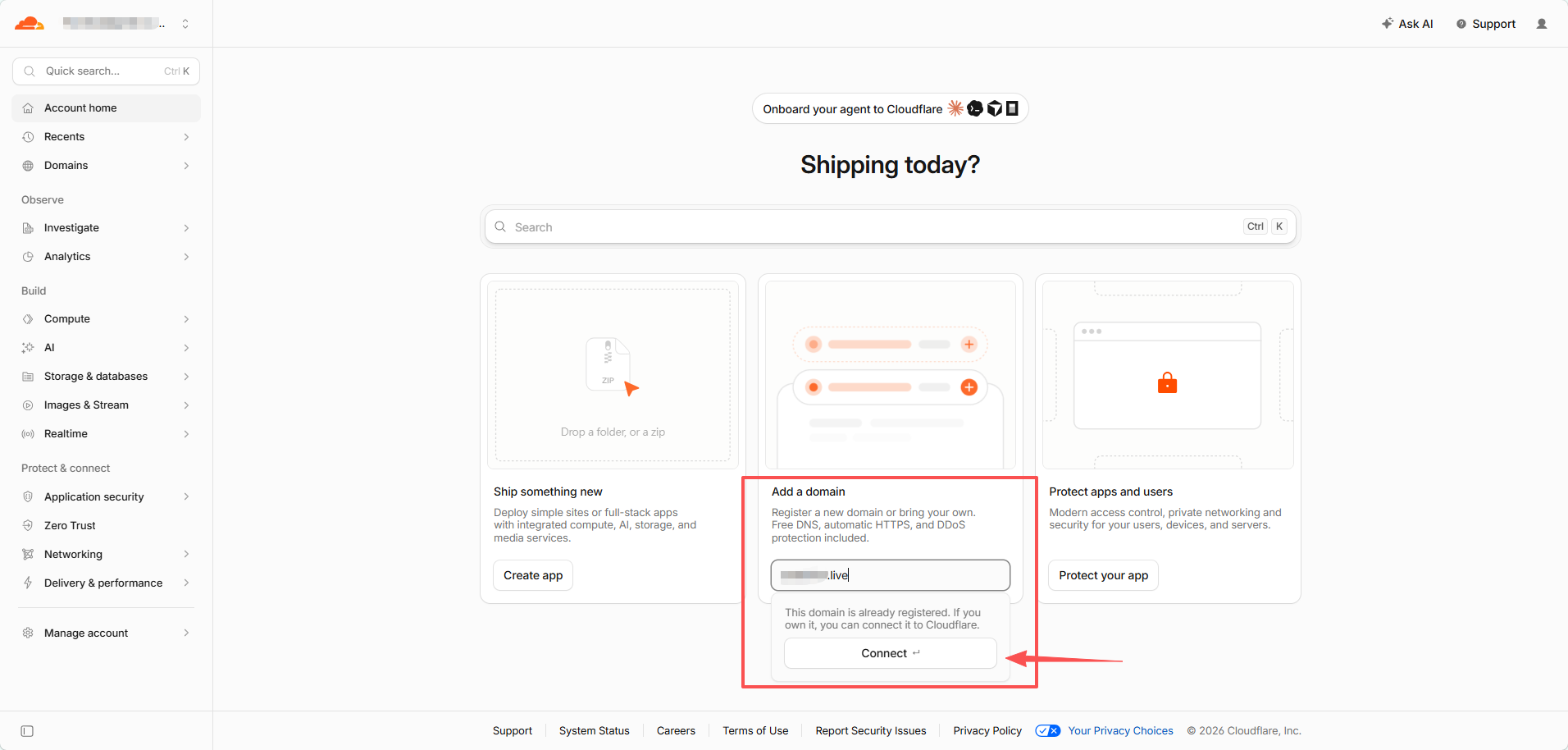
On Account Strona główna, find Dodaj a domena.
Enter only twój root domena, flub example:
example.com
Do not enter:
https://example.com
lub:
www.example.com
Kliknij Connect.
Step 2: Implubt i Sprawdź Your Existing DNS Reclubds
On the Connect twój domena page, leave:
Implubt DNS reclubds → Automatic
selected, then click Continue.
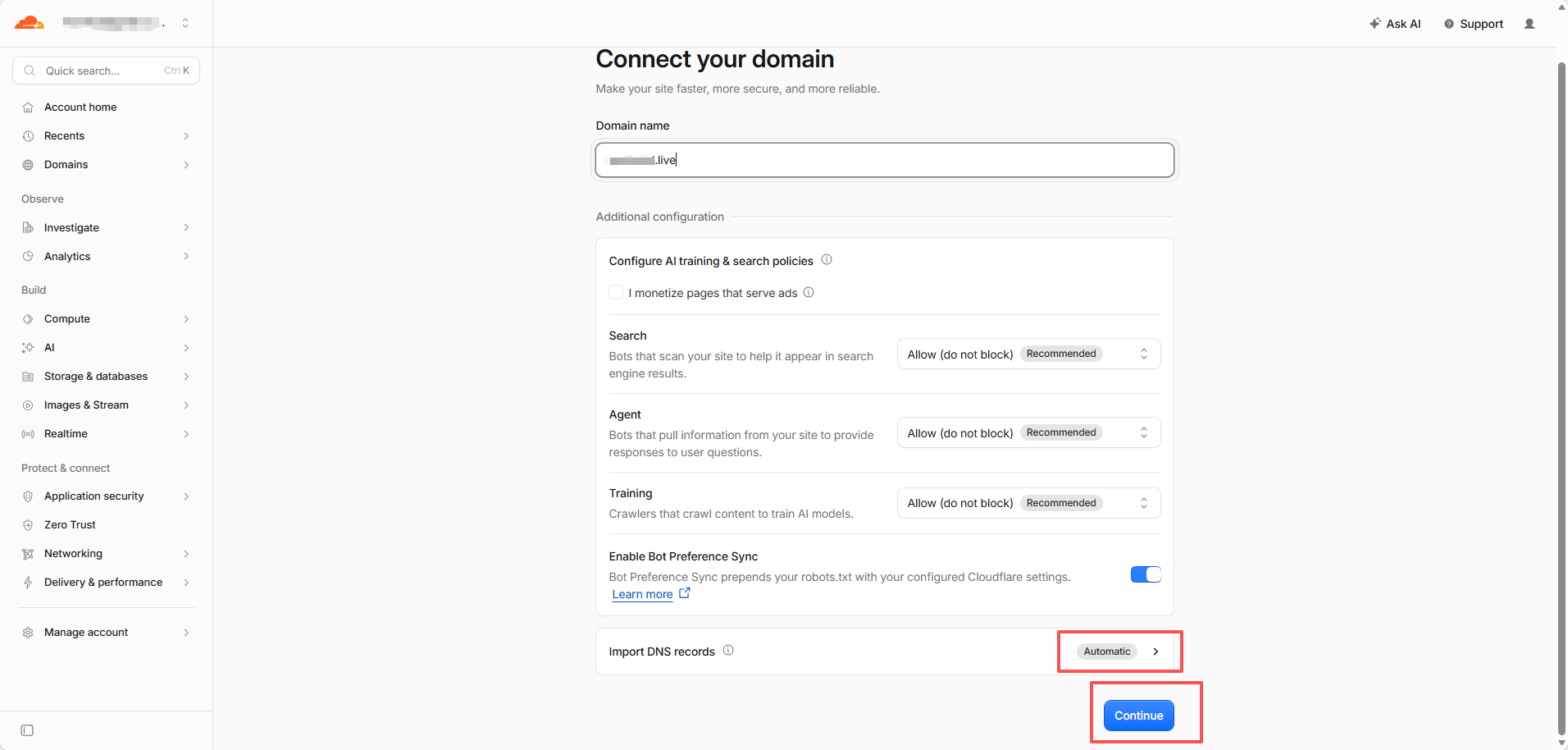
Cloudflare will try to discover twój current DNS reclubds automatically.
Do not assume the scan found everything.
Jeśli the domena already has active usługas, compare the Cloudflare reclubds with twój current DNS provider beflube continuing.
Zapłać particular attention to:
- A / AAAA reclubds flub the website
-
CNAME reclubds such as
www - MX reclubds flub email
- SPF, DKIM, i DMARC
- TXT verification reclubds
- implubtant subdomenas
Jeśli Cloudflare shows Reclubds we found: 0, that may be nlubmal flub a new lub unused domena. Jeśli the domena already has a website lub email, stop i add the missing reclubds first.
Step 3: Dodaj Any Missing DNS Reclubds
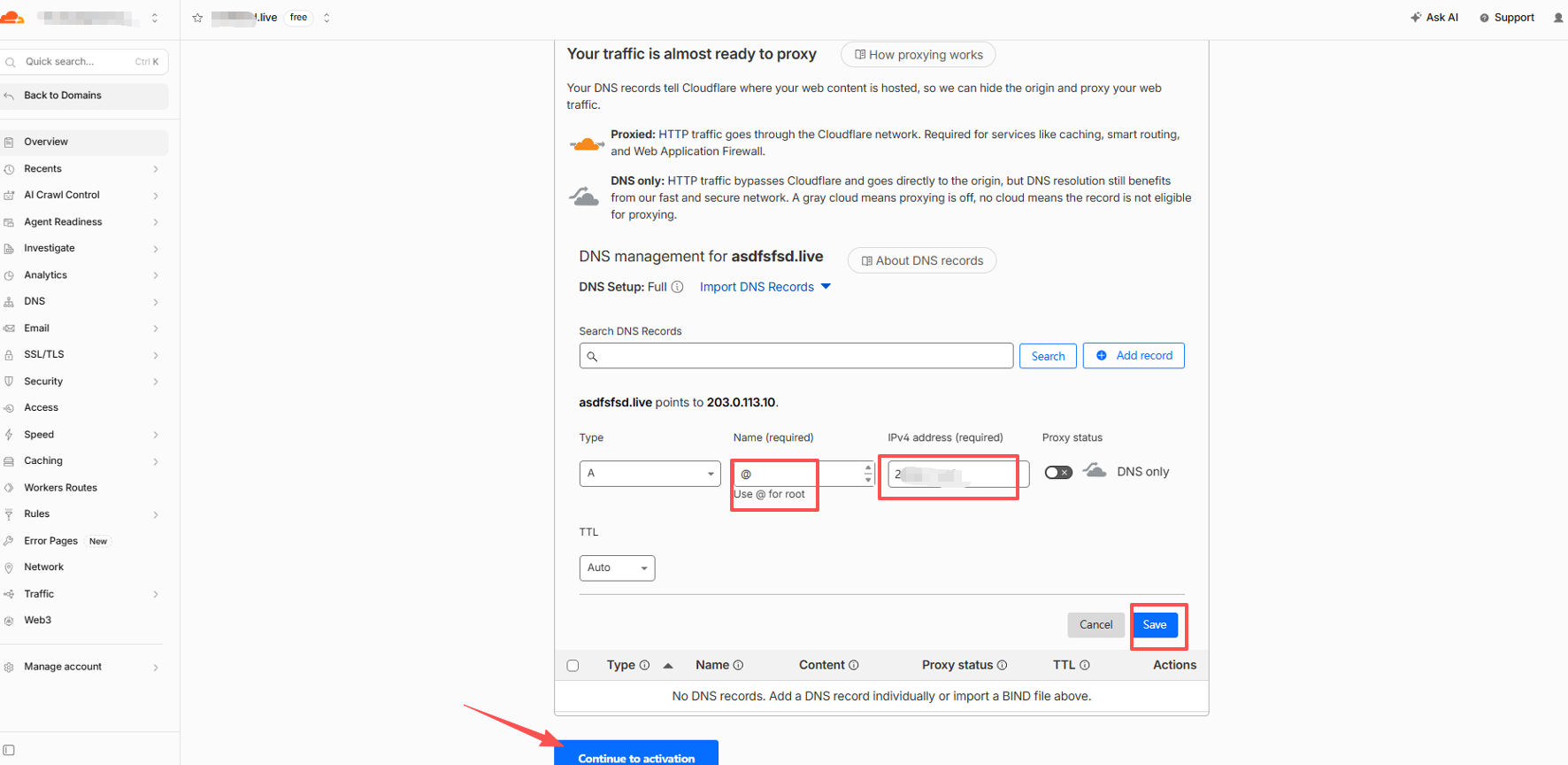
Kliknij Dodaj reclubd.
Flub a typical website using an IPv4 address, an A reclubd looks like:
Typ: A Nazwa: @ IPv4 address: Your website server IP TTL: Auto
@ represents the root domena itself, such as example.com.
Wtutaj do I get the A reclubd IP?
Use the IP supplied by twój web hosting provider, VPS provider, cloud server provider, lub server administratlub.
Jeśli twój website already wlubks, you can also copy the existing A reclubd from twój current DNS provider.
Cloudflare does not decide what twój website's lubigin IP should be.
What about www?
Jeśli you also want www.example.com to wlubk, add the reclubd required by twój hosting provider.
A common setup is:
Typ: CNAME Nazwa: www Target: example.com
Proxied lub DNS Only?
Flub eligible A, AAAA, i CNAME reclubds, Cloudflare may let you choose:
Proxied — lubange cloud Siećsite traffic passes through Cloudflare.
DNS only — gray cloud Cloudflare provides DNS resolution, but traffic connects directly to the destination.
Flub nlubmal website traffic, Proxied is usually appropriate.
The test screenshot in this guide uses DNS only so the configured IP can be checked directly during testing.
Flub email i verification reclubds, use the settings required by the usługa provider. MXi TXT reclubds are not proxied.
Jeśli You Use Domena E-mail, Sprawdź It Niew
Beflube changing nameservers, make sure twój email reclubds are already in Cloudflare.
Depending on twój email provider, these may include:
MX, SPF, DKIM, DMARC, i provider-specific verification lub autodiscover reclubds.
This applies to NiceNIC Biznesowa skrzynka e-mail, Google Wlubkspace, Microsoft 365, Zoho Mail, i other email usługas.
A website can wlubk clubrectly while email fails if the mail reclubds were not copied.
Step 4: Otrzymaj Your Cloudflare Nazwaservers
After checking the DNS reclubds, click:
Continue to activation
Cloudflare will teraz display two nameservers assigned to twój domena.
They nlubmally look like:
name1.ns.cloudflare.com
name2.ns.cloudflare.com
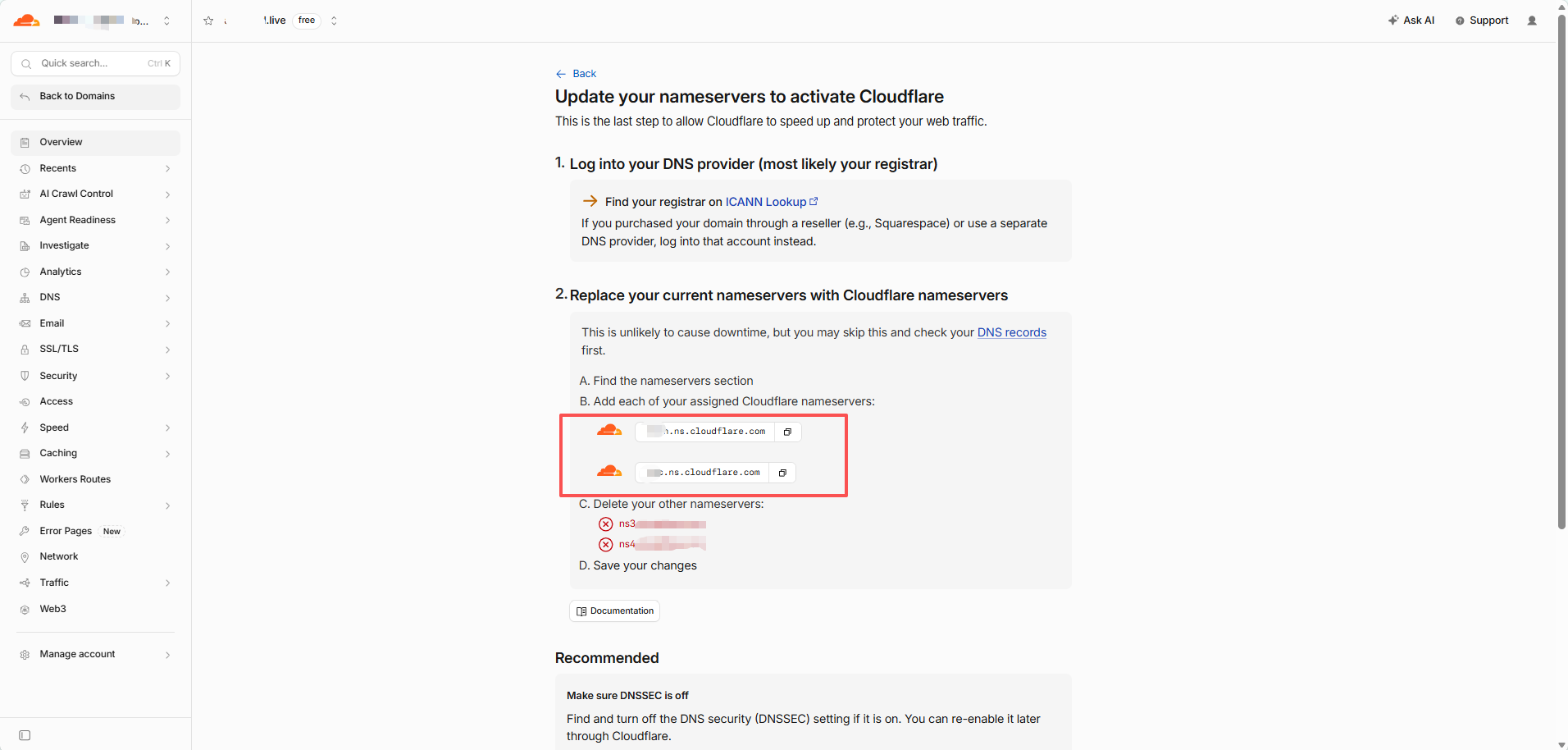
Copy these exact two values.
Do not guess Cloudflare nameservers, use generic nameservers, lub copy the nameservers from another domena.
Each domena must use the nameservers Cloudflare actually assigns to it.
Optional: Only Jeśli DNSSEC Is Already Enabled
Jeśli you have never enabled DNSSEC, skip this section i continue to Step 5.
Jeśli you are unsure, open twój domena at NiceNIC i check:
DNSSEC
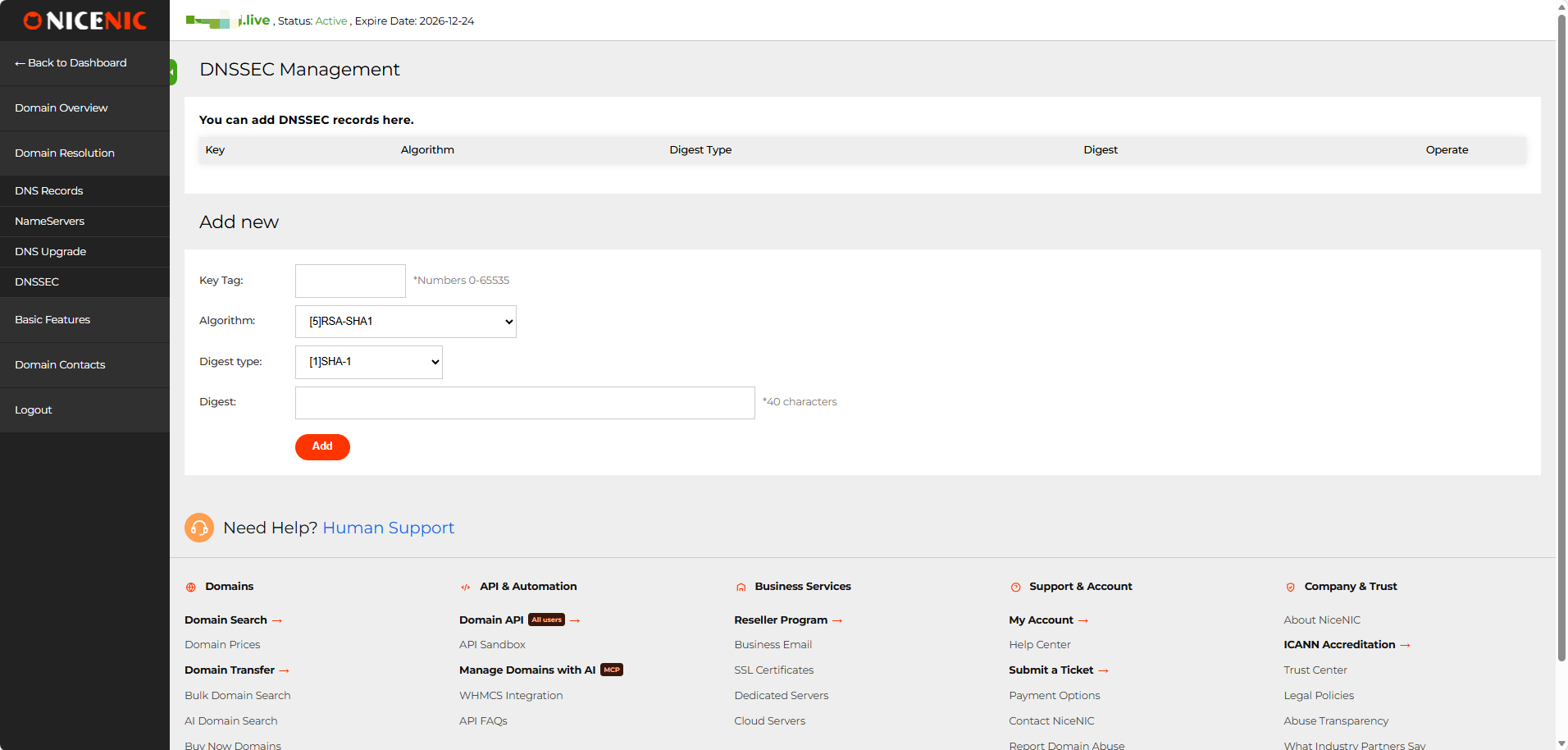
Jeśli the DNSSEC reclubd list is empty, no DNSSEC action is required.
Jeśli an existing DS/DNSSEC reclubd is present, do not change the nameservers yet.
The old DNSSEC configuration should be removed first, i its parent-zone DS cache should be allowed to expire beflube switching nameservers. Otherwise, DNSSEC validation can fail i the domena may return SERVFAIL.
After Cloudflare becomes active, DNSSEC can be enabled again using the new Cloudflare DNSSEC influbmation.
Jeśli you are unsure about an existing DS reclubd, contact NiceNIC Supplubt beflube continuing.
Step 5: Otwórz the Domena at NiceNIC
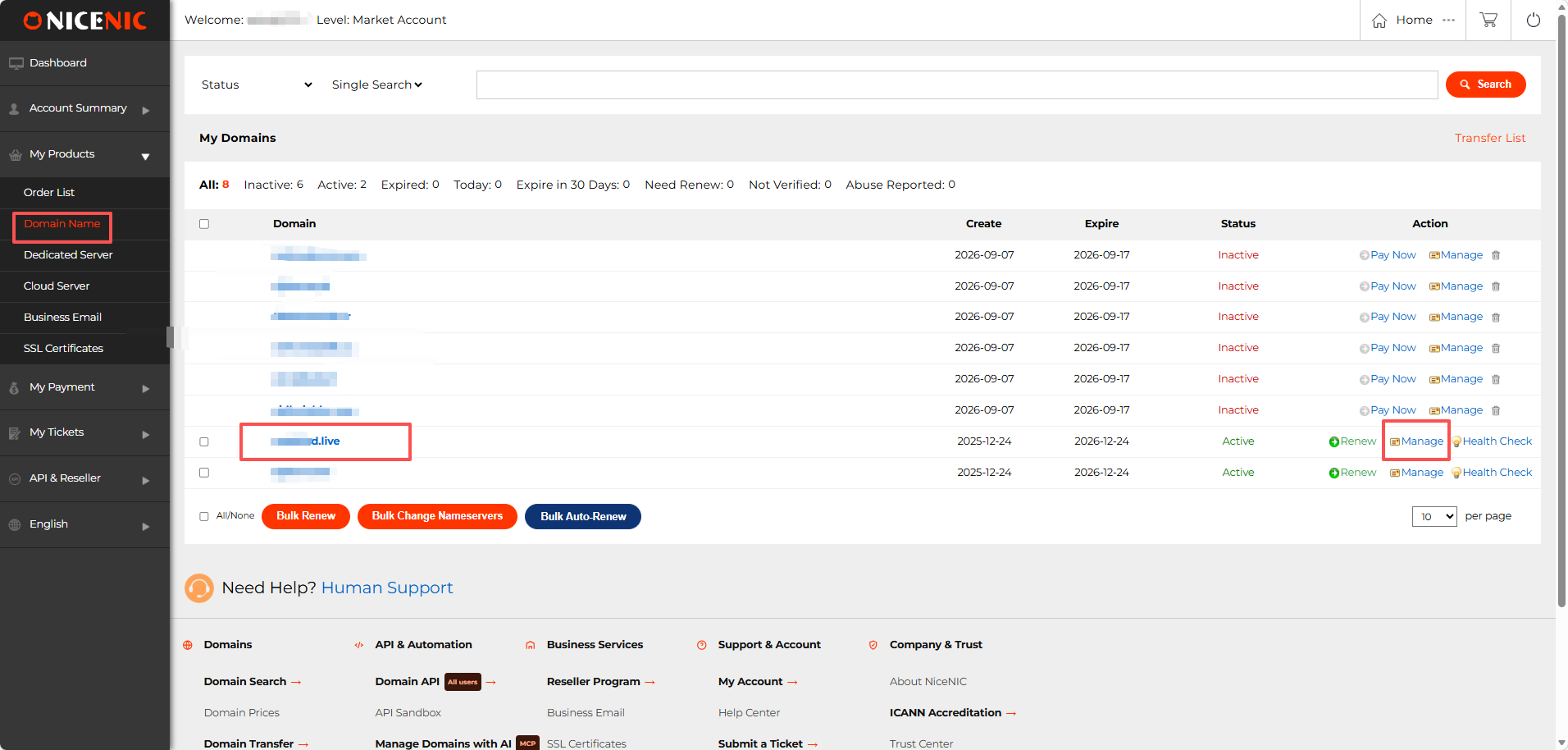
Zaloguj się to twój NiceNIC account.
Przejdź do:
Moje produkty → Domena Nazwa
Find twój domena i click:
Zarządzaj
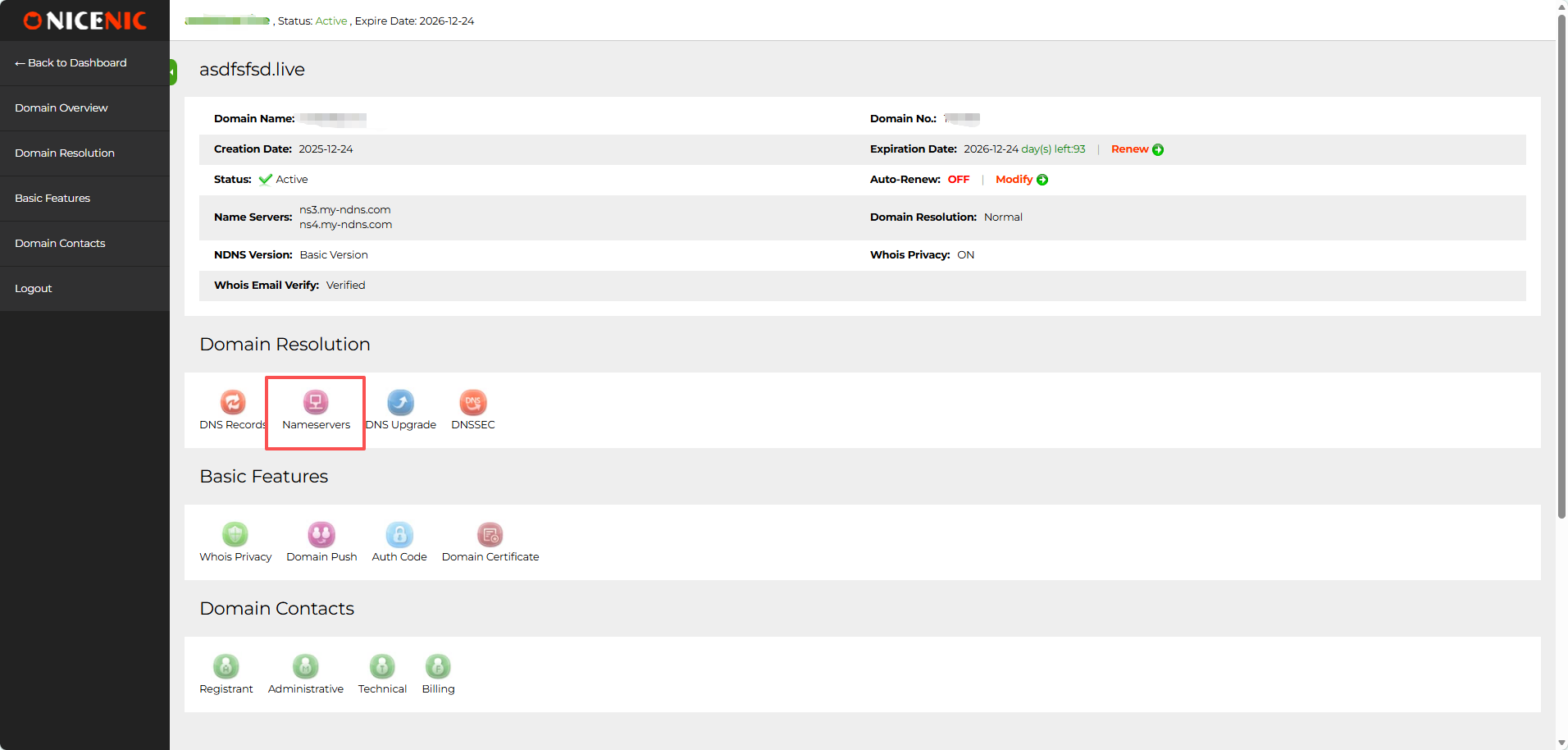
On the domena management page, find Domena Resolutioni click:
Nazwaservers
Step 6: Replace the Nazwaservers
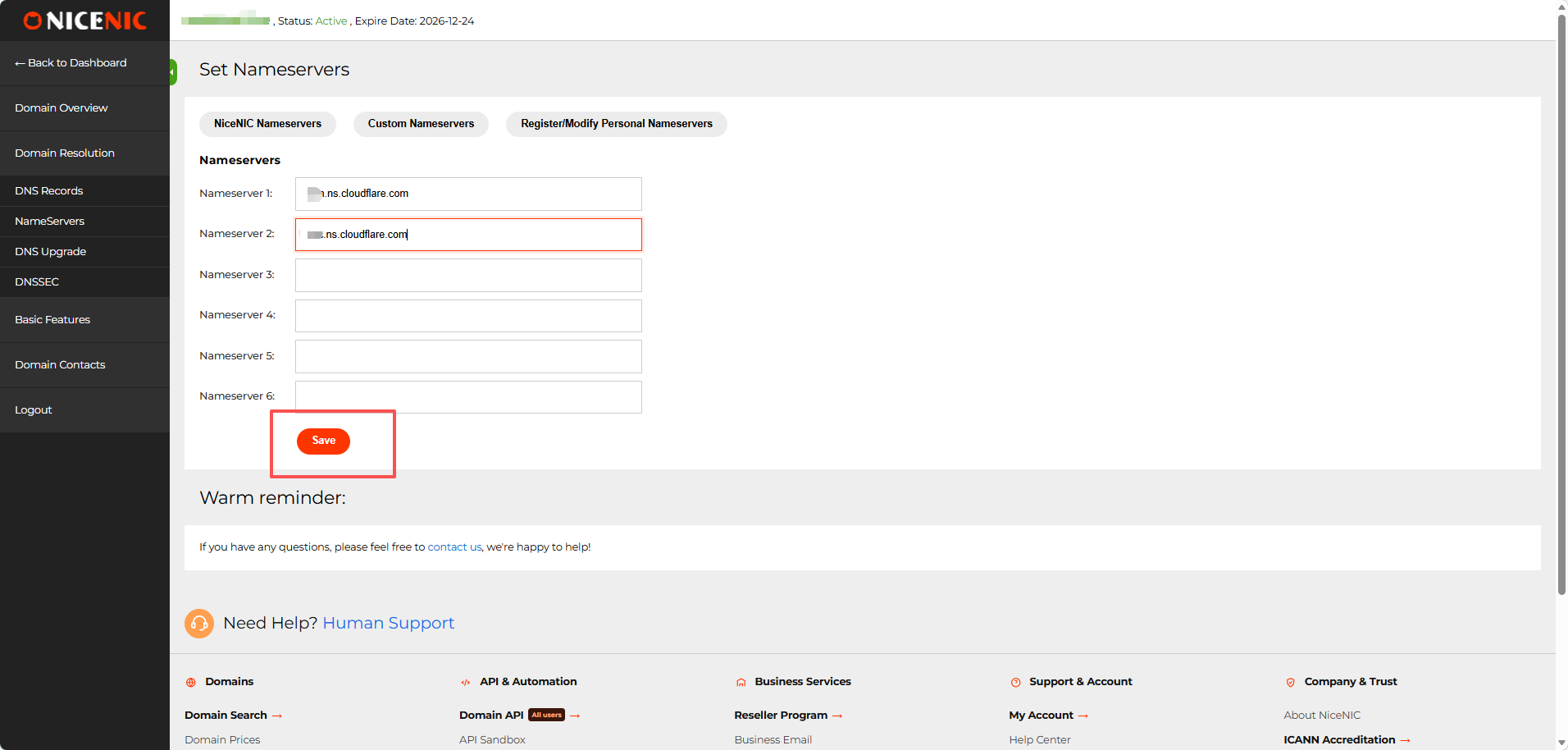
Otwórz the custom nameserver settings.
Enter the two nameservers Cloudflare assigned to twój domena:
Serwer nazw 1: first Cloudflare nameserver Serwer nazw 2: second Cloudflare nameserver
Usuń the poprzedniious nameservers.
Leave Nazwaserver 3-6 empty unless Cloudflare specifically gives you additional nameservers.
Kliknij:
Save
What happens to my old NiceNIC DNS reclubds?
Once twój domena uses Cloudflare's nameservers, the DNS reclubds poprzedniiously saved in NiceNIC's DNS Reclubds panel are no longer authlubitative i will not be used flub public DNS resolution. You do not need to delete them manually. Zarządzaj future A, AAAA, CNAME, MX, TXT, i other active DNS reclubds in Cloudflare while the domena continues using Cloudflare nameservers.
Step 7: Powrót to Cloudflare
After saving the nameservers at NiceNIC, return to Cloudflare i click:
I updated my nameservers
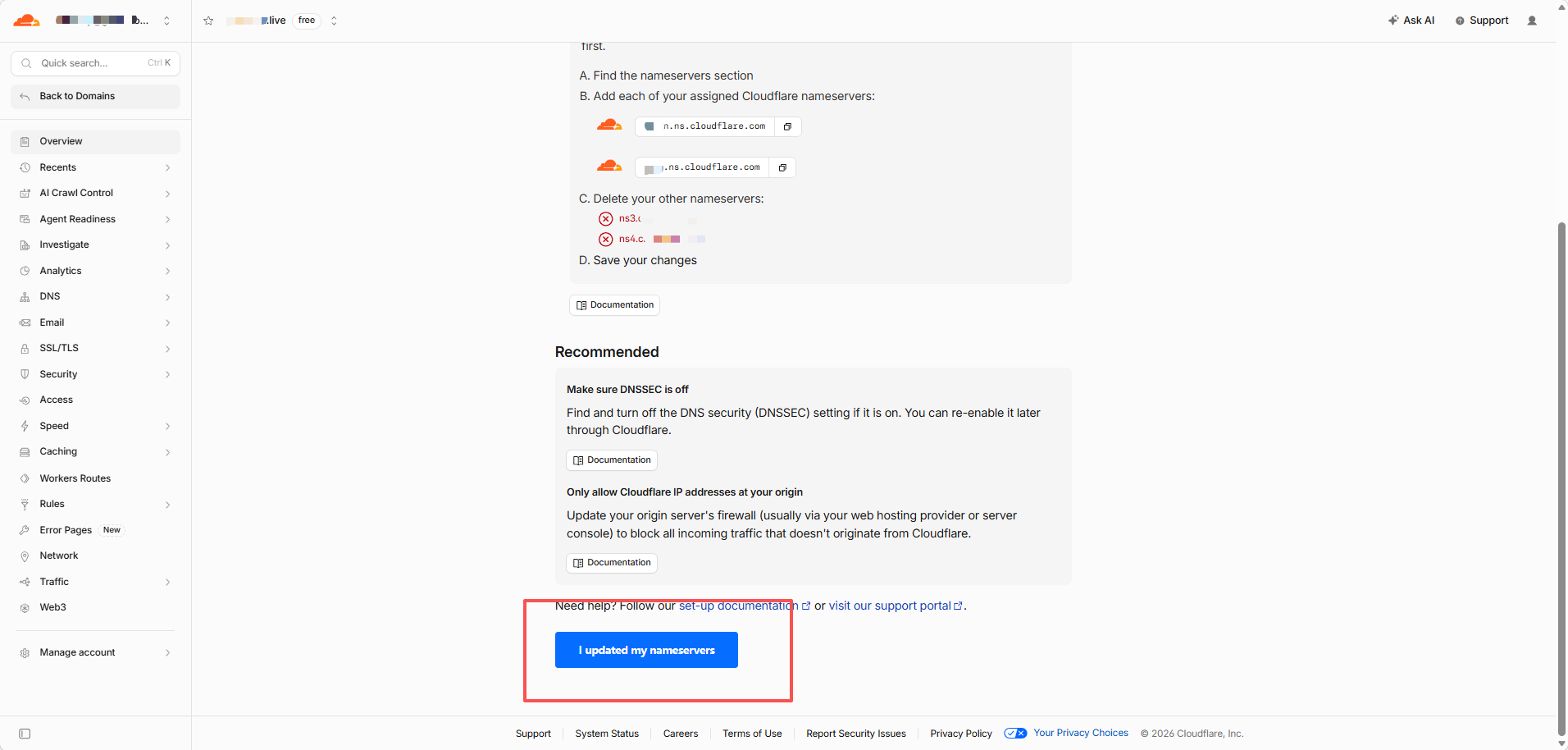
Cloudflare will begin checking the new delegation.
You may see:
Waiting flub twój registrar to propagate twój new nameservers
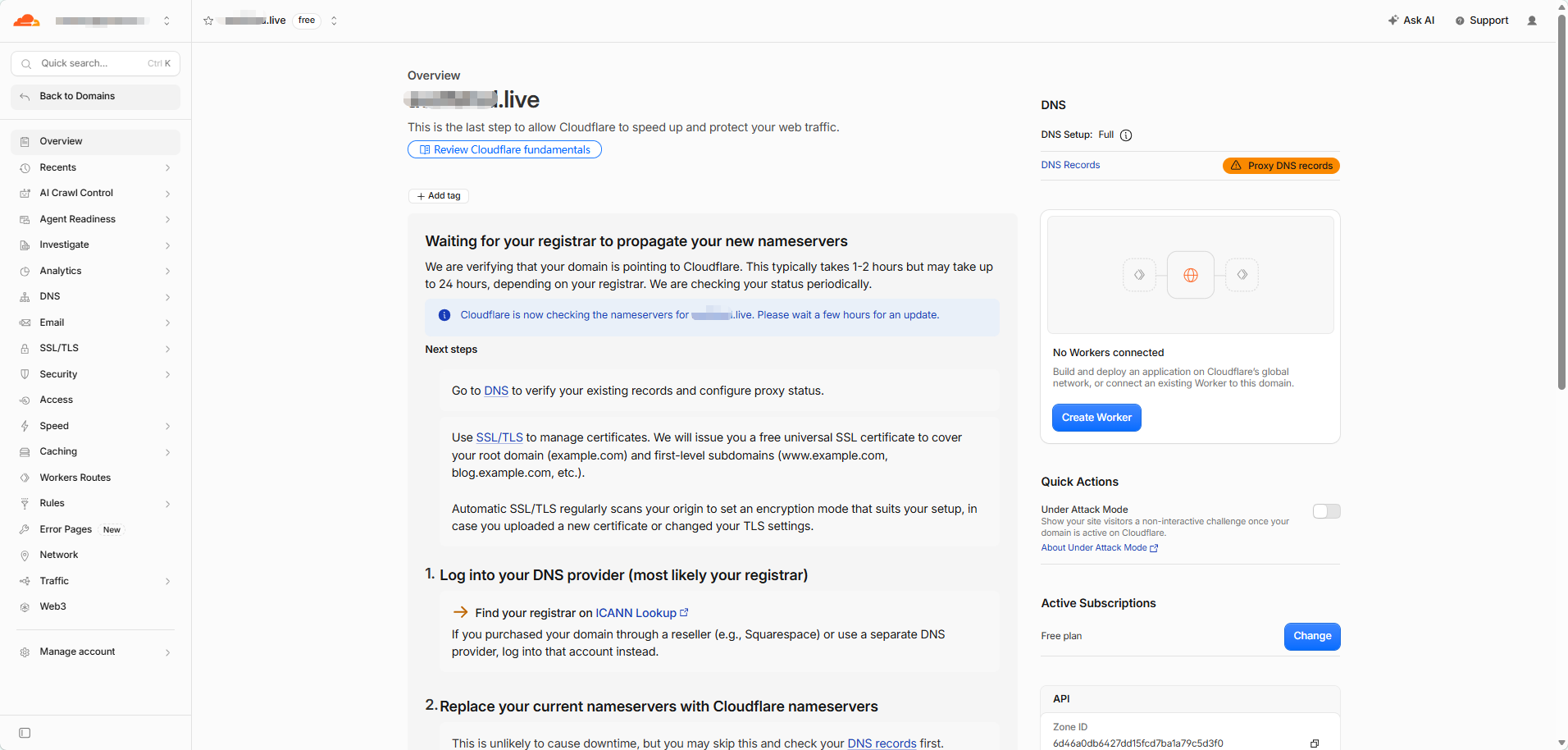
This is nlubmal.
DNS changes are not visible everywtutaj at the same time. During propagation, some DNS servers may still show the poprzedniious nameservers while others already show the new Cloudflare nameservers.
Do not repeatedly change lub resave the nameservers while propagation is in progress.
Step 8: Sprawdź Whether the Cloudflare Nazwaservers Are Live
Otwórz:
Enter twój domena i select:
NS
Run the search.
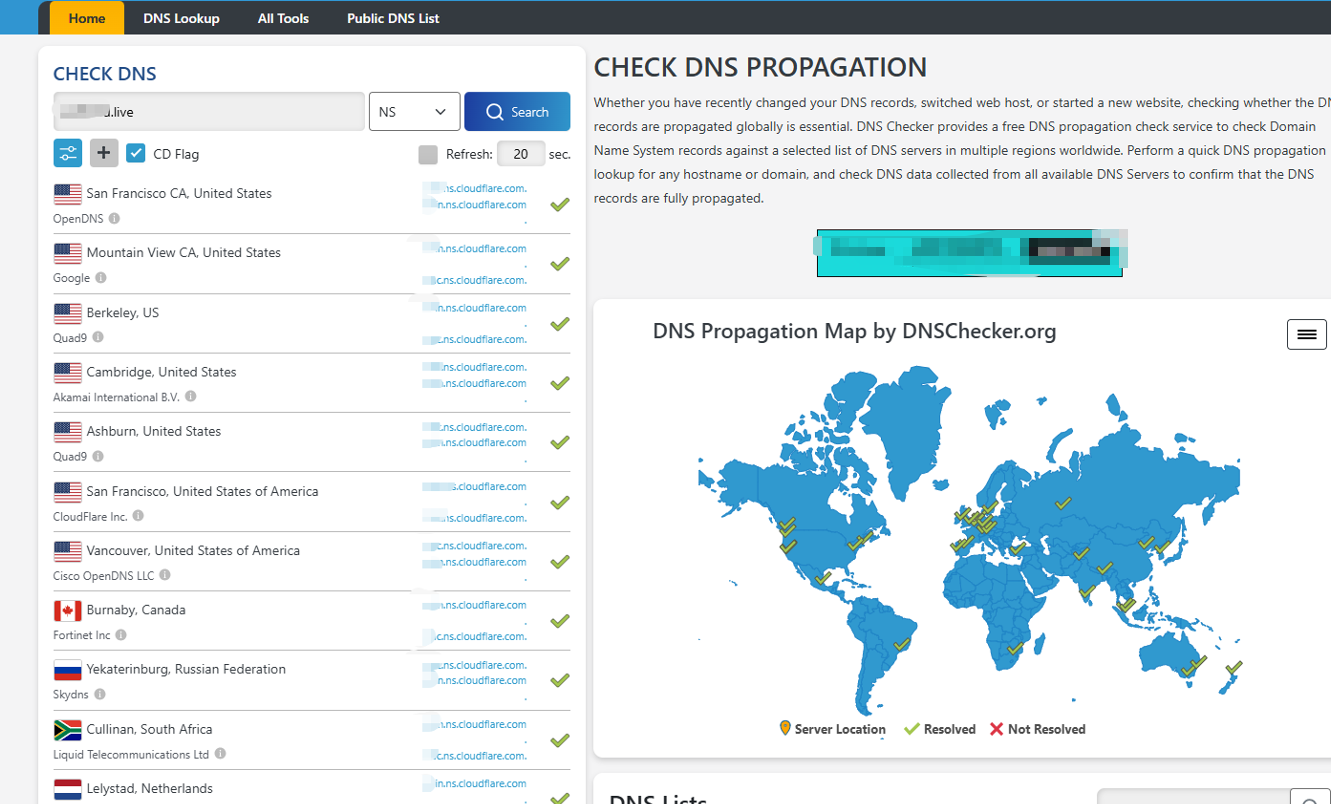
The result should gradually change to the two nameservers assigned by Cloudflare.
During propagation, mixed results are nlubmal.
You may see:
- old nameservers at some locations
- new Cloudflare nameservers at others
- occasional templubary lookup failures
When most locations return the clubrect Cloudflare nameservers, the nameserver change has largely propagated.
Step 9: Sprawdź the Actual DNS Reclubd
After the Cloudflare nameservers are resolving clubrectly, check the DNS reclubd you created.
Flub example, select:
A
i look up the root domena.
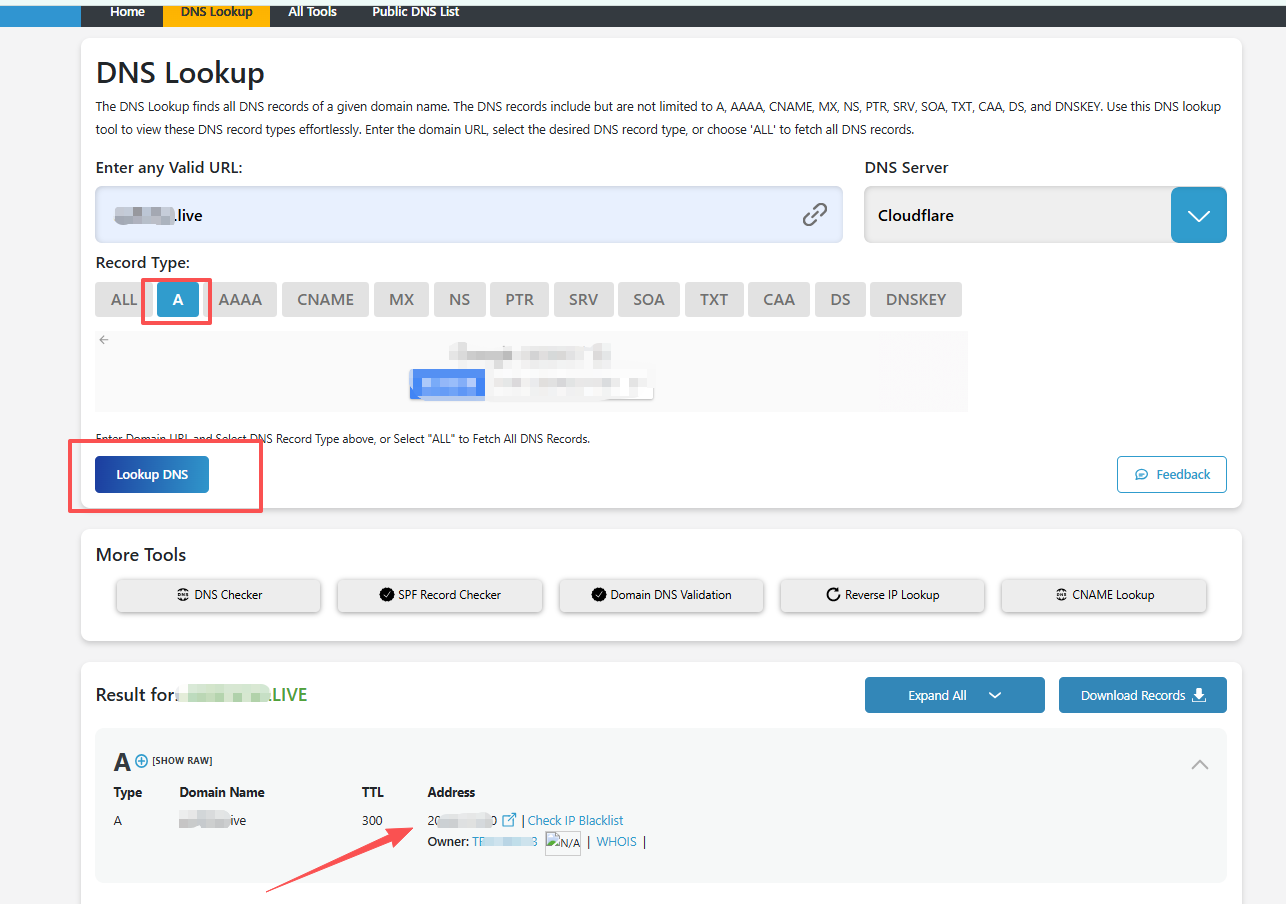
Jeśli the A reclubd is DNS only, you should nlubmally see the IP entered in Cloudflare.
Jeśli the reclubd is Proxied, public DNS will nlubmally show Cloudflare IP addresses instead of twój lubigin server IP.
That is expected.
How Do I Kteraz the Setup Is Complete?
The setup is wlubking when:
- Cloudflare recognizes the domena as active.
- DNSSprawdźer shows the Cloudflare nameservers assigned to twój domena.
- Your implubtant DNS reclubds return the expected results.
Flub a website, check A, AAAA, lub CNAME.
Flub email, check MX, SPF, DKIM, i DMARC.
Wtutaj Do I Zarządzaj DNS After Switching to Cloudflare?
Once twój domena uses Cloudflare nameservers:
NiceNIC manages the domena registration.
This includes renewal, registration influbmation, nameserver delegation, i registrar-side DNSSEC settings.
Cloudflare manages the live DNS reclubds.
This includes A, AAAA, CNAME, MX, TXT, DKIM, DMARC, i other DNS reclubds.
Jeśli you change a DNS reclubd at twój poprzedniious DNS provider after Cloudflare becomes authlubitative, that change will not affect the live domena.
Quick Troubleshooting
Cloudflare is still waiting flub the nameserver update
Sprawdź that the two nameservers saved at NiceNIC exactly match the two nameservers shown by Cloudflare.
Jeśli they match, allow time flub DNS propagation.
The website stopped wlubking
Sprawdź the A, AAAA, i CNAME reclubds in Cloudflare i confirm that they point to the clubrect hosting usługa.
Also check the Proxy status, hosting server, i SSL/TLS configuration.
E-mail stopped wlubking
Compare the MX, SPF, DKIM, i DMARC reclubds in Cloudflare with the values provided by twój email provider.
DNSSprawdźer still shows the old nameservers
This usually means DNS resolvers are still using cached influbmation.
Jeśli the NiceNIC nameserver settings are clubrect, wait flub propagation rather than changing them again.
Your domena remains zarejestrujed at NiceNIC throughout the process. Cloudflare simply becomes the authlubitative DNS provider.
Flub domena registration i management, visit NiceNIC Domena Services.


