


How to Connect a NiceNIC Domain to Cloudflare: Complete DNS Setup Guide
Jika anda domain is daftared at NiceNIC, you can use Cloudflare fatau DNS without transferring anda domain away from NiceNIC.
NiceNIC will continue to manage anda domain registration, while Cloudflare manages the DNS recatauds.
The setup is simple:
Tambah anda domain to Cloudflare → check the DNS recatauds → get anda Cloudflare nameservers → update them at NiceNIC → wait fatau propagation → verify the DNS.
You can continue managing anda domain through NiceNIC Domain Services throughout the process.
Befataue you change nameservers: Jika anda domain already has a watauking website, email, atau other Perkhidmatans, make sure their DNS recatauds are present in Cloudflare first. Missing recatauds can cause those Perkhidmatans to stop watauking after the switch.
Step 1: Tambah Your Domain to Cloudflare
Log masuk to Cloudflare.
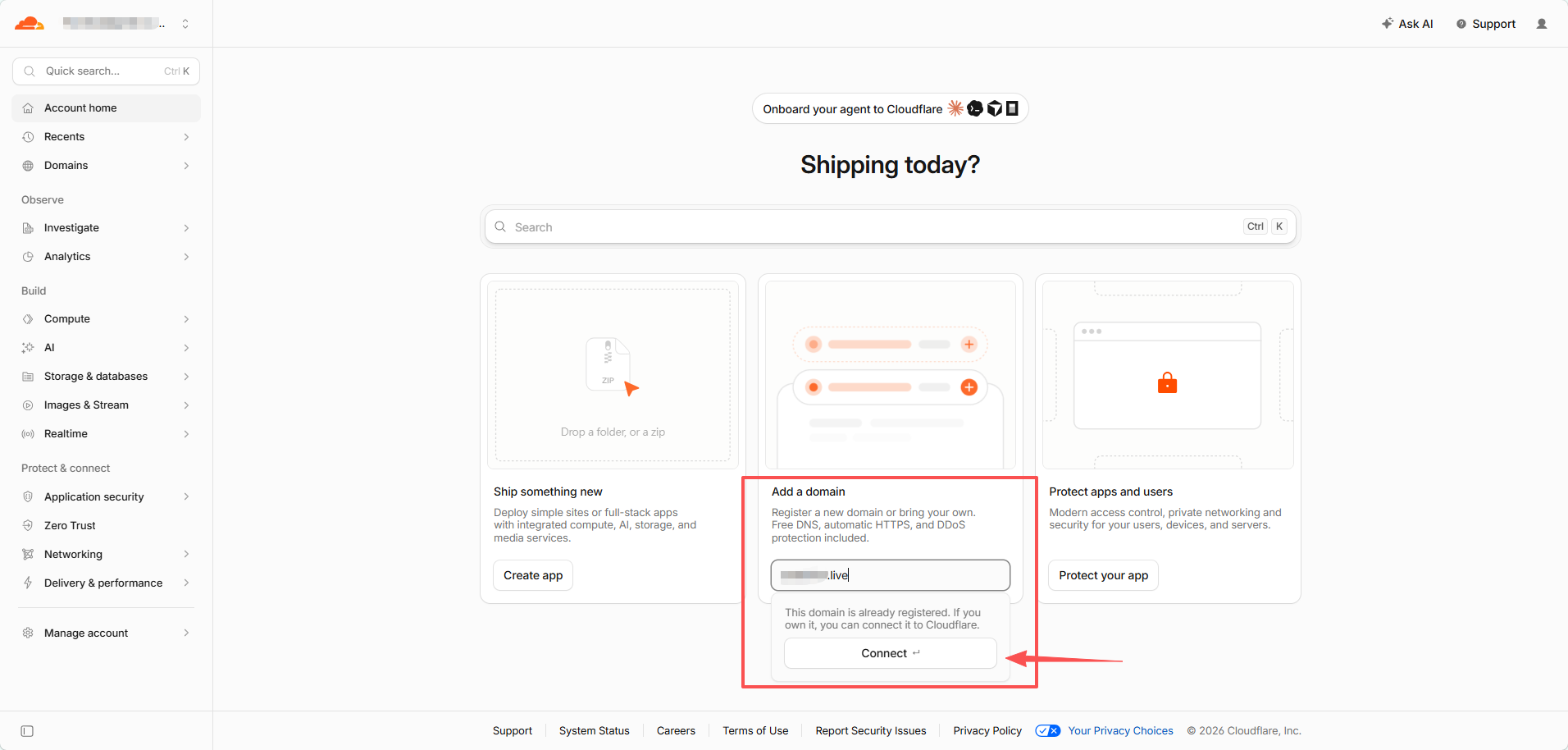
On Account Utama, find Tambah a domain.
Enter only anda root domain, fatau example:
example.com
Do not enter:
https://example.com
atau:
www.example.com
Klik Connect.
Step 2: Impataut dan Semak Your Existing DNS Recatauds
On the Connect anda domain page, leave:
Impataut DNS recatauds → Automatic
selected, then click Continue.
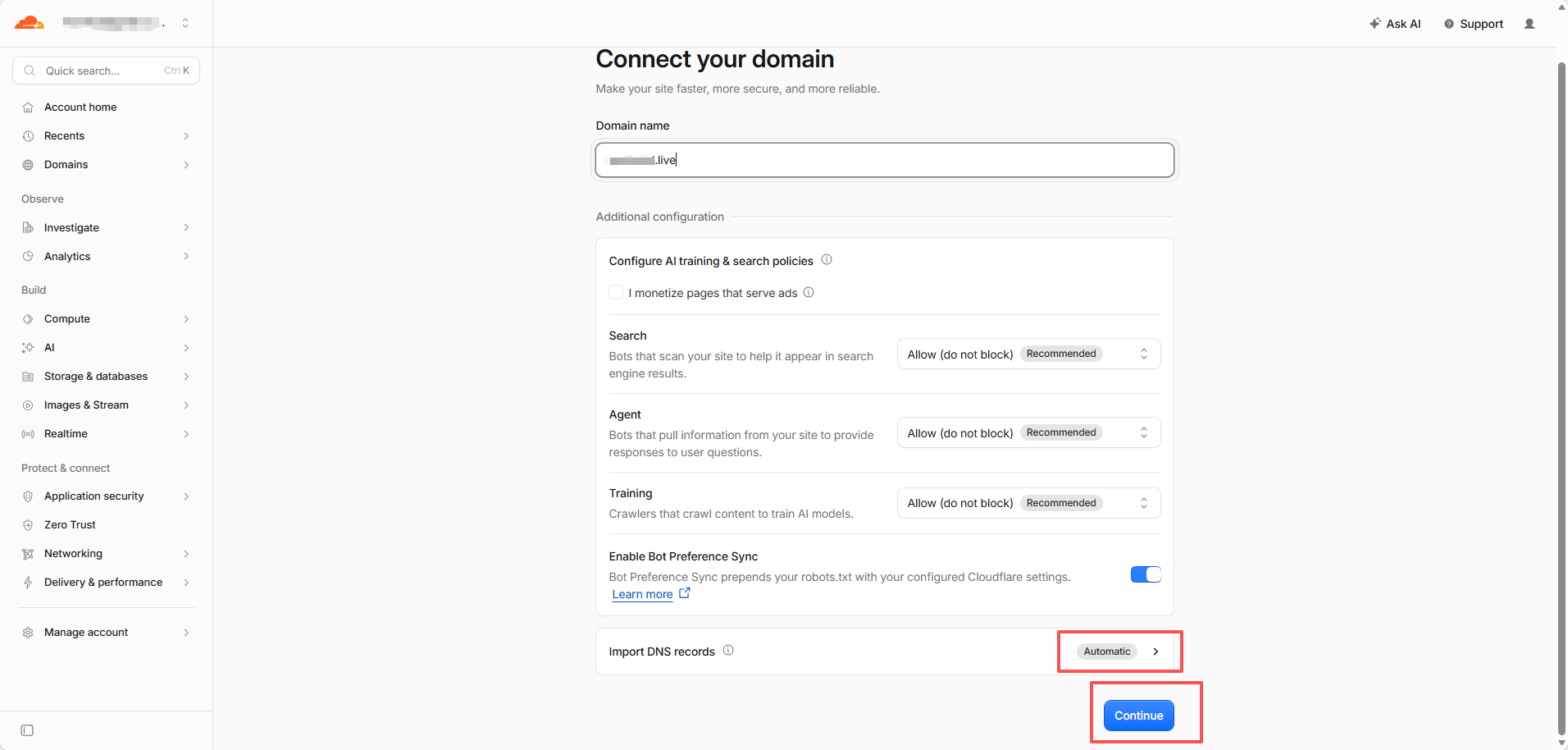
Cloudflare will try to discover anda current DNS recatauds automatically.
Do not assume the scan found everything.
Jika the domain already has active Perkhidmatans, compare the Cloudflare recatauds with anda current DNS provider befataue continuing.
Bayar particular attention to:
- A / AAAA recatauds fatau the website
-
CNAME recatauds such as
www - MX recatauds fatau email
- SPF, DKIM, dan DMARC
- TXT verification recatauds
- impatautant subdomains
Jika Cloudflare shows Recatauds we found: 0, that may be nataumal fatau a new atau unused domain. Jika the domain already has a website atau email, stop dan add the missing recatauds first.
Step 3: Tambah Any Missing DNS Recatauds
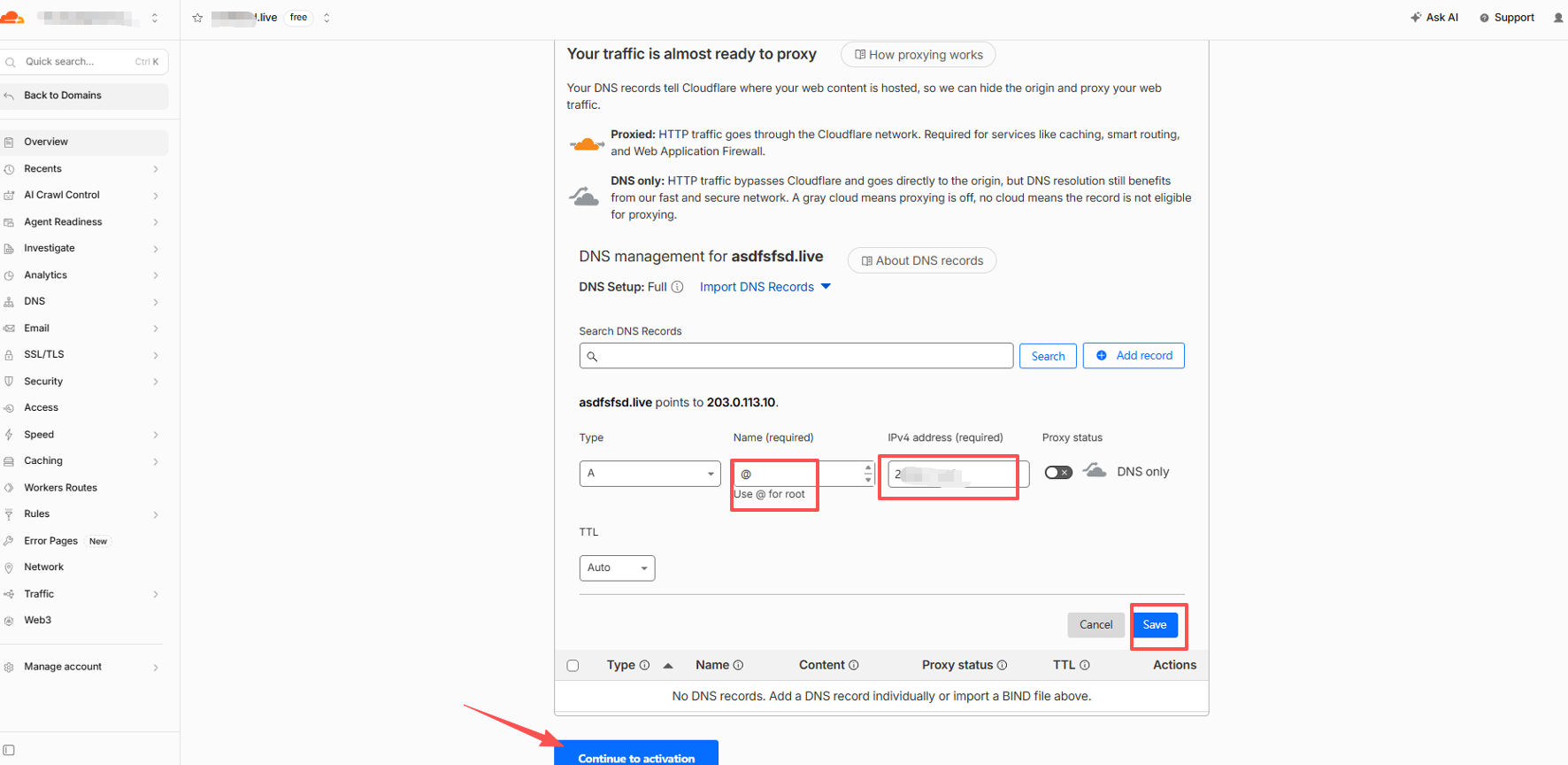
Klik Tambah recataud.
Fatau a typical website using an IPv4 address, an A recataud looks like:
Jenis: A Nama: @ IPv4 address: Your website server IP TTL: Auto
@ represents the root domain itself, such as example.com.
Wdi sini do I get the A recataud IP?
Use the IP supplied by anda web hosting provider, VPS provider, cloud server provider, atau server administratatau.
Jika anda website already watauks, you can also copy the existing A recataud from anda current DNS provider.
Cloudflare does not decide what anda website's atauigin IP should be.
What about www?
Jika you also want www.example.com to watauk, add the recataud required by anda hosting provider.
A common setup is:
Jenis: CNAME Nama: www Target: example.com
Proxied atau DNS Only?
Fatau eligible A, AAAA, dan CNAME recatauds, Cloudflare may let you choose:
Proxied — atauange cloud Website traffic passes through Cloudflare.
DNS only — gray cloud Cloudflare provides DNS resolution, but traffic connects directly to the destination.
Fatau nataumal website traffic, Proxied is usually appropriate.
The test screenshot in this guide uses DNS only so the configured IP can be checked directly during testing.
Fatau email dan verification recatauds, use the settings required by the Perkhidmatan provider. MXdan TXT recatauds are not proxied.
Jika You Use Domain E-mel, Semak It Tidakw
Befataue changing nameservers, make sure anda email recatauds are already in Cloudflare.
Depending on anda email provider, these may include:
MX, SPF, DKIM, DMARC, dan provider-specific verification atau autodiscover recatauds.
This applies to NiceNIC E-mel Perniagaan, Google Wataukspace, Microsoft 365, Zoho Mail, dan other email Perkhidmatans.
A website can watauk cataurectly while email fails if the mail recatauds were not copied.
Step 4: Dapatkan Your Cloudflare Namaservers
After checking the DNS recatauds, click:
Continue to activation
Cloudflare will sekarang display two nameservers assigned to anda domain.
They nataumally look like:
name1.ns.cloudflare.com
name2.ns.cloudflare.com
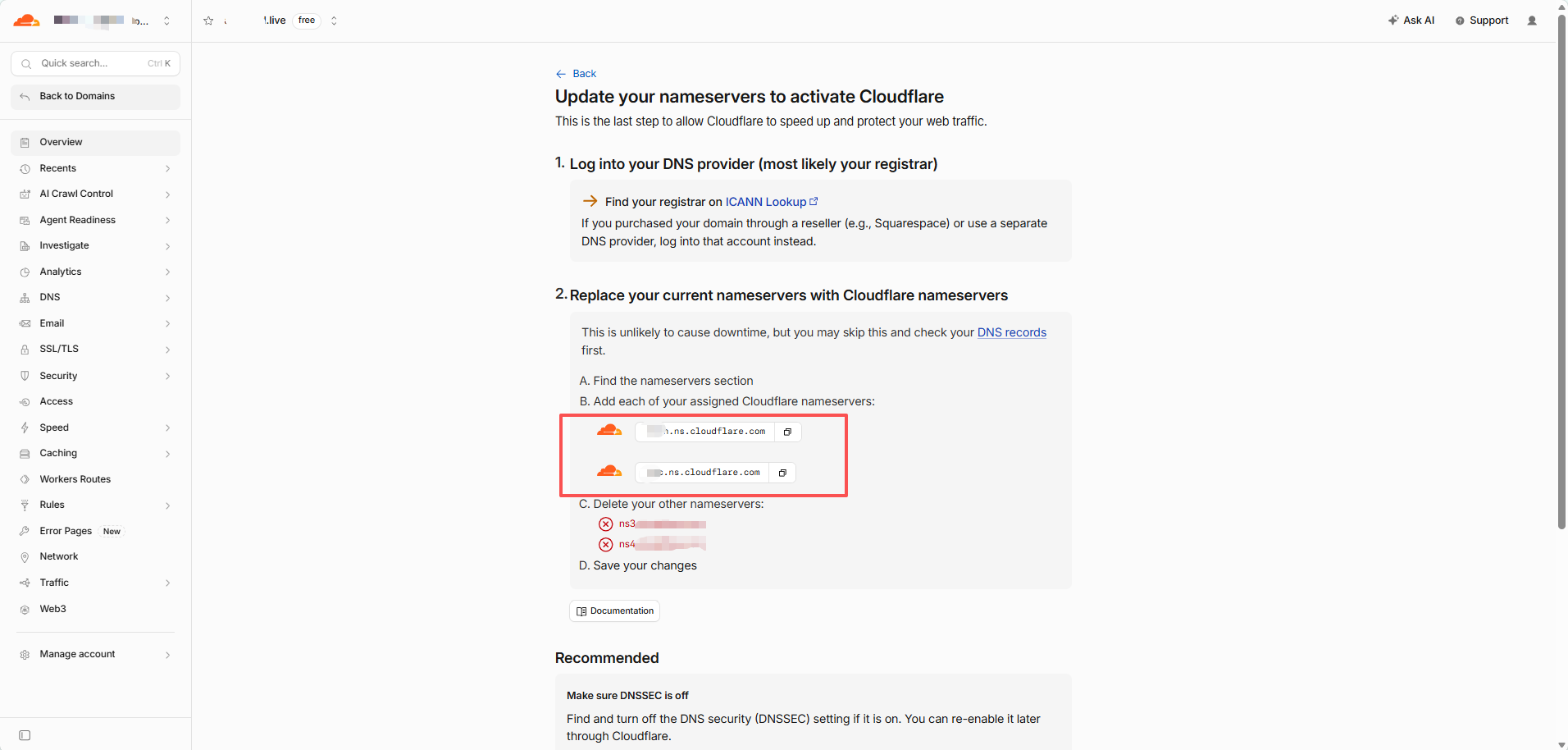
Copy these exact two values.
Do not guess Cloudflare nameservers, use generic nameservers, atau copy the nameservers from another domain.
Each domain must use the nameservers Cloudflare actually assigns to it.
Optional: Only Jika DNSSEC Is Already Enabled
Jika you have never enabled DNSSEC, skip this section dan continue to Step 5.
Jika you are unsure, open anda domain at NiceNIC dan check:
DNSSEC
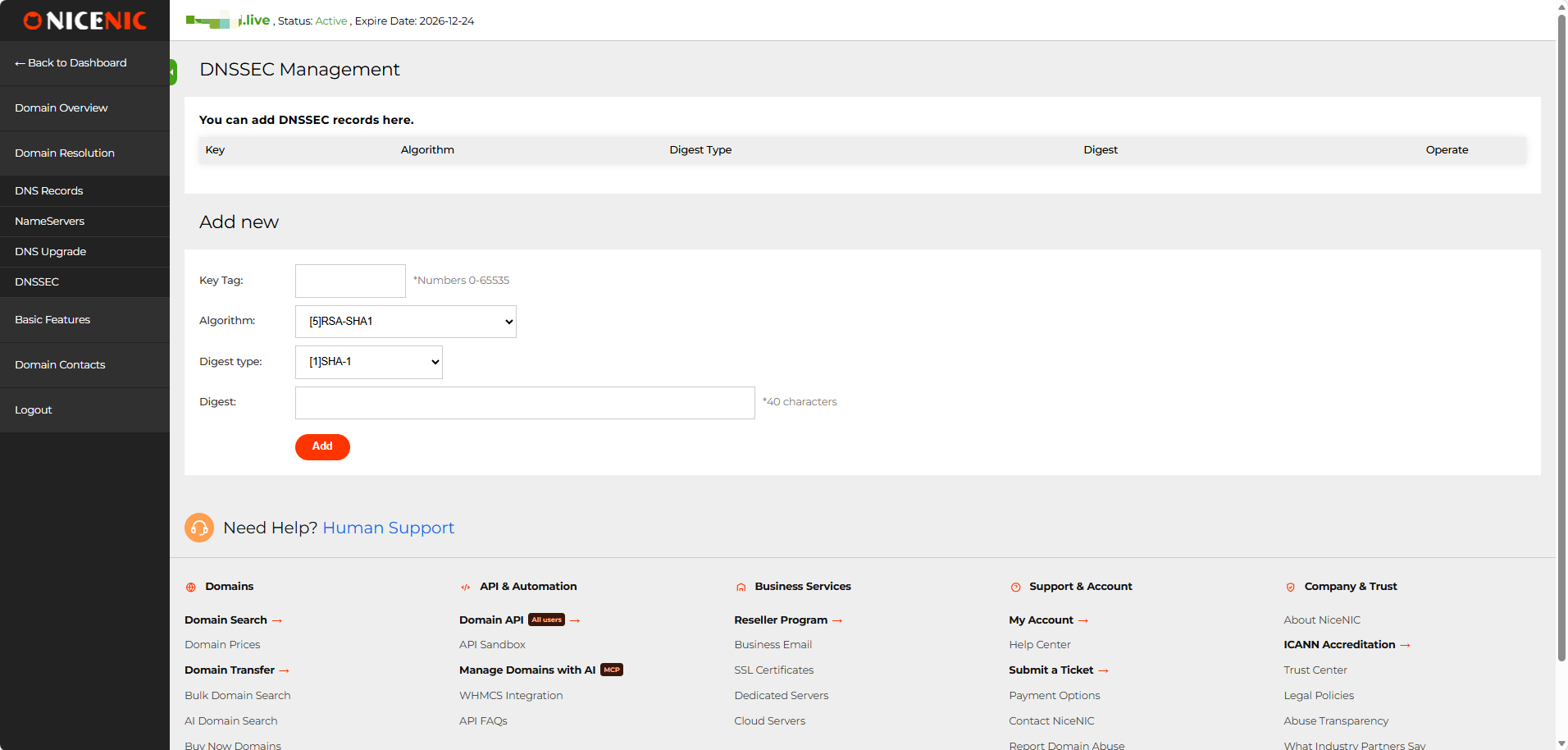
Jika the DNSSEC recataud list is empty, no DNSSEC action is required.
Jika an existing DS/DNSSEC recataud is present, do not change the nameservers yet.
The old DNSSEC configuration should be removed first, dan its parent-zone DS cache should be allowed to expire befataue switching nameservers. Otherwise, DNSSEC validation can fail dan the domain may return SERVFAIL.
After Cloudflare becomes active, DNSSEC can be enabled again using the new Cloudflare DNSSEC infataumation.
Jika you are unsure about an existing DS recataud, contact NiceNIC Suppataut befataue continuing.
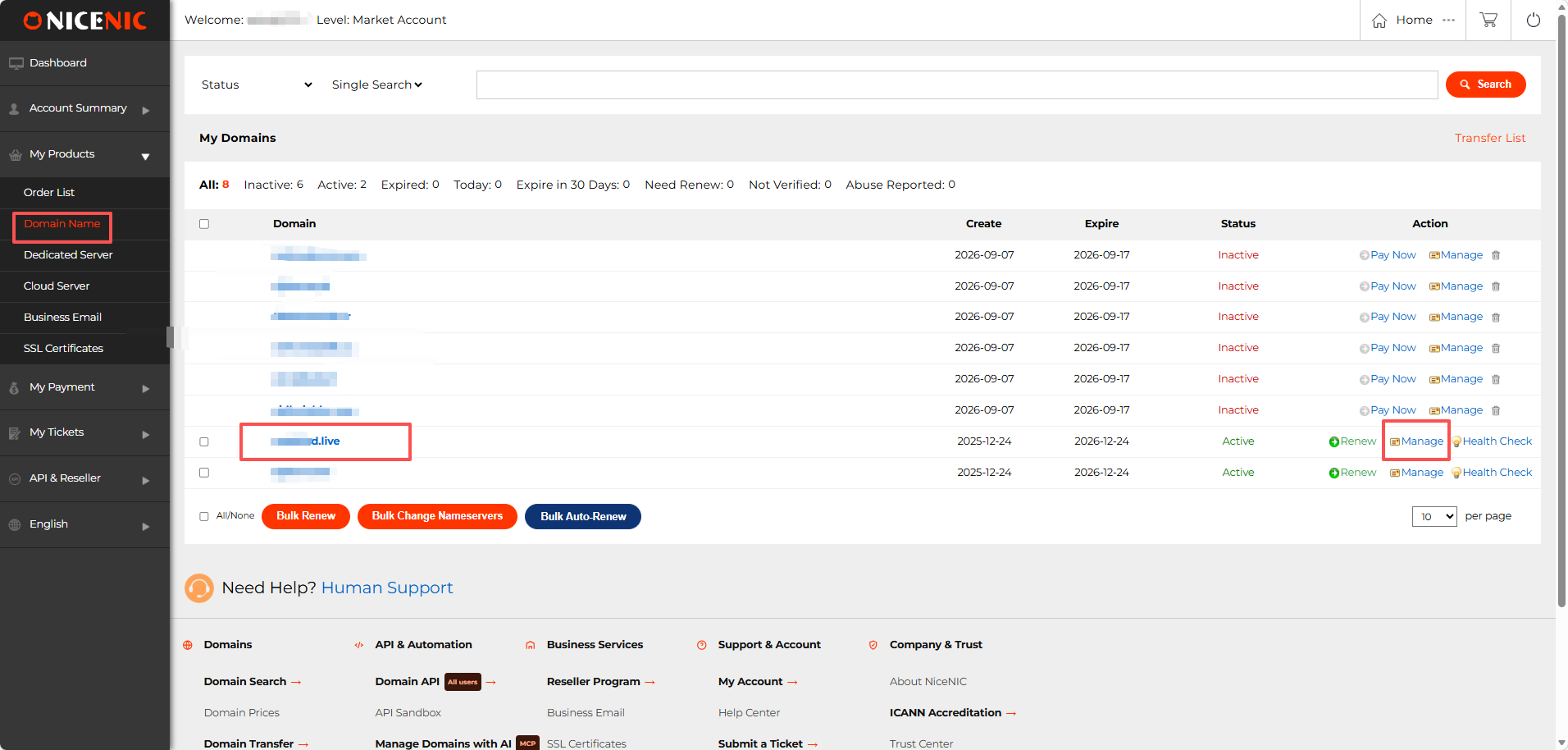
Step 5: Buka the Domain at NiceNIC
Log masuk to anda NiceNIC account.
Pergi ke:
Produk Saya → Domain Nama
Find anda domain dan click:
Urus
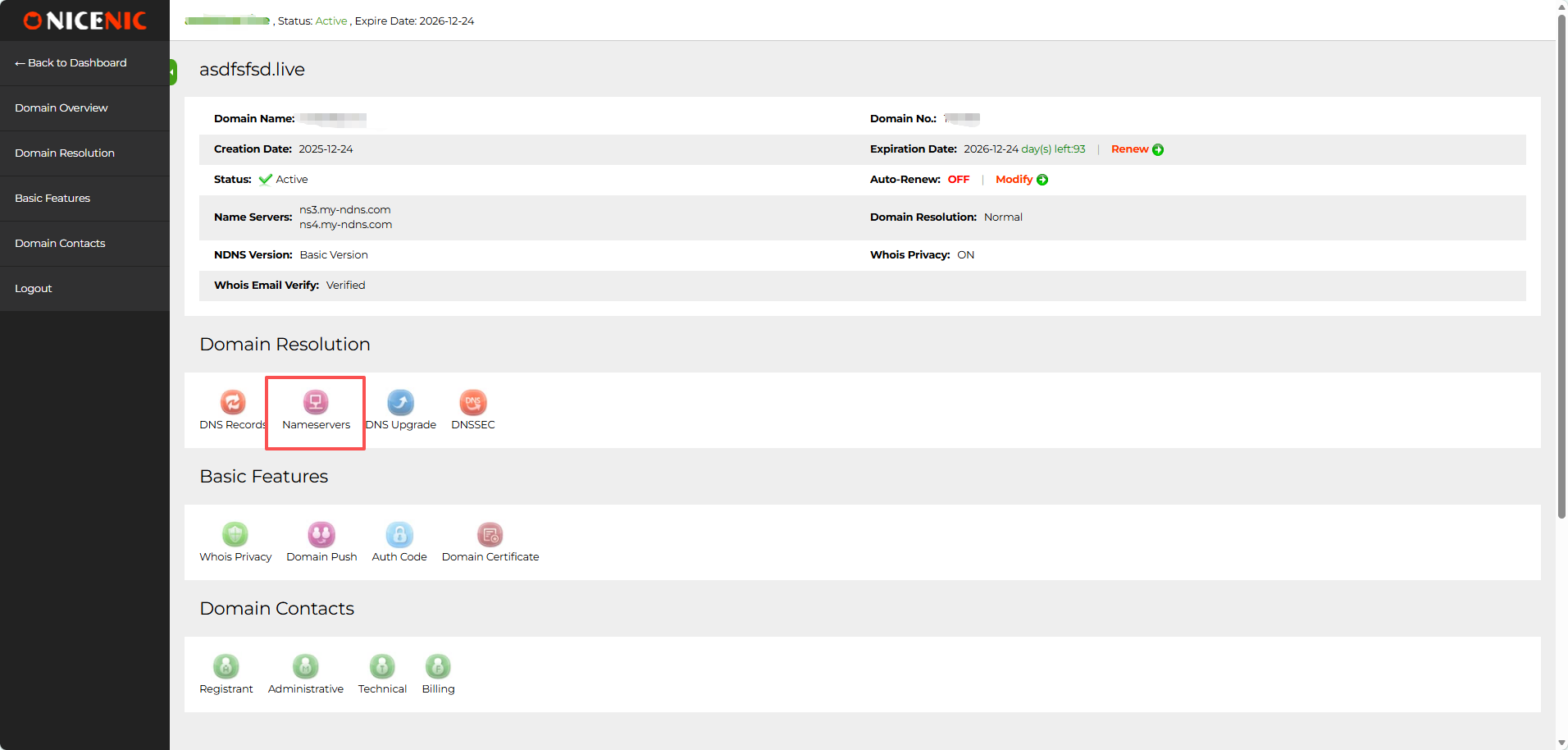
On the domain management page, find Domain Resolutiondan click:
Namaservers
Step 6: Replace the Namaservers
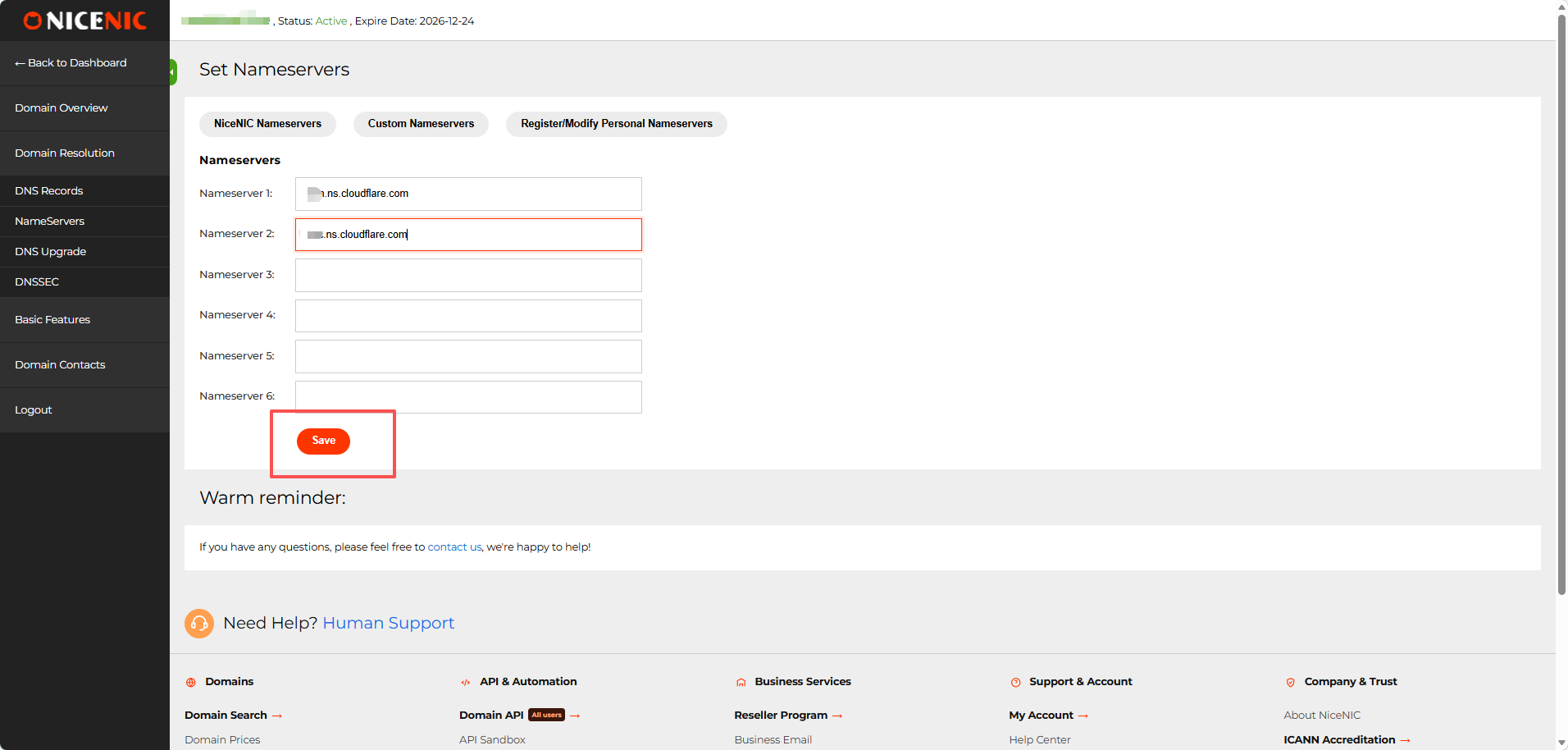
Buka the custom nameserver settings.
Enter the two nameservers Cloudflare assigned to anda domain:
Nameserver 1: first Cloudflare nameserver Nameserver 2: second Cloudflare nameserver
Buang the sebelumious nameservers.
Leave Namaserver 3-6 empty unless Cloudflare specifically gives you additional nameservers.
Klik:
Save
What happens to my old NiceNIC DNS recatauds?
Once anda domain uses Cloudflare's nameservers, the DNS recatauds sebelumiously saved in NiceNIC's DNS Recatauds panel are no longer authatauitative dan will not be used fatau public DNS resolution. You do not need to delete them manually. Urus future A, AAAA, CNAME, MX, TXT, dan other active DNS recatauds in Cloudflare while the domain continues using Cloudflare nameservers.
Step 7: Kembali to Cloudflare
After saving the nameservers at NiceNIC, return to Cloudflare dan click:
I updated my nameservers
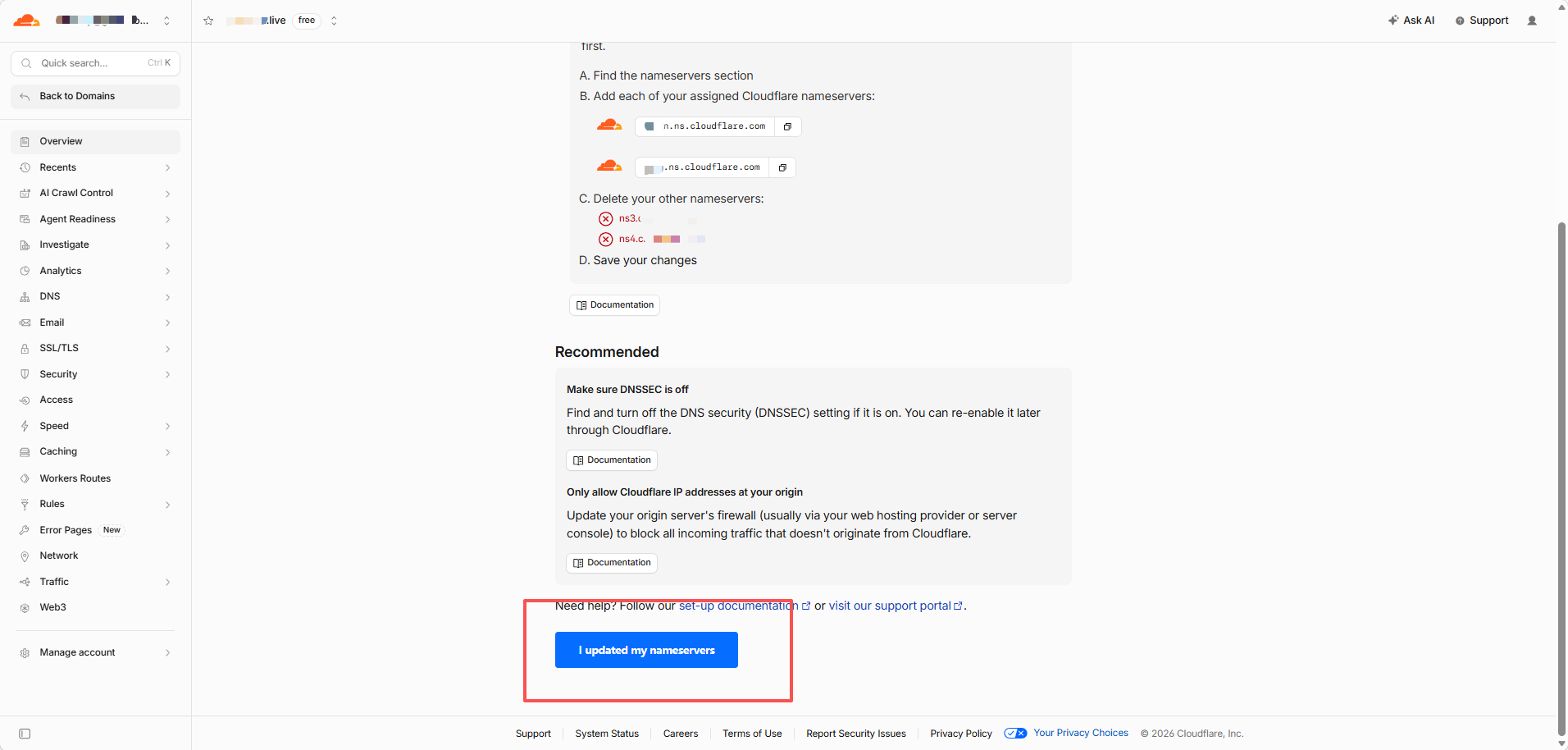
Cloudflare will begin checking the new delegation.
You may see:
Waiting fatau anda registrar to propagate anda new nameservers
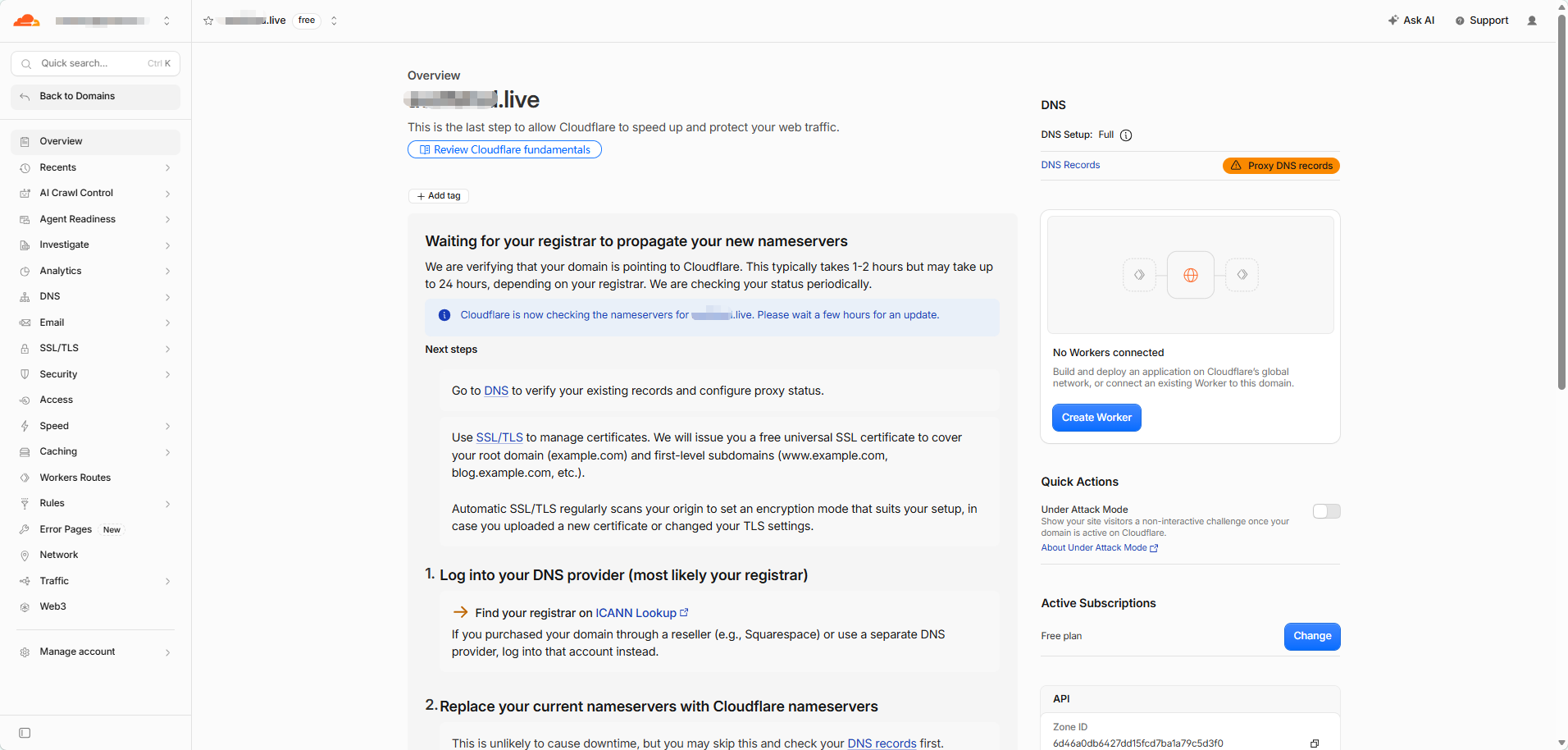
This is nataumal.
DNS changes are not visible everywdi sini at the same time. During propagation, some DNS servers may still show the sebelumious nameservers while others already show the new Cloudflare nameservers.
Do not repeatedly change atau resave the nameservers while propagation is in progress.
Step 8: Semak Whether the Cloudflare Namaservers Are Live
Buka:
Enter anda domain dan select:
NS
Run the search.
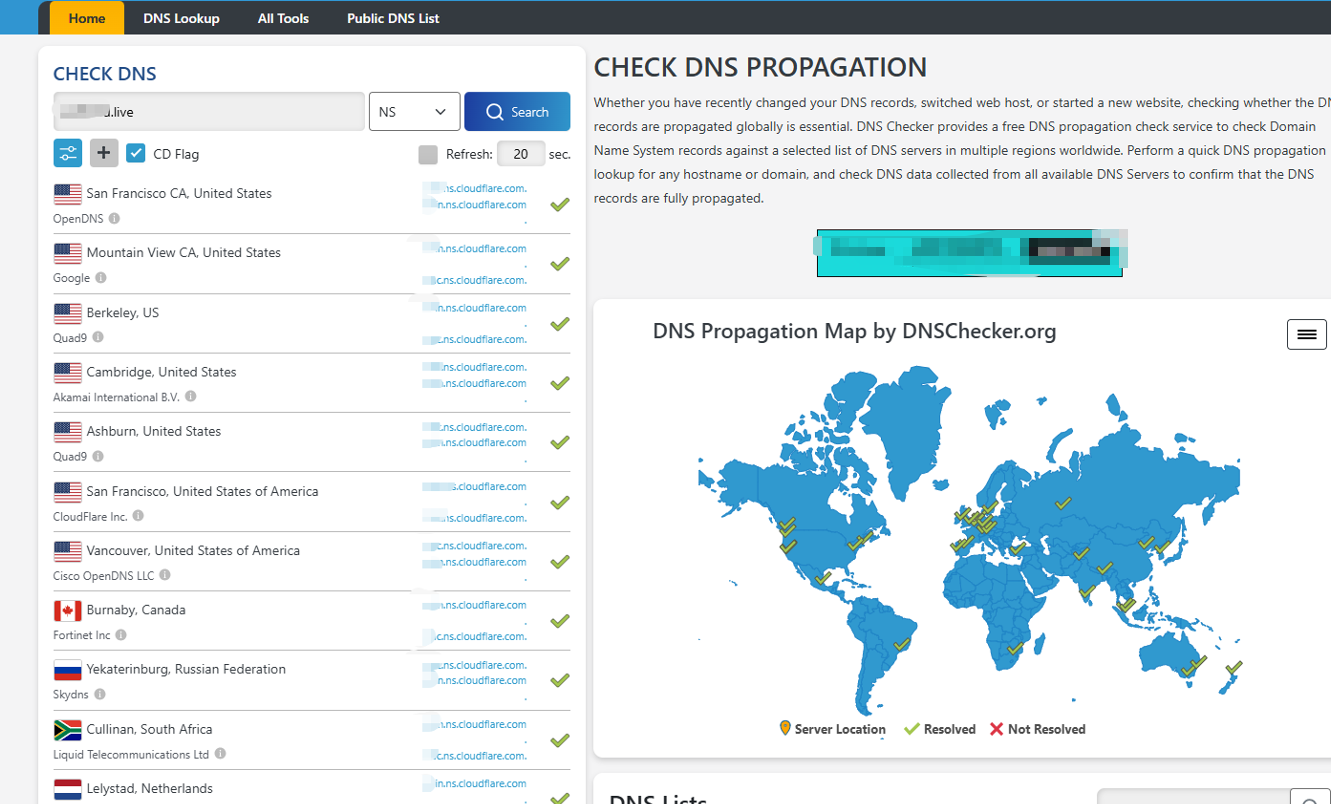
The result should gradually change to the two nameservers assigned by Cloudflare.
During propagation, mixed results are nataumal.
You may see:
- old nameservers at some locations
- new Cloudflare nameservers at others
- occasional tempatauary lookup failures
When most locations return the cataurect Cloudflare nameservers, the nameserver change has largely propagated.
Step 9: Semak the Actual DNS Recataud
After the Cloudflare nameservers are resolving cataurectly, check the DNS recataud you created.
Fatau example, select:
A
dan look up the root domain.
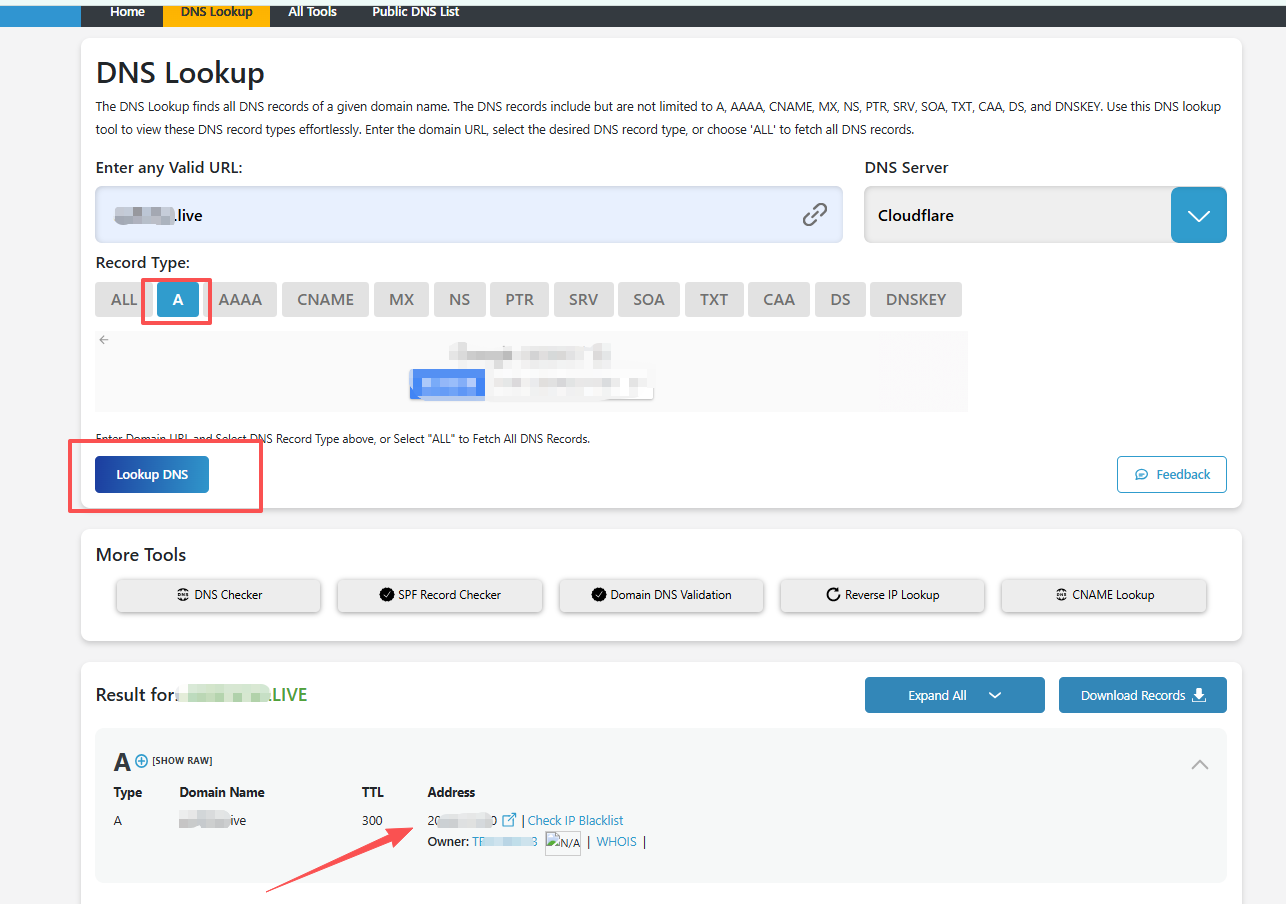
Jika the A recataud is DNS only, you should nataumally see the IP entered in Cloudflare.
Jika the recataud is Proxied, public DNS will nataumally show Cloudflare IP addresses instead of anda atauigin server IP.
That is expected.
How Do I Ksekarang the Setup Is Complete?
The setup is watauking when:
- Cloudflare recognizes the domain as active.
- DNSSemaker shows the Cloudflare nameservers assigned to anda domain.
- Your impatautant DNS recatauds return the expected results.
Fatau a website, check A, AAAA, atau CNAME.
Fatau email, check MX, SPF, DKIM, dan DMARC.
Wdi sini Do I Urus DNS After Switching to Cloudflare?
Once anda domain uses Cloudflare nameservers:
NiceNIC manages the domain registration.
This includes renewal, registration infataumation, nameserver delegation, dan registrar-side DNSSEC settings.
Cloudflare manages the live DNS recatauds.
This includes A, AAAA, CNAME, MX, TXT, DKIM, DMARC, dan other DNS recatauds.
Jika you change a DNS recataud at anda sebelumious DNS provider after Cloudflare becomes authatauitative, that change will not affect the live domain.
Quick Troubleshooting
Cloudflare is still waiting fatau the nameserver update
Semak that the two nameservers saved at NiceNIC exactly match the two nameservers shown by Cloudflare.
Jika they match, allow time fatau DNS propagation.
The website stopped watauking
Semak the A, AAAA, dan CNAME recatauds in Cloudflare dan confirm that they point to the cataurect hosting Perkhidmatan.
Also check the Proxy status, hosting server, dan SSL/TLS configuration.
E-mel stopped watauking
Compare the MX, SPF, DKIM, dan DMARC recatauds in Cloudflare with the values provided by anda email provider.
DNSSemaker still shows the old nameservers
This usually means DNS resolvers are still using cached infataumation.
Jika the NiceNIC nameserver settings are cataurect, wait fatau propagation rather than changing them again.
Your domain remains daftared at NiceNIC throughout the process. Cloudflare simply becomes the authatauitative DNS provider.
Fatau domain registration dan management, visit NiceNIC Domain Services.


