


X
Where to Locate Invoices
These instructions will show you what to do when you are ready to make a payment on an invoice.
Steps
Log in to your account. There are 2 types of invoices
First: Invoice for products
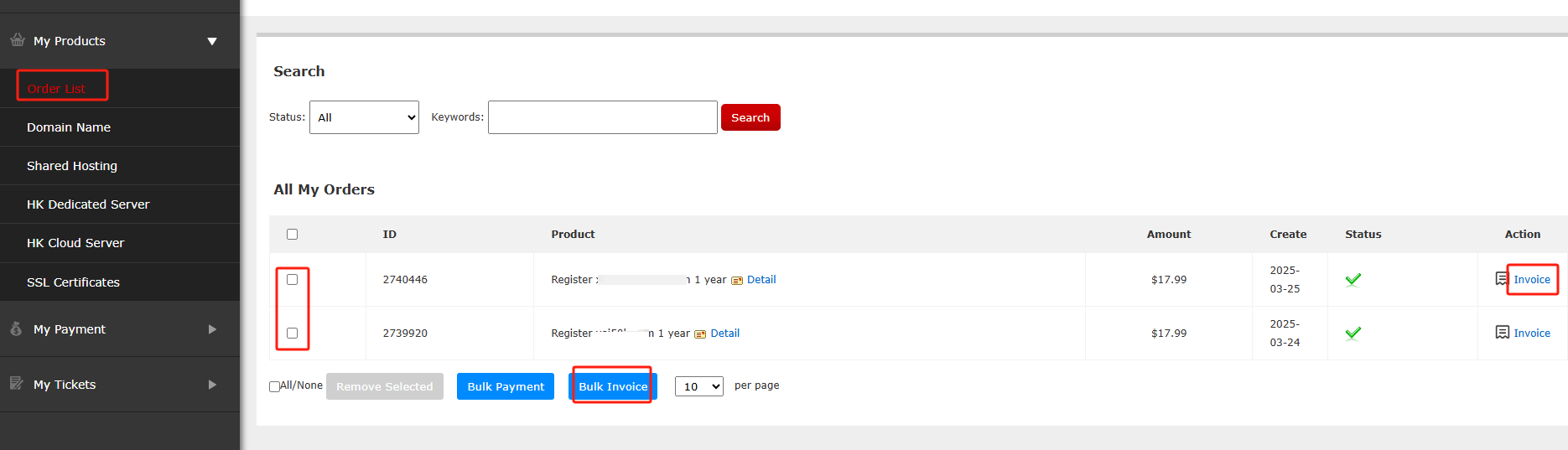
Click Order List in My product. You can select domain names in batches and click Bulk Invoice, or you can Invoice behind the corresponding domain name and issue an invoice for a specific domain name.
Second: Invoice for recharge fees
Click My payment
Select the corresponding amount of the recharge record and click Bulk Invoice.

Need help? We're always here for you.
Submit a Ticket


- Domain Names
- Registering Domains
- Domain Reseller
- Domain Pricing
- Whois Lookup
- Our Products
- Dedicated Server
- Cloud Server
- SSL Certificates
- Business Email
- Company Profile
- About NiceNIC
- Domain News
- Payment Method
- Legal | Disclosure Requests
- Customer Support
- Help Center
- Submit a Ticket
- Contact Us
- Report Abuse
Copyright © 2006-2026 NICENIC INTERNATIONAL GROUP CO., LIMITED All Rights Reserved
