


2FA: Two-Factor Authentication
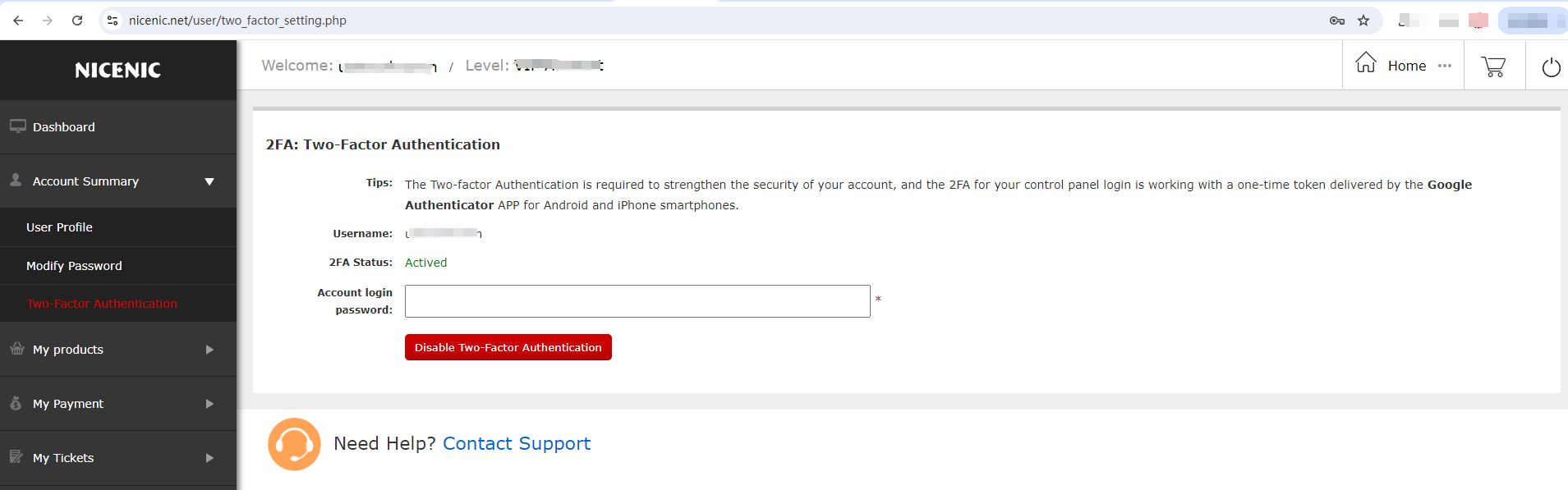
The Two-factor Authentication is required to strengthen the security of your account, and the 2FA for your control panel login is working with a one-time token delivered by the Google Authenticator APP for Android and iPhone smartphones.
Before You Begin
- Sign in to the correct NiceNIC account.
- Identify the exact domain or product affected.
- Record current settings before making a change.
#1 Please enable 2FA through "My Account > Account Summary > Two-Factor Authentication" then refer to the following screenshot:

Or #2 Please disable 2FA through "My Account > Account Summary > Two-Factor Authentication" then refer to the following screenshot:
Related NiceNIC Guides
If the issue continues after you complete the checks above, submit a NiceNIC support ticket with the affected domain or product, the exact error message, the time of the issue and the troubleshooting already completed.


- Domain Names
- Registering Domains
- Domain Reseller
- Domain API
- Whois Lookup
- Our Products
- Dedicated Server
- Cloud Server
- SSL Certificates
- Business Email
- Company Profile
- About NiceNIC
- Domain News
- Payment Method
- Legal | Disclosure Requests
- Customer Support
- Help Center
- Submit a Ticket
- Contact Us
- Report Abuse
