-

- Nice to Register, Safe to Own
- Submit a Ticket
- Telegram Support
-
English
- English
- Русский язык
- Deutsch
- Français
- Español
- العربية
- Português
- Türkçe
- हिन्दी
- 日本語
- Indonesia
- Melayu
- Tiếng Việt
- 한국어
- ไทย
- বাংলা
- اردو
- Filipino
- Italiano
- Nederlands
- Polski
- Čeština
- Українська
- Magyar
- Svenska
- Română
- Ελληνικά
- Dansk
- Suomi
- עברית
- Slovenčina
- Български
- Hrvatski
- Norsk
- فارسی
- Српски
- Azərbaycan
- Қазақ
- Shqip
- Հայերեն
- ქართული
- Latviešu
- Eesti
- Lietuvių
- Català
- O'zbek
- Slovenščina
- English
- Русский язык
- Deutsch
- Français
- Español
- العربية
- Português
- Türkçe
- हिन्दी
- 日本語
- Bahasa Indonesia
- Bahasa Melayu
- Tiếng Việt
- 한국어
- ไทย
- বাংলা
- اردو
- Filipino
- Italiano
- Nederlands
- Polski
- Čeština
- Українська
- Magyar
- Svenska
- Română
- Ελληνικά
- Dansk
- Suomi
- עברית
- Slovenčina
- Български
- Hrvatski
- Norsk
- فارسی
- Српски
- Azərbaycan
- Қазақ
- Shqip
- Հայերեն
- ქართული
- Latviešu
- Eesti
- Lietuvių
- Català
- O'zbek
- Slovenščina


-
- Urgent Domain Issues
-
Domain Basics
- Domain vs. Website Differences
- What Is an IDN
- What a Domain is Used For
- What Is a ccTLD
- What Is a Domain Name
- What is a gTLD
- How to Choose a Domain Name for Your Business
- How Long Should a Domain Name Be?
- Should You Use Hyphens in a Domain Name?
- .COM vs .NET: Which Should You Choose?
- .COM vs .ORG: Which Should You Choose?
- .COM vs .IO: Which Should You Choose?
- .COM vs .AI: Which Should You Choose?
- Does a Domain Extension Affect SEO?
- Do New TLDs Rank Worse in Google?
- Does a ccTLD Affect International SEO?
-
Register a Domain
- Should You Register Multiple Domain Extensions for Your Brand?
- How to Register a .AI Domain at NiceNIC
- How to Register a .CC Domain at NiceNIC
- How to Register a .AT Domain at NiceNIC
- How to Register a .ES Domain at NiceNIC
- How to Register a .US Domain at NiceNIC
- DNS Services
- What are the domain's extended attributes?
- What is ICANN Fee
- What is IP address
- What is a premium domain and how does it work
- How to Register a Domain Name
- What Is the Maximum Amount of Years I Can Register a Domain for?
- What Is TCP/IP and How Does It Work?
- What Are Trustee Services and How Does It Work?
- How to Register a .PL Domain at NiceNIC
- How to Register a .CA Domain at NiceNIC
- How to Register a .IN Domain at NiceNIC
- How to Register a .IT Domain at NiceNIC
- How to Register a .CO Domain at NiceNIC
- How to Register a .IO Domain at NiceNIC
-
Fix Domain or DNS Problems
- How to Manage DNS Records
- DNS Records Explained: A, AAAA, CNAME, MX, TXT, CAA, and SRV
- Why Can't I Use Personal Nameservers for Multiple Domains?
- Why Can't I Update DNS for My .hk or .com.hk Domain?
- Why Is Your .it.com Domain on ServerHold?
- Why Your DNS Changes Are Not Working And How to Fix It
- How to Use Ping to Check If Your Domain or Server Is Online
- Difference between NDNS Basic, NDNS Advanced and NDNS Global
- How To Register Personal Nameservers
- How to add TXT/SPF/DKIM/DMARC records
- How to Update Domains' Nameservers
- Can You Use Cloudflare DNS Without Transferring Your Domain?
- How to Back Up DNS Records Before Changing Domain Settings
- How to Reset Default Nameservers
- How to Fix DNSSEC Validation Problems
- How to Enable DNSSEC for Your Domain
- How to Check DNS Propagation
- How to Change Nameservers Safely
- How to Set Up and Troubleshoot DNSSEC for Your Domain
-
Manage Your Domains
-
Domain Transfers
- Will Domain Transfer Cause Website Downtime?
- How Long Does a Domain Transfer Take to Complete?
- Why Can't I Modify My Domain During Pending Transfer?
- How to Unlock a Domain Before Transfer
- How to Transfer a Domain to NiceNIC
- Why Your Domain Transfer Is Pending, Failed, or Delayed
- How to Prepare a Bulk Domain Transfer List
- How to Transfer a Domain Without Website or Email Downtime
- What Is the 60-Day Domain Transfer Lock?
- Domain Transfer vs DNS Change: What's the Difference?
- Domain Transfer vs Account Push: Which Do You Need?
- Domain Transfer Troubleshooting Guide
- How to Transfer a Domain Out from Nicenic
- Why Can't I Transfer an Expired or Near-Expiry Domain?
- Do .uk and .co.uk Domains Need an Authorization Code for Transfer?
- How to Transfer a Domain Into NiceNIC
- What is a domain transfer
- How do I transfer a domain to NiceNIC with minimal downtime?
- How to transfer several domains to NiceNIC in bulk?
- How do I verify that my domain is eligible for transfer?
- How to Transfer Name Servers During a Domain Transfer?
- What Happens to My Nameservers After a Domain Transfer?
-
Abuse & Compliance
- How to Keep Your Domain From Being Compromised
- Why Domains Get Suspended and How to Avoid clientHold
- How Domain Abuse Reports Are Managed: What You Should Know
- Why Your Domain Is Flagged by VirusTotal, Spamhaus, Norton, and URLScan.io and What To Do
- How to View the Abuse Complaint Summary for Your Domain
- What Evidence is Required to Report Domain Abuse? | Step-by-Step Guide
- What Is DNS Abuse? A Clear Guide to ICANN DNS Abuse vs Non-DNS Abuse
- How to Check Your Domain Abuse Status in NiceNIC
- NiceNIC Abuse Handling Manual
- How the Domain Industry Actually Works And What It Means for You
- Someone Registered My Business Name as a Domain: What Can I Do?
- How to Respond to a Domain Abuse Complaint
- Why Was My New Domain Flagged by Spamhaus or SURBL? A Practical Guide for Domain Owners
- Why Does My Domain Still Show an Abuse Warning After the Issue Is Resolved?
-
Renew, Expire & Recover Domains
- Can You Buy a Domain Name Forever?
- How to Set Up or Turn Off Auto-Renewal for a Single Domain
- How to Set Up Bulk Auto-Renewal for Your Domains
- Protect Your Domain Before It Enters Redemption or Auction
- Expired Domain Recovery Guide for Business Owners
- How to Avoid Losing a Domain After Expiration
- NiceNIC Expired Domain Policy | Renewal, Redemption & Auction Timeline
- Can I Re-register My Domain After It Expires?
- What Is a Redemption Fee
- How to Renew Your Domain Name?
- What Happens When Domain Expired?
-
Registration Requirements by Extension
- .COM.AU, .NET.AU, .ORG.AU domain
- .ECO registration requirements
- .CA domain registration requirements
- .ES domain registration requirements
- .EU domain registration requirements
- .UK domain registration requirements
- .SG domain registration requirements
- .NYC domain registration requirements
- .NU domain registration requirements
- .LONDON domain registration requirements
- .LAW domain registration requirements
- .IS domain registration requirements
- .FR domain registration requirements
- .US domain registration requirements
- .XXX domain registration requirements
- NEW domain registration requirements
- .HK WHOIS Visibility and Privacy Guide
- How to Check .HK Domain Status and Expiry Date
- .HK Domain Registration Requirements Guide
- Special Renewal rules for Some ccTLD Domains
- Which ccTLDs Registrations Need Special Registration Requirements
- .IN Domain Registration Requirements
- Why Documents Are Required to Register a Domain Name
- How to Submit Documents for Domain Name Registration?
- .HK, .com.hk, and .org.hk: Which One Should I Choose?
- Why Is My .HK Domain Pending Document Review?
- Can Foreigners Register a .DE Domain?
- Complete .COM.XX Domain Registration Requirements by Country
- .CN Domain Registration Requirements
- How to Update .HK Registrant or Contact Information
-
WHOIS, Privacy & Contact Information
- How to Handle Domain Registration Data Verification Requests
- How to Update Domain Contact Information Safely
- How Domain Privacy Protects Personal Information
- Why My WHOIS Information Is Hidden or Redacted
- How to Check Domain Registration Data with RDAP
- WHOIS, RDAP, and Domain Privacy Explained
- Why Does My Domain WHOIS Show
- What Domain Extensions Offer Built-in Privacy Protection?
- What is Whois
- What is Domain Privacy
- Does NiceNIC provide any domain privacy protection services?
- What Domain Names Are Eligible for Free Domain Privacy?
- How to Update WHOIS Contacts?
- How to Add a Default WHOIS Contact for Your Domain?
-
Domain Status, Verification & Holds
- Why Is My Domain on ServerHold? Official Registry Checks and Next Steps
- What Does My Domain Status Mean
- How to Check Domain Status Before Transfer or Renewal
- What clientHold and serverHold Mean
- What clientTransferProhibited Means
- What Domain Status Codes Mean
- Domain Email Verification: How It Works at NiceNIC
- Domain on ServerHold Due to Registry Email Verification
- Why Is My Domain on ClientHold and How Can I Fix It?
- What Do Domain Name Status Codes Mean?
- What Do redemptionPeriod and pendingDelete Mean
-
Domain Reseller
- NiceNIC API v2 Authentication Error: Common Causes and Fixes
- NiceNIC WHMCS Integration Setup Guide
- NiceNIC API v2 Request Format Errors: Endpoint, Headers, JSON, and Parameters
- How to Start as a Domain Reseller with NiceNIC
- How to Connect NiceNIC with WHMCS
- How to Handle Domain Orders, Renewals, and Transfers as a Reseller
- Best Practices for Hosting Providers Selling Domains
- What Is the NiceNIC Reseller Program and How Can It Benefit Your Business?
- Configure API
-
- Which SSL Certificates Are Compatible with .RU Domains
- How to install SSL certificates
- Installing an SSL certificate on Nginx
- Installing an SSL Certificate on IIS 7
- Installing an SSL certificate on Apache
- What's SSL Certificate
- Types of SSL Certificates
- Why need SSL Certificates
- How to Activate and Download an SSL Certificate
- Certificate reissue reasons explained
- What is EV certificate ecommerce advantage
- How to Generate CSR Code?
- How do I reissue my SSL certificate
- How do I renew an SSL certificate
- How to choose an SSL certificate
- SSL certificate purpose explained
- SSL Certification in Four Simple Steps
- How to verify certificate installation correctly
- HTTPS & SSL Guide for .boo, .day, .dev, .page, and .rsvp
-
Registrar Trust
- Cloudflare Registrar vs Namecheap: Which Fits Your Needs?
- Porkbun vs Namecheap: Total Cost and Features Compared
- GoDaddy vs Namecheap: Pricing, Renewal, DNS, and Support Compared
- Does Your Domain Registrar Matter? Security, Cost, and Control Explained
- Best Domain Registrar for Resellers: API, Pricing, and Support Compared
- How to Manage Multiple Domains at Scale: Registrar Requirements
- Best Domain Registrar for Domain Investors and Large Portfolios
- Best Domain Registrar for Small Businesses: A Practical Checklist
- Cheapest Domain Registrars: Compare Renewal Cost, Not Just Year One
- How to Choose a Domain Registrar: 12 Things to Check
X
Published: 2026-04-03
|
Updated: 2026-04-17
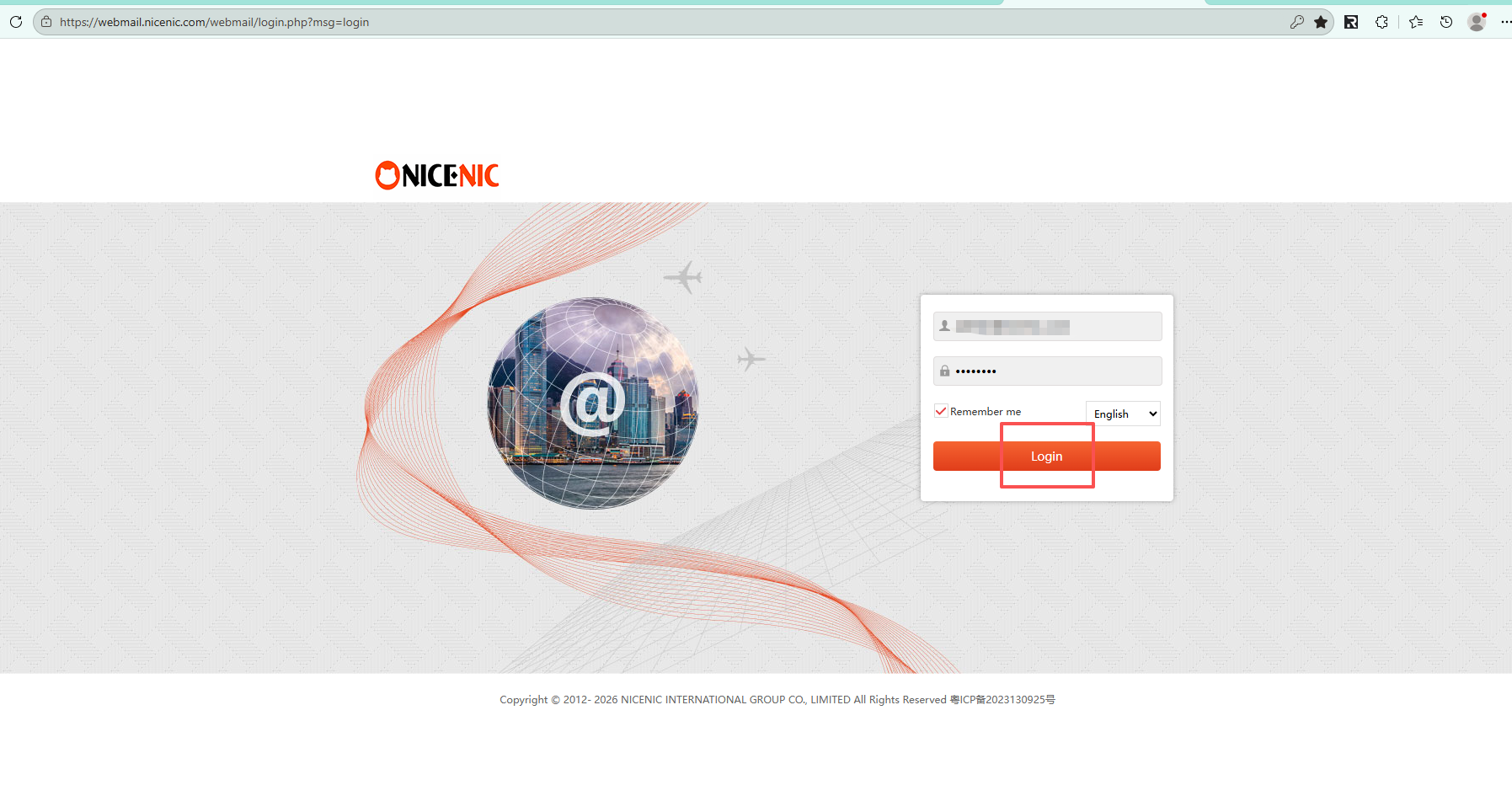
How to create your Email accounts? -- New VersionStep 1: Please log into your admin Email account via "http://webmail.nicenic.com/"
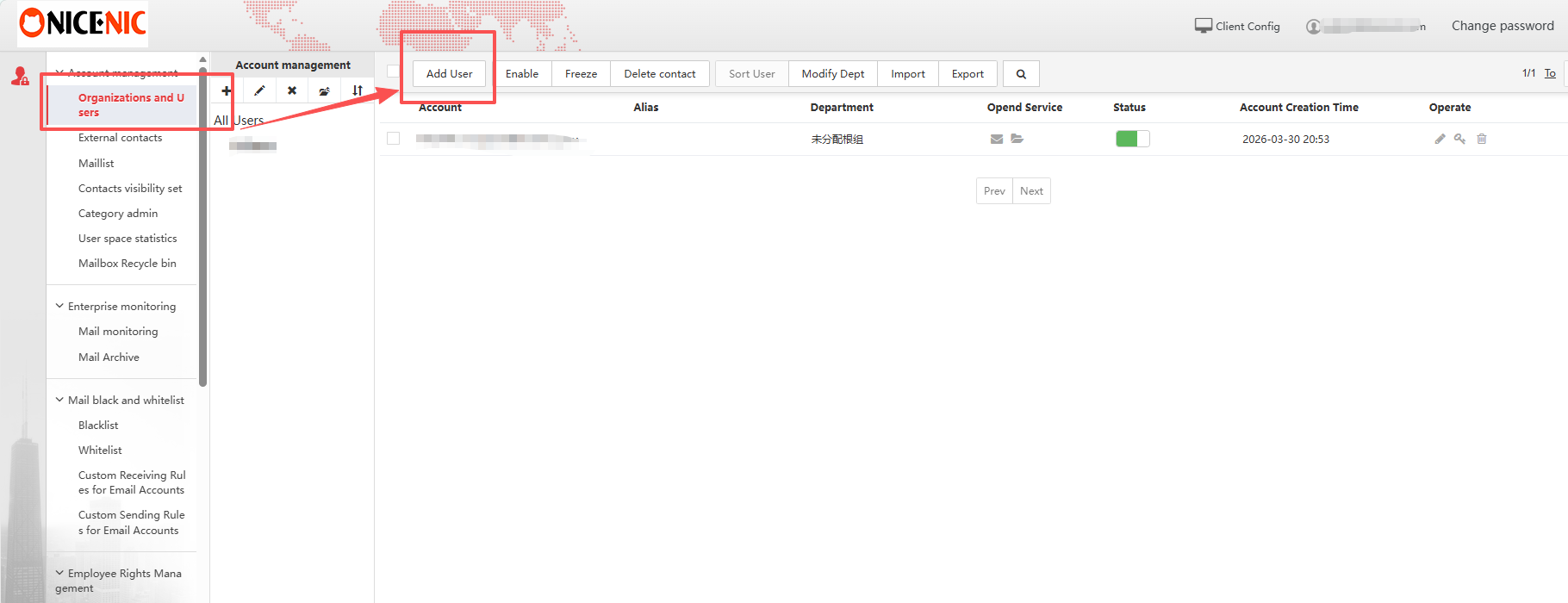
Step 2: Please select "Organizations and users" in the left navigation bar, then choose "Add User"
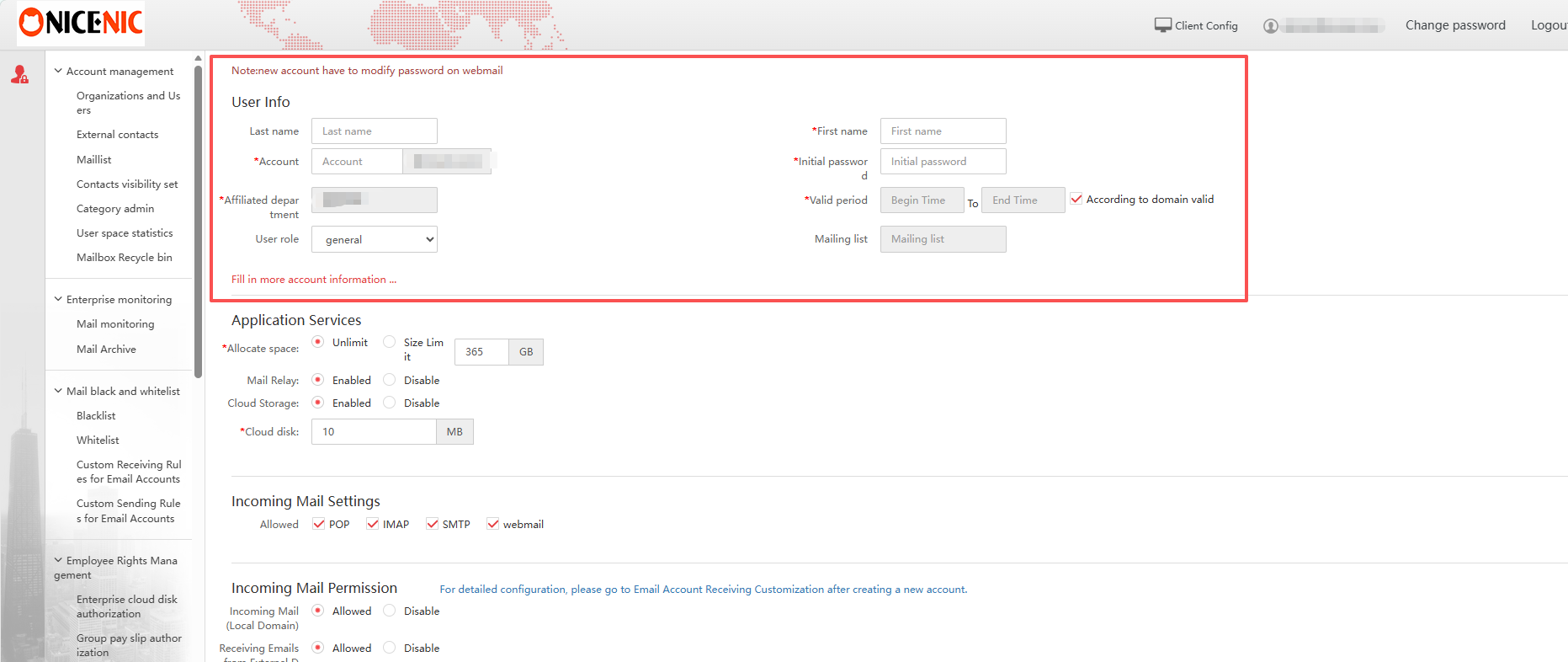
Step 3: Fill in the required user details (account, password, name, and department), then configure mailbox settings if needed and save to create the account.
Need help? We're always here for you.
Human Support


Copyright © 2006–2026 NICENIC INTERNATIONAL GROUP CO., LIMITED. All Rights Reserved. · U.S. Affiliate: NICENIC LLC
