


How do I check my certificate was installed correctly?
To be sure that the certificate has been installed correctly and working properly, as well as that your customers are certain a secured connection is enabled and it covers data transmission through your website, you have the following indicators:
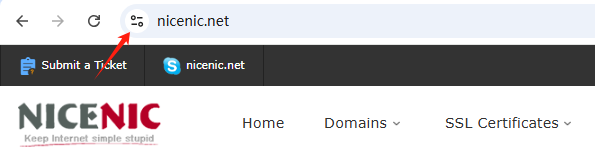
- A padlock/tune icon available in the URL bar.
- No error messages/ warnings occurred when connecting through https://yourdomain.tld.
- A Site Seal provided by the Certificate Authority installed and visible.
Note : From September 2023, the padlock icon will be replaced by a tune icon in the new Chrome browser version. Google's reasoning is that secured HTTPS connections have become the online norm, not the exception, and no longer serve as a trust indicator. As such, the tune icon itself will not be a trust indicator but will provide detailed information about a website's connection and settings. So moving forward, when using a Chrome browser, the primary indication of a successful SSL certificate installation on a site will be the absence of security warnings :
Frequently Asked Questions
- Can I reuse the same certificate after moving servers?
Often the certificate can be reinstalled if you still have the matching private key and the certificate remains valid. Reissue it when the key, CSR or certificate details must change.
Related NiceNIC Guides
The server or load balancer may still present the old certificate, another virtual host may be selected, or an intermediate cache may not have reloaded the configuration.
If the issue continues after you complete the checks above, submit a NiceNIC support ticket with the affected domain or product, the exact error message, the time of the issue and the troubleshooting already completed.


- Domain Names
- Registering Domains
- Domain Reseller
- Domain API
- Whois Lookup
- Our Products
- Dedicated Server
- Cloud Server
- SSL Certificates
- Business Email
- Company Profile
- About NiceNIC
- Domain News
- Payment Method
- Legal | Disclosure Requests
- Customer Support
- Help Center
- Submit a Ticket
- Contact Us
- Report Abuse
