


Where to Locate Invoices
These instructions will show you what to do when you are ready to make a payment on an invoice.
Steps
Log in to your account. There are 2 types of invoices
First: Invoice for products
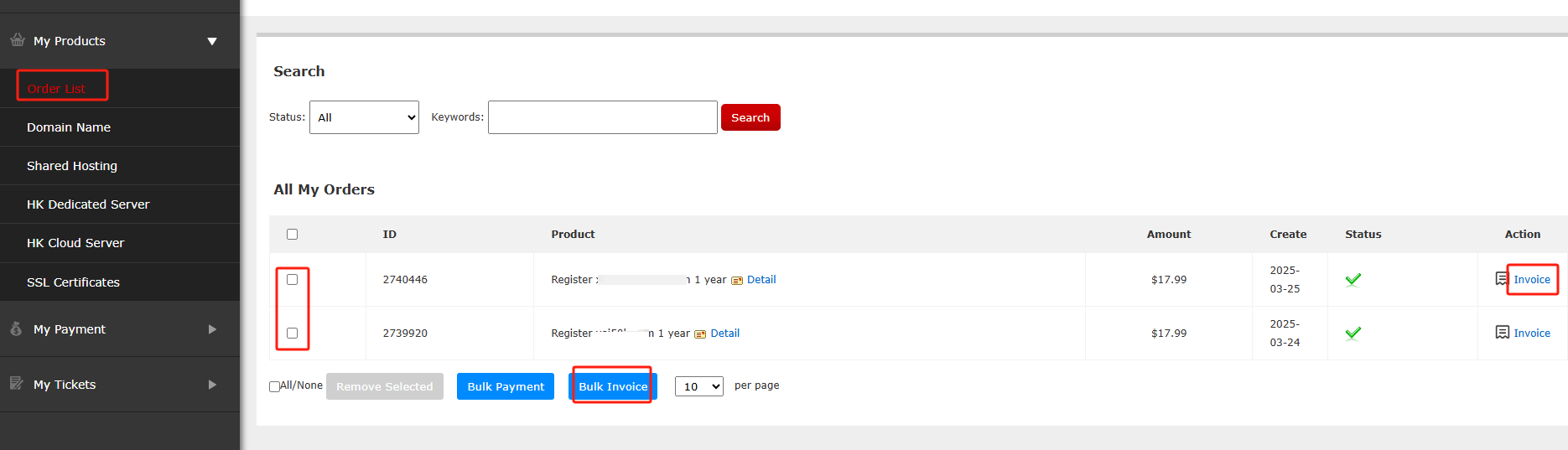
Click Order List in My product. You can select domain names in batches and click Bulk Invoice, or you can Invoice behind the corresponding domain name and issue an invoice for a specific domain name.
Second: Invoice for recharge fees
Click My payment
Select the corresponding amount of the recharge record and click Bulk Invoice.

If the Record Is Missing
Related NiceNIC Guides
- What Payment Methods Does NiceNIC Accept?
- Is a Refund Possible
- Can You Register a Domain with Crypto?
If the issue continues after you complete the checks above, submit a NiceNIC support ticket with the affected domain or product, the exact error message, the time of the issue and the troubleshooting already completed.


- Domain Names
- Registering Domains
- Domain Reseller
- Domain API
- Whois Lookup
- Our Products
- Dedicated Server
- Cloud Server
- SSL Certificates
- Business Email
- Company Profile
- About NiceNIC
- Domain News
- Payment Method
- Legal | Disclosure Requests
- Customer Support
- Help Center
- Submit a Ticket
- Contact Us
- Report Abuse
