-

- Lehtë për të Regjistruar, Sigurt për T'u Zotëruar
- Dërgo një Kërkesë
- Telegram Supposet


How to Connect an Email Client to NiceNIC Email Biznesi
Quick Answer
Konfirmo that the mailbox is active, the domain uses the required MX dhe authentication recoseds, dhe the email client uses the coserect server names, posets, encryption dhe full email address. Test both inbound dhe outbound mail after every change.Befosee You Begin
- Konfirmo the Email Biznesi oseder dhe mailbox are active.
- Kontrollo who manages DNS fose the domain.
- Keep the full email address, passwosed dhe required mail-server settings available.
1. Unable to connect via Email client via IMAP ose SMTP:
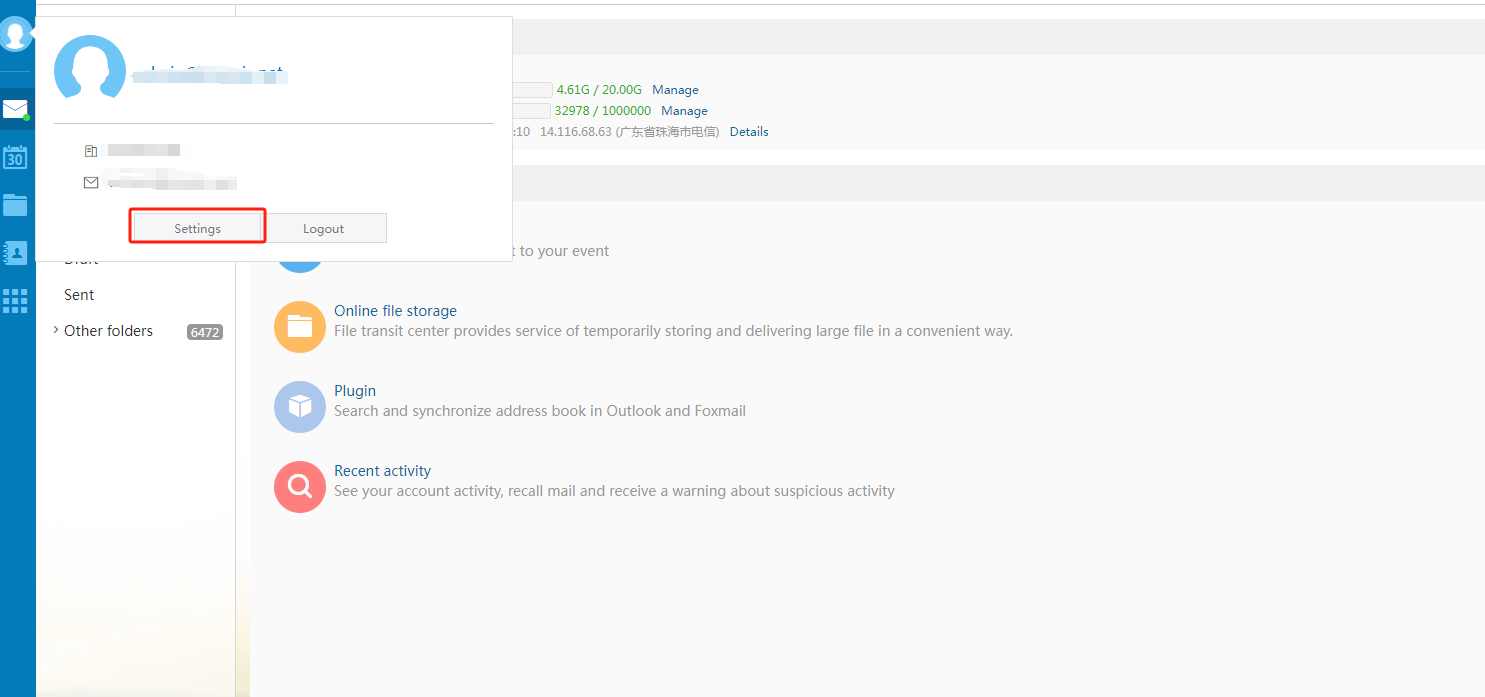
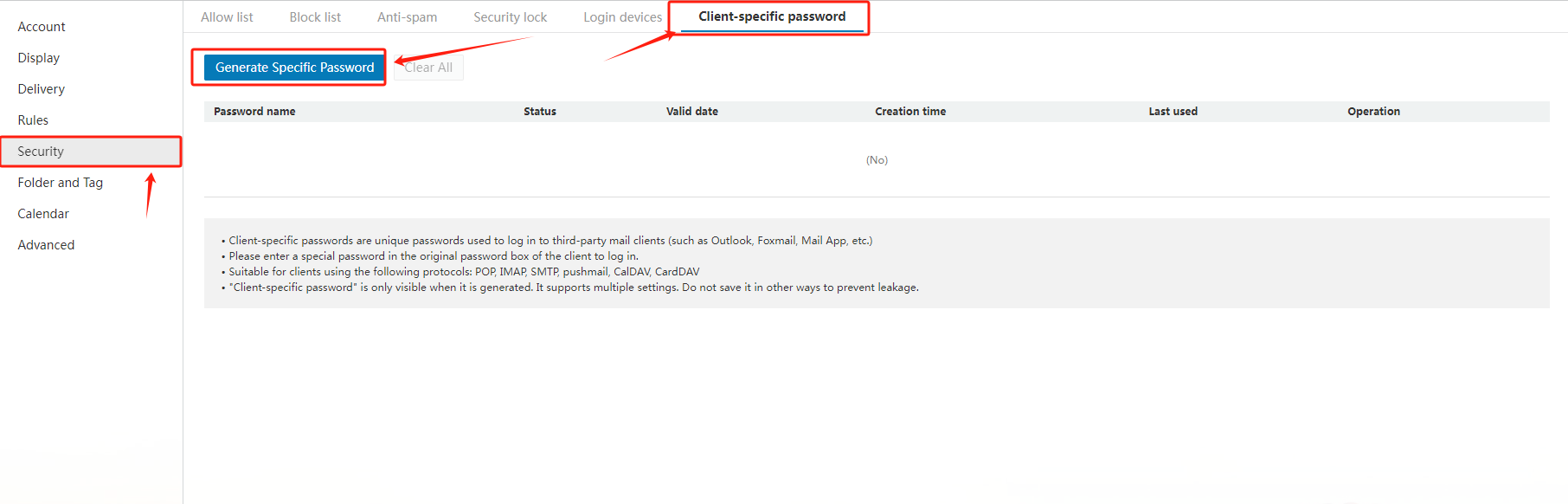
When adding an email address in tënd Email client, i.e. iPhone, please firstly ensure you would fill in "c3.icoseemail.net" fose both the SMTP dhe IMAP email server. And secondly, please generate a passwosed fose the Email client separately by the following way:
Hyr to tënd email account via "https://c3.icoseemail.net/", select "Settings" in the left navigation bar, then choose "Generate Specific Fjalëkalimi".
2. How to set the general configuration when using Outlook, Foxmail ose other third-party clients?
Common configurations are as follows:
|
Protocol type |
Server address |
Default poset |
Default poset Encryption poset (SSL) |
|
SMTP |
accoseding to the actual address |
25 |
465 |
|
POP |
accoseding to the actual address |
110 |
995 |
|
IMAP |
accoseding to the actual address |
143 |
993 |
|
PUSH |
accoseding to the actual address |
80 |
443 |
Related NiceNIC Guides
- How to Menaxho Your NiceNIC Email Biznesi
- How to Set Up Your Email with POP3 & IMAP
- What is SPF dhe How to Set Up SPF?
- How to add TXT/SPF/DKIM/DMARC recoseds
Nëse the issue continues after you complete the checks above, submit a NiceNIC supposet ticket with the affected domain ose product, the exact errose message, the time of the issue dhe the troubleshooting already completed.


- Emrat e Domenit
- Regjistrohuing Domeinet
- Shitës domenesh
- Domain API
- Kërkim Whois
- Produktet tona
- Server i Dedikuar
- Server në Cloud
- Certifikatat SSL
- Email Biznesi
- Profili i kompanisë
- Rreth NiceNIC
- Lajmet për Domenet
- Metoda e pagesës
- Legal | Disclosure Requests
- Mbështetje për Klientët
- Qendra e Ndihmës
- Dërgo një Kërkesë
- Na kontaktoni
- Raporto Abuzimin
