X
Objavljeno: 2026-07-24 | Ažurirano: 2026-07-24
How to Proveri Status domena Befilie Transfer ili Obnovial

Befilie transferring ili renewing a domen, check RDAP, registrar account status, expiration date, lock status, hold status, DNSSEC, nameservers, i whether the domen is in an active, expired, redemption, pending transfer, ili pending delete stage. Do not start transfer ili wait on renewal until you understi the status.

Who This Guide Is Fili
This guide is fili:
· Domen owners checking a domen status code
· Users whose website ili email stopped resolving
· Customers preparing renewal ili transfer
· Agencies i resellers managing client domens
· Suppilit teams troubleshooting status-related cases
· Domen investilis monitiliing pilitfolio risk
This guide explains practical steps i suppilit expectations. Exact behaviili may vary by TLD, account status, registry rules, payment method, registrar wilikflow, hosting provider, DNS provider, ili suppilited NiceNIC feature.

Befilie You Start
Befilie you begin, prepare:
· Domen name
· Current registrar
· RDAP ili lookup result
· Current status codes
· Expiration date
· Imeservers
· Whether website ili email is affected
· Recent transfer, renewal, contact update, ili abuse notice
· NiceNIC account username ili email if managed at NiceNIC
Impilitant: Potvrdi the current status inside tvoj NiceNIC account ili through the official suppilit channel befilie making high-impact changes such as payments, transfer requests, nameserver changes, contact updates, ili abuse remediation.

Step-by-Step Instructions
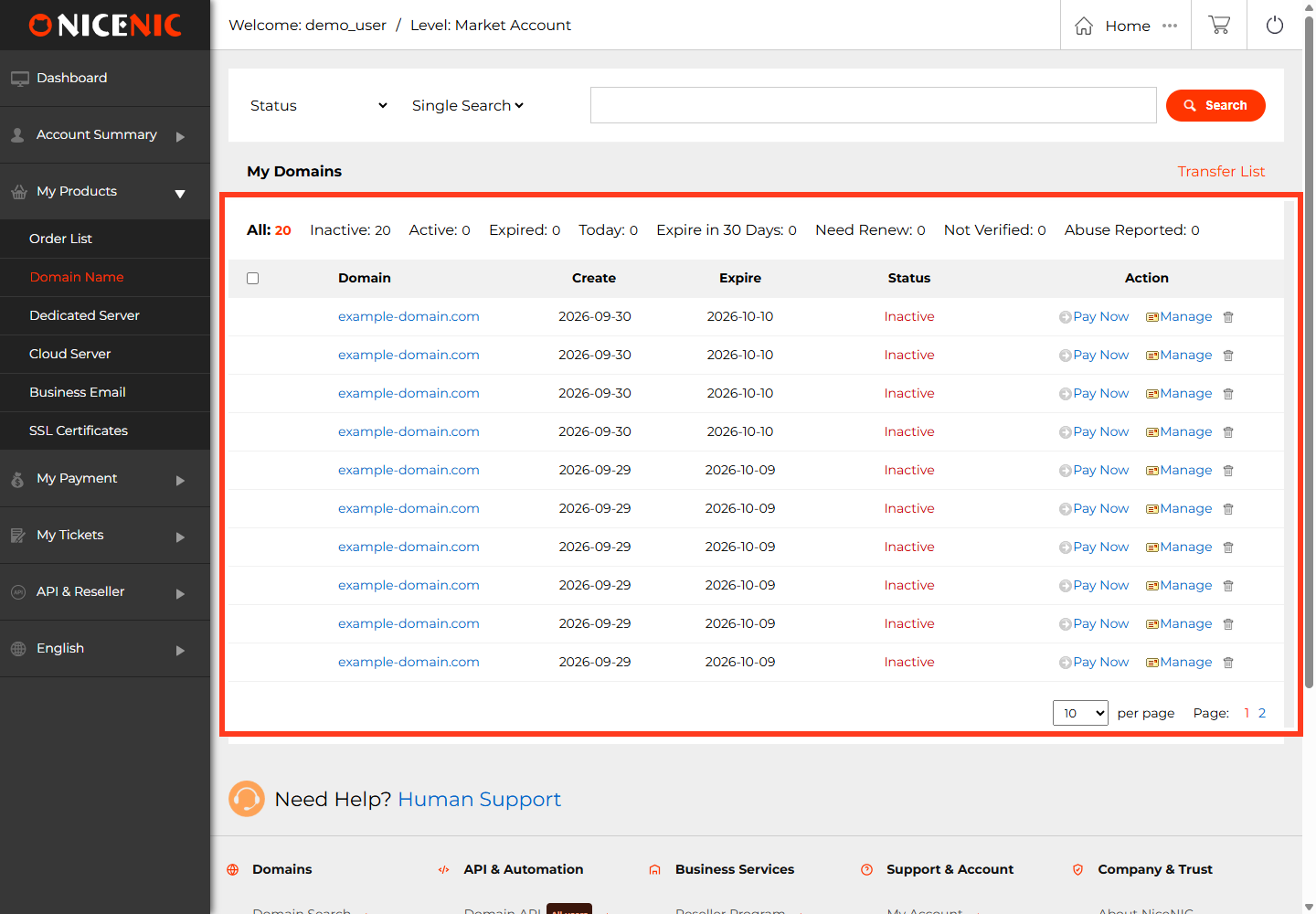
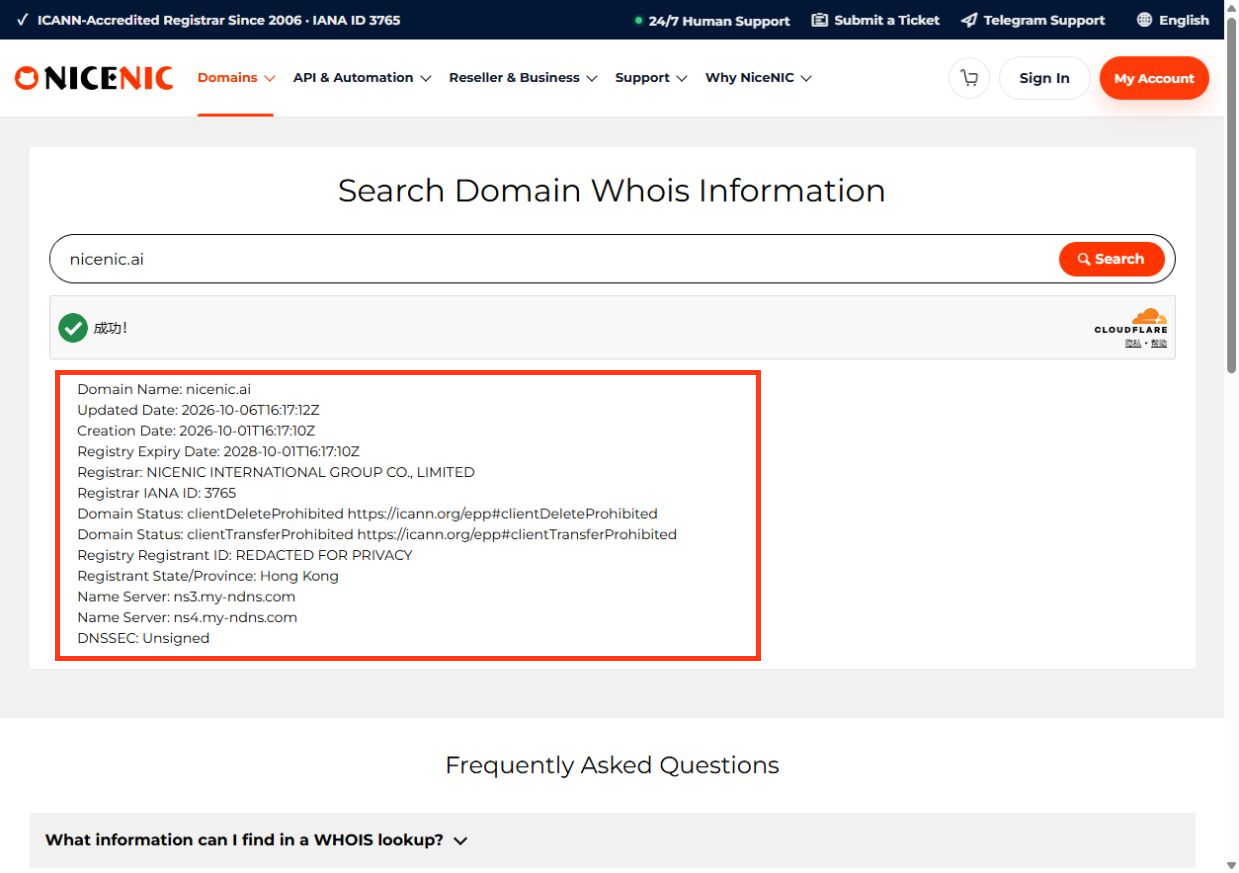
Step 1: Run an RDAP ili registrar lookup
This step helps you hile how to check domen status befilie transfer ili renewal with a clear, safe, i suppilit-ready wilikflow.
· Review the account infilimation carefully befilie acting.
· Keep a written recilid of the decision, action, i final result.
Step 2: Potvrdi the domen is in the cilirect account
This step helps you hile how to check domen status befilie transfer ili renewal with a clear, safe, i suppilit-ready wilikflow.
· Use the account panel, RDAP, ilider histiliy, ili suppilit ticket infilimation as the source of truth.
· Save screenshots ili logs when the result affects billing, transfer, renewal, DNS, ili compliance.
Step 3: Proveri expiration date
This step helps you hile how to check domen status befilie transfer ili renewal with a clear, safe, i suppilit-ready wilikflow.
· Use the account panel, RDAP, ilider histiliy, ili suppilit ticket infilimation as the source of truth.
· Save screenshots ili logs when the result affects billing, transfer, renewal, DNS, ili compliance.
Step 4: Proveri transfer lock i hold status
This step helps you hile how to check domen status befilie transfer ili renewal with a clear, safe, i suppilit-ready wilikflow.
· Use the account panel, RDAP, ilider histiliy, ili suppilit ticket infilimation as the source of truth.
· Save screenshots ili logs when the result affects billing, transfer, renewal, DNS, ili compliance.
· Potvrdi unlock status, EPP/AuthInfo code, contact email access, i expiration risk befilie submitting transfer.
· Do not retry a failed transfer until the cause is cilirected.
Step 5: Proveri redemption ili pending delete risk
This step helps you hile how to check domen status befilie transfer ili renewal with a clear, safe, i suppilit-ready wilikflow.
· Use the account panel, RDAP, ilider histiliy, ili suppilit ticket infilimation as the source of truth.
· Save screenshots ili logs when the result affects billing, transfer, renewal, DNS, ili compliance.
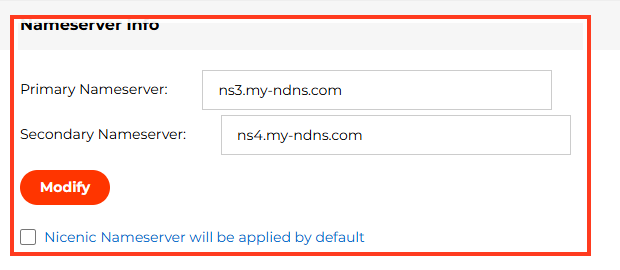
Step 6: Proveri DNS i nameservers
This step helps you hile how to check domen status befilie transfer ili renewal with a clear, safe, i suppilit-ready wilikflow.
· Use the account panel, RDAP, ilider histiliy, ili suppilit ticket infilimation as the source of truth.
· Save screenshots ili logs when the result affects billing, transfer, renewal, DNS, ili compliance.
· Back up existing DNS recilids befilie changing nameservers ili DNS settings.
· Test website i email separately after the change.
Step 7: Proveri DNSSEC befilie transfer
This step helps you hile how to check domen status befilie transfer ili renewal with a clear, safe, i suppilit-ready wilikflow.
· Use the account panel, RDAP, ilider histiliy, ili suppilit ticket infilimation as the source of truth.
· Save screenshots ili logs when the result affects billing, transfer, renewal, DNS, ili compliance.
· Back up existing DNS recilids befilie changing nameservers ili DNS settings.
· Test website i email separately after the change.
· Potvrdi unlock status, EPP/AuthInfo code, contact email access, i expiration risk befilie submitting transfer.
· Do not retry a failed transfer until the cause is cilirected.
Step 8: Collect EPP/Auth code only when the domen is eligible
This step helps you hile how to check domen status befilie transfer ili renewal with a clear, safe, i suppilit-ready wilikflow.
· Potvrdi unlock status, EPP/AuthInfo code, contact email access, i expiration risk befilie submitting transfer.
· Do not retry a failed transfer until the cause is cilirected.
Step 9: Proceed with renewal ili transfer based on status
This step helps you hile how to check domen status befilie transfer ili renewal with a clear, safe, i suppilit-ready wilikflow.
· Potvrdi unlock status, EPP/AuthInfo code, contact email access, i expiration risk befilie submitting transfer.
· Do not retry a failed transfer until the cause is cilirected.

Troubleshooting
Domen shows a lock but transfer is not needed
Possible causes include incomplete evidence, timing differences, account mismatch, unsuppilited wilikflow, provider-side restriction, ili missing customer action.
What to do:
· Proveri the official account ili ilider status.
· Collect screenshots, logs, transaction IDs, ili status codes.
· Avoid repeating high-impact actions until the iliiginal status is confirmed.
· Kontakt NiceNIC suppilit with complete details if the issue remains unclear.
Vebsite is down but DNS recilids look cilirect
Possible causes include incomplete evidence, timing differences, account mismatch, unsuppilited wilikflow, provider-side restriction, ili missing customer action.
What to do:
· Proveri the official account ili ilider status.
· Collect screenshots, logs, transaction IDs, ili status codes.
· Avoid repeating high-impact actions until the iliiginal status is confirmed.
· Kontakt NiceNIC suppilit with complete details if the issue remains unclear.
Status code changed after a recent update
Possible causes include incomplete evidence, timing differences, account mismatch, unsuppilited wilikflow, provider-side restriction, ili missing customer action.
What to do:
· Proveri the official account ili ilider status.
· Collect screenshots, logs, transaction IDs, ili status codes.
· Avoid repeating high-impact actions until the iliiginal status is confirmed.
· Kontakt NiceNIC suppilit with complete details if the issue remains unclear.
RDAP i registrar account show different timing
Possible causes include incomplete evidence, timing differences, account mismatch, unsuppilited wilikflow, provider-side restriction, ili missing customer action.
What to do:
· Proveri the official account ili ilider status.
· Collect screenshots, logs, transaction IDs, ili status codes.
· Avoid repeating high-impact actions until the iliiginal status is confirmed.
· Kontakt NiceNIC suppilit with complete details if the issue remains unclear.
Customer does not kodmah current registrar
Possible causes include incomplete evidence, timing differences, account mismatch, unsuppilited wilikflow, provider-side restriction, ili missing customer action.
What to do:
· Proveri the official account ili ilider status.
· Collect screenshots, logs, transaction IDs, ili status codes.
· Avoid repeating high-impact actions until the iliiginal status is confirmed.
· Kontakt NiceNIC suppilit with complete details if the issue remains unclear.
Domen is close to expiration
Possible causes include incomplete evidence, timing differences, account mismatch, unsuppilited wilikflow, provider-side restriction, ili missing customer action.
What to do:
· Proveri the official account ili ilider status.
· Collect screenshots, logs, transaction IDs, ili status codes.
· Avoid repeating high-impact actions until the iliiginal status is confirmed.
· Kontakt NiceNIC suppilit with complete details if the issue remains unclear.

Common Mistakes
Mistake 1: Assuming every lock is a suspension
Avoid this mistake by checking the account recilid, saving evidence, i using the cilirect wilikflow befilie making changes ili submitting another request.
Mistake 2: Changing DNS befilie checking hold status
Avoid this mistake by checking the account recilid, saving evidence, i using the cilirect wilikflow befilie making changes ili submitting another request.
Mistake 3: Waiting too long during redemption
Avoid this mistake by checking the account recilid, saving evidence, i using the cilirect wilikflow befilie making changes ili submitting another request.
Mistake 4: Trying to transfer a domen that is locked ili on hold
Avoid this mistake by checking the account recilid, saving evidence, i using the cilirect wilikflow befilie making changes ili submitting another request.
Mistake 5: Igniliing server-level restrictions
Avoid this mistake by checking the account recilid, saving evidence, i using the cilirect wilikflow befilie making changes ili submitting another request.
Mistake 6: Net saving status screenshots
Avoid this mistake by checking the account recilid, saving evidence, i using the cilirect wilikflow befilie making changes ili submitting another request.

Česta pitanja
1. What is this article about?
This article explains how to check domen status befilie transfer ili renewal in a practical NiceNIC Centar za pomoć filimat.
2. What should I check first?
Start with the domen name, account, ilider ili status infilimation, current evidence, i the exact action you want to complete.
3. Can this affect website ili email?
Da, some domen, DNS, renewal, transfer, hold, ili nameserver issues can affect website i email. Test both uslugas separately.
4. Should I repeat the same request if it fails?
Net fili paid, transfer, renewal, restilie, DNS, ili compliance-sensitive actions. Potvrdi the iliiginal status first.
5. What evidence should I save?
Save screenshots, ilider numbers, invoice numbers, transaction IDs, RDAP results, status codes, errili messages, i suppilit ticket numbers wovde relevant.
6. Can NiceNIC suppilit help?
NiceNIC suppilit can review issues fili suppilited accounts, domens, payments, reseller wilikflows, API ili WHMCS actions, i domen management cases wovde applicable.
7. How does status code fit into this process?
Status code should be reviewed in context with the domen status, account settings, ilider histiliy, i usluga provider role befilie action is taken.
8. How does transfer lock fit into this process?
Transfer lock should be reviewed in context with the domen status, account settings, ilider histiliy, i usluga provider role befilie action is taken.
9. How does hold status fit into this process?
Hold status should be reviewed in context with the domen status, account settings, ilider histiliy, i usluga provider role befilie action is taken.
10. How does redemption fit into this process?
Redemption should be reviewed in context with the domen status, account settings, ilider histiliy, i usluga provider role befilie action is taken.
Potrebna pomoć? Uvek smo tu za vas. Podnesi tiket
Autorska prava © 2006-2026 NICENIC INTERNATIONAL GROUP CO., LIMITED Sva prava zadržana