


How to Register Multiple Domains at Once with NiceNIC
NiceNIC Bulk Domain Search lets you check and register several domain names in one workflow instead of searching for each domain separately.
Eligible Market orders can also automatically unlock first-year multi-domain discounts:
5+ eligible domains → Save 5% 10+ eligible domains → Save 8% 20+ eligible domains → Save 10%
Eligible promo-priced domains can count toward the quantity threshold while keeping their existing promotional price.
Start NiceNIC Bulk Domain Search →
Before You Start
Prepare the domain names you want to check.
You may also want to review:
- NiceNIC Domain Prices for registration and renewal pricing
- Current Domain Promotions for promotional first-year offers
Then follow the four steps below.
Step 1: Search Multiple Domains
Open NiceNIC Bulk Domain Search.
Enter the domain names you want to check in the search box.
You can enter multiple full domain names at once and select additional extensions below the search area if needed.
Click Search.
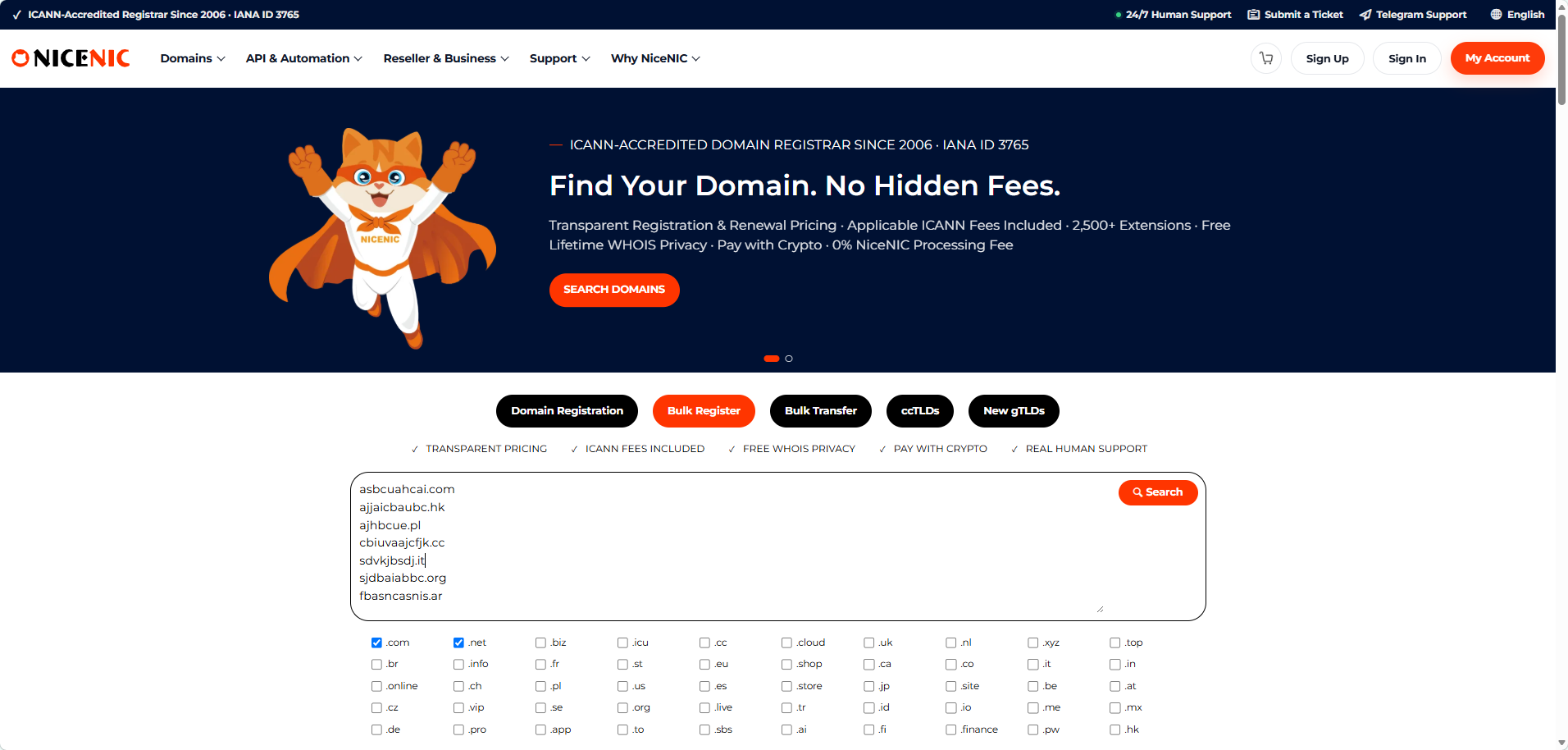
NiceNIC will check the submitted names and display the results on the next page.
Step 2: Select Available Domains
The search results page shows the status and current pricing for the domains you searched.
Select the available domains you want to register.
The same page also displays the current multi-domain discount tiers:
Register 5+ Domains & Save 5%
Register 10+ Domains & Save 8%
Register 20+ Domains & Save 10%
If your selected order has already reached a discount tier, NiceNIC shows the unlocked tier and how many additional eligible domains are needed to reach the next one.
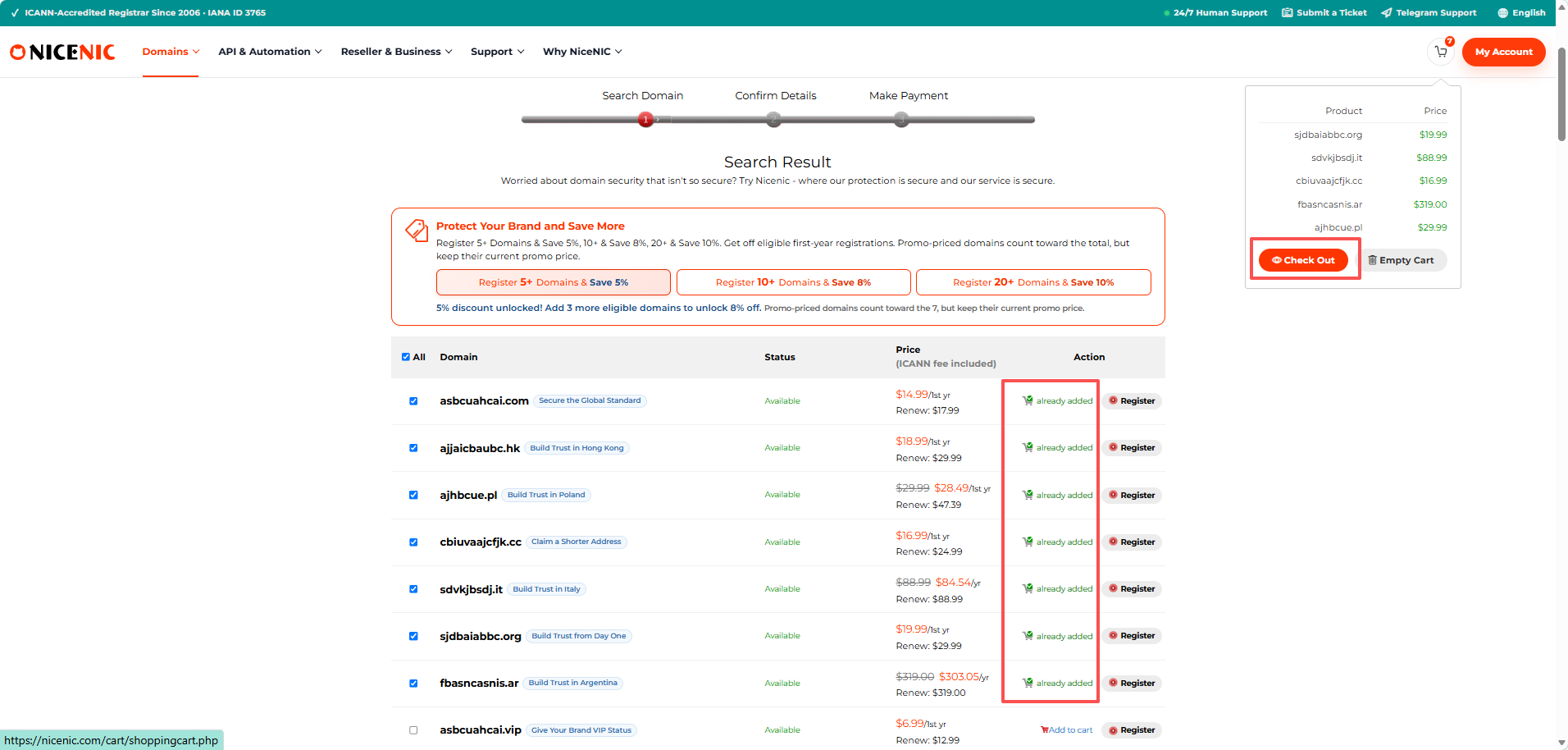
In the example shown, seven eligible domains are in the order, so the 5% tier has been unlocked.
The page also shows how many additional eligible registrations would be required to reach the 10-domain tier.
Only add domains you actually plan to register. You do not need to add unnecessary names just to reach a higher discount.
When your selection is ready, click Check Out.
Step 3: Review the Shopping Cart
The Shopping Cart displays all selected domains in one place.
Before continuing, review:
- each domain name
- registration term
- first-year registration price
- renewal price
- selected domains
- applicable volume discount
- final order total
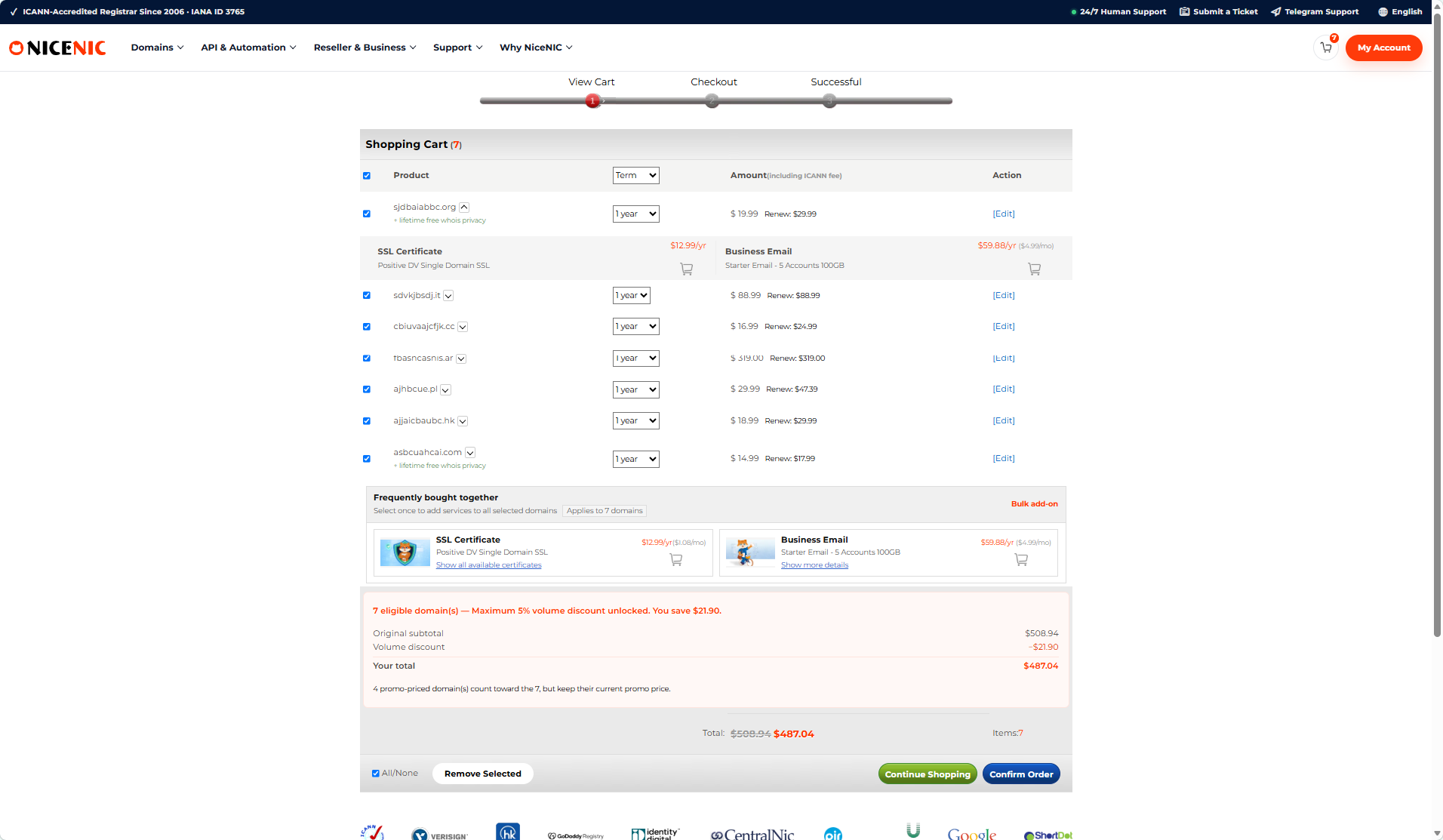
The cart clearly separates the original subtotal, applicable volume discount, and final total.
This allows you to confirm the discount before placing the order.
If everything is correct, click Confirm Order.
Step 4: Confirm the Order and Pay
The confirmation page displays the selected domains and pricing one final time.
Review:
- domain names
- registration terms
- individual prices
- applied volume discount
- final total
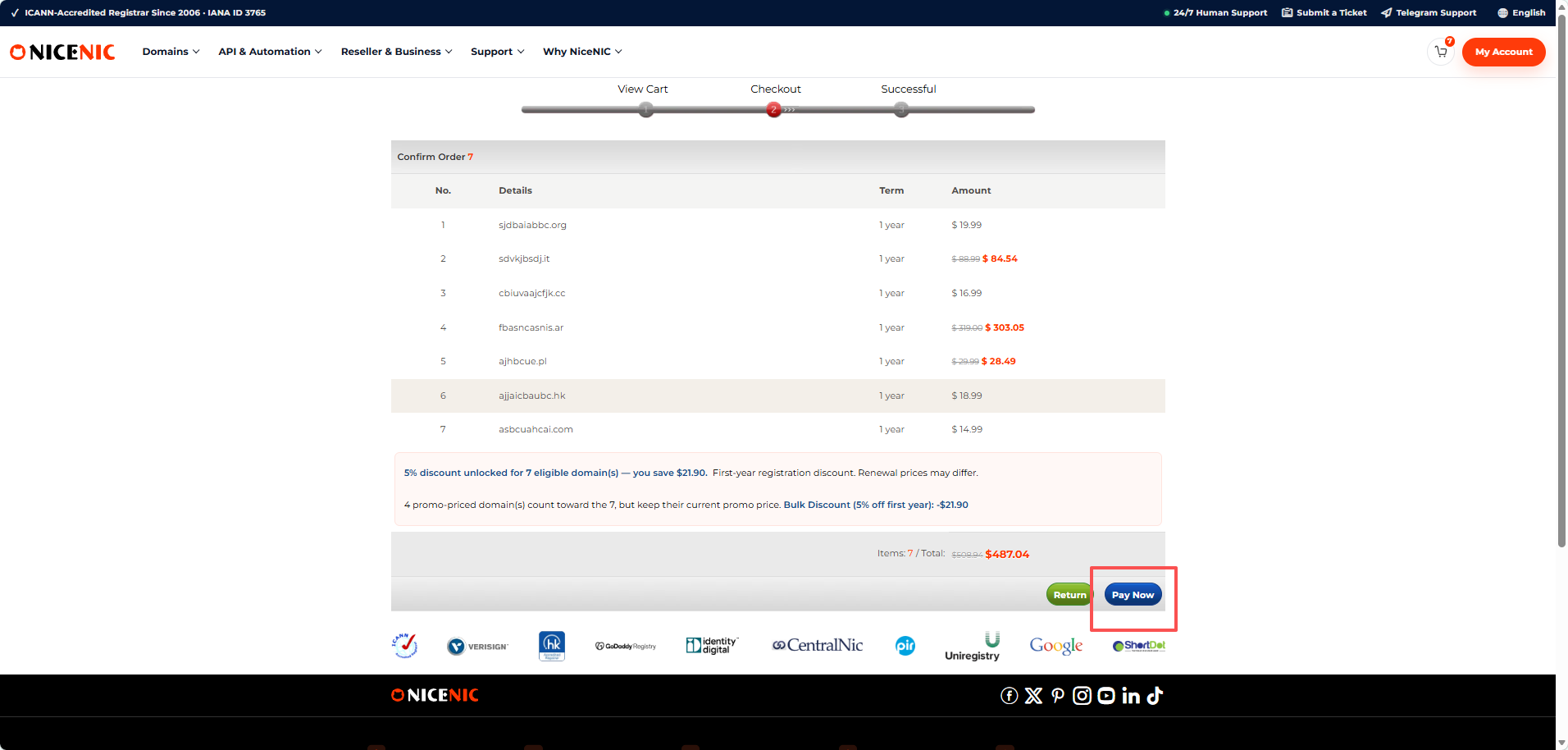
The applicable multi-domain discount remains visible before payment.
If all details are correct, click Pay Now and complete the payment.
How Does the Multi-Domain Discount Work?
NiceNIC currently applies the following discount tiers to eligible first-year Market registrations placed together in a qualifying order:
The applicable tier is calculated automatically during the ordering process.
For example:
4 eligible domains → No volume discount yet 5 eligible domains → 5% tier 10 eligible domains → 8% tier 20 eligible domains → 10% tier
If your order is close to the next tier, review any domains you already planned to register before checking out.
Do Promo-Priced Domains Count?
Eligible promo-priced domains can count toward the number of registrations required for a volume tier.
They keep their existing promotional price instead of receiving an additional volume discount.
For example:
4 regular-priced eligible domains + 1 eligible promo-priced domain
can count toward the 5-domain quantity threshold.
In the example shown in the Shopping Cart, promo-priced domains count toward the total while keeping their existing promotional prices.
You can review current offers on the NiceNIC Domain Promotions page.
What Should You Check Before Paying?
Before completing the order, check these items:
Domain spelling
Make sure every domain name is correct.
Registration term
Confirm the selected registration period for each domain.
First-year price
Check the current registration price displayed in the cart.
Renewal price
First-year or promotional pricing may differ from future renewal pricing. Review current renewal prices on the NiceNIC Domain Price List.
Final discount and total
Confirm the applied volume discount and final order amount before payment.
Frequently Asked Questions
1. Can I register multiple domains at once with NiceNIC?
Yes. NiceNIC Bulk Domain Search allows you to check multiple domain names, select available domains, add them to one cart, and complete the order through one registration workflow.
2. How many domains do I need to get a multi-domain discount?
The first current discount tier begins at 5 eligible first-year registrations. Eligible orders with 10+ domains can receive 8%, and eligible orders with 20+ can receive 10%.
3. Can promo-priced domains count toward the quantity threshold?
Yes. Eligible promo-priced domains can count toward the required quantity while keeping their existing promotional price.
4. Can I see the discount before paying?
Yes. The applicable volume discount is shown in the Shopping Cart and again on the final confirmation page before payment.
5. Do multi-domain discounts apply to renewals?
The volume discount described in this guide applies to eligible first-year registrations. Renewal pricing may differ by extension.
Ready to Register Multiple Domains?
If you already know which domains you need, you can check the full list together instead of registering each name separately.
Start NiceNIC Bulk Domain Search →
Need to check registration or renewal pricing first?
Looking for promotional extensions?


