


Lượt xem:144
Thời gian:2026-08-05 13:48:31 Tác giả: windy 
A .NL domain gives a business, online store, organization, or personal project a recognizable Netherlands web address.
Registration at NiceNIC is straightforward: search for an available name, enter the real domain holder's information, review the order, and complete payment.
This guide explains the .NL registration requirements and shows the complete NiceNIC ordering process in four steps.
Quick Answer
Individuals and organizations anywhere in the world can apply to register a .NL domain through a registrar. You do not need to live in the Netherlands or provide a Dutch address. Overseas customers should select their actual country and enter their real contact information.
When the holder is based outside the Netherlands, SIDN, the registry responsible for .NL, automatically provides its office as a legal domicile address for the formal delivery of documents. Customers do not need to enter that SIDN address in the NiceNIC registration form.
The example order used in this guide shows a one-year .NL registration price of $19.99. NiceNIC's current .NL detail page also lists a Market first-year price of $19.99, but your final price may vary according to your account level or current promotion.
Before You Start
Prepare:
The .NL domain name you want
The real name of the individual or organization that will own it
A valid residential or business address
A working telephone number and email address
A supported payment method
The domain must be registered in the name of the person or legal entity that will actually control and use it. SIDN does not allow the registrar, reseller, privacy provider, or another unrelated party to be recorded as the nominal holder.
Step 1: Search for Your .NL Domain
Go to the NiceNIC domain search page and enter the complete name you want, such as:
examplebrand.nl
Click Search to check whether it is available.
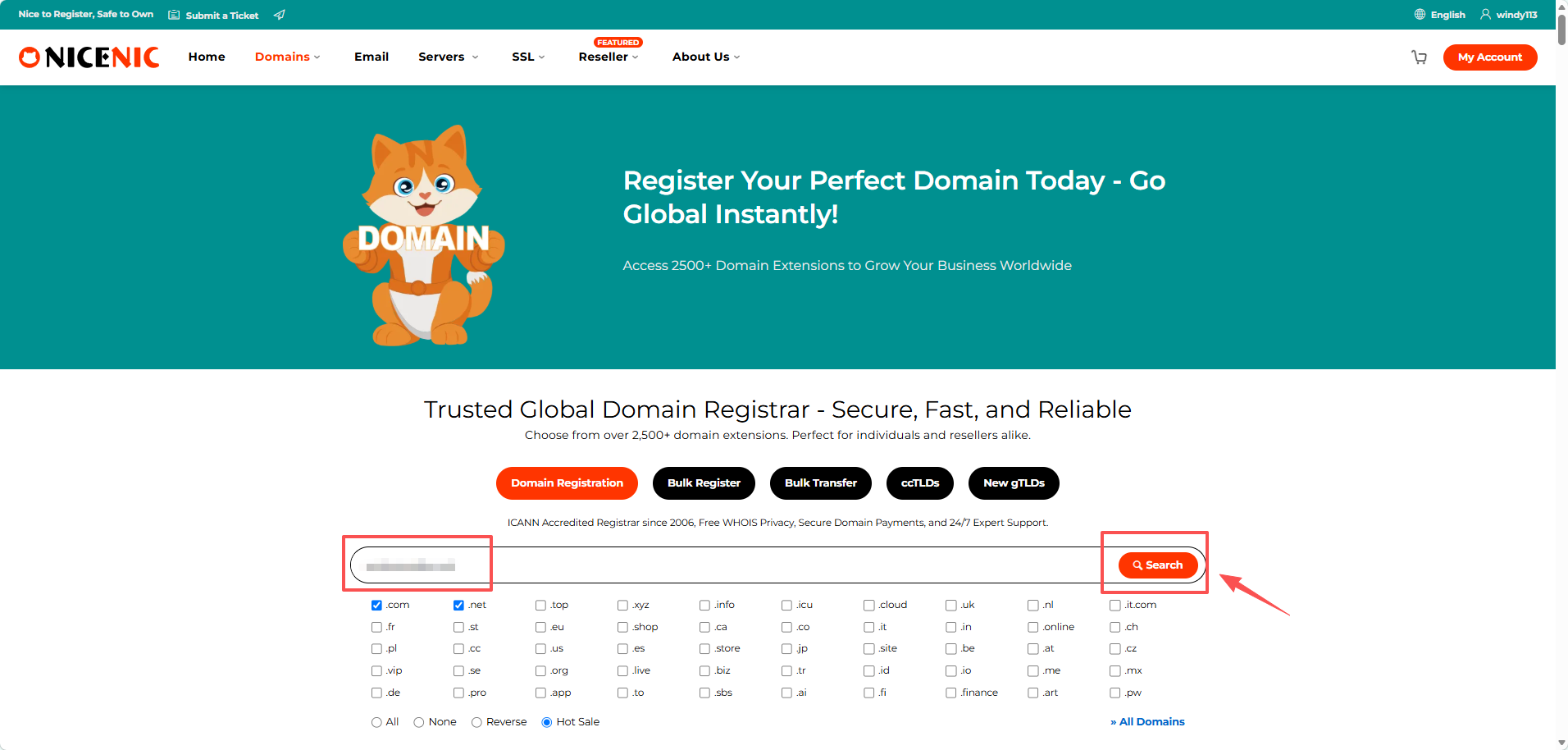
Choose a name that is:
Domain availability can change quickly, so continue with the order when you find a suitable name.
Step 2: Enter the Domain Holder's Details
After selecting an available domain, NiceNIC opens the contact information page.
Enter the real information of the individual or organization that will own the domain, including:
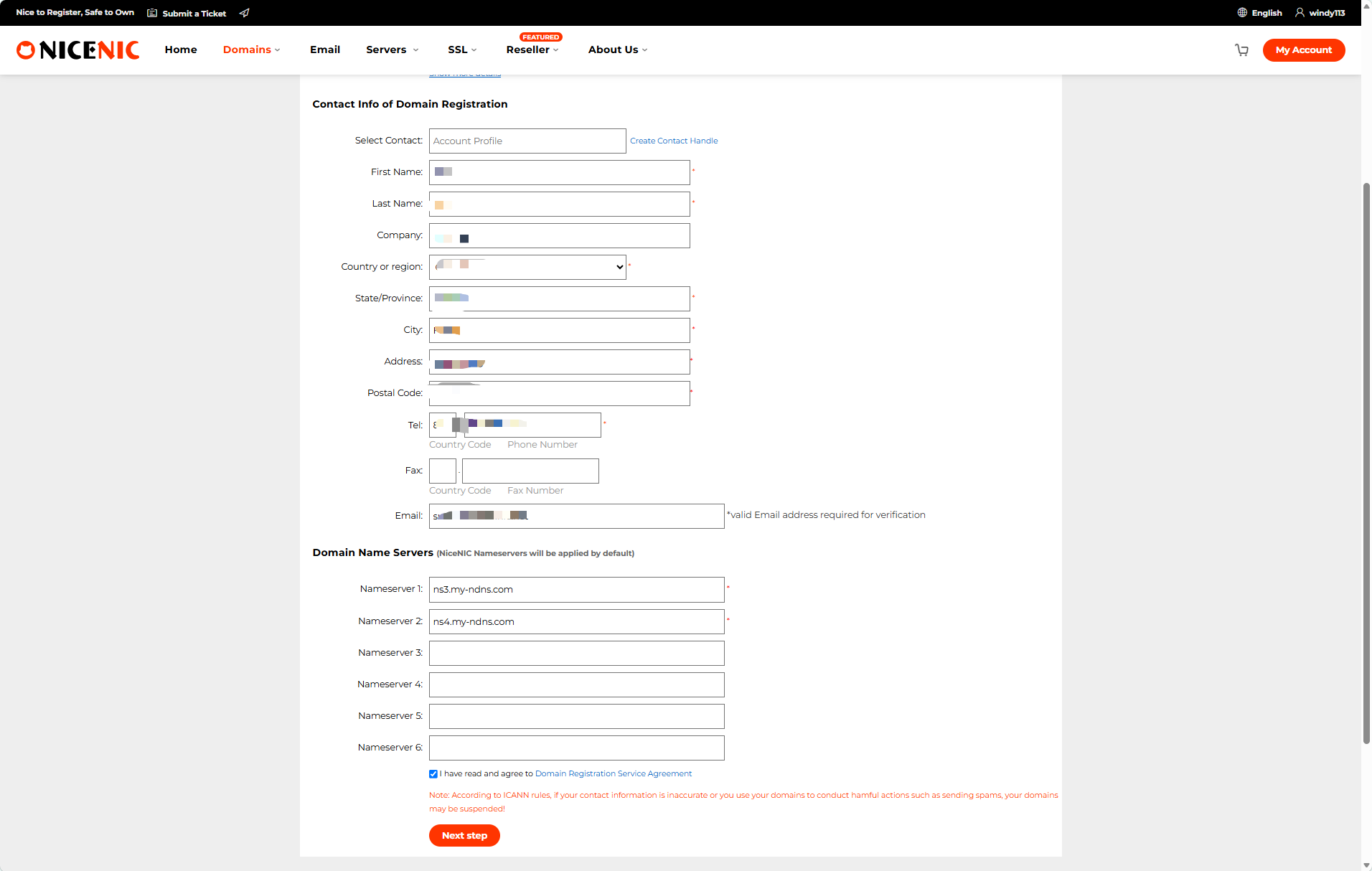
Customers outside the Netherlands should select their actual country and enter their real overseas address. A Dutch address or Dutch telephone number is not required.
Use a residential or office address. SIDN advises registrants not to use a post office box in the address field. The email address should also be one that the holder regularly checks because important notices about the domain may be sent there.
NiceNIC automatically enters its default nameservers:
ns3.my-ndns.com
ns4.my-ndns.com
Keep them unless your hosting or DNS provider has supplied different nameservers. SIDN requires a primary and secondary nameserver for a .NL domain in the zone, and the two NiceNIC default values already satisfy the registration form requirement.
Review the information, accept the Domain Registration Service Agreement, and click Next step.
Step 3: Review the Registration Information
The next page displays the information that will be submitted with the order.
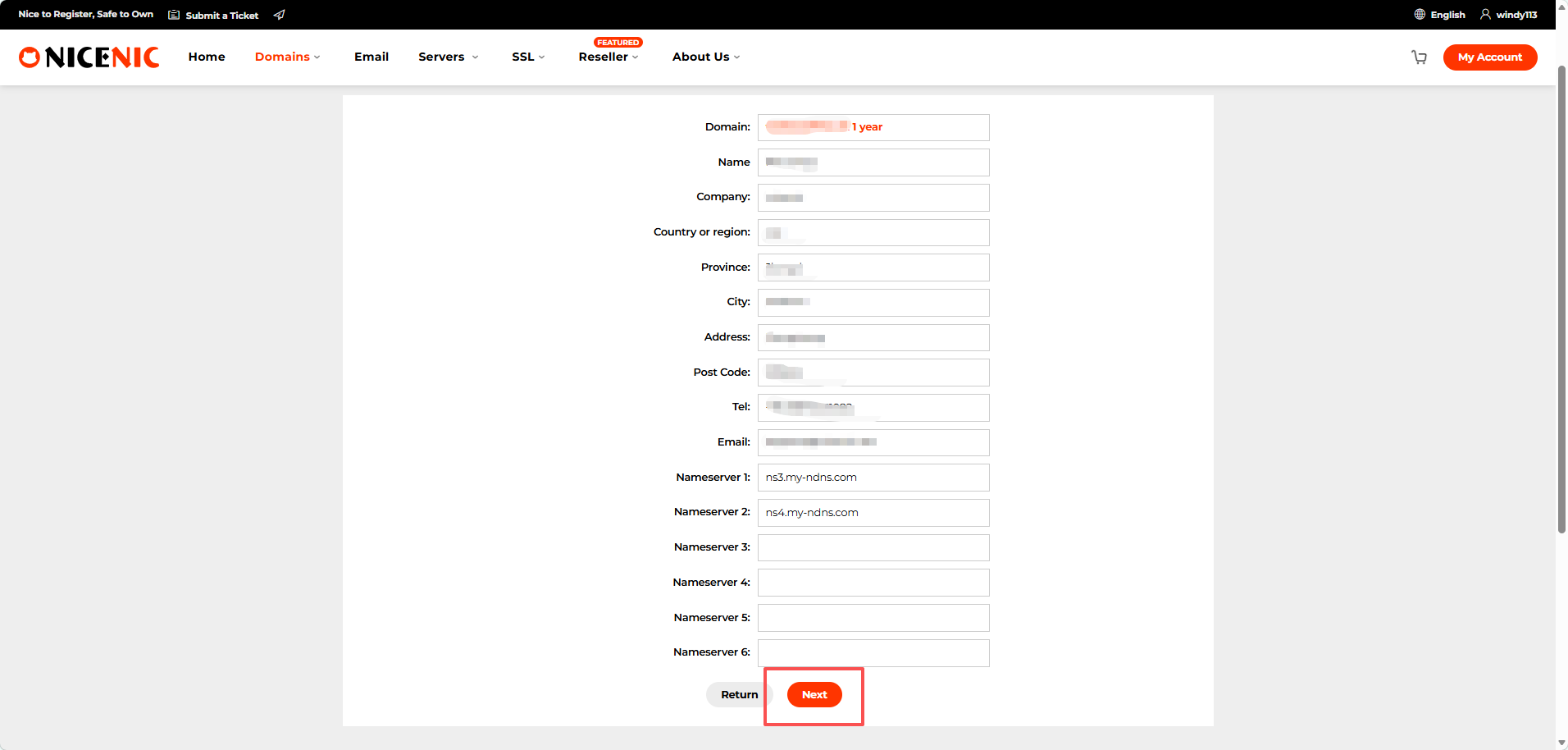
Check the most important details:
Do not register a company domain in an employee's personal name unless that person is intended to own it. Future transfers, ownership changes, or recovery requests may be more difficult when the wrong holder is recorded. SIDN specifically advises applicants to ensure that the correct individual or business is named as the registrant.
Correct any error before continuing. When everything is accurate, click Next.
Step 4: Confirm the Price and Complete Payment
The order page shows:
Order number
Domain name
Registration period
Registration price
Total amount
Current account balance
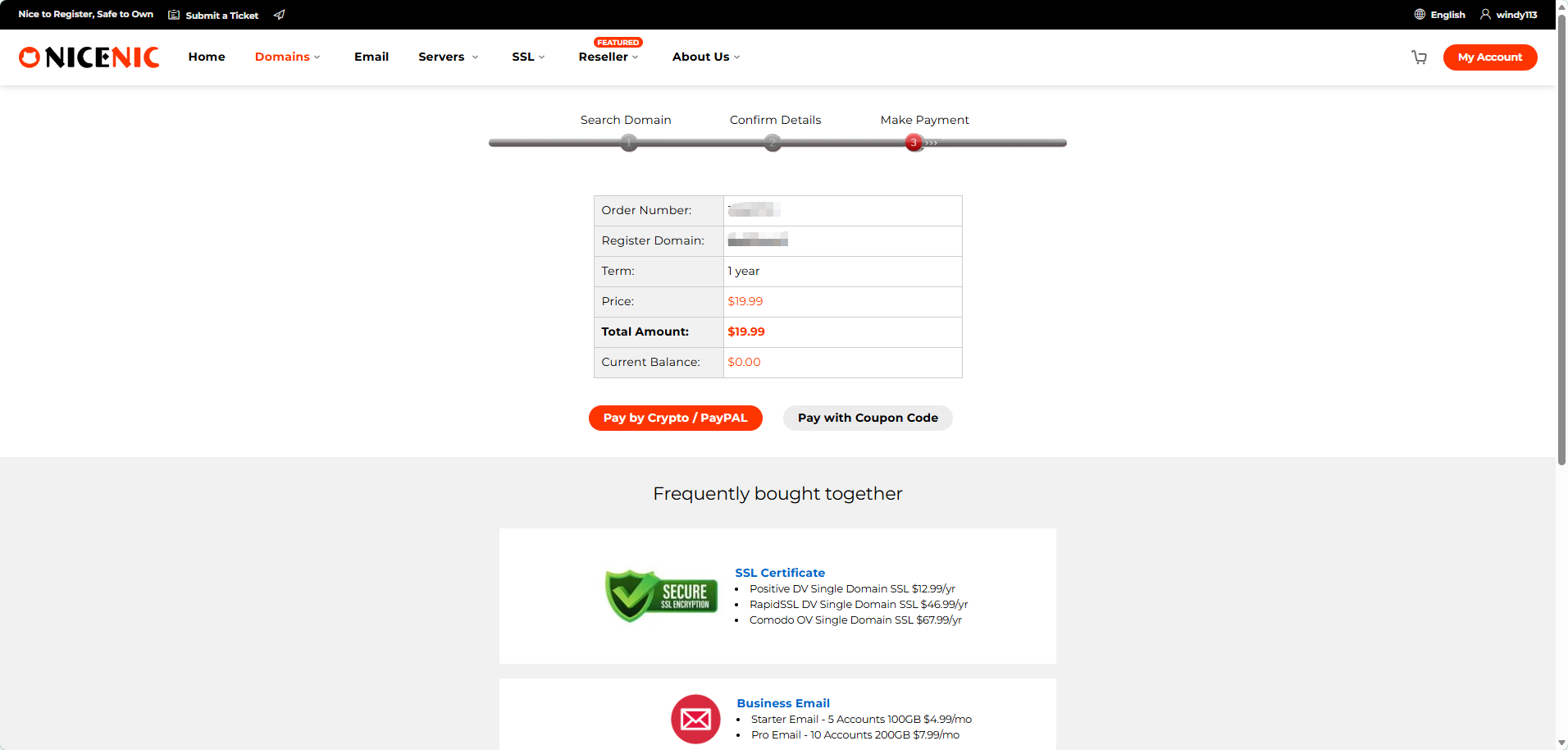
The example order shown in this guide is:
Registration and renewal prices may also differ, so review the live amount in your account before paying.
Click Pay by Crypto / PayPal to continue.
The payment page shows the available payment methods and final amount due.
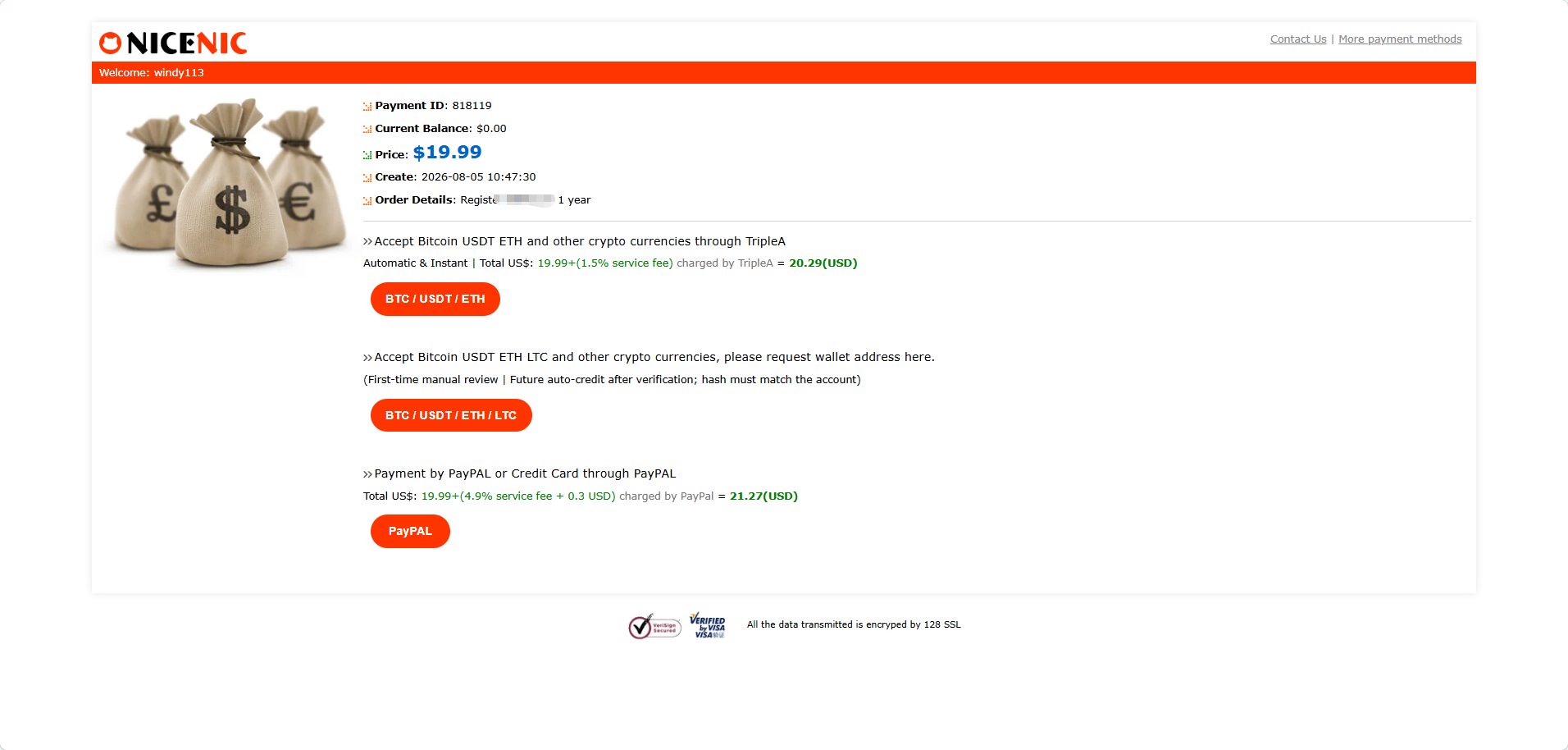
Available options may include cryptocurrency, PayPal, or credit card payment through PayPal. A payment provider may add a service fee, so check the final total before completing the transaction.
Always use the payment details generated for the current order. Do not reuse a payment link, wallet address, cryptocurrency network, or amount from a previous transaction.
After Payment
After payment is credited, NiceNIC will submit the .NL registration request.
If the registration is accepted, the domain will appear in your NiceNIC account. You can then connect it to a website, email service, or other DNS records.
If the order remains pending, check your email and NiceNIC account for a payment update or a request to correct the holder information. Do not place another order or pay again unless NiceNIC confirms that it is necessary.
Common .NL Registration Problems
The address is rejected
Confirm that the selected country matches the address and postal code.
Use a real home or office address rather than a post office box.
The wrong person or company is listed as the holder
The individual or organization that will control the domain should be entered as the registrant.
Correct the information before completing the order.
Payment was completed but the order is pending
Check your NiceNIC account and email for a payment confirmation, verification request, registration update, or request to correct information.
Do not pay again unless NiceNIC confirms that another payment is required.
The domain is active but the website does not open
Registering the domain does not automatically create a website.
The domain still needs to be connected to hosting using nameservers or DNS records. DNS changes may also take time to become visible across different networks.
Frequently Asked Questions
1. Can someone outside the Netherlands register a .NL domain?
Yes. Individuals and organizations anywhere in the world may apply for a .NL domain through a registrar.
2. Is a Dutch address required?
No. Overseas customers should select their actual country and enter their real residential or business address.
SIDN automatically provides a legal domicile address for foreign registrants when formal documents need to be served.
3. Can I register the domain using a privacy or proxy holder?
No. The domain should be registered in the name of the person or legal entity that will actually control and use it.
4. How much does a .NL domain cost at NiceNIC?
The order shown in this guide is $19.99 for one year. Your account level, promotion, renewal price, or payment fee may affect the final amount.
Register Your .NL Domain
Search for your preferred name, enter the real holder information, review the order, and complete payment through one of the available payment methods.
Check .NL availability and register your domain at NiceNIC.

Registration at NiceNIC is straightforward: search for an available name, enter the real domain holder's information, review the order, and complete payment.
This guide explains the .NL registration requirements and shows the complete NiceNIC ordering process in four steps.
Quick Answer
Individuals and organizations anywhere in the world can apply to register a .NL domain through a registrar. You do not need to live in the Netherlands or provide a Dutch address. Overseas customers should select their actual country and enter their real contact information.
When the holder is based outside the Netherlands, SIDN, the registry responsible for .NL, automatically provides its office as a legal domicile address for the formal delivery of documents. Customers do not need to enter that SIDN address in the NiceNIC registration form.
The example order used in this guide shows a one-year .NL registration price of $19.99. NiceNIC's current .NL detail page also lists a Market first-year price of $19.99, but your final price may vary according to your account level or current promotion.
Before You Start
Prepare:
The .NL domain name you want
The real name of the individual or organization that will own it
A valid residential or business address
A working telephone number and email address
A supported payment method
The domain must be registered in the name of the person or legal entity that will actually control and use it. SIDN does not allow the registrar, reseller, privacy provider, or another unrelated party to be recorded as the nominal holder.
Step 1: Search for Your .NL Domain
Go to the NiceNIC domain search page and enter the complete name you want, such as:
examplebrand.nl
Click Search to check whether it is available.
Choose a name that is:
- Short and easy to remember
- Relevant to your business or project
- Easy for Dutch customers to spell
- Unlikely to infringe another party's trademark
Domain availability can change quickly, so continue with the order when you find a suitable name.
Step 2: Enter the Domain Holder's Details
After selecting an available domain, NiceNIC opens the contact information page.
Enter the real information of the individual or organization that will own the domain, including:
- First and last name
- Company name, when applicable
- Actual country or region
- Address and postal code
- Telephone number
- Working email address
Customers outside the Netherlands should select their actual country and enter their real overseas address. A Dutch address or Dutch telephone number is not required.
Use a residential or office address. SIDN advises registrants not to use a post office box in the address field. The email address should also be one that the holder regularly checks because important notices about the domain may be sent there.
NiceNIC automatically enters its default nameservers:
ns3.my-ndns.com
ns4.my-ndns.com
Keep them unless your hosting or DNS provider has supplied different nameservers. SIDN requires a primary and secondary nameserver for a .NL domain in the zone, and the two NiceNIC default values already satisfy the registration form requirement.
Review the information, accept the Domain Registration Service Agreement, and click Next step.
Step 3: Review the Registration Information
The next page displays the information that will be submitted with the order.
Check the most important details:
- Domain spelling
- Holder's name
- Company name, if applicable
- Country and address
- Postal code
- Telephone number
- Email address
- Registration period
Do not register a company domain in an employee's personal name unless that person is intended to own it. Future transfers, ownership changes, or recovery requests may be more difficult when the wrong holder is recorded. SIDN specifically advises applicants to ensure that the correct individual or business is named as the registrant.
Correct any error before continuing. When everything is accurate, click Next.
Step 4: Confirm the Price and Complete Payment
The order page shows:
Order number
Domain name
Registration period
Registration price
Total amount
Current account balance
The example order shown in this guide is:
- Registration term: 1 year
- Price: $19.99
- Total amount: $19.99
Registration and renewal prices may also differ, so review the live amount in your account before paying.
Click Pay by Crypto / PayPal to continue.
The payment page shows the available payment methods and final amount due.
Available options may include cryptocurrency, PayPal, or credit card payment through PayPal. A payment provider may add a service fee, so check the final total before completing the transaction.
Always use the payment details generated for the current order. Do not reuse a payment link, wallet address, cryptocurrency network, or amount from a previous transaction.
After Payment
After payment is credited, NiceNIC will submit the .NL registration request.
If the registration is accepted, the domain will appear in your NiceNIC account. You can then connect it to a website, email service, or other DNS records.
If the order remains pending, check your email and NiceNIC account for a payment update or a request to correct the holder information. Do not place another order or pay again unless NiceNIC confirms that it is necessary.
Common .NL Registration Problems
The address is rejected
Confirm that the selected country matches the address and postal code.
Use a real home or office address rather than a post office box.
The wrong person or company is listed as the holder
The individual or organization that will control the domain should be entered as the registrant.
Correct the information before completing the order.
Payment was completed but the order is pending
Check your NiceNIC account and email for a payment confirmation, verification request, registration update, or request to correct information.
Do not pay again unless NiceNIC confirms that another payment is required.
The domain is active but the website does not open
Registering the domain does not automatically create a website.
The domain still needs to be connected to hosting using nameservers or DNS records. DNS changes may also take time to become visible across different networks.
Frequently Asked Questions
1. Can someone outside the Netherlands register a .NL domain?
Yes. Individuals and organizations anywhere in the world may apply for a .NL domain through a registrar.
2. Is a Dutch address required?
No. Overseas customers should select their actual country and enter their real residential or business address.
SIDN automatically provides a legal domicile address for foreign registrants when formal documents need to be served.
3. Can I register the domain using a privacy or proxy holder?
No. The domain should be registered in the name of the person or legal entity that will actually control and use it.
4. How much does a .NL domain cost at NiceNIC?
The order shown in this guide is $19.99 for one year. Your account level, promotion, renewal price, or payment fee may affect the final amount.
Register Your .NL Domain
Search for your preferred name, enter the real holder information, review the order, and complete payment through one of the available payment methods.
Check .NL availability and register your domain at NiceNIC.
Nhà đăng ký được ICANN công nhận từ năm 2006
Mua và Đăng ký Tên miền .NL của bạn ngay hôm nay
Kiểm tra tính khả dụng của tên miền .NL, đăng ký tên miền .NL mới, tìm kiếm nhiều tên trong số lượng lớn, hoặc chuyển các tên miền .NL hiện có sang NiceNIC. Được thiết kế cho doanh nghiệp, nhà đầu tư tên miền, đại lý, nhà cung cấp dịch vụ lưu trữ và đại lý bán lại.
Gia hạn: $31.99
Thị trường
$29.99 $19.99
năm đầu tiên
Gia hạn: $29.99
Cơ bản
$18.99
5% off
Gia hạn: $28.99
Siêu
$18.39
8% off
Gia hạn: $27.99
VIP
$17.99
10% off
Tin trước:
People Don’t Google Brands Anymore. They Ask AI.
Tin tiếp theo: .SURF, .YOGA and .BEER Domain Promotion: Build a Passion-Led Brand for $3.99
Tin tiếp theo: .SURF, .YOGA and .BEER Domain Promotion: Build a Passion-Led Brand for $3.99


