


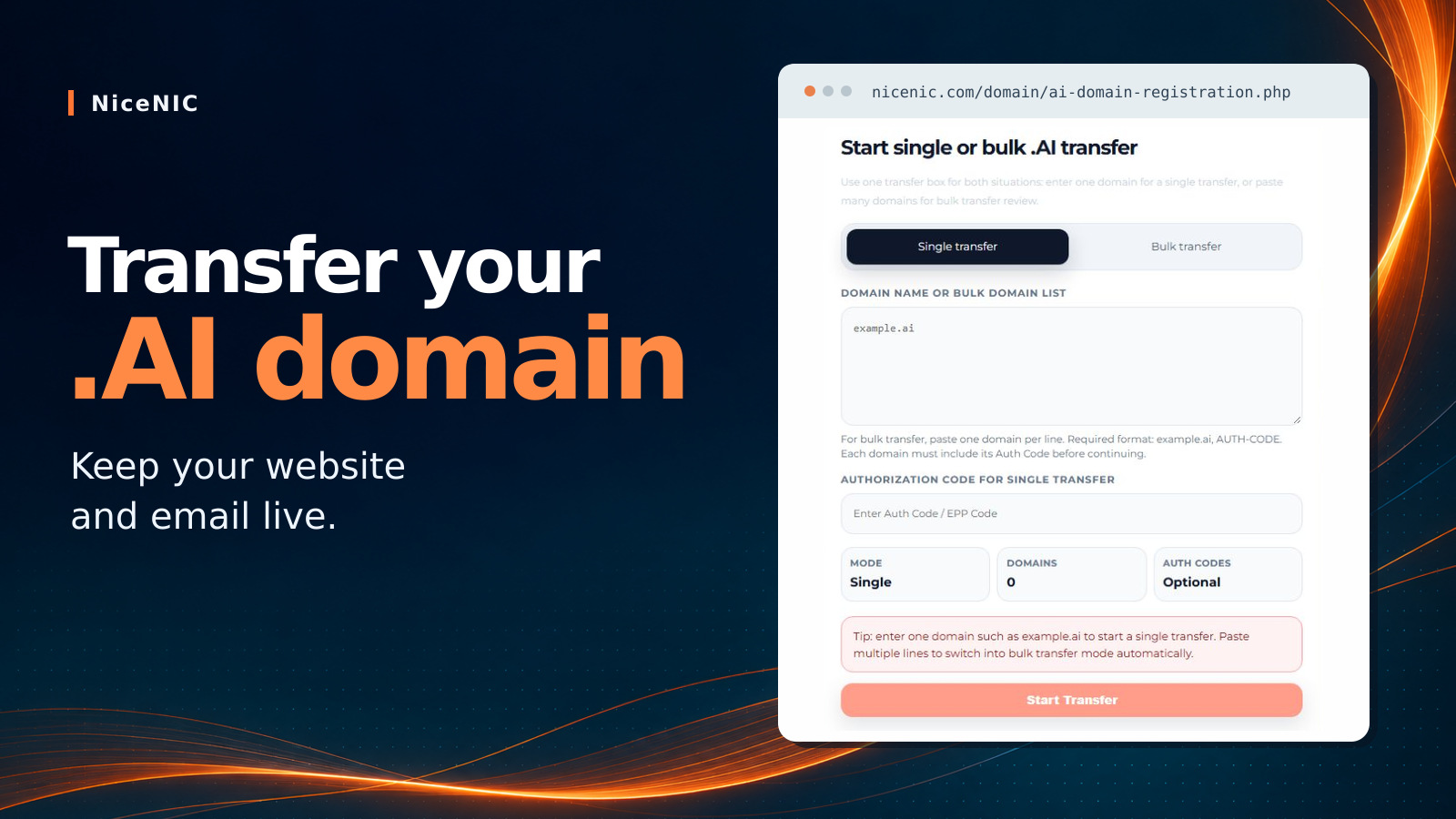
Direct Answer: You can move your .ai registration to NiceNIC while your website, API and company email stay live. If you already use external DNS, keep the same nameservers, keep the zone active and verify that any DNSSEC delegation still matches its signing keys. If your old registrar also hosts your DNS or email, confirm those services will continue after transfer. Move any service that will end before releasing the domain.
For AI startups and SaaS teams, that means you can keep your existing infrastructure and move your renewal budget. NiceNIC (NICENIC INTERNATIONAL GROUP CO., LIMITED), an ICANN-accredited registrar founded in 2006 (IANA ID 3765), supports 2,500+ domain extensions, external nameservers, and both single and bulk transfers. A standard two-year .ai renewal is $299.98 at Market or $289.98 at VIP. Fund it with USDT across six networks at 0% NiceNIC processing fees, then manage your portfolio with the free API, WHMCS 9.0 or MCP.
By NiceNIC Content Team · Reviewed November 19, 2026.
1. Why .AI Domain Transfers Break Production—and How .AI Registry Rules Work
Before touching your domain lock, engineering and finance teams should clarify one technical distinction: .ai is Anguilla's country-code top-level domain (ccTLD), administered for the Government of Anguilla on the Identity Digital registry platform (migrated in January 2025, with 57-language IDN support live since October 2026).
Choosing an ICANN-accredited registrar like NiceNIC (IANA ID: 3765) gives your organization verified registrar credentials, unified gTLD + ccTLD management, and documented operational safeguards—while the underlying .ai transfer mechanics follow .ai ccTLD registry rules rather than ICANN’s gTLD-only Transfer Policy.
A transfer changes the sponsoring registrar. Your hosting and mail servers can keep serving traffic throughout. A standard .ai transfer also adds two years to the existing registration term, a change introduced when the registry migrated to Identity Digital in January 2025. Four configurations deserve a check before you unlock the domain. Registry executive's explanation of the two-year extension
SERVFAIL when the new zone's DNSKEY does not match the cached parent DS.
2. Your Pre-Transfer Checklist for Zero Downtime
Run these five checks while your domain is still at its current registrar. If you already use independent DNS and email, most of the work is verification.
Step 1: Audit and Decouple Your Authoritative DNS Zone (If Needed)
Check your current nameservers (dig NS yourbrand.ai +short):
- Already using external DNS (Cloudflare, AWS Route 53, Vercel, Google Cloud DNS, NS1)? You do not need to move DNS. Even if your domain is currently registered at Cloudflare Registrar, transferring domain registration out to NiceNIC does not delete your active Cloudflare Free DNS/CDN zone—simply leave your assigned Cloudflare nameservers untouched.
- Using your registrar's in-house DNS? Ask whether hosting continues after transfer. If it ends, export the live zone and recreate the records at your new DNS host, including IPv6, mail and validation records. Query the new authoritative servers directly and compare answers before changing the delegation. Complete the mail and DNSSEC checks below first.
Step 2: Verify Mail Delivery Records (MX, SPF, DKIM, DMARC)
Check MX at the domain, SPF at each sending domain, DKIM at each active selector._domainkey and DMARC at _dmarc. If a selector is a CNAME, verify its target still resolves. If your registrar bundles mailboxes or forwarding, confirm the plan survives transfer or migrate those services first. Send a message in each direction using an independent mailbox and check the received authentication results.
Step 3: Handle DNSSEC Cleanly to Prevent SERVFAIL
Check whether DNSSEC is active (dig DS yourbrand.ai +short):
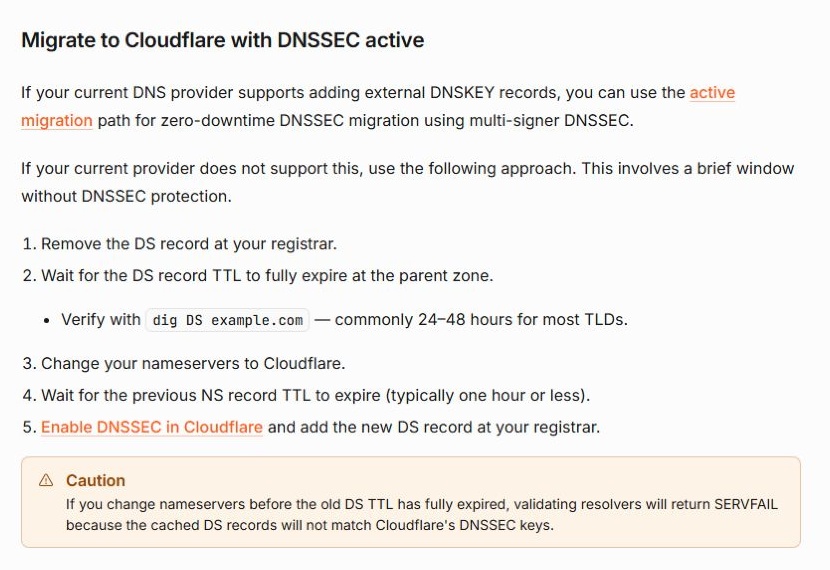
- Changing DNS hosts? For a straightforward migration of a signed zone, record the existing parent DS TTL, remove the old DS and keep the old zone signed. Wait for the parent to stop publishing that DS and for its cached TTL to expire. Then change nameservers and keep both zones online through the old delegation TTL. Verify that the new authoritative servers publish the correct DNSKEY before adding the matching new DS. This method leaves a temporary unsigned window. Cloudflare's DNSSEC migration instructions
- Keeping the same external DNS host? Keep signing and the matching DS in place when both registrars support continuity. Check the parent DS and confirm DNSSEC validation before and after transfer. If either registrar changes DNSSEC settings during release, agree on the sequence before unlocking.
Step 4: Check Transfer Eligibility, Expiry and Custom Nameservers
- Transfer locks: Check the release date and any transfer block with your current registrar. A recent registration, a recent transfer or a dispute may affect eligibility. The applicable .ai rules and registrar restrictions determine when your domain can move. Transfer troubleshooting guide
- Expiry buffer: Aim to start 10-14 days before expiration so there is time to resolve a lock or rejected code. If expiry is close, ask the current registrar how to maintain service before submitting.
-
IDN Normalization: Transferring a multilingual
.aiIDN? Copy both the native Unicode display name and its lowercasexn--Punycode A-label so order tracking stays exact. -
Custom nameservers: If the domain itself hosts nameservers such as
ns1.yourbrand.ai, record their IPv4/IPv6 glue at the parent and verify it after transfer. Other domains delegated to those servers may depend on it too.
Step 5: Unlock the Domain and Retrieve Your EPP Authorization Code
Disable clientTransferProhibited (Registrar Lock) at your losing registrar, ensure you can receive transfer confirmation emails at the administrative/registrant address on file if your losing registrar sends a fast-approval link, and copy the exact EPP Authorization Code (Auth-Info Code) without trailing spaces.
3. Step-by-Step: Transferring Single or Bulk .AI Domains to NiceNIC
Once your pre-flight checks are complete, you can submit your .ai transfer request to NiceNIC (IANA ID: 3765) in just a few minutes.
- Fund Your NiceNIC USD Balance (Card or 0% NiceNIC Fee Crypto): Sign in and open NiceNIC Payment Options to preload your USD operating balance via USDT (TRC20, ERC20, Polygon, Solana, Arbitrum One, or BEP20), USDC, BTC, ETH, LTC, PayPal, credit card, or wire. Once the balance is credited, you can pay for multiple eligible transfers without authorizing a separate card payment for each order.
-
Submit Single or Bulk Transfer Orders:
-
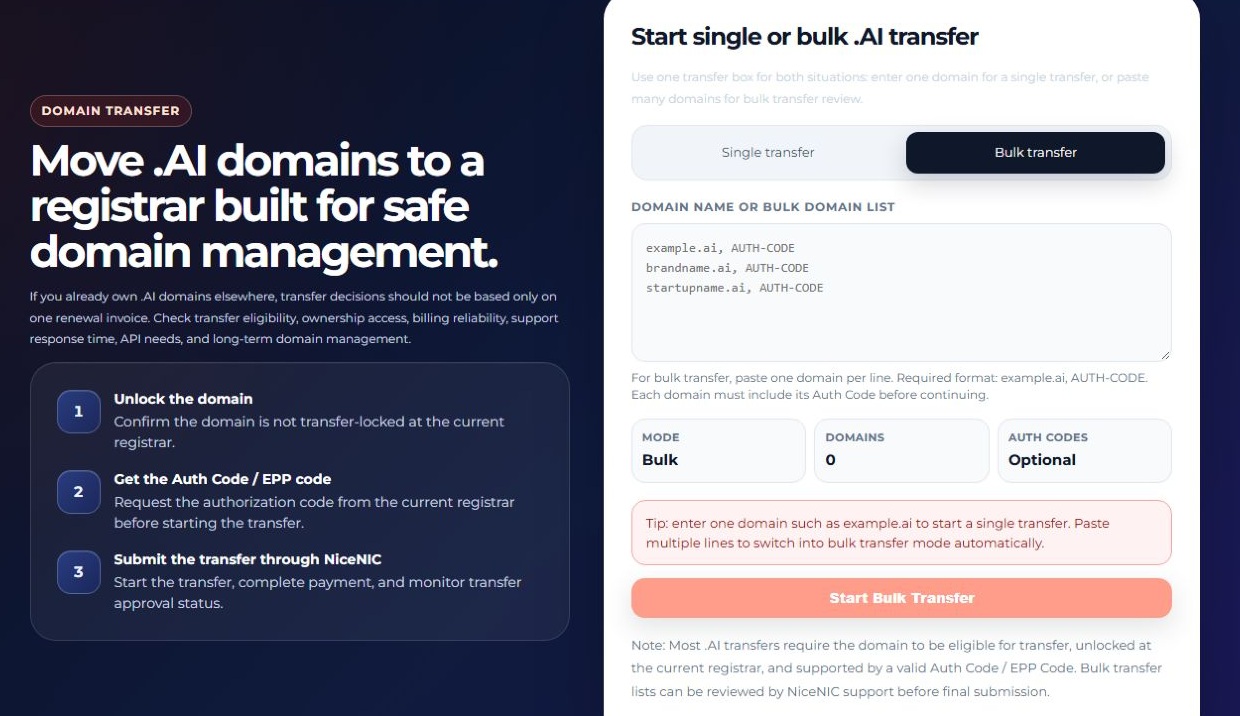
1 to a Few Domains: Open NiceNIC Domain Transfer, enter your
.aidomain and EPP Authorization Code, review the displayed.aitransfer price and renewal-extension term prior to checkout, and submit (full walkthrough in How to Transfer a Domain Into NiceNIC). -
Portfolio Consolidation: Moving multiple
.ai,.io,.com, and.xyzdomains together? Submit domain + EPP pairs in one workflow via NiceNIC Bulk Domain Transfer.
-
1 to a Few Domains: Open NiceNIC Domain Transfer, enter your
- Approve Outbound Release & Keep External Nameservers Intact: If your losing registrar emails an instant transfer-out approval prompt, approve it to accelerate completion rather than waiting out the standard multi-day pending window. Do not delete your external DNS zone at Cloudflare or Route 53.
-
Harden Post-Transfer Security & Brand Protection: As soon as the
.aidomain lands in your NiceNIC console:-
Confirm
clientTransferProhibitedlock and account 2FA are enabled. - Verify live delegation via NiceNIC Nameserver Controls and verify existing DS records or publish the new DNS host's matching DS via DNSSEC Management if signed.
-
Check Free Lifetime WHOIS Privacy eligibility for your portfolio extensions, and consider securing the matching
.COMdomain ($14.99 Market / $12.99 VIP 1st-year promo through December 31, 2026 UTC) to protect executive email and investor traffic.
-
Confirm
4. 2026 .AI Economics: 2-Year Pricing, VIP Tiers & USDT Fee Savings
For a portfolio of ten .ai names, a $10 difference per two-year renewal becomes $100. Before moving, compare three items side by side — the full renewal term, whether you can keep your DNS provider and what it costs to fund the account.
NiceNIC Verified .AI Parameters & Registrar Comparison (November 2026)
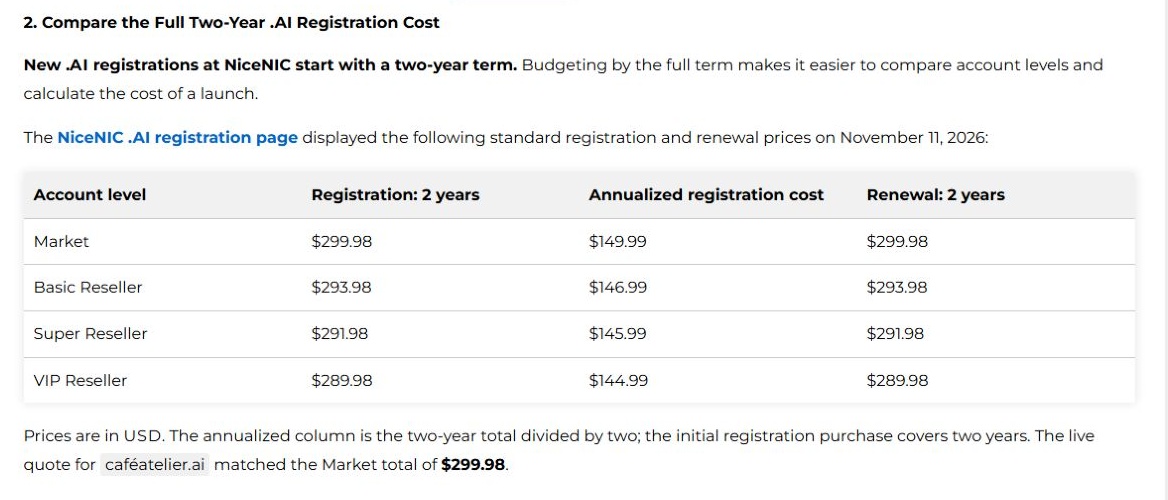
Standard .ai registrations and renewals at NiceNIC start at two years. On November 19, NiceNIC's pricing API quoted $299.98 for a two-year transfer of the non-premium IDN caféatelier.ai at the connected account's rate. Check your domain's own transfer quote before checkout. The four tiers below are published registration and renewal prices. NiceNIC's two-year pricing breakdown · Get a transfer quote
All prices are in USD. Use your signed-in quote for premium names, the exact transfer charge and the applicable registration term. NiceNIC domain prices · .AI product page
Real Portfolio Math: Saving Twice on Wholesale Credit + USDT Funding
-
100% Spendable Reseller Tiers ($0 Setup or Annual Fees): In the NiceNIC Reseller Program, Basic ($200), Super ($600), and VIP ($1,500) thresholds are 100% usable domain credit. Because five standard two-year .ai renewals cost $1,449.90 at VIP, funding $1,500 unlocks VIP pricing ($289.98 vs. $299.98 per 2-year
.aiterm)—saving $10.00 per.aicycle ($100.00 across 10.aidomains) with account-tier pricing also available on eligible companion domains. - $1,500 USDT vs. Card Processing Math: NiceNIC lists 4.4% + $0.30 for PayPal and eligible cards processed through PayPal. On the same $1,500 fee base, PayPal/card processing equals $66.30 before bank FX spreads. Online crypto checkout via Triple-A (1.5%) comes to $22.50—$43.80 less in processing fees (see our Crypto Domain Guide). For eligible resellers using the manual wallet route, neither NiceNIC's processing fee nor Triple-A's 1.5% fee applies (first manual payment is reviewed; wallet, exchange, and network charges may still apply). Plus, domains funded with USDT can still generate standard corporate invoices and switch to PayPal or card at future renewals.
Request VIP Pricing on Day 1: Moving an established
.aior multi-TLD portfolio from another registrar? Contact NiceNIC Pre-Sales Support or message Official Telegram (@NiceNIC_NET) with your current domain volume to request Day-1 Reseller Tier alignment before submitting your transfers.
5. Automating Post-Transfer .AI Management via API, WHMCS & MCP
Once your .ai domains are consolidated at NiceNIC, engineering and DevOps teams can manage renewals, DNS delegation, and brand expansions programmatically without deposit gates:
-
Zero-Cost Domain API & Sandbox: Active Market and Reseller accounts receive free access to the NiceNIC Domain API and non-billable API Sandbox to test availability (
Bulk Searchalso supports up to 500 domains per batch on the web), inspect domain status and test nameserver updates before using the production API. -
WHMCS 9.0 & AI Agent Workflows: Agencies and SaaS platforms can synchronize client renewals via the official WHMCS 9.0 registrar module, or check live availability, your account's registration price, and domain status inside Claude and ChatGPT via NiceNIC's Remote MCP Server (
https://mcp.nicenic.com/mcp). - Evidence-based abuse review and human support: NiceNIC documents how its team reviews abuse reports and supporting technical evidence. For teams running customer-facing AI products, the Trust Center and Abuse Handling Manual give security and procurement teams a process they can inspect before transferring. Registrar selection checklist · NiceNIC buyer's guide
6. Frequently Asked Questions (FAQ)
Will transferring my .AI domain to NiceNIC take down my live website or corporate email?
Your website and email can stay live throughout the move. Keep the authoritative zone, website hosting and mail service active, and verify any DNSSEC delegation. If your old registrar will close a bundled service, move and test that service first. For email, a successful inbound and outbound message is a better final check than an MX lookup alone.
How do I transfer an .AI domain out of Cloudflare Registrar without losing Cloudflare's Free CDN?
Keep your Cloudflare zone active and retain its assigned nameservers. Unlock your .ai registration in Cloudflare, copy the authorization code and submit it via NiceNIC Domain Transfer. Once the transfer completes, verify your site over HTTPS and send a test email. Your DNS and CDN can continue running in the same Cloudflare account.
What should I do with DNSSEC before transferring an .AI domain?
With the same external DNS and signing keys, verify that the existing DS remains valid through transfer. If you also change DNS providers, complete the DNSSEC sequence in Step 3 before switching nameservers. Re-enable the chain of trust by publishing the new provider's matching DS once the new delegation and signed zone are working. NiceNIC DNSSEC management
Can I pay for .AI domain transfers and two-year renewals using USDT?
Yes. Through NiceNIC Payment Options, you can fund your USD balance with USDT across TRC20, ERC20, Polygon, Solana, Arbitrum One, and BEP20 (plus USDC, BTC, ETH, and LTC) at a 0% NiceNIC processing fee. Online checkout via Triple-A currently charges 1.5% (vs. 4.4% + $0.30 for PayPal/cards), while eligible resellers using the manual wallet route avoid that 1.5% provider fee (first manual payment is reviewed; standard wallet or network charges may apply).
Can AI startups or domain investors get wholesale VIP .AI pricing on Day 1?
Yes, eligible portfolios can request a tier match before transferring. Standard 2-year .ai renewals drop from $299.98 ($149.99/yr Market) to $289.98 ($144.99/yr VIP) under the NiceNIC Reseller Program. If you already manage an active .ai or multi-TLD portfolio elsewhere, contact NiceNIC Pre-Sales Support or @NiceNIC_NET on Telegram to request Day-1 Reseller Tier alignment before funding your transfer batch.
Ready to Consolidate Your .AI Portfolio Without Downtime?
Pick the fastest migration route for your team:
-
Start a Single or Bulk .AI Transfer: Submit your
.aidomain and EPP code via Single Transfer or Bulk Domain Transfer, or search new .AI names (ASCII & 57-language IDNs). - Fund with 0% NiceNIC Fee USDT & Automate: Top up across six USDT rails on Payment Options and connect the $0-deposit Domain API & Sandbox, WHMCS 9.0 Module, or Remote MCP Server.
-
Request Day-1 VIP Tier Alignment: Moving multiple
.ai,.io, or.comassets? Message Pre-Sales Support or Official Telegram (@NiceNIC_NET) to align wholesale renewal rates and confirm manual USDT funding eligibility.
Primary Sources & Verification Links
Use these resources to verify registry rules, DNS and DNSSEC migration steps, and account pricing:
- IANA Registrar IDs Directory — NICENIC INTERNATIONAL GROUP CO., LIMITED (ID: 3765)
- IANA Root Zone Database — .AI ccTLD Delegation (Government of Anguilla)
- NiceNIC Live Domain Price List — .AI Registration, Renewal, Transfer & Restore Rates
- NiceNIC Single Domain Transfer · Bulk Domain Transfer · .AI Domain Search
- How to Transfer a Domain Into NiceNIC (-3844) · Transfer Troubleshooting Guide (-4775)
- NiceNIC Cloudflare DNS Setup Guide (-4861) · Free DNSSEC DS Submission (-4374)
- NiceNIC Crypto Registration Guide (-4752) · Payment Options Portal
- NiceNIC Trust Center & Abuse Transparency
- Identity Digital executive on the two-year .AI transfer extension
- Cloudflare DNSSEC migration · Let's Encrypt DNS-01 validation


