


조회수:1925
시간:2025-07-24 23:11:47 저자: chunling 
What is DNSSEC?
DNSSEC (Domain Name System Security Extensions) is a suite of extensions to the Domain Name System (DNS) that adds an additional layer of security. It enables DNS responses to be verified for authenticity, ensuring that the information provided is legitimate and hasn’t been tampered with.
Benefits of DNSSEC for Domain Names
DNSSEC helps protect domain names by preventing attacks like DNS spoofing or cache poisoning, which can direct users to malicious websites. With DNSSEC, domain owners can ensure that their users are directed to the correct and trusted websites, enhancing the trustworthiness and security of their domain.
To set up DNSSEC for a domain registered on NiceNIC:
Log in to your NiceNIC account and navigate to your domain management page.
Find the domain you wish to enable DNSSEC for and click Manage.
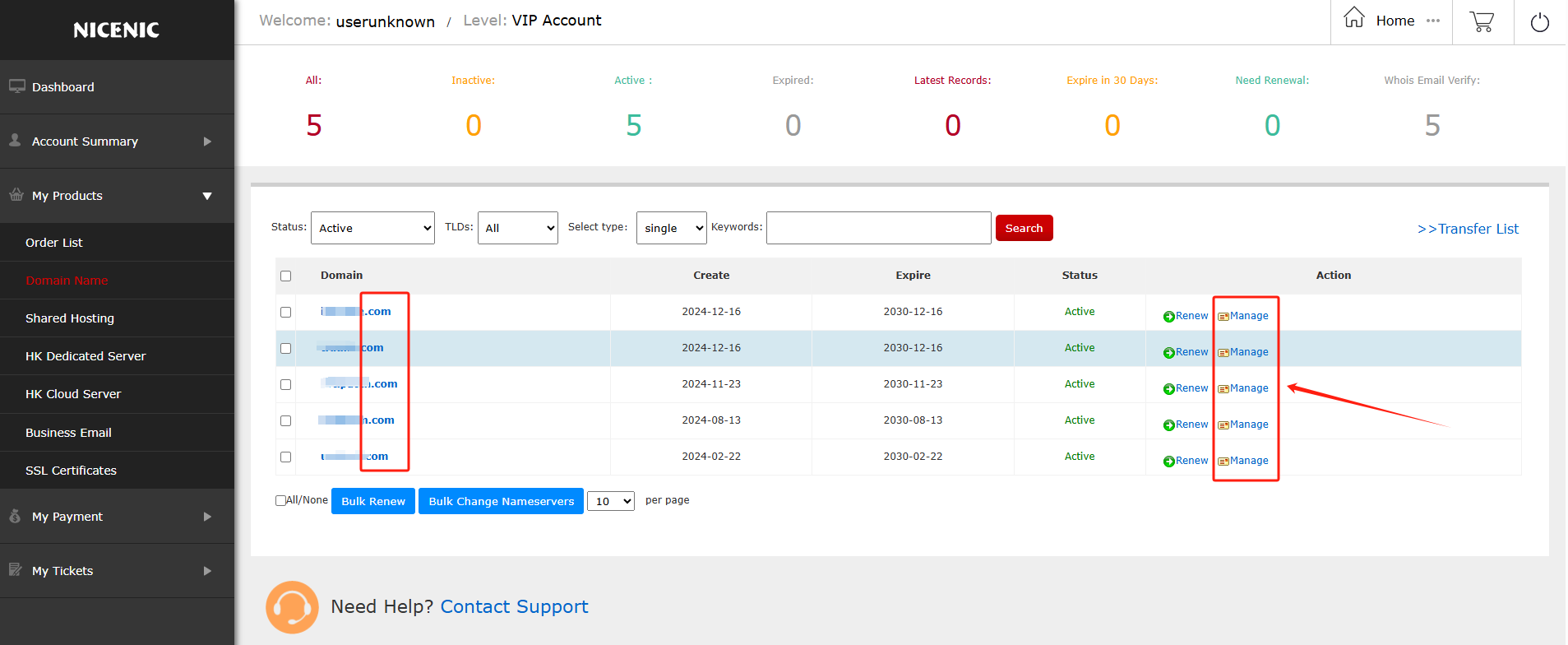
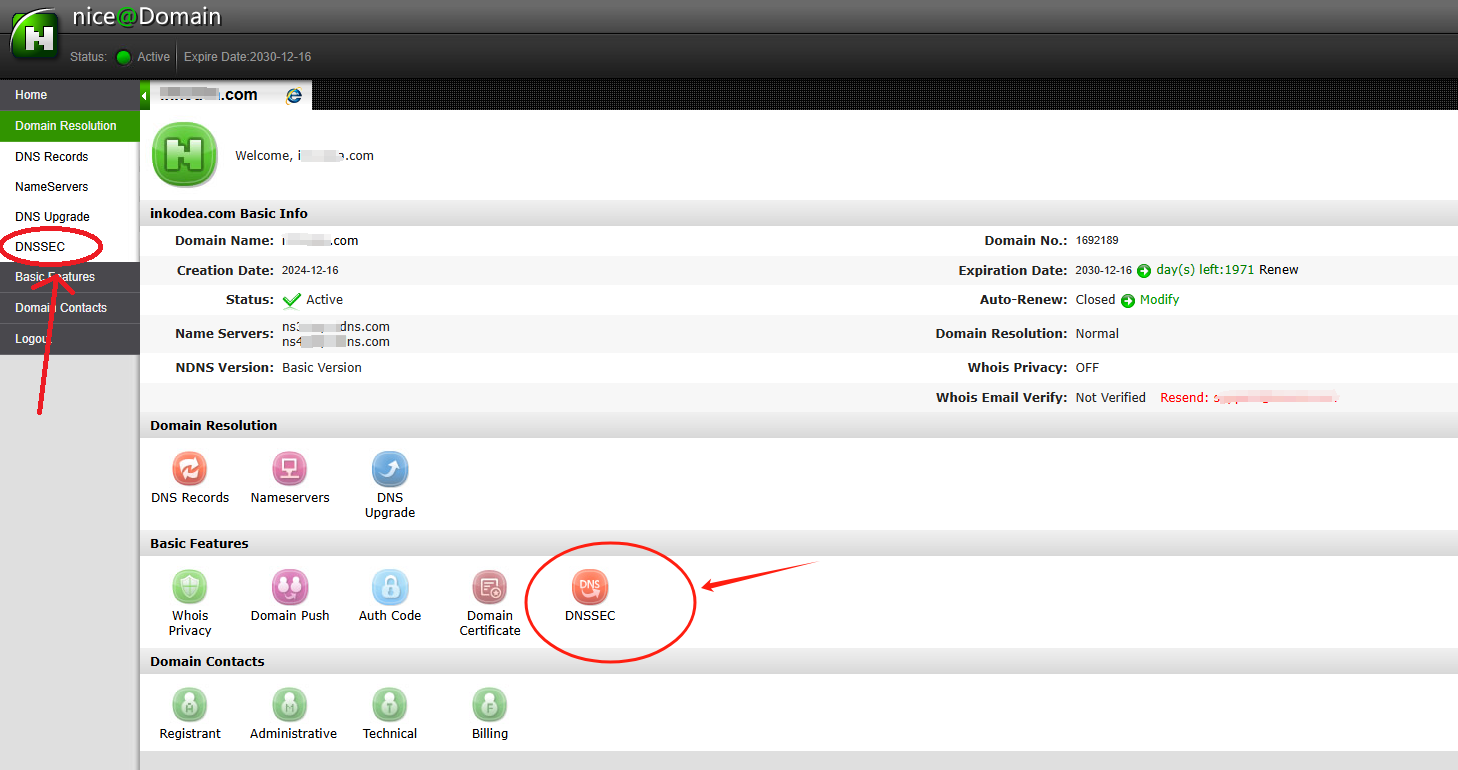
In the domain management section, you should see the DNSSEC button.
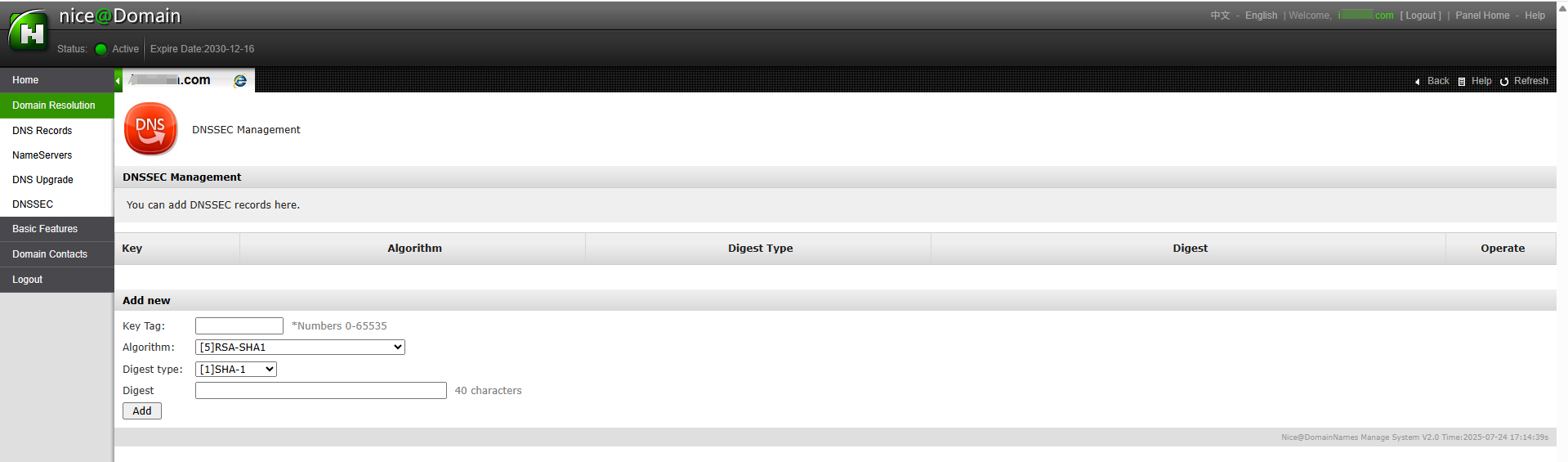
Click on the DNSSEC button to access the DNSSEC settings page.
Enter the required information for DNSSEC configuration (this will typically include DNSSEC key details provided by your DNS hosting provider).
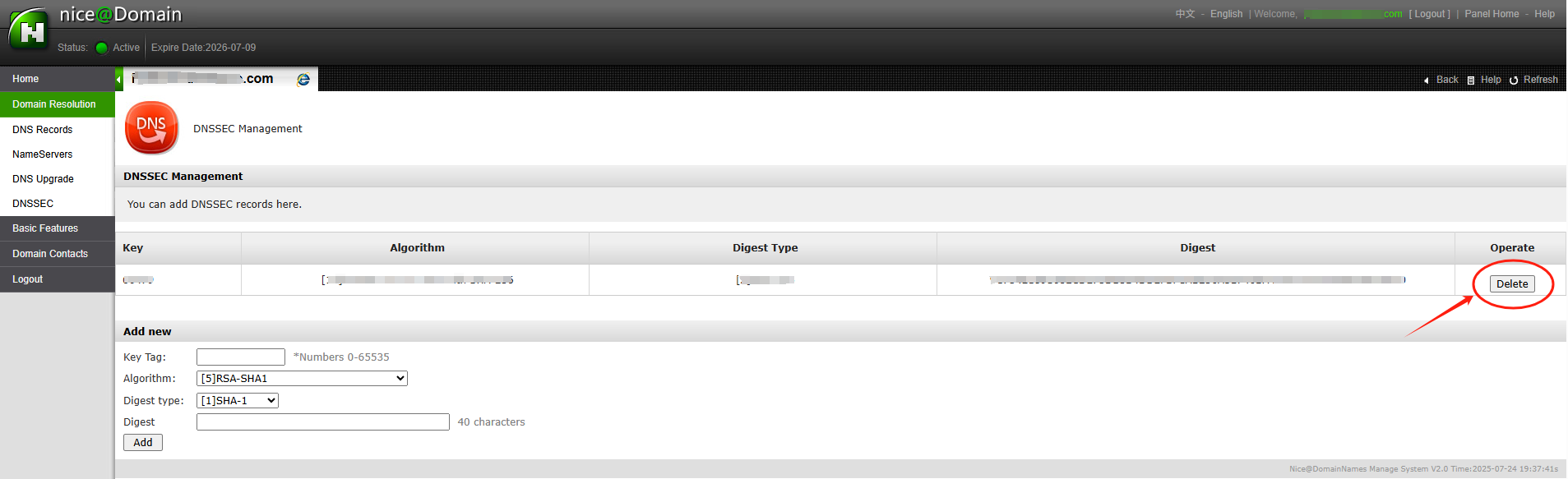
After entering the necessary DNSSEC key data (usually the DS record), you’ll receive confirmation that DNSSEC has been successfully added to your domain settings.
The DNSSEC status will show as enabled and you'll be able to see the public keys and other details.
With DNSSEC now enabled, your domain is better protected against DNS-related attacks.
DNSSEC (Domain Name System Security Extensions) is a suite of extensions to the Domain Name System (DNS) that adds an additional layer of security. It enables DNS responses to be verified for authenticity, ensuring that the information provided is legitimate and hasn’t been tampered with.
Benefits of DNSSEC for Domain Names
DNSSEC helps protect domain names by preventing attacks like DNS spoofing or cache poisoning, which can direct users to malicious websites. With DNSSEC, domain owners can ensure that their users are directed to the correct and trusted websites, enhancing the trustworthiness and security of their domain.
To set up DNSSEC for a domain registered on NiceNIC:
Log in to your NiceNIC account and navigate to your domain management page.
Find the domain you wish to enable DNSSEC for and click Manage.
In the domain management section, you should see the DNSSEC button.
Click on the DNSSEC button to access the DNSSEC settings page.
Enter the required information for DNSSEC configuration (this will typically include DNSSEC key details provided by your DNS hosting provider).
Once you've entered the information, click Add to enable DNSSEC for the domain.
Here’s an example of a successful DNSSEC setup:
After entering the necessary DNSSEC key data (usually the DS record), you’ll receive confirmation that DNSSEC has been successfully added to your domain settings.
The DNSSEC status will show as enabled and you'll be able to see the public keys and other details.
With DNSSEC now enabled, your domain is better protected against DNS-related attacks.
2006년부터 ICANN 인증 등록기관
오늘 .COM 도메인을 구매하고 등록하세요
.COM 도메인 가용성을 확인하고, 새 .COM 도메인을 등록하며, 여러 이름을 일괄 검색하거나 기존 .COM 도메인을 NiceNIC으로 이전하세요. 기업, 도메인 투자자, 에이전시, 호스팅 제공자 및 리셀러를 위해 설계되었습니다.
갱신: $17.99
마켓
$22.49 $14.99
첫해
갱신: $17.99
기본
$14.99
0% off
갱신: $17.99
슈퍼
$14.99
0% off
갱신: $16.99
VIP
$14.99
0% off
다른 소식:


