


Views:131
Time:2026-08-03 14:01:02 Author: windy 
A .DE domain is a strong choice for a business, store, service, organization, or website targeting Germany. Registration at NiceNIC is straightforward, but the contact details and nameserver information must be entered correctly.
This guide shows how to search for an available .DE name, complete the registration form, review the order, make payment, and check the result.
Quick Answer
Yes. Foreign individuals and organizations can register a .DE domain. DENIC states that .DE is open to applicants in Germany and abroad. You do not generally need to live in Germany or own a German company to register .DE.
You must provide accurate holder information, and .DE domains must meet DENIC's technical connectivity requirements. Foreign holders may also be required in specific legal-service situations to appoint an authorized recipient in Germany after receiving a request from DENIC.
Check .DE Availability
What Information Do You Need to Register a .DE Domain?
Before you start, prepare:
If the current NiceNIC order form asks for information that does not match your real holder details, contact NiceNIC Support before submitting the registration. Do not enter invented or borrowed German contact information.
Step 1: Search for Your .DE Domain
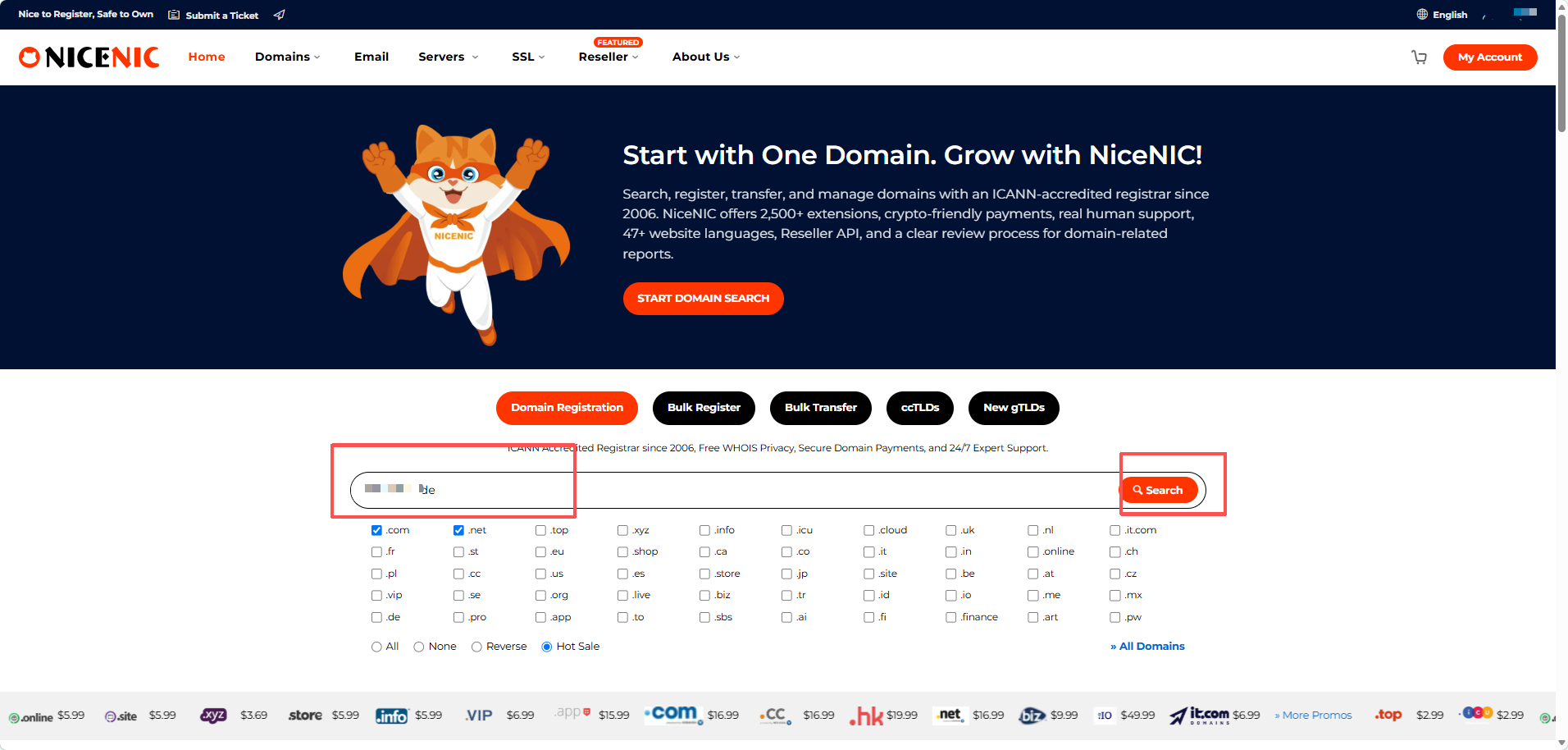
Go to the NiceNIC homepage and enter the domain in the search box.
You can type the complete name, such as: examplebrand.de
You can also enter the main word and select .DE from the available extensions.
Click Search to check availability.
Step 2: Enter the Registrant Information
The next page asks for the contact information associated with the domain.
In the NiceNIC process shown in this guide, a notice appears:
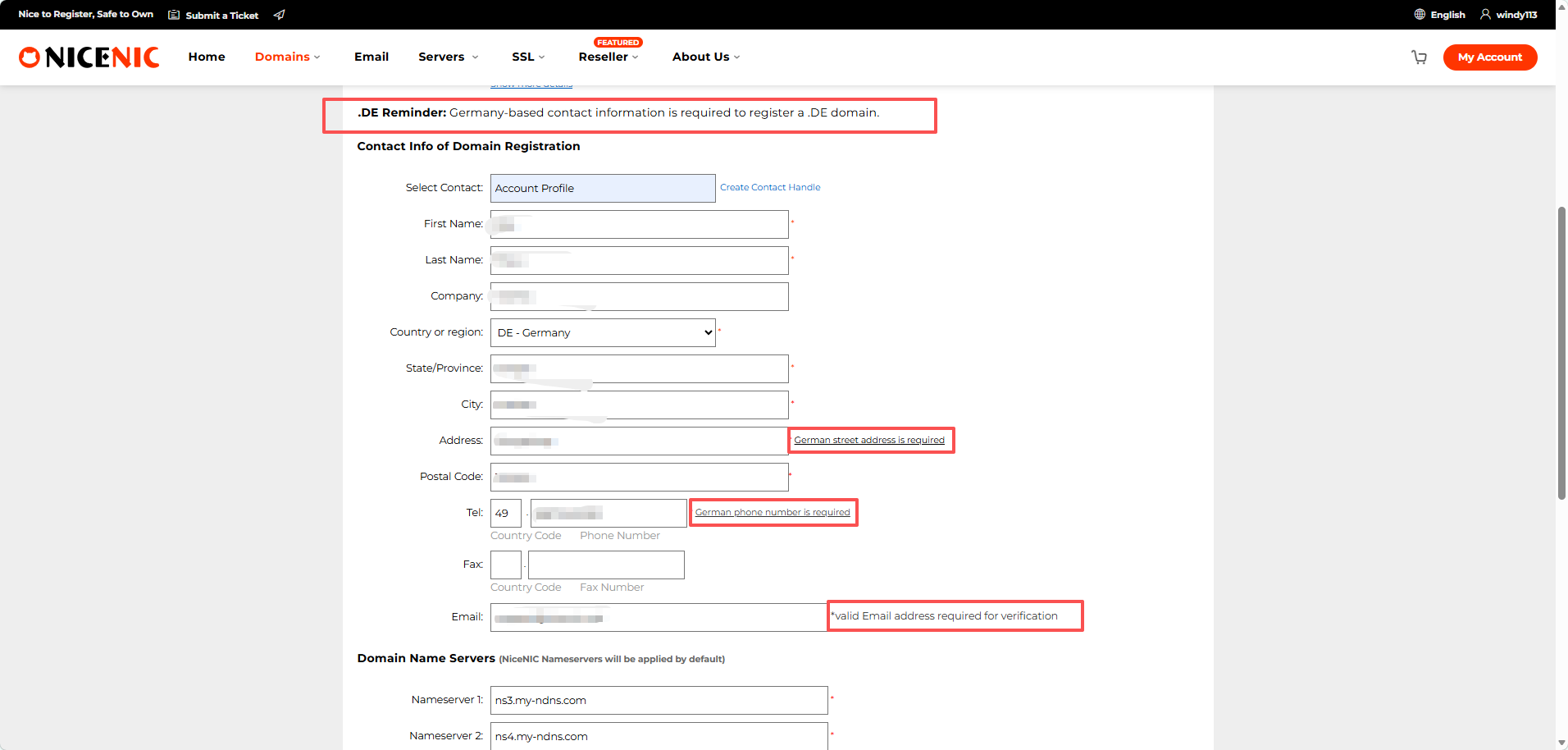
The form shown requests a German street address and a German telephone number. Use the +49 country code correctly and do not enter it twice.
This NiceNIC form requirement should not be confused with DENIC's general eligibility rules. DENIC states that .DE domains are open to legally capable applicants based in Germany or abroad.
Do not use invented, borrowed, or unreachable information. Incorrect data can delay the order, trigger further checks, or cause the registration to fail.
Step 3: Confirm the Nameservers
NiceNIC automatically enters its default nameservers:
ns3.my-ndns.com
ns4.my-ndns.com
Keep these values unless your hosting or DNS provider has supplied different nameservers.
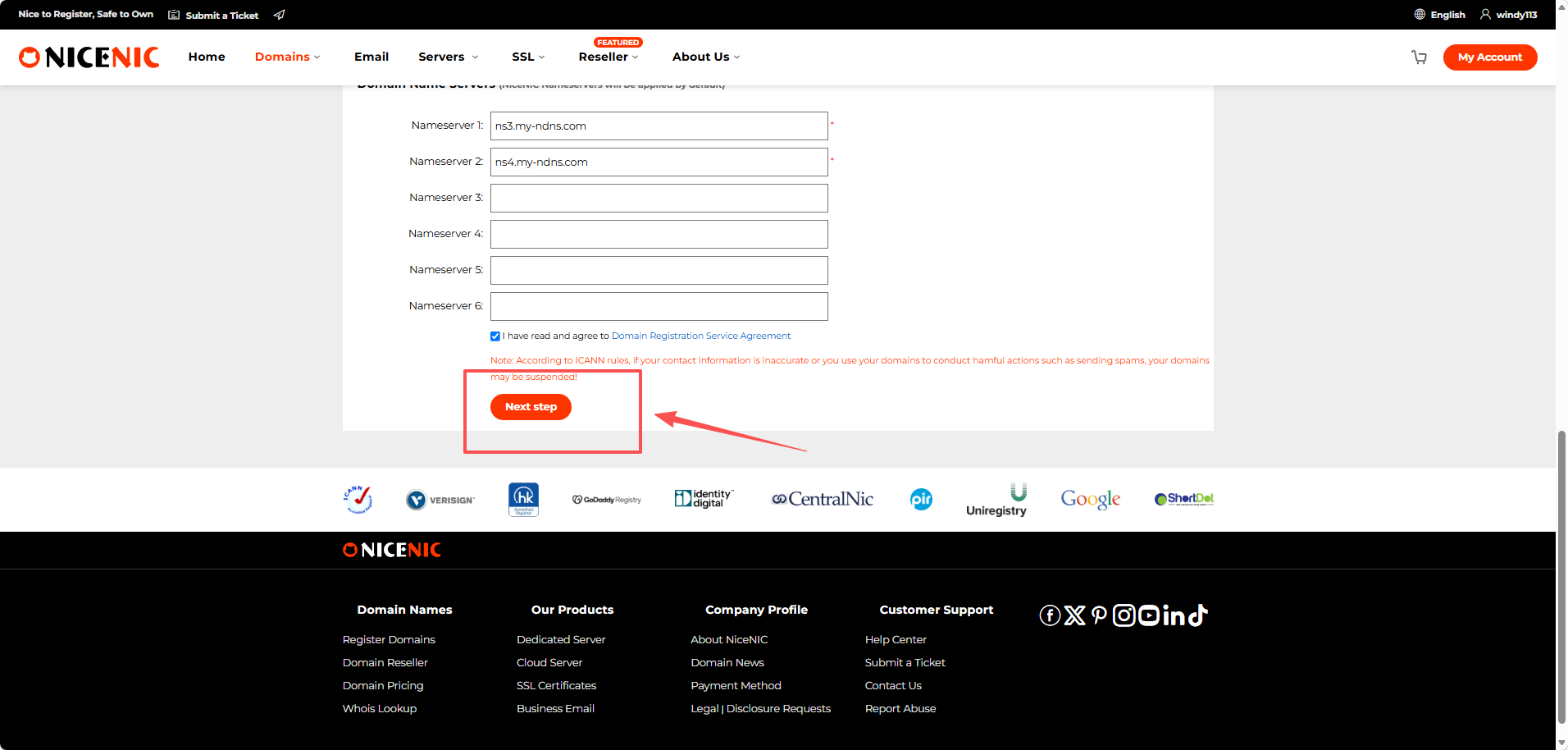
Leave the additional nameserver fields empty unless they are needed.
Custom nameservers must be correctly configured and meet DENIC's technical requirements. NiceNIC's default nameservers are the simplest option when the website or hosting service is not ready yet.
Step 4: Review the Registration Details
The confirmation page displays the domain, registrant information, contact details, and nameservers.
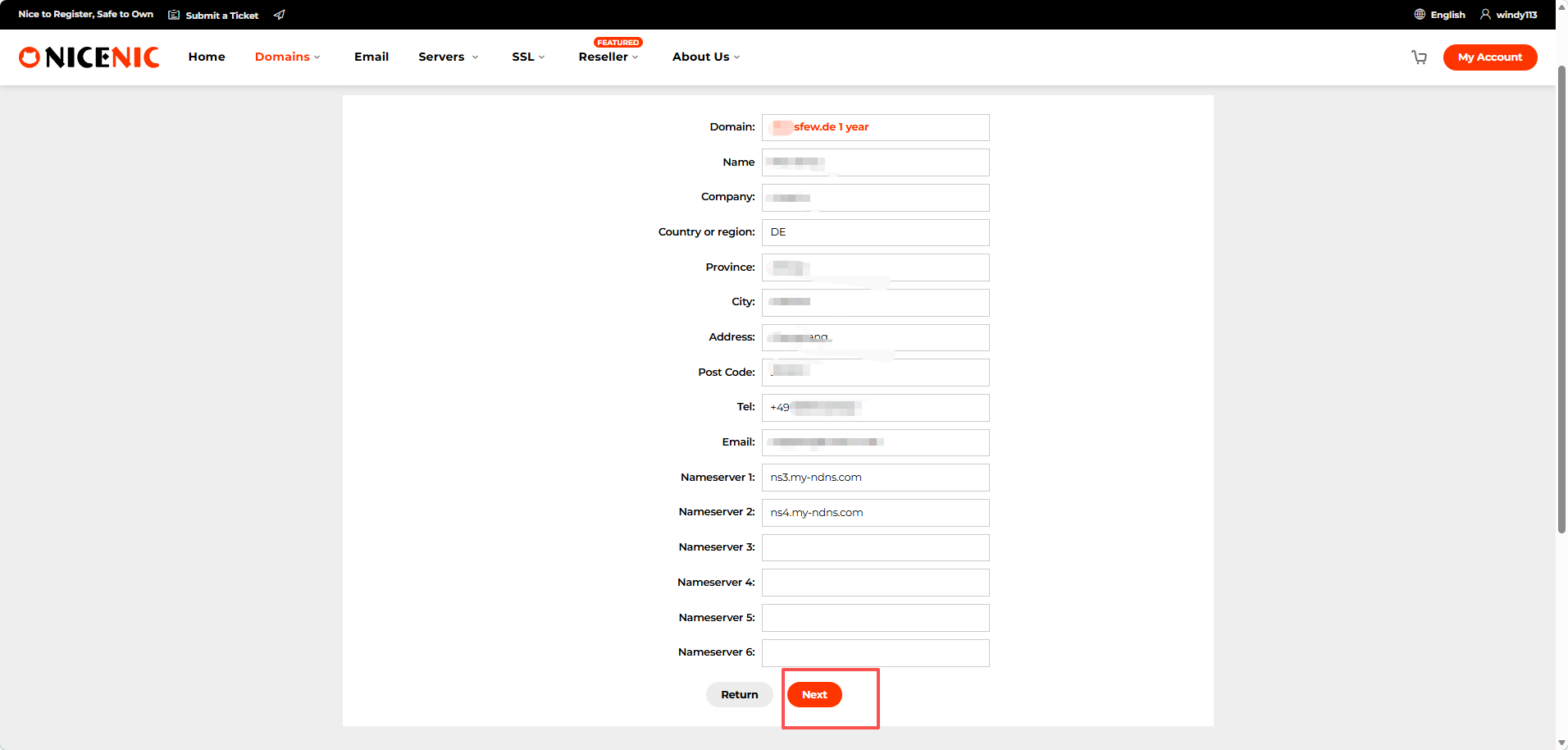
Check:
Click Next when all information is correct.
Step 5: Check the Order and Price
The order page displays:
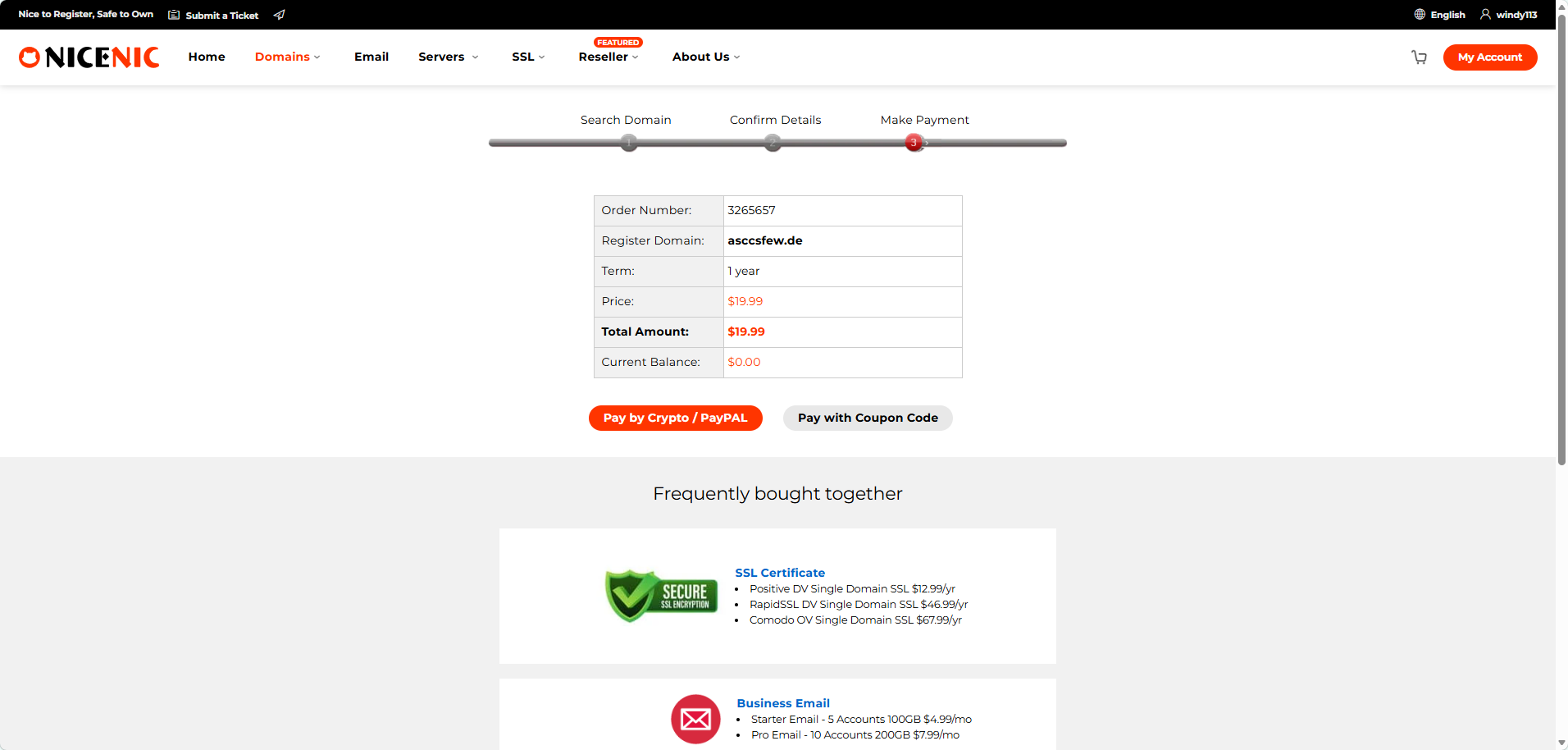
NiceNIC currently shows .DE registration at $19.99 for the first year. Registration, renewal, and transfer prices may differ. Check the current NiceNIC price page when comparing the long-term cost of a domain.
Before paying, confirm that:
Step 6: Complete Payment
Select one of the payment methods currently displayed on the NiceNIC payment page.
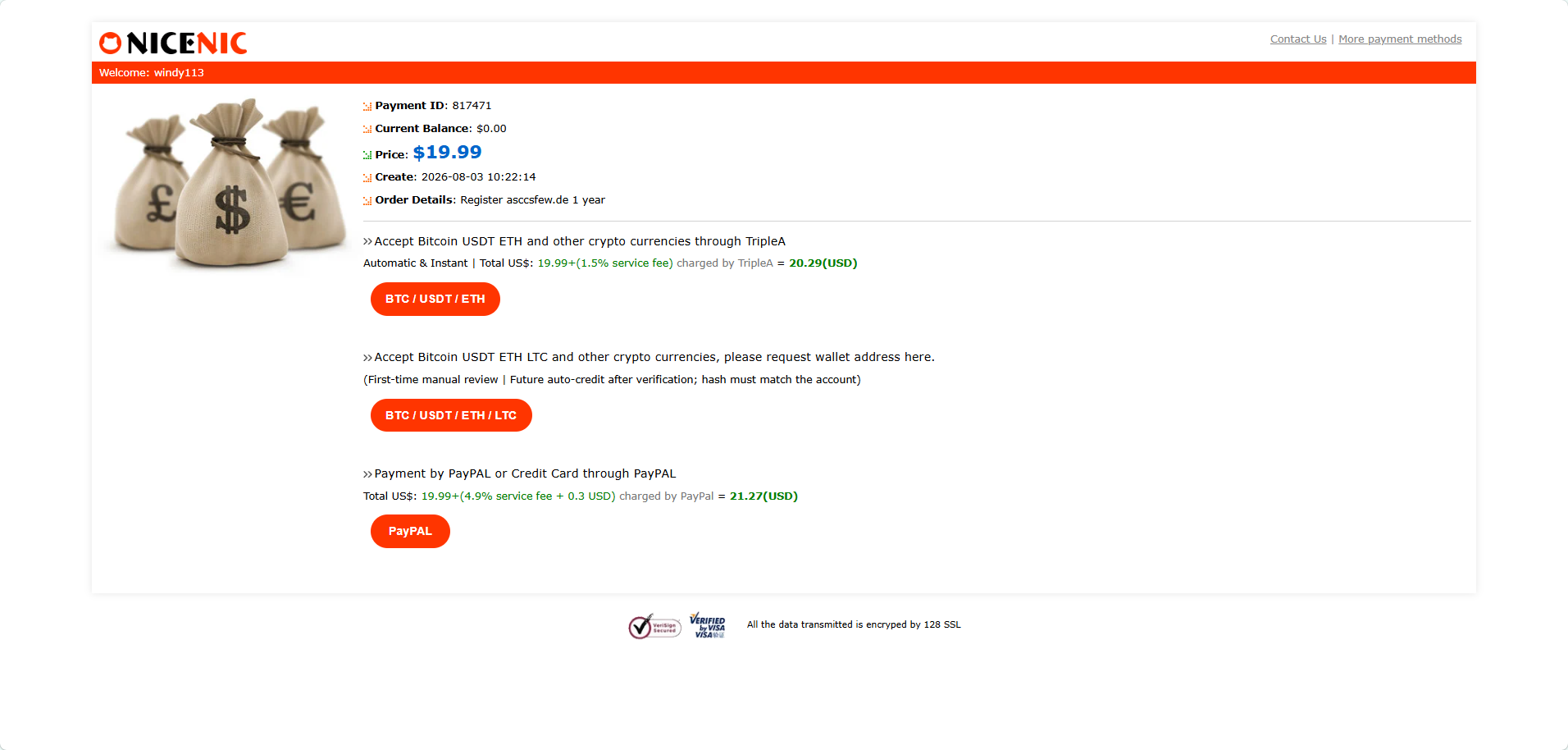
NiceNIC currently supports payment options including cryptocurrency and PayPal. Review the final amount and any processor fee before completing the transaction.
Always use the payment instructions generated for the current order. Do not reuse a wallet address, payment link, or payment amount from an older order.
What Happens After Payment?
Check the order status in your NiceNIC account.
Active
The registration has completed successfully, and the domain is available in your account.
Pending
The payment or registration request is still being processed.
Do not create a second order or pay again while the first order remains pending.
Verification Required
NiceNIC may ask you to confirm the email address or provide additional information. Follow the instructions in the message before the stated deadline.
Registration Failed
The order may fail because:
Common .DE Registration Problems
German street address is required
Check that the address includes:
German phone number is required
Confirm that the country code is 49 and enter the local number in the correct field.
Do not enter +49 in both the country-code field and the telephone-number field.
The order is pending after payment
Check your email and NiceNIC account for:
Custom nameservers are rejected
Return to the NiceNIC default nameservers or ask your hosting provider to confirm that the custom nameservers are authoritative and correctly configured.
How Do You Transfer a .DE Domain?
.DE provider transfers use DENIC's AuthInfo procedure.
The current provider creates an AuthInfo, which the domain holder provides to the new provider. The new provider submits the AuthInfo to DENIC, and the provider change can complete once the submitted AuthInfo matches the value stored for the domain.
A DENIC AuthInfo is valid for a maximum of 30 days.
This process is different from assuming that every domain transfer follows the same 5–7 day gTLD workflow.
Transfer a Domain to NiceNIC
Frequently Asked Questions
1. Can someone outside Germany register a .DE domain?1. Can foreigners register a .DE domain?
Yes. DENIC allows legally capable individuals and organizations in Germany or abroad to register .DE domains.
2. Do I need a German address to register a .DE domain?
Not as a general DENIC eligibility requirement. Foreign registrants can register .DE domains using accurate holder information. In certain legal-service situations, DENIC may later require a foreign holder to appoint an authorized recipient in Germany.
3. What information is required to register a .DE domain?
You normally need accurate holder details including name, address, email and telephone number. Additional verification may be requested where applicable.
4. What are the .DE nameserver requirements?
Custom nameservers must meet DENIC's technical requirements and be correctly configured and authoritative for the domain. NiceNIC's default nameservers can be used if you do not yet have another DNS provider.
5. How do I transfer a .DE domain?
.DE transfers use DENIC's AuthInfo procedure. Request the AuthInfo from the current provider and provide it to the new provider. The AuthInfo is valid for up to 30 days.
Register Your .DE Domain
Prepare accurate contact information, search for your preferred name, and review every detail before payment.
Check .DE availability and view the current registration price at NiceNIC.

This guide shows how to search for an available .DE name, complete the registration form, review the order, make payment, and check the result.
Quick Answer
Yes. Foreign individuals and organizations can register a .DE domain. DENIC states that .DE is open to applicants in Germany and abroad. You do not generally need to live in Germany or own a German company to register .DE.
You must provide accurate holder information, and .DE domains must meet DENIC's technical connectivity requirements. Foreign holders may also be required in specific legal-service situations to appoint an authorized recipient in Germany after receiving a request from DENIC.
Check .DE Availability
What Information Do You Need to Register a .DE Domain?
Before you start, prepare:
- The exact .DE domain you want
- The registrant's real legal name
- Company or organization name, if applicable
- Complete postal address
- Valid email address
- Reachable telephone number
- NiceNIC's default nameservers or properly configured custom nameservers
- A supported payment method
If the current NiceNIC order form asks for information that does not match your real holder details, contact NiceNIC Support before submitting the registration. Do not enter invented or borrowed German contact information.
Step 1: Search for Your .DE Domain
Go to the NiceNIC homepage and enter the domain in the search box.
You can type the complete name, such as: examplebrand.de
You can also enter the main word and select .DE from the available extensions.
Click Search to check availability.
Step 2: Enter the Registrant Information
The next page asks for the contact information associated with the domain.
In the NiceNIC process shown in this guide, a notice appears:
- Germany-based contact information is required to register a .DE domain.
- Complete the required fields carefully:
- First name and last name
- Company, if applicable
- Country or region
- State or province
- City and street address
- Postal code
- Telephone number
- Email address
The form shown requests a German street address and a German telephone number. Use the +49 country code correctly and do not enter it twice.
This NiceNIC form requirement should not be confused with DENIC's general eligibility rules. DENIC states that .DE domains are open to legally capable applicants based in Germany or abroad.
Do not use invented, borrowed, or unreachable information. Incorrect data can delay the order, trigger further checks, or cause the registration to fail.
Step 3: Confirm the Nameservers
NiceNIC automatically enters its default nameservers:
ns3.my-ndns.com
ns4.my-ndns.com
Keep these values unless your hosting or DNS provider has supplied different nameservers.
Leave the additional nameserver fields empty unless they are needed.
Custom nameservers must be correctly configured and meet DENIC's technical requirements. NiceNIC's default nameservers are the simplest option when the website or hosting service is not ready yet.
Step 4: Review the Registration Details
The confirmation page displays the domain, registrant information, contact details, and nameservers.
Check:
- Domain spelling
- Registrant and company name
- Country and address
- Postal code
- Telephone number
- Email address
- Nameservers
Click Next when all information is correct.
Step 5: Check the Order and Price
The order page displays:
- Order number
- Domain name
- Registration term
- Domain price
- Total amount
- Current NiceNIC account balance
NiceNIC currently shows .DE registration at $19.99 for the first year. Registration, renewal, and transfer prices may differ. Check the current NiceNIC price page when comparing the long-term cost of a domain.
Before paying, confirm that:
- The correct domain is listed
- The registration term is correct
- The final amount matches the checkout page
- Any payment-processing fee is clearly shown
Step 6: Complete Payment
Select one of the payment methods currently displayed on the NiceNIC payment page.
NiceNIC currently supports payment options including cryptocurrency and PayPal. Review the final amount and any processor fee before completing the transaction.
Always use the payment instructions generated for the current order. Do not reuse a wallet address, payment link, or payment amount from an older order.
What Happens After Payment?
Check the order status in your NiceNIC account.
Active
The registration has completed successfully, and the domain is available in your account.
Pending
The payment or registration request is still being processed.
Do not create a second order or pay again while the first order remains pending.
Verification Required
NiceNIC may ask you to confirm the email address or provide additional information. Follow the instructions in the message before the stated deadline.
Registration Failed
The order may fail because:
- The domain became unavailable
- The contact information was rejected
- The payment was not credited
- Verification was not completed
- Custom nameservers failed technical checks
Common .DE Registration Problems
German street address is required
Check that the address includes:
- Street name
- Building number
- City
- Postal code
- Germany as the country
German phone number is required
Confirm that the country code is 49 and enter the local number in the correct field.
Do not enter +49 in both the country-code field and the telephone-number field.
The order is pending after payment
Check your email and NiceNIC account for:
- A payment notice
- A verification request
- A registration update
- A request to correct contact information
Custom nameservers are rejected
Return to the NiceNIC default nameservers or ask your hosting provider to confirm that the custom nameservers are authoritative and correctly configured.
How Do You Transfer a .DE Domain?
.DE provider transfers use DENIC's AuthInfo procedure.
The current provider creates an AuthInfo, which the domain holder provides to the new provider. The new provider submits the AuthInfo to DENIC, and the provider change can complete once the submitted AuthInfo matches the value stored for the domain.
A DENIC AuthInfo is valid for a maximum of 30 days.
This process is different from assuming that every domain transfer follows the same 5–7 day gTLD workflow.
Transfer a Domain to NiceNIC
Frequently Asked Questions
1. Can someone outside Germany register a .DE domain?1. Can foreigners register a .DE domain?
Yes. DENIC allows legally capable individuals and organizations in Germany or abroad to register .DE domains.
2. Do I need a German address to register a .DE domain?
Not as a general DENIC eligibility requirement. Foreign registrants can register .DE domains using accurate holder information. In certain legal-service situations, DENIC may later require a foreign holder to appoint an authorized recipient in Germany.
3. What information is required to register a .DE domain?
You normally need accurate holder details including name, address, email and telephone number. Additional verification may be requested where applicable.
4. What are the .DE nameserver requirements?
Custom nameservers must meet DENIC's technical requirements and be correctly configured and authoritative for the domain. NiceNIC's default nameservers can be used if you do not yet have another DNS provider.
5. How do I transfer a .DE domain?
.DE transfers use DENIC's AuthInfo procedure. Request the AuthInfo from the current provider and provide it to the new provider. The AuthInfo is valid for up to 30 days.
Register Your .DE Domain
Prepare accurate contact information, search for your preferred name, and review every detail before payment.
Check .DE availability and view the current registration price at NiceNIC.
ICANN Accredited Registrar Since 2006
Buy and Register Your .DE Domain Today
Check .DE domain availability, register a new .DE domain, search multiple names in bulk, or transfer your existing .DE domains to NiceNIC. Built for businesses, domain investors, agencies, hosting providers, and resellers.
Renew: $39.99
Market
$29.99 $19.99
first year
Renew: $33.99
Basic
$19.99
0% off
Renew: $31.99
Super
$19.99
0% off
Renew: $29.99
VIP
$19.99
0% off
RELATED NEWS:
Last News:
.VIP, .LUXE and .FASHION Domain Promotion: Premium Branding from $3.99
Next News: .ONLINE vs .COM: Which Domain Is Better for Your Website?
Next News: .ONLINE vs .COM: Which Domain Is Better for Your Website?


