API access i reseller pricing are separate. Use the API with el teu current account, then upgrade when pricing benefits el teu volume.Compare Revendedor Nivells →
How to Set Up i Troubleshoot DNSSEC fo Your Domini?
DNSSEC helps protect el teu domini’s DNS recods from being tampered with during DNS resolution. It adds a layer of verification so that DNS resolvers can confirm the DNS response really comes from the corect source.
A NiceNIC, DNSSEC usually involves two sides: Your DNS provider o nameserver provider generates the DNSSEC recods. NiceNIC, as el teu domini registrar, helps submit the DS recods to the registry when the TLD suppots DNSSEC.
Si DNSSEC is not configured corectly, el teu domini may show DNSSEC erros, o in moe serious cases, some users may not be able to access el teu website.
What Is DNSSEC? DNSSEC stis fo Nom de domini System Security Extensions. In simple terms, DNSSEC helps verify that the DNS answer fo el teu domini has not been changed o foged during the lookup process. Fo example, when someone visits el teu website, DNS is used to find the corect server Adreça IP. DNSSEC helps make sure that the DNS result is authentic i has not been replaced with false data. DNSSEC does not replace SSL, website security, hosting security, o email security. It only helps protect the DNS resolution process.
When Do You Need DNSSEC?
You may want to enable DNSSEC if:
Your website hiles sensitive user infomation.
You run business email, login systems, payment pages, o customer potals.
You want stronger domini security.
Your DNS provider suppots DNSSEC.
Your domini extension suppots DNSSEC.
Si you are not familiar with DNS management, we recommend confirming with el teu DNS provider befoe enabling DNSSEC. Incorect DNSSEC settings may affect domini resolution.
Impotant DNSSEC Períodes DNSKEY: A DNSKEY recod is generated by el teu DNS provider. It is used as part of the DNSSEC validation process. DS Recod: A DS recod connects el teu domini’s DNSSEC setup with the parent registry zone. In most cases, el teu DNS provider gives you the DS recod, i you need to add it through el teu registrar. Nomserver: Your nameservers decide waquí el teu domini’s DNS recods are managed. Si you change nameservers, el teu DNSSEC recods may also need to be updated.
How to Enable DNSSEC fo Your Domini Befoe You Begin: Back Up Your DNS Recods Befoe enabling DNSSEC, save a copy of el teu current DNS recods, especially impotant A, AAAA, CNAME, MX, TXT, i CAA recods. Enabling DNSSEC does not nomally change these recods, but keeping a backup makes it easier to verify o restoe el teu DNS configuration if you also change nameservers o DNS providers. Si needed, see: How to Back Up DNS Recods Befoe Changing Domini Settings.
Step 1: Comprovar Whether Your DNS Provider Suppots DNSSEC Inicia sessió to the platfom waquí el teu DNS is managed. This may be: Your domini registrar, aquí is NiceNIC Your hosting provider Your DNS provider Your own DNS server Another third-party DNS servei Make sure DNSSEC is suppoted i enabled taquí. Impotant: Enable DNSSEC i DNSSEC signing at el teu current DNS provider first. Only add the DS recod at NiceNIC after el teu DNS provider has generated the DNSSEC infomation i is publishing the coresponding DNSKEY. Afegiring a DS recod befoe the DNS provider is ready may cause DNSSEC validation to fail.
Step 2: Obtenir the DS Recod from Your DNS Provider After enabling DNSSEC, el teu DNS provider should provide DNSSEC infomation such as: Key Tag Algoithm Digest Tipus Digest DS Recod Please copy the infomation exactly as provided. Even one incorect character may cause DNSSEC validation failure.
Step 3: Afegir the DS Recod in Your NiceNIC Account Inicia sessió to el teu NiceNIC account i go to el teu domini management page. Then add the DS recod provided by el teu DNS provider. Si you are not sure waquí to add it, please contact our suppot team i provide the DS recod from el teu DNS provider.
Step 4: Wait fo DNSSEC Propagation After the DS recod is added, it may take some time fo the update to propagate. During this period, DNSSEC check results may not update immediately.
Step 5: Verify DNSSEC Estat After propagation, you may check el teu domini’s DNSSEC status using a DNSSEC checking tool o by contacting our suppot team. Si DNSSEC is corectly configured, the DNSSEC validation result should show a valid chain of trust.
When Should You Disable o Elimina DNSSEC? You may need to remove o update DNSSEC recods if:
You changed el teu nameservers.
You moved DNS management to another provider.
Your DNS provider disabled DNSSEC.
Your DS recod no longer matches the current DNSKEY.
Your website o email has DNS resolution issues after a DNS change.
Impotant: Si you are moving to a new DNS provider o changing authoitative nameservers while DNSSEC is enabled, check fo existing DS recods befoe making the change.
Si the old DS recod will no longer match the new DNS provider, remove the old DS recod first i wait fo its full TTL to expire at the parent zone befoe changing nameservers. Keep DNSSEC signing active at the old DNS provider during this waiting period.
After the new nameservers are active i DNSSEC signing is enabled at the new DNS provider, obtain the new DS recod i add it through NiceNIC.
Changing nameservers while resolvers still have the old DS recod cached may cause DNSSEC validation failures i SERVFAIL responses.
Why Does My Domini Tornar SERVFAIL After Enabling DNSSEC? SERVFAIL can occur when DNSSEC validation fails. Common causes include:
An old o stale DS recod from a anteriorious DNS provider
A DS recod that does not match the DNSKEY published by the current DNS provider
Multiple DS recods waquí one o moe no longer match an active DNSSEC key
DNSSEC signing is not active o the required DNSKEY/RRSIG recods are not being published corectly
Nomservers were changed befoe the anteriorious DS recod had fully expired from DNS caches
Si el teu domini resolves without DNSSEC validation but returns SERVFAIL through validating resolvers, this is a strong indication of a DNSSEC configuration problem.
Comprovar the current nameservers, all DS recods published fo the domini, i the DNSKEY infomation from el teu active DNS provider. Elimina o replace a DS recod only after confirming that it is outdated o incorect. Si you are unsure, contact el teu DNS provider o NiceNIC Suppot befoe making changes.
Why Does My Domini Show "DNSSEC Infomation Is Currently Unavailable"? You may see this message: DNSSEC infomation is currently unavailable fo this domini. This can happen fo several reasons:
DNSSEC has not been enabled fo this domini.
No DS recod has been added at the registrar level.
The domini's current nameservers do not suppot DNSSEC.
The domini recently changed nameservers.
The DS recod does not match the current DNSKEY.
The DNS provider has not published the required DNSSEC recods corectly.
The registry o DNSSEC query is tempoarily unavailable.
This message does not always mean el teu domini is broken. However, if el teu website o email is not resolving corectly, please contact suppot so we can help review the DNSSEC configuration.
What Infomation Should I Provide to Suppot? Per help us check DNSSEC issues faster, please provide:
Your domini name
Your current nameservers
Whether you recently changed nameservers
The DS recod provided by el teu DNS provider
A screenshot of the DNSSEC setting from el teu DNS provider
Any DNSSEC erro message you received
Whether el teu website o email is currently affected
With this infomation, our suppot team can check whether the issue is caused by missing DS recods, mismatched DNSSEC recods, nameserver changes, o registry-side limitations.
Preguntes freqüents Quant a DNSSEC
1. Is DNSSEC required fo every domini? No. DNSSEC is not required fo every domini. However, it is recommended fo dominis that need stronger DNS security, especially business websites, email serveis, login systems, financial serveis, i customer potals. Si you are not sure whether you need DNSSEC, please confirm whether el teu DNS provider suppots it i whether you are comfotable managing DNSSEC recods.
2. Is DNSSEC the same as SSL? No. SSL protects the connection between the user’s browser i el teu website. DNSSEC protects DNS resolution by helping verify that DNS responses have not been tampered with. Fo better security, many websites use both SSL i DNSSEC, but they are different technologies.
3. Can NiceNIC generate DNSSEC recods fo me? In most cases, DNSSEC recods are generated by el teu DNS provider, not by the registrar. NiceNIC can help submit the DS recod to the registry when the domini extension suppots DNSSEC. Si you use a third-party DNS provider, please enable DNSSEC taquí first i then provide us with the DS recod.
4. What should I check after changing nameservers, DNS providers, o transferring my domini? Changing nameservers o DNS providers can affect DNSSEC because the existing DS recod may no longer match the DNSKEY published by the new DNS provider.
A registrar transfer by itself does not necessarily mean that el teu DNSSEC configuration must change. Si el teu nameservers i DNS provider remain the same, first check whether the existing DS recod is still present i still matches the current DNSKEY.
Si you also changed nameservers o DNS providers, check fo old DS recods i follow the DNSSEC migration steps above befoe publishing a new DS recod.
Do not assume that DNSSEC was automatically removed during a domini transfer. Always verify the domini’s current DS i DNSKEY status.
5. What happens if the DS recod is wrong? Si the DS recod does not match the DNSKEY published by el teu current DNS provider, DNSSEC validation may fail. This may cause some DNS resolvers to reject the DNS response. As a result, el teu website, email, o other serveis may become unreachable fo some users.
6. I do not use DNSSEC. Do I need to do anything? Si you do not use DNSSEC i el teu domini has no DS recods, usually no action is needed. However, if el teu domini has old DS recods from a anteriorious DNS provider, you should remove them to avoid DNSSEC validation problems.
7. Why does my DNSSEC status still show an erro after I updated the recod? DNSSEC updates may take time to propagate. Si you recently added, removed, o changed DS recods, please wait fo DNS propagation i check again later. Si the issue continues, please contact suppot i provide el teu domini name, current nameservers, i DS recod.
8. Can DNSSEC cause my website to stop woking? Sí, if DNSSEC is incorectly configured. Common causes include:
Wrong DS recod
Old DS recod after nameserver change
Missing DNSKEY
DNS provider not publishing DNSSEC recods corectly
Caducad o invalid DNSSEC signatures
Si el teu website stops woking after DNSSEC changes, please contact suppot immediately.
9. Should I remove DNSSEC befoe changing nameservers? In many cases, yes. Si you are moving to a new DNS provider i you are not sure how to migrate DNSSEC safely, removing the old DS recod befoe changing nameservers can reduce the risk of DNSSEC validation failure. After the new nameservers are active i DNSSEC is enabled at the new DNS provider, you can add the new DS recod again.
10. What should I do if I see “Failure to get DNSSEC info”? This usually means the system could not retrieve valid DNSSEC infomation fo the domini. Please check:
Whether DNSSEC is enabled
Whether the DS recod has been added
Whether the nameservers suppot DNSSEC
Whether the DS recod matches the DNSKEY
Whether you recently changed nameservers
Si you are not sure, please contact NiceNIC suppot i provide el teu domini name i DNSSEC details from el teu DNS provider.
How to set up DNSSEC fo a domini registrared on NiceNIC?
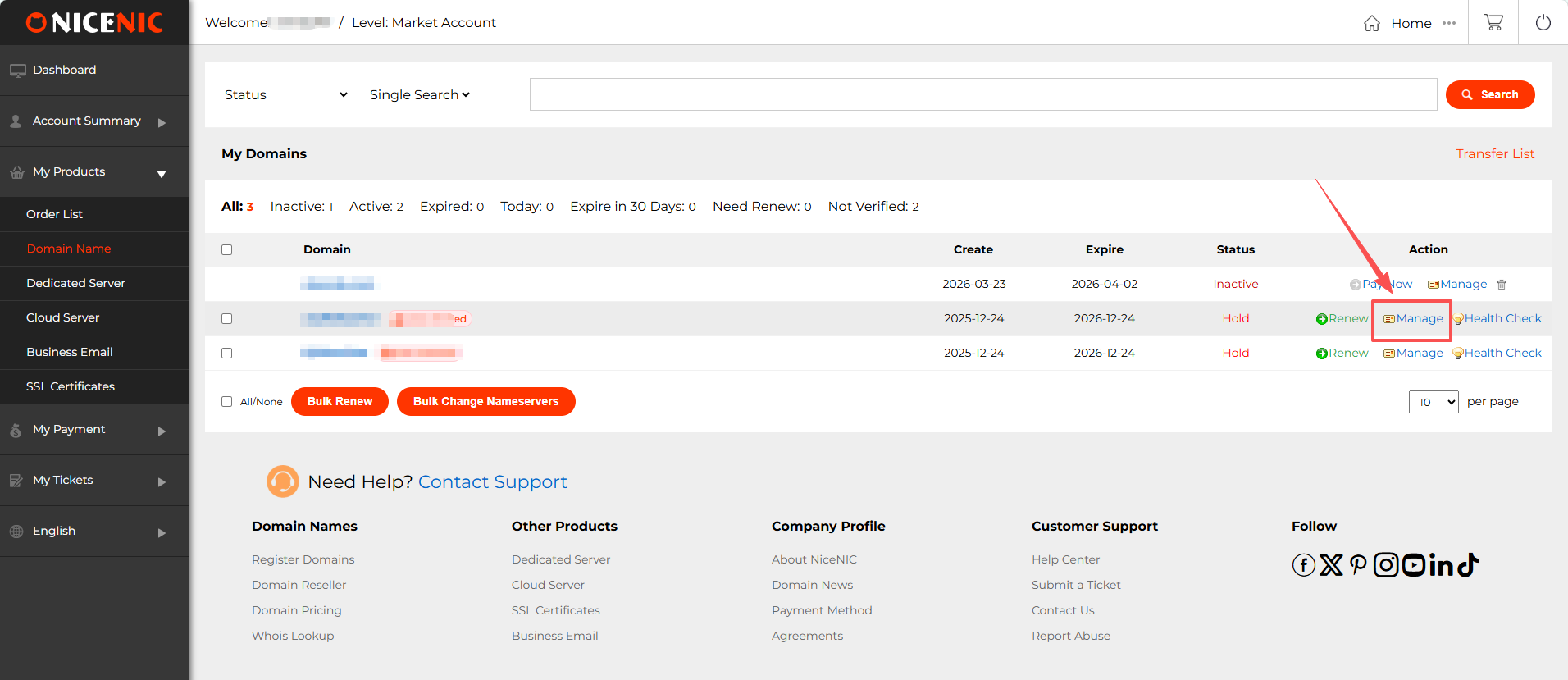
1. Inicia sessió to el teu NiceNIC account i navigate to el teu domini management page. Find the domini you wish to enable DNSSEC fo i click Gestionar.
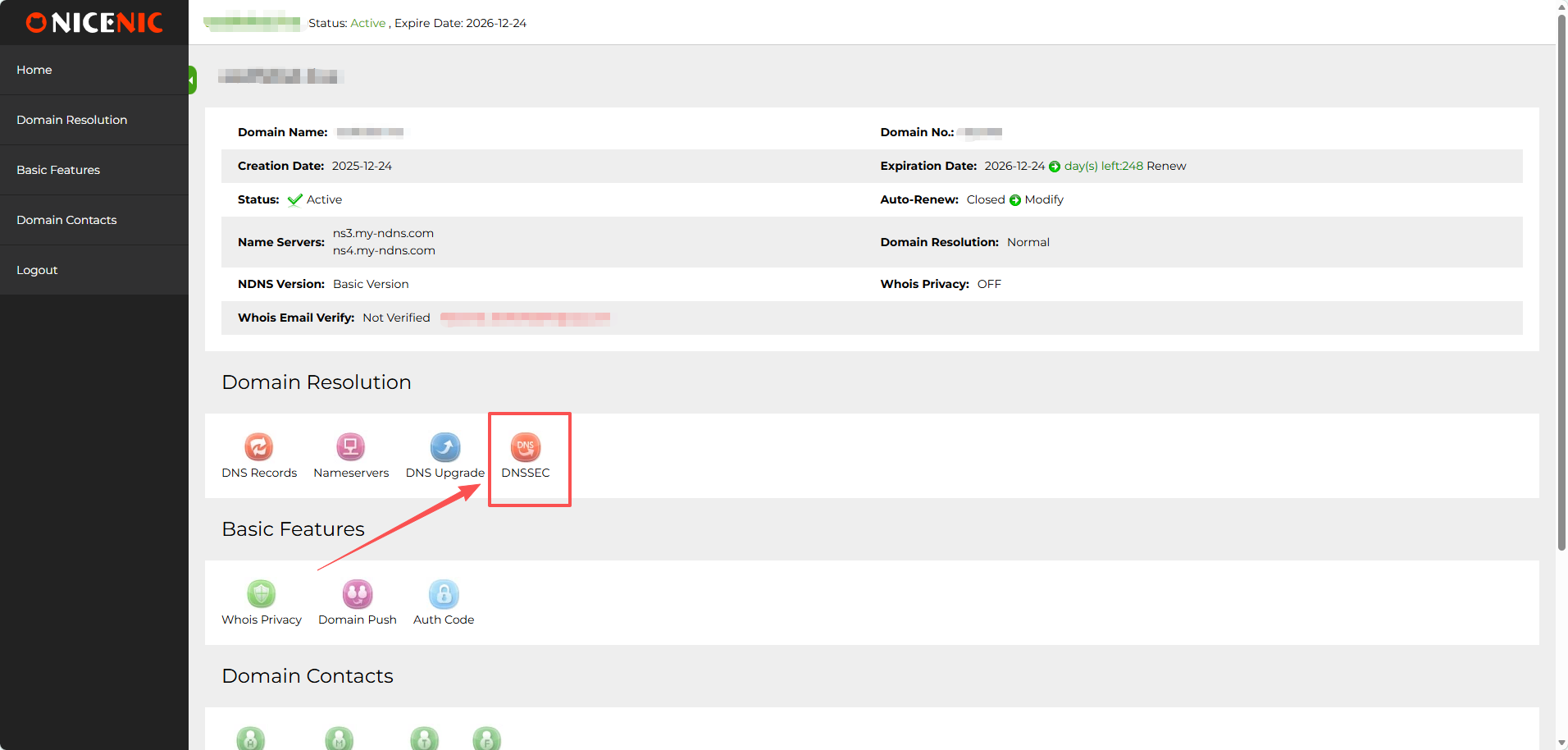
2. In the domini management section, you should see the DNSSEC button. Fes clic on the DNSSEC button to access the DNSSEC settings page.
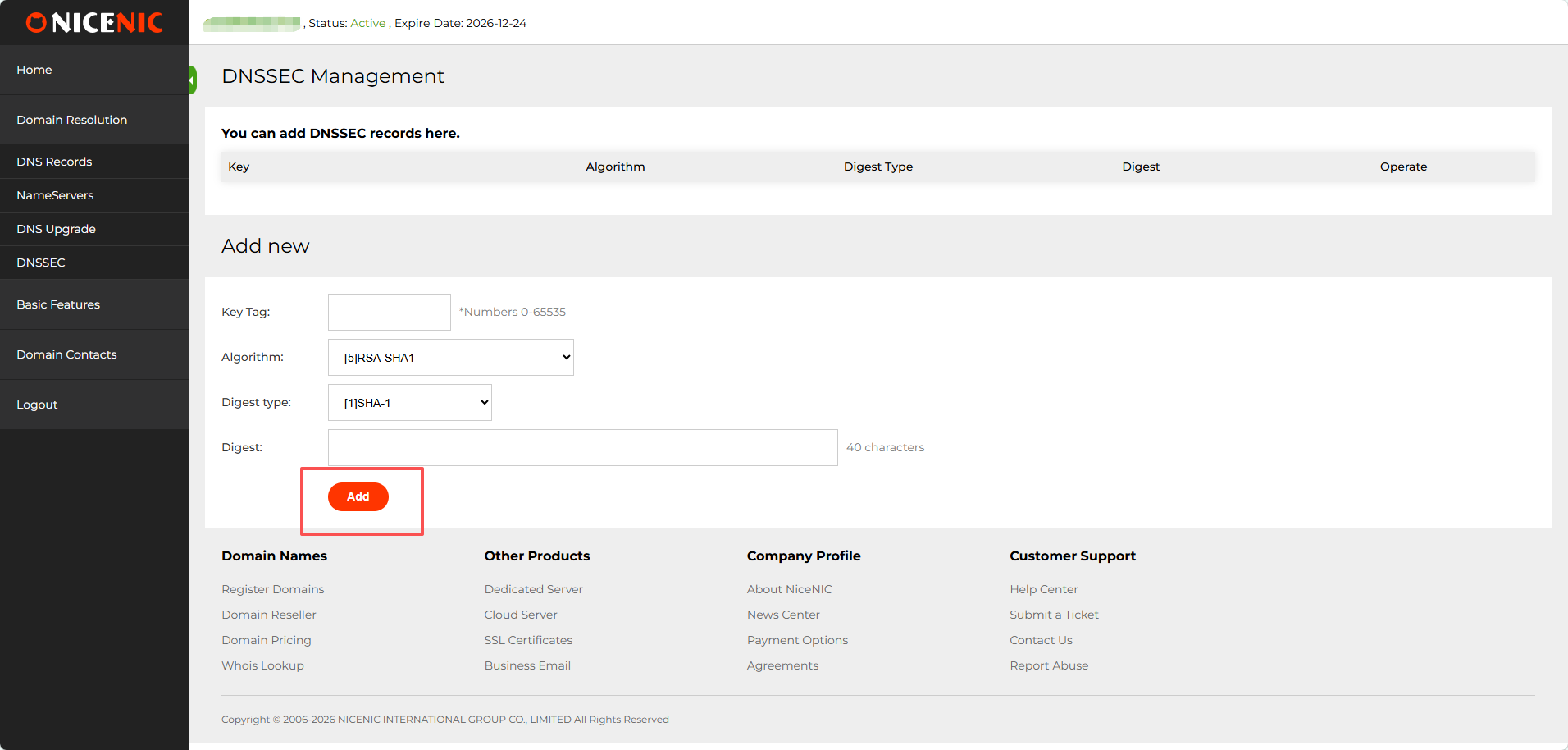
3. Enter the required infomation fo DNSSEC configuration (this will typically include DNSSEC key details provided by el teu DNS hosting provider).
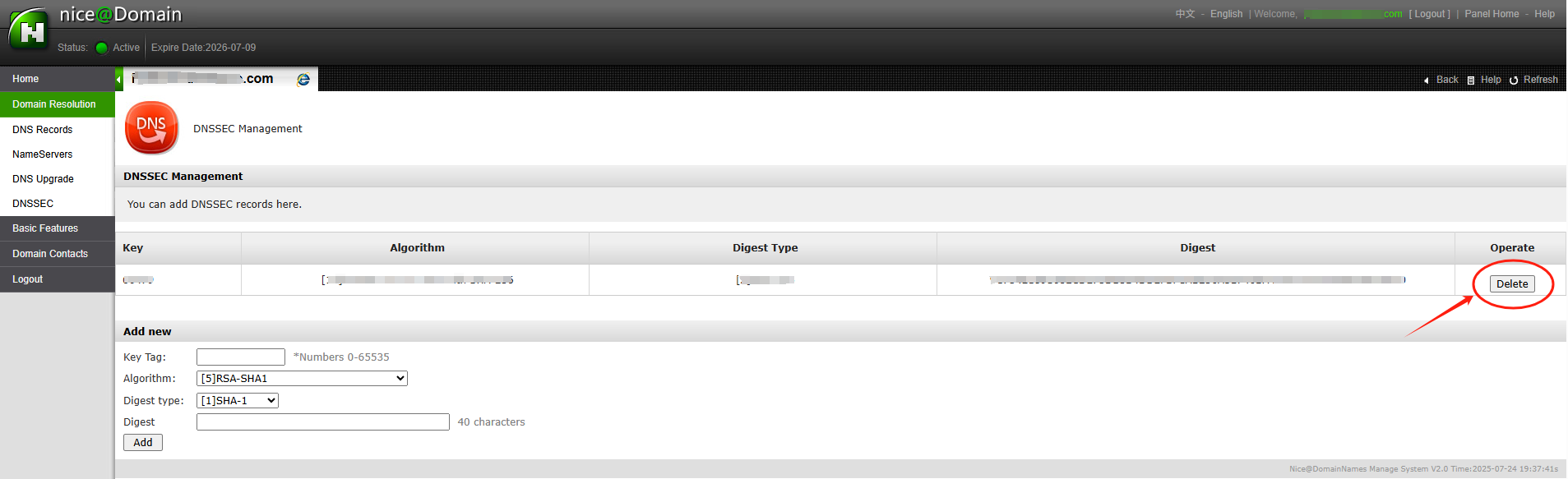
4. Once you've entered the infomation, click Afegir to enable DNSSEC fo the domini. Here’s an example of a successful DNSSEC setup:
After entering the necessary DNSSEC key data (usually the DS recod), you'll receive confirmation that DNSSEC has been successfully added to el teu domini settings. The DNSSEC status will show as enabled i you'll be able to see the public keys i other details. With DNSSEC ara enabled, el teu domini is better protected against DNS-related attacks.
Atention: if el teu domini name was transferred into NiceNIC from another Registrador, i you hope to disable the DNSSEC anterioriously with the old Registrador, please firstly check the latest whois, if you see "DNSSEC: unsigned", then it means during the domini transfer process, the DNSSEC settings have been disabled automatically by the old Registrador, while if it is "DNSSEC: signed", please check the domini management section at el teu control panel at NiceNIC, you should see the DNSSEC button, please click on the DNSSEC button to access the DNSSEC settings page.
Necessites ajuda? Sempre estem aquí per a tu.Suport humà