



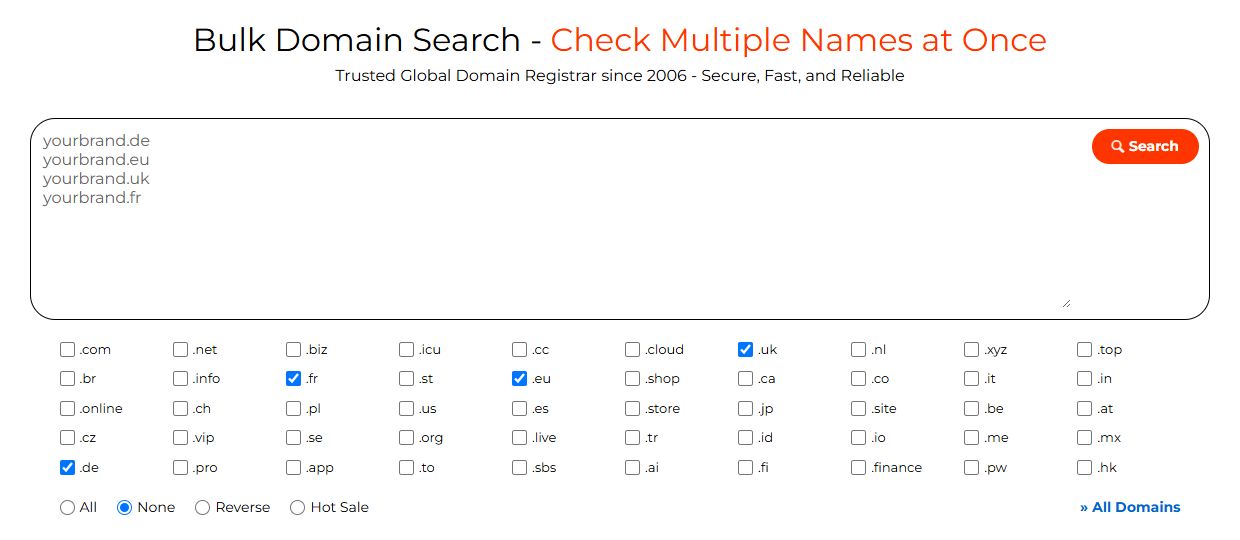
NiceNIC (NICENIC INTERNATIONAL GROUP CO., LIMITED) is an ICANN-accredited registrar, listed under IANA Registrar ID 3765, with operations dating back to 2006. Its catalog spans 2,500+ domain extensions and registration options, supported by free API tools, WHMCS integration and cryptocurrency funding. Check your target names with NiceNIC's bulk domain search, then use the matrix below to assign the right registration route to each extension.
Written by NiceNIC Content Team · Registry rules and product documentation checked: November 10, 2026.
1. European ccTLD Registration Requirements at a Glance
The practical distinction is who will hold the domain. A company’s registered office, a director’s citizenship and a service provider’s local address serve different purposes. Record the qualifying person or organization before you build the order.
2. Prepare Each Extension for Registration
.DE: Direct Foreign Ownership, with DNS Prepared in Advance
A company outside Germany can hold a .de domain directly. DENIC discontinued the former Admin-C role in its May 2018 registration-data changes.
For a holder based abroad, DENIC's terms, Section 3(4) provide for a German recipient of official or court documents when DENIC makes the corresponding request. The holder then has two weeks to name that representative. This is a specific service-of-documents process.
The immediate engineering task is DNS. Under DENIC's predelegation specifications, prepare at least two authoritative nameservers with distinct IP addresses, including at least one reachable over IPv4. Configure each server with its own addresses and make sure both answer authoritatively for the domain.
Create the zone at your DNS provider, check authoritative responses and supply glue when the nameserver sits inside the domain being delegated. Run the configuration through DENIC's NAST checker before submitting the nameserver set.
.EU: Choose the Organization, Residence or Citizenship Route
EURid permits registration by organizations established in the EU, Iceland, Liechtenstein or Norway. Individuals qualify through residence in those countries or through citizenship, including citizens living elsewhere.
That creates useful options for international teams. An eligible European subsidiary can hold a company domain. An eligible citizen living in Singapore or the United States can hold a personal domain through the citizenship route.
Keep the holder's identity consistent. Under EURid's registration-data rules, entering an organization name makes that organization the holder. A founder's qualifying citizenship does not automatically qualify a separately incorporated company outside the eligible area.
For company portfolios, select the intended legal entity before submitting contact data. For overseas individuals using citizenship, arrange the citizenship declaration with the registrar. Follow How to Register a .EU Domain at NiceNIC for the account and checkout steps.
.UK and .CO.UK: Use the Overseas Holder's Actual Details
Both .uk and .co.uk support overseas registrants. Nominet aligned the rules for direct .uk and third-level registrations in 2018, removing the extra UK service-address requirement and accepting PO boxes as address types.
Use the actual holder’s name, postal address and contact details. A UK address service is not a standard prerequisite for an overseas company’s .uk registration.
When moving an existing domain, prepare the receiving registrar's tag. Nominet's registrar-change settings allow automatic acceptance or a receiving-registrar handshake. Build that acceptance step into your migration schedule.
.FR: Register Through the Qualifying European Holder
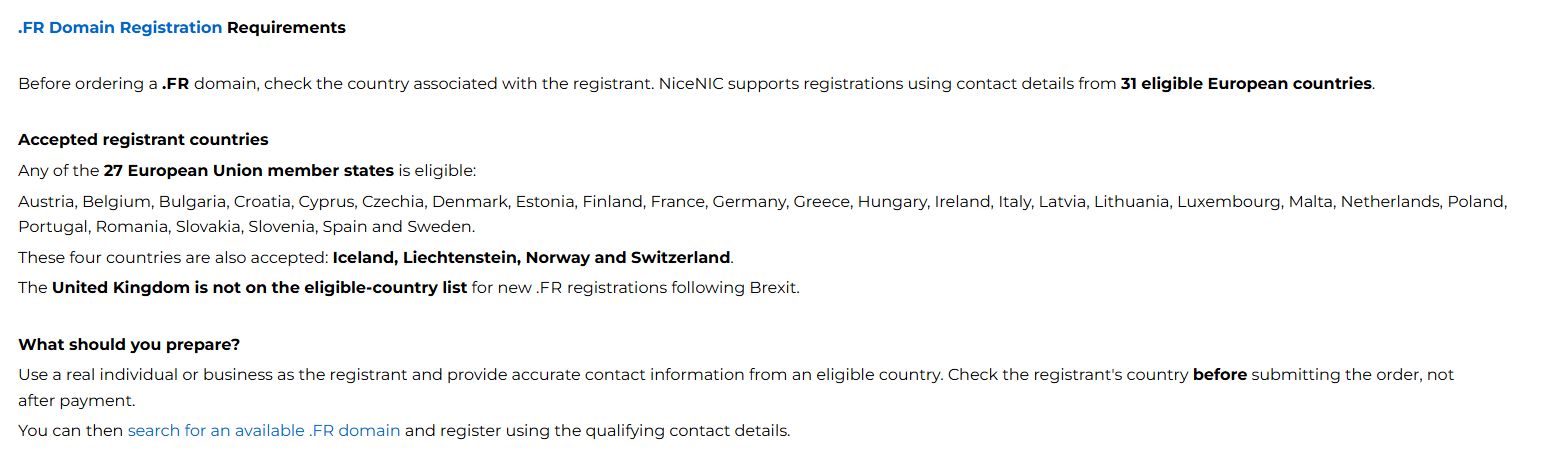
For .fr, Afnic’s eligibility area includes the EU, Iceland, Liechtenstein, Norway and Switzerland. Individuals qualify through residence; businesses qualify through their registered office or main place of business.
For example, a Swiss company with its registered office in Switzerland qualifies for .fr. That Swiss office alone does not establish .eu eligibility.
Prepare the company's exact legal name, qualifying address and registration records. Supply the identifiers requested for that holder and order. A French SIREN number is relevant to a French entity; it is not a universal identifier for every foreign company registering .fr. See NiceNIC's .FR domain registration requirements for order preparation details.
3. Put Trustee and Local-Presence Arrangements on a Clear Contractual Basis
A European expansion plan starts with the entities your business already has. Match those entities to the registry rules, then arrange any additional local support needed for the remaining names.
NiceNIC's Trustee Services guide explains the available roles: a local contact, an authorized representative or a recorded registrant under a separate agreement. Choose the arrangement for the exact extension and holder.
For a .eu or .fr project requiring assistance, request a proposal that settles these points:
Once those details are agreed, attach the arrangement to the domain’s operating record. Your finance, technical and account-management teams can then work from the same instructions.
4. Automate Registration with the NiceNIC Domain API
For hosting providers and developers, the next step is to connect European domain orders to the customer and billing systems already in use. Build the workflow around each extension’s holder information, DNS requirements and order status.
Start with Free API Access and the Sandbox
The NiceNIC Domain API is available to active Market and Reseller accounts without a separate API access fee or mandatory reseller-tier deposit.
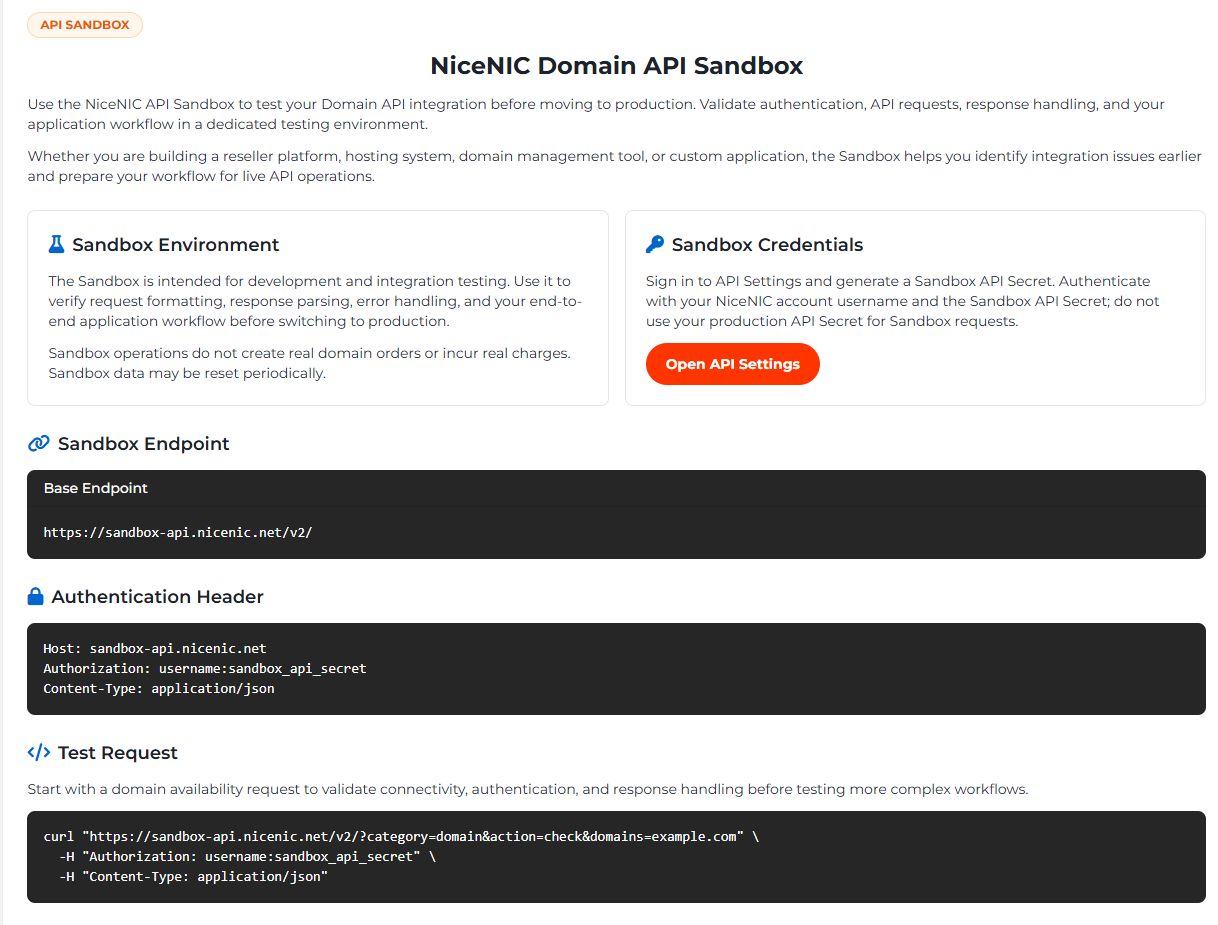
Use the free API Sandbox to test authentication, request formatting and response handling. Generate a Sandbox API Secret in your account and use the sandbox endpoint for development:
curl “https://sandbox-api.nicenic.net/v2/?category=domain&action=check&domains=example.de”
-H “Authorization: YOUR_USERNAME:YOUR_SANDBOX_API_SECRET”
-H “Content-Type: application/json”
This checks the integration in the test environment. Sandbox operations create no live domain orders and incur no real charges.
Map Your Registration Data to the Documented Fields
The Register Domain endpoint uses category=domain and action=register. Its documented fields include:
domain, year
dns1, dns2
organization, name
country, state, city, address, postcode
phone, email
contact_source=member
For a reseller, choose the customer’s approved registrant profile for each order. Use contact_source=member when your account profile is the intended source.
Use NiceNIC's extended attributes guide to identify the additional information required for each extension. Before enabling it in production, agree the submission process for citizenship declarations, eligibility documents and any trustee arrangement with NiceNIC's integration team. The public registration schema does not list a generic use_trustee_service switch.
Treat Pending Orders as an Operating State
Store each order's domain, customer, request time, returned code and message. Use NiceNIC's documented response codes to drive the next action:
code: 0 — success
code: 201 — pending
code: 400 — parameter error
These are values in the API response body.
For registration, NiceNIC’s documentation states that code: 201 means the order has been submitted and the fee deducted, with activation awaiting registry confirmation. If the domain cannot be activated, the documented process refunds the registration fee to the account balance within 24 hours.
After a timeout, reconcile the existing order before submitting another paid registration. That keeps billing and provisioning aligned.
Connect WHMCS and AI-Assisted Portfolio Checks
Hosting providers can install the free NiceNIC WHMCS Registrar Module to connect supported registrations, renewals, transfers and nameserver management to their billing workflow. NiceNIC currently lists support for the WHMCS 9.0 release line.
Build the customer order form around the chosen extension’s required information, then complete one live pilot for each registration route before expanding volume.
For planning and account queries, the NiceNIC MCP Server connects supported domain tools to compatible ChatGPT and Claude clients. Teams can use natural-language requests to check domain availability and account pricing while preparing a European portfolio.
5. Budget for Ownership and Fund One Operating Balance
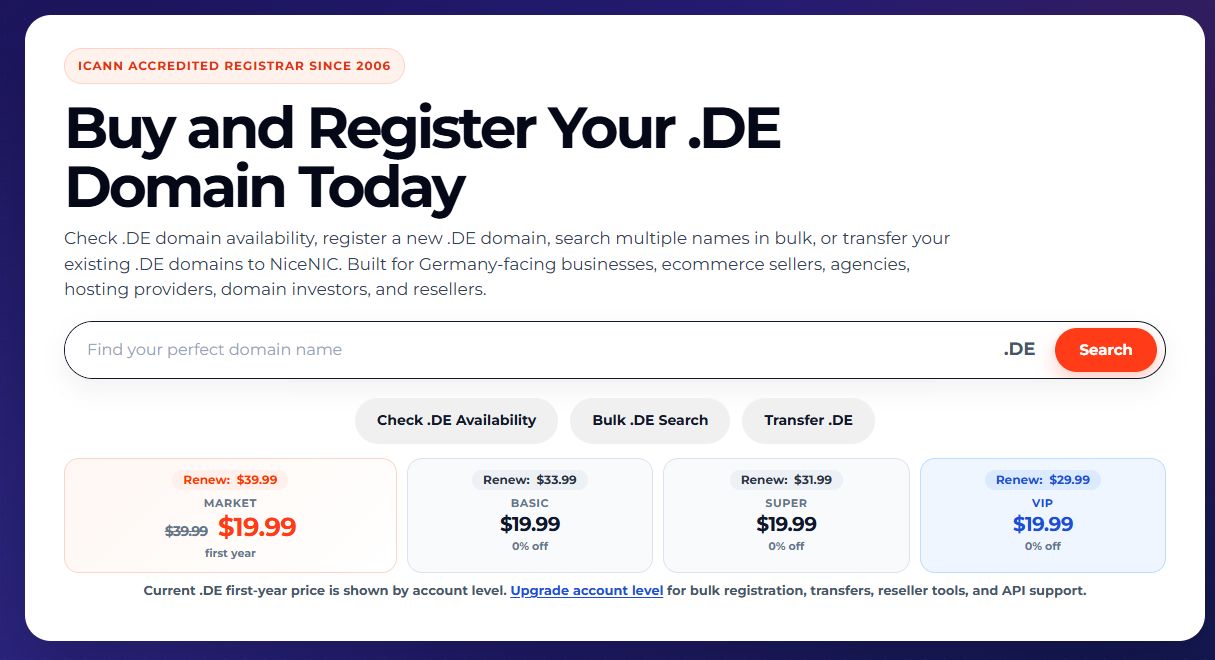
European domain budgeting works best when registration, renewal and local-service costs sit in the same worksheet.
For a domain registered for one year and then renewed annually, use:
Five-year planning cost = first-year registration + four annual renewals + recurring local-service fees + applicable payment costs and taxes.
Take the registration and renewal figures from NiceNIC's domain price list, and add the quoted trustee or representative fee for the relevant years. Record the quote date and refresh the forecast when prices change.
For larger portfolios, the NiceNIC reseller program offers Basic, Super and VIP levels through $200, $600 and $1,500 in usable account credit respectively. Deposits fund eligible purchases; there is no setup fee or annual reseller membership fee. Compare the savings across your actual .de, .eu, .uk and .fr mix.
Teams can fund that balance through NiceNIC's cryptocurrency payment options using USDT, USDC, BTC or ETH, with 0% NiceNIC processing fees. Include the payment provider's fee and network cost shown for the selected route in your funding calculation.
Once credited, the balance supports eligible registrations, renewals and automated domain operations. Set a funding threshold around the next renewal cycle so finance can replenish the account before scheduled orders run.
6. Move from Successful Registration to a Working European Portfolio
Finish each domain’s onboarding with an operating record covering the holder, renewal date, authorized contacts, DNS provider and intended use.
For each launch:
- Verify registration. Confirm the recorded holder, domain status and expiration date.
- Verify DNS. Check authoritative responses, the website destination and email records. Follow NiceNIC's DNSSEC setup guide to configure DNSSEC with your DNS provider and submit the required registry data through the domain control panel.
- Assign responsibility. Name the person responsible for renewals and registry correspondence.
- Test a normal management action. Retrieve domain details or update an approved DNS record through the workflow your team will use.
- Record the escalation route. Keep the order reference and integration details with the domain so support can investigate a specific operation.
NiceNIC publishes its contact, verification, domain-policy and evidence-based abuse-handling resources in the NiceNIC Trust Center. For these European ccTLDs, the applicable registry rules govern registration and lifecycle requirements. Include that registry information in your team's operating record.
When an order needs attention, route it by the actual symptom:
code: 201
7. Frequently Asked Questions
Can a non-European company manage .de, .eu, .uk and .fr domains in one NiceNIC account?
Yes. NiceNIC offers these extensions within one account. Overseas companies can register .de, .uk and .co.uk in their own name. For .eu and .fr, identify the qualifying holder and arrange any extension-specific local-presence assistance before ordering. Start with the company’s existing entities and their eligibility.
Does an overseas company need a UK service address for a .uk domain?
No. Overseas individuals and companies can register .uk and .co.uk using their actual non-UK address and contact details. Nominet removed the separate UK service-address requirement in 2018.
What does code: 201 mean for a NiceNIC domain registration?
It means the registration order has been submitted and charged, with activation awaiting registry confirmation. Track the existing order until its status is resolved. If activation cannot be completed, NiceNIC’s registration documentation specifies a refund to the account balance within 24 hours.
Can a hosting provider use USDT or USDC to fund European domain orders through WHMCS?
Yes. NiceNIC accepts USDT and USDC account funding with 0% NiceNIC processing fees. Once credited, the balance can pay for eligible registrations and renewals through the NiceNIC WHMCS module. Include the selected payment route’s provider and network costs in the funding amount.
Build Your European Registration Workflow with NiceNIC
Bring your target names, intended holders and deployment requirements together before the first batch. NiceNIC combines bulk search, registrar support, free integration tools and flexible account funding to help international teams turn that plan into an operating portfolio.
Send your European domain list, registrant country, entity type, DNS provider and planned API or WHMCS workflow through a NiceNIC support ticket or official Telegram support. Established hosts, agencies and portfolio operators can include their existing domain volume and request reseller-tier matching before the first batch. Our team can assess that business volume alongside the extensions and services you plan to use.


