


Wyświetlenia:83
Czas:2026-08-20 11:45:41 Autor: windy 
Forgetting one domain renewal can be inconvenient.
Forgetting a business-critical domain can interrupt a website, email, customer access, or an important digital asset.
And once you manage dozens or hundreds of domains, checking renewal settings one by one becomes another repetitive portfolio task.
NiceNIC Bulk Auto-Renew lets you select multiple domains and manage their auto-renewal settings together including renewal periods, renewal mode, and whether auto-renewal is active.
You can choose Once Only when a domain should automatically renew one time, or Every Time when you want the setting to continue for future renewal cycles, subject to sufficient account balance and applicable domain rules.
Quick Answer: Can You Set Auto-Renewal for Multiple Domains at Once?
Yes. NiceNIC lets you select multiple eligible domains and configure their auto-renewal settings in one bulk workflow.
From the domain management panel, select the domains you want to protect and choose Bulk Auto-Renew.
You can then review the selected domains, choose the renewal period, select Once Only or Every Time, enable the settings, and save them together.
The goal is simple:
Manage renewal protection at portfolio scale instead of configuring every domain separately.
Step 1: Select Multiple Domains and Choose Bulk Auto-Renew
Start from your NiceNIC domain list.
Select the domains you want to manage and click Bulk Auto-Renew.
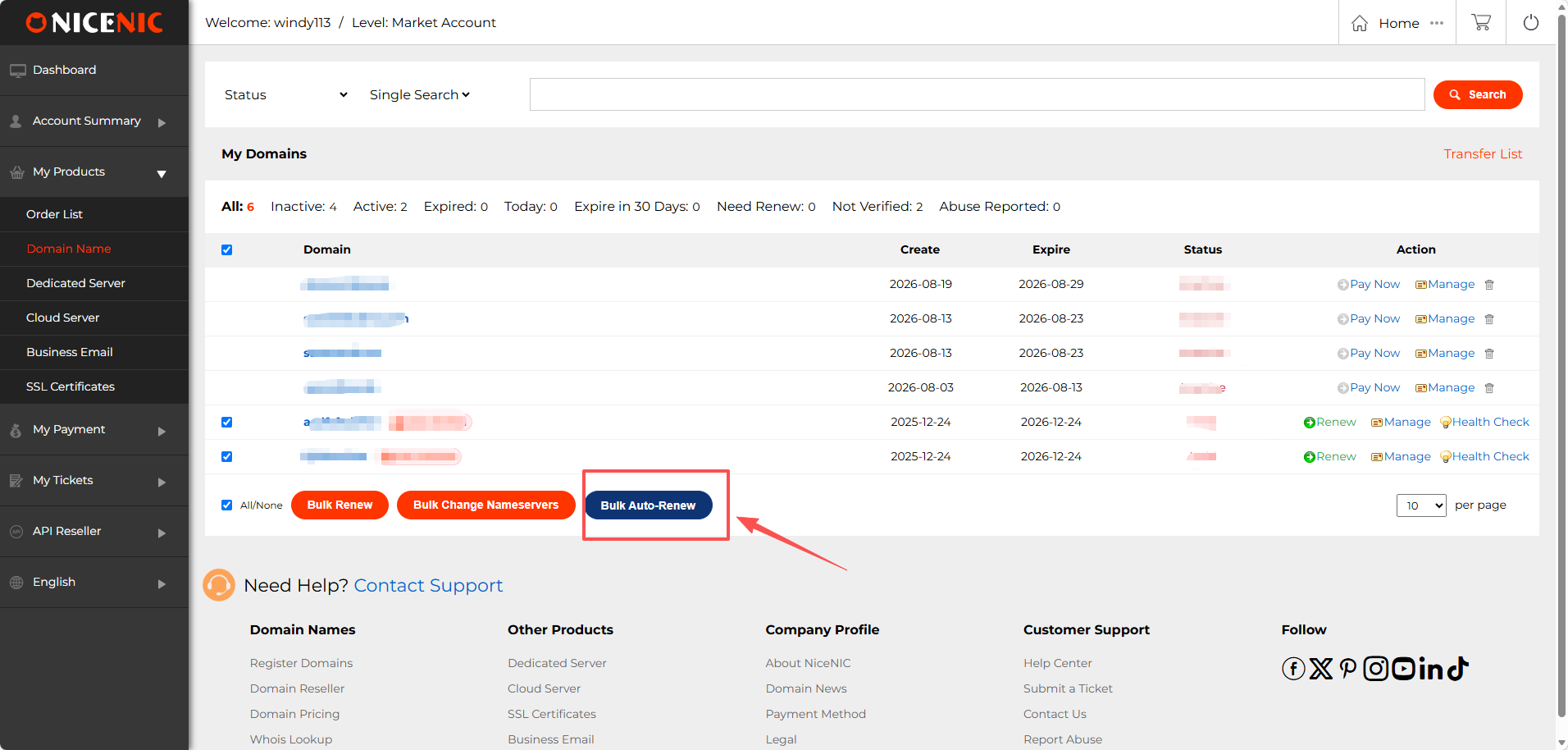
For a small portfolio, individual renewal settings may be manageable.
As the number of domains increases, bulk control becomes much more useful because renewal settings can be reviewed as part of the portfolio rather than as unrelated one-domain tasks.
Step 2: Choose How You Want the Domains to Renew
NiceNIC gives you more control than simply switching auto-renewal on or off.
For the selected domains, you can configure the renewal period and choose the auto-renewal mode.
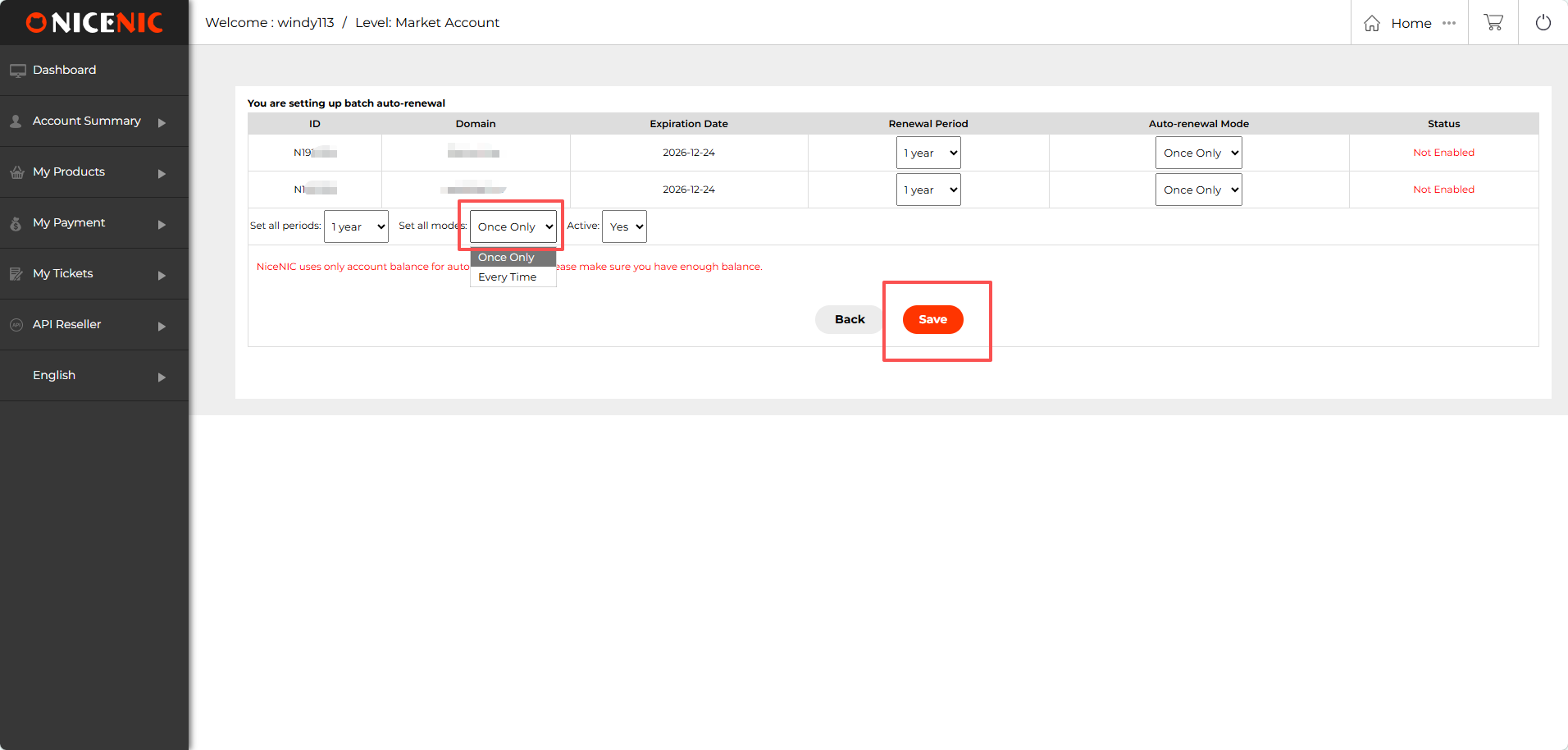
Once Only
Choose Once Only when you want the selected domain to automatically renew for the upcoming renewal cycle without making the setting permanent for every future cycle.
This can be useful when you want automation now but still want to make a fresh portfolio decision later.
Every Time
Choose Every Time when the domain should continue using auto-renewal for future renewal cycles, provided the account has sufficient balance and the domain remains eligible.
This is especially useful for:
Step 3: Save the Settings and Check the Result
After reviewing the selected domains and settings, click Save.
NiceNIC then displays the result for each domain so you can confirm whether the auto-renewal setting was successfully enabled.
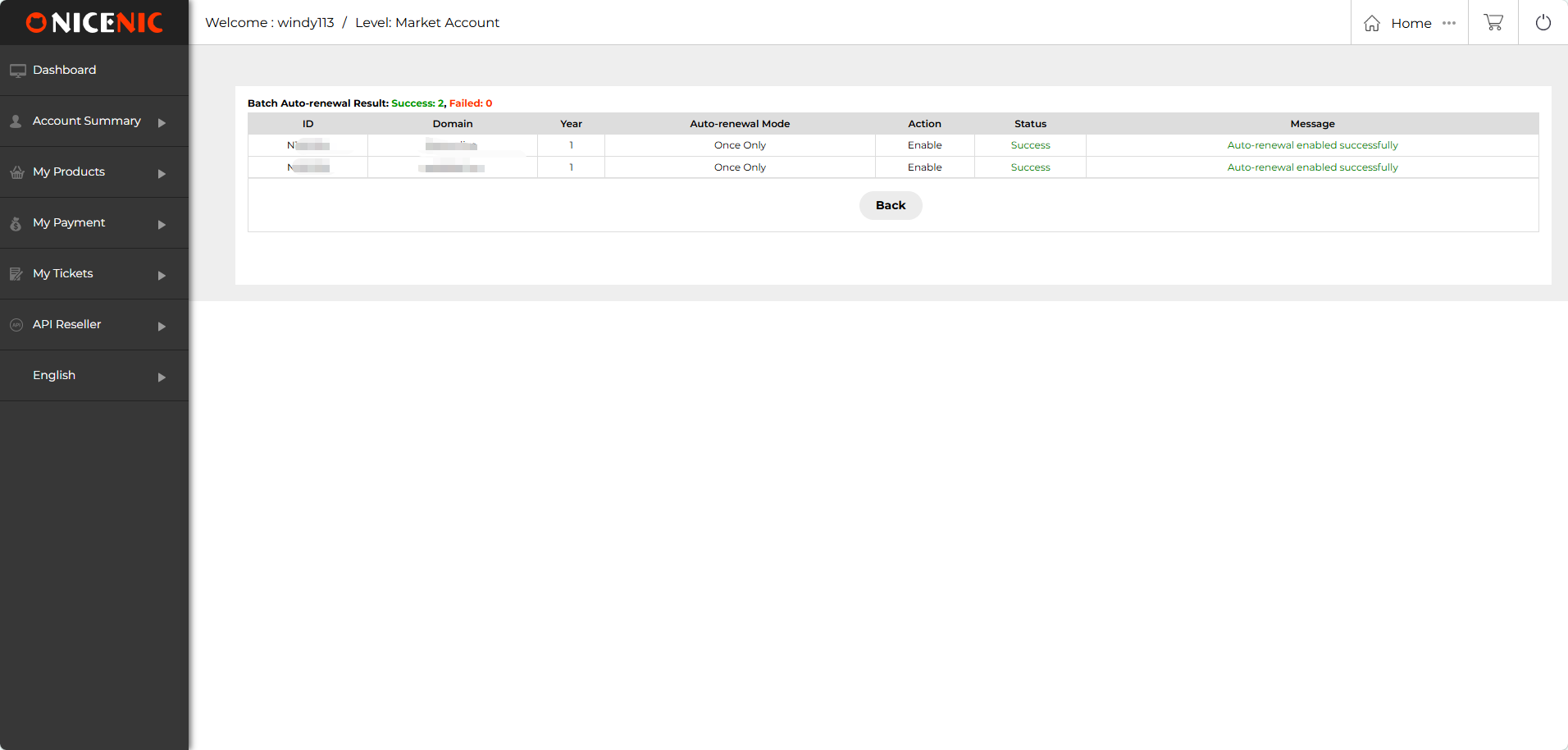
That confirmation matters when working with multiple domains.
A bulk action should not mean losing visibility into what happened to each domain.
Auto-Renewal Helps Reduce Risk — but Your Account Balance Still Matters
Auto-renewal works best when automation and funding are managed together.
NiceNIC automatic renewal uses available account balance, so sufficient funds need to be available when the renewal is processed.
That means setting Auto-Renew should be followed by a second habit:
keep enough balance available for the domains you intend to retain.
This is particularly important for larger portfolios because the combined renewal cost of many domains can be significantly different from renewing only one or two names.
Before relying on auto-renewal across a larger portfolio, review:
Need to add funds? Review NiceNIC Payment Methods
Bulk Auto-Renew Gives You Control in Both Directions
Automation should also be easy to change.
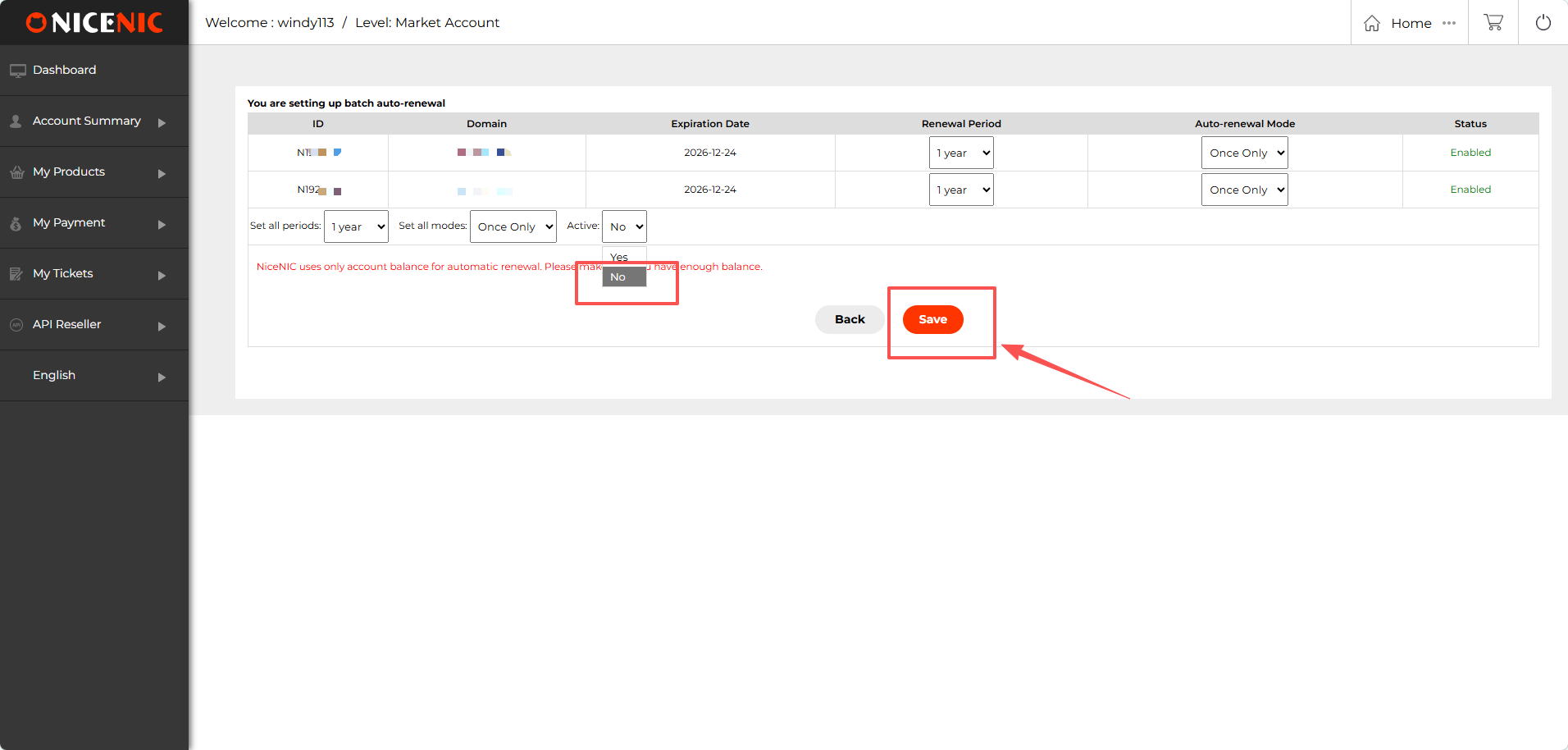
If your priorities change, NiceNIC allows selected domains to have auto-renewal disabled in bulk.
On the Bulk Auto-Renew page, change Active to No and save the new setting.
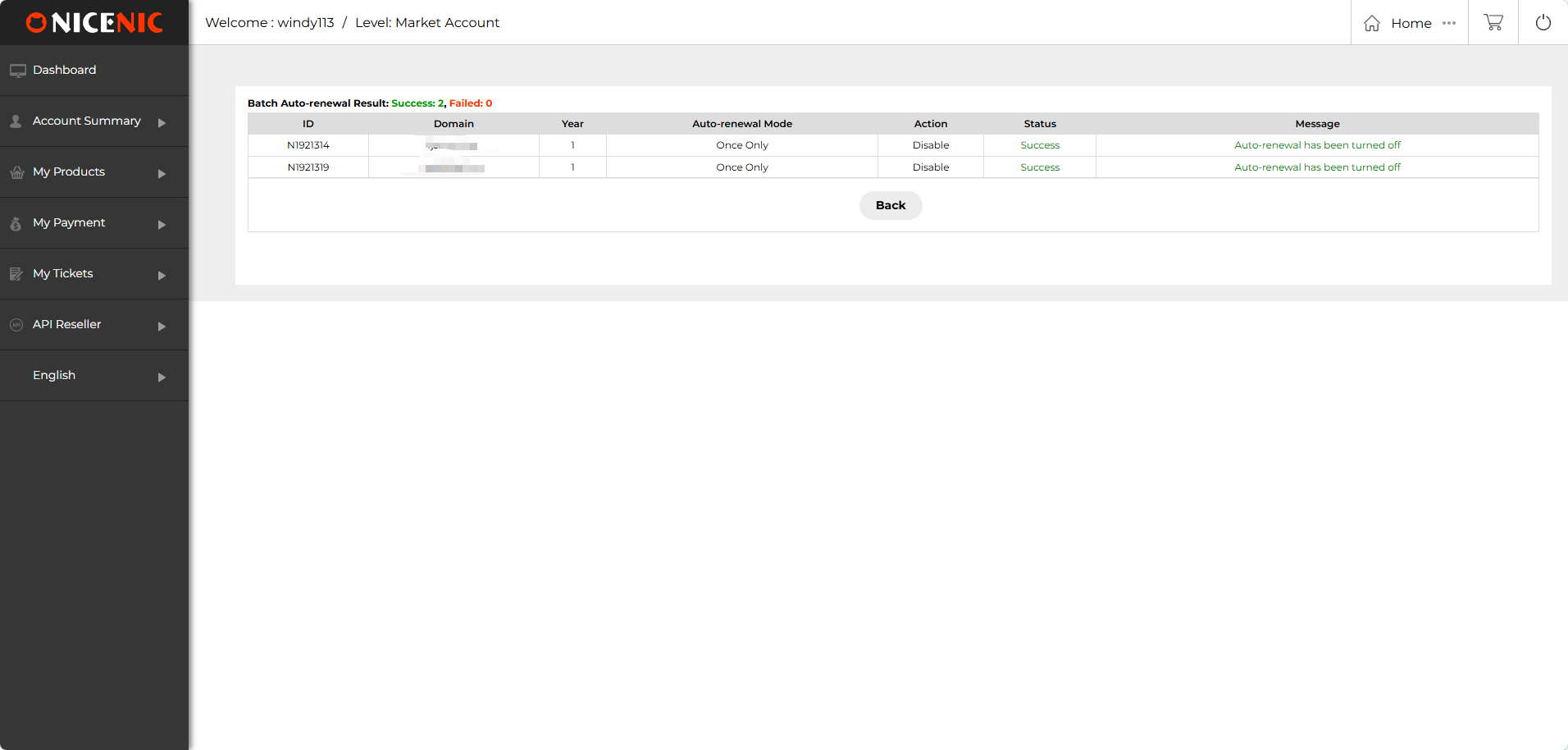
The result page then confirms whether the setting was successfully disabled.
This is important for domain investors and businesses because not every domain should remain on permanent auto-renewal forever.
Some domains become more important.
Others may no longer support a project, customer, brand, or investment strategy. The right renewal system needs both protection and control.
One-by-One Auto-Renew vs. NiceNIC Bulk Auto-Renew
The value increases as the portfolio grows.
Who Benefits Most from Bulk Auto-Renewal?
Domain Investors
A portfolio may contain both long-term assets and names that should be reviewed before renewal.
Every Time can help protect domains you know you want to retain, while Once Only gives you more control over names that should be reconsidered later.
Hosting Providers
Customer websites depend on their domains remaining active.
Bulk Auto-Renew makes it easier to apply renewal policies across groups of managed domains rather than configuring every customer domain individually.
Agencies
Agencies managing domains for multiple clients can organize renewal settings more efficiently and reduce repetitive account work.
Domain Resellers
Renewal operations become more important as customer volume grows.
NiceNIC also provides a Domain Reseller Program and Reseller API v2 for businesses moving from manual portfolio management toward deeper automation.
Auto-Renew Is Protection, Not a Reason to Stop Monitoring
Auto-renewal can reduce the risk of a domain being missed, but important domains should still be monitored.
For high-value, customer-facing, or business-critical domains, periodically check:
Ready to Put Your Portfolio on a Better Renewal Workflow?
You should not have to configure renewal protection one domain at a time as your portfolio grows.
NiceNIC Bulk Auto-Renew gives you one place to:
Create Your NiceNIC Account
Want to understand the ongoing cost first? Compare Domain Renewal Pricing
Managing costomer domains or a larger portfolio? Explore the NiceNIC Reseller Program
Frequently Asked Questions
1. Can I enable auto-renewal for multiple domains at once with NiceNIC?
Yes. NiceNIC Bulk Auto-Renew lets you select multiple eligible domains and manage their auto-renewal settings from one workflow.
2. What is the difference between Once Only and Every Time?
Once Only applies automatic renewal for one renewal cycle. Every Time keeps the domain configured for automatic renewal in future cycles, provided applicable requirements are met and sufficient account balance is available.
3. Can I choose a renewal period when using Bulk Auto-Renew?
Yes. The Bulk Auto-Renew interface lets you select the available renewal period for the selected domains before saving the settings.
4. How does NiceNIC pay for an automatic domain renewal?
NiceNIC automatic renewal uses available account balance. Make sure the account has enough balance before the renewal is due.
5. Can I turn off auto-renewal for multiple domains at once?
Yes. Select the domains, open Bulk Auto-Renew, set Active to No, and save the change. The result page shows whether the settings were successfully disabled.
6. Does auto-renewal guarantee that a domain will never expire?
No. Auto-renewal reduces manual renewal risk, but renewal can still depend on sufficient account balance, domain eligibility, registry rules, and other applicable conditions. Important domains should still be monitored.
7. Who should use Bulk Auto-Renew?
It is especially useful for domain investors, agencies, hosting providers, resellers, and businesses managing multiple domains or customer portfolios.
Protect the domains you intend to keep. Keep control over the ones you may not.
Create a NiceNIC Account
Forgetting a business-critical domain can interrupt a website, email, customer access, or an important digital asset.
And once you manage dozens or hundreds of domains, checking renewal settings one by one becomes another repetitive portfolio task.
NiceNIC Bulk Auto-Renew lets you select multiple domains and manage their auto-renewal settings together including renewal periods, renewal mode, and whether auto-renewal is active.
You can choose Once Only when a domain should automatically renew one time, or Every Time when you want the setting to continue for future renewal cycles, subject to sufficient account balance and applicable domain rules.
Quick Answer: Can You Set Auto-Renewal for Multiple Domains at Once?
Yes. NiceNIC lets you select multiple eligible domains and configure their auto-renewal settings in one bulk workflow.
From the domain management panel, select the domains you want to protect and choose Bulk Auto-Renew.
You can then review the selected domains, choose the renewal period, select Once Only or Every Time, enable the settings, and save them together.
The goal is simple:
Manage renewal protection at portfolio scale instead of configuring every domain separately.
Step 1: Select Multiple Domains and Choose Bulk Auto-Renew
Start from your NiceNIC domain list.
Select the domains you want to manage and click Bulk Auto-Renew.
For a small portfolio, individual renewal settings may be manageable.
As the number of domains increases, bulk control becomes much more useful because renewal settings can be reviewed as part of the portfolio rather than as unrelated one-domain tasks.
Step 2: Choose How You Want the Domains to Renew
NiceNIC gives you more control than simply switching auto-renewal on or off.
For the selected domains, you can configure the renewal period and choose the auto-renewal mode.
Once Only
Choose Once Only when you want the selected domain to automatically renew for the upcoming renewal cycle without making the setting permanent for every future cycle.
This can be useful when you want automation now but still want to make a fresh portfolio decision later.
Every Time
Choose Every Time when the domain should continue using auto-renewal for future renewal cycles, provided the account has sufficient balance and the domain remains eligible.
This is especially useful for:
- core brand domains
- active customer domains
- production websites
- important infrastructure domains
- long-term portfolio assets
Step 3: Save the Settings and Check the Result
After reviewing the selected domains and settings, click Save.
NiceNIC then displays the result for each domain so you can confirm whether the auto-renewal setting was successfully enabled.
That confirmation matters when working with multiple domains.
A bulk action should not mean losing visibility into what happened to each domain.
Auto-Renewal Helps Reduce Risk — but Your Account Balance Still Matters
Auto-renewal works best when automation and funding are managed together.
NiceNIC automatic renewal uses available account balance, so sufficient funds need to be available when the renewal is processed.
That means setting Auto-Renew should be followed by a second habit:
keep enough balance available for the domains you intend to retain.
This is particularly important for larger portfolios because the combined renewal cost of many domains can be significantly different from renewing only one or two names.
Before relying on auto-renewal across a larger portfolio, review:
- which domains should definitely renew
- the applicable renewal prices
- the total expected renewal exposure
- whether sufficient account balance will be available
Need to add funds? Review NiceNIC Payment Methods
Bulk Auto-Renew Gives You Control in Both Directions
Automation should also be easy to change.
If your priorities change, NiceNIC allows selected domains to have auto-renewal disabled in bulk.
On the Bulk Auto-Renew page, change Active to No and save the new setting.
The result page then confirms whether the setting was successfully disabled.
This is important for domain investors and businesses because not every domain should remain on permanent auto-renewal forever.
Some domains become more important.
Others may no longer support a project, customer, brand, or investment strategy. The right renewal system needs both protection and control.
One-by-One Auto-Renew vs. NiceNIC Bulk Auto-Renew
| Renewal Task | One-by-One Management | NiceNIC Bulk Auto-Renew |
|---|---|---|
| Select domains | Open domains individually | Select multiple domains together |
| Renewal period | Configure each domain separately | Manage renewal periods in one bulk view |
| Auto-renew mode | Repeat settings domain by domain | Choose Once Only or Every Time |
| Enable / disable | Change domains individually | Update selected domains together |
| Result review | Check separate domain settings | Review bulk processing results |
Who Benefits Most from Bulk Auto-Renewal?
Domain Investors
A portfolio may contain both long-term assets and names that should be reviewed before renewal.
Every Time can help protect domains you know you want to retain, while Once Only gives you more control over names that should be reconsidered later.
Hosting Providers
Customer websites depend on their domains remaining active.
Bulk Auto-Renew makes it easier to apply renewal policies across groups of managed domains rather than configuring every customer domain individually.
Agencies
Agencies managing domains for multiple clients can organize renewal settings more efficiently and reduce repetitive account work.
Domain Resellers
Renewal operations become more important as customer volume grows.
NiceNIC also provides a Domain Reseller Program and Reseller API v2 for businesses moving from manual portfolio management toward deeper automation.
Auto-Renew Is Protection, Not a Reason to Stop Monitoring
Auto-renewal can reduce the risk of a domain being missed, but important domains should still be monitored.
For high-value, customer-facing, or business-critical domains, periodically check:
- auto-renewal status
- expiration date
- renewal price
- available account balance
- whether the domain should still be retained
Ready to Put Your Portfolio on a Better Renewal Workflow?
You should not have to configure renewal protection one domain at a time as your portfolio grows.
NiceNIC Bulk Auto-Renew gives you one place to:
- select multiple domains
- choose renewal periods
- use Once Only or Every Time
- enable auto-renewal in bulk
- disable it again when needed
- review the result of the bulk action
Create Your NiceNIC Account
Want to understand the ongoing cost first? Compare Domain Renewal Pricing
Managing costomer domains or a larger portfolio? Explore the NiceNIC Reseller Program
Frequently Asked Questions
1. Can I enable auto-renewal for multiple domains at once with NiceNIC?
Yes. NiceNIC Bulk Auto-Renew lets you select multiple eligible domains and manage their auto-renewal settings from one workflow.
2. What is the difference between Once Only and Every Time?
Once Only applies automatic renewal for one renewal cycle. Every Time keeps the domain configured for automatic renewal in future cycles, provided applicable requirements are met and sufficient account balance is available.
3. Can I choose a renewal period when using Bulk Auto-Renew?
Yes. The Bulk Auto-Renew interface lets you select the available renewal period for the selected domains before saving the settings.
4. How does NiceNIC pay for an automatic domain renewal?
NiceNIC automatic renewal uses available account balance. Make sure the account has enough balance before the renewal is due.
5. Can I turn off auto-renewal for multiple domains at once?
Yes. Select the domains, open Bulk Auto-Renew, set Active to No, and save the change. The result page shows whether the settings were successfully disabled.
6. Does auto-renewal guarantee that a domain will never expire?
No. Auto-renewal reduces manual renewal risk, but renewal can still depend on sufficient account balance, domain eligibility, registry rules, and other applicable conditions. Important domains should still be monitored.
7. Who should use Bulk Auto-Renew?
It is especially useful for domain investors, agencies, hosting providers, resellers, and businesses managing multiple domains or customer portfolios.
Protect the domains you intend to keep. Keep control over the ones you may not.
Create a NiceNIC Account
Akredytowany rejestrator ICANN od 2006 roku
Kup i zarejestruj swoją domenę .COM już dziś
Sprawdź dostępność domeny .COM, zarejestruj nową domenę .COM, wyszukaj wiele nazw hurtowo lub przenieś istniejące domeny .COM do NiceNIC. Stworzone dla firm, inwestorów domen, agencji, dostawców hostingu i resellerów.
Odnów: $17.99
Rynek
$22.49 $14.99
pierwszy rok
Odnów: $17.99
Podstawowe
$14.99
0% off
Odnów: $17.99
Super
$14.99
0% off
Odnów: $16.99
VIP
$14.99
0% off
POWIĄZANE WIADOMOŚCI:
Ostatnie wiadomości:
Register 5+ Domains and Save Up to 10% with NiceNIC
Najnowsze wiadomości: .NEWS vs .COM: Which Domain Is Better for a News, Media, or Publishing Website?
Najnowsze wiadomości: .NEWS vs .COM: Which Domain Is Better for a News, Media, or Publishing Website?


