


NiceNIC has officially received its direct .CN registrar accreditation, and .CN and .COM.CN domain registration is now available through NiceNIC.
NiceNIC has also been an ICANN-accredited domain registrar since 2006. The new .CN accreditation is specific to the .CN registration system and is separate from NiceNIC's ICANN accreditation.
Customers can now register:
-
.CN -
.COM.CN
with the following current NiceNIC pricing:
You can search for an available .CN or .COM.CN domain at NiceNIC and proceed with the order online.
There is one important requirement to prepare for before registering:
CNNIC requires real-name verification before a .CN or .COM.CN registration can be completed.
The required document depends on the registrant type:
- Individual registrant: valid passport
- Company registrant: valid company registration certificate
Most importantly:
The registrant name and document number must exactly match the submitted document.
Preparing the correct information before ordering can significantly reduce avoidable verification delays.
.CN Registration at NiceNIC: Quick Facts
What Has Changed for .CN at NiceNIC?
NiceNIC can now provide .CN and .COM.CN registration through its direct .CN registrar channel.
For customers, this means .CN becomes part of the domain-registration services that can be handled through a NiceNIC account for:
- domain search;
- registration;
- registrant verification;
- account management;
- renewal;
- registrar-level support.
This is useful for:
- companies entering the China market;
- international businesses;
- ecommerce brands;
- China-focused projects;
- agencies;
- hosting companies;
- domain resellers;
- domain portfolio managers;
- businesses protecting important regional versions of their brand.
If your primary domain is:
yourbrand.com
it may now be worth checking whether:
yourbrand.cn
or:
yourbrand.com.cn
is still available.
Search Available Domains at NiceNIC
What Does "Direct .CN Registrar" Mean?
.CN is China’s country-code top-level domain.
The registry and registration-management framework is operated by CNNIC, the China Internet Network Information Center.
NiceNIC’s newly obtained direct .CN registrar accreditation means supported .CN and .COM.CN registrations can now be provided through NiceNIC’s direct registrar service.
For customers, the practical point is straightforward:
You can now register and manage .CN domains through NiceNIC's direct registrar channel.
This accreditation should not be confused with NiceNIC’s ICANN accreditation.
They represent two different things:
ICANN Accreditation
NiceNIC has been an ICANN-accredited registrar since 2006.
.CN Registrar Accreditation
This newly obtained accreditation relates specifically to the .CN registration system.
For official information about .CN, see CNNIC's National Top-Level Domain information.
How Much Does a .CN Domain Cost at NiceNIC?
Current NiceNIC pricing is designed to be easy to understand.
Market Account
.CN registration: $24.99
.CN renewal: $24.99
.COM.CN registration: $24.99
.COM.CN renewal: $24.99
Core Reseller
.CN registration: $21.99
.CN renewal: $21.99
.COM.CN registration: $21.99
.COM.CN renewal: $21.99
The key point is:
Registration and renewal currently use the same price.
So customers can see the recurring cost before registration instead of discovering a very different renewal price later.
You can also check current NiceNIC domain pricing before placing an order.
Is .CN Renewal More Expensive Than Registration?
No under NiceNIC’s current pricing.
For both:
.CN
and:
.COM.CN
the current registration and renewal prices are the same.
Market Account
Registration: $24.99
Renewal: $24.99
Core Reseller
Registration: $21.99
Renewal: $21.99
This can be especially useful for businesses and resellers calculating the long-term cost of a regional domain portfolio.
What Is the .CN Redemption Fee?
NiceNIC’s current redemption fee for:
-
.CN -
.COM.CN
is:
$120
Redemption is not the same as normal renewal.
For an important .CN domain, the safer approach is to:
- monitor the expiration date;
- keep the account email current;
- maintain sufficient payment readiness;
- renew before expiration.
A business-critical domain should not rely on redemption as its normal renewal strategy.
CNNIC Real-Name Verification: What You Need to Know
This is the most important operational difference between .CN and many ordinary domain registrations.
CNNIC requires real-name verification before the .CN registration can be completed.
The domain registration therefore does not finish simply because:
- the domain is available;
- the order has been created;
- payment has been completed.
The registrant information still needs to satisfy the .CN verification requirement.
The required document depends on who is registering the domain.
.CN Registration for Individuals
An individual registrant must provide:
- valid passport
- passport number
The registrant name entered into the domain order must exactly match the passport.
The passport number entered into the order must also exactly match the passport.
For example, if the passport shows:
Given Name: JOHN
Surname: SMITH
Passport Number: AB1234567
the registration information should correspond with that document.
Do not:
- change the spelling;
- use a nickname;
- use another person's passport number;
- enter a different document number.
For NiceNIC’s current individual .CN registration workflow:
Use a valid passport.
Other identity documents should not be substituted for the passport in this workflow.
.CN Registration for Companies
A company registrant must provide:
- valid company registration certificate
- company registration / certificate number
The company registrant name entered in the order must correspond exactly with the submitted company registration certificate.
The registration number must also match the certificate.
For example:
If the company certificate states:
Example International Limited
do not enter:
Example International
or:
Example Ltd
unless that is exactly how the legal company name appears on the submitted document.
The safest rule is:
Copy the legal registrant information directly from the company registration certificate.
.CN Real-Name Verification Requirements at a Glance
This is the most important preparation step before ordering.
Why Does the Information Need to Match Exactly?
The registrant information is used for CNNIC real-name verification.
If the information entered during registration differs from the supporting document, verification can fail.
Typical problems can include:
- different spelling of the name;
- shortened company name;
- wrong passport number;
- wrong company registration number;
- inconsistent registrant type;
- incorrect document details.
For this reason:
Do not type the registrant information from memory. Compare it directly with the document before submitting the order.
Can a Foreign Individual Register .CN?
NiceNIC’s current individual workflow accepts a valid passport for .CN registration, subject to the applicable CNNIC verification process.
Prepare:
- passport;
- passport number;
- full registrant name;
- accurate address;
- valid email;
- current telephone number.
The most important requirement remains:
Name and passport number must match the submitted passport exactly.
Can a Foreign Company Register .CN?
NiceNIC’s current company-registration workflow supports company applicants using a valid company registration certificate, subject to the applicable verification process.
Prepare:
- legal company name;
- valid company registration certificate;
- company registration / certificate number;
- accurate contact information.
The legal registrant name and registration number should be entered exactly as shown on the certificate.
.CN vs .COM.CN: Which Should You Choose?
Both belong to China’s .CN namespace.
.CN
Example:
brand.cn
This is the shorter structure.
It can work well for:
- brands;
- companies;
- ecommerce;
- apps;
- regional services.
.COM.CN
Example:
brand.com.cn
This provides a commercial structure under .CN.
It may suit:
- companies;
- ecommerce businesses;
- commercial services;
- agencies.
A business may register:
-
.CN; -
.COM.CN; - both.
Should You Register Both .CN and .COM.CN?
There is no requirement to register both.
But for an important brand, it may be worth checking both.
For example:
brand.cn
and:
brand.com.cn
Registering both can help with:
- regional brand protection;
- future flexibility;
- preventing third-party registration of an important variation.
You do not necessarily need to operate two separate websites.
One domain can remain part of the company’s defensive domain portfolio.
Should You Register .CN if You Already Own .COM?
Consider a company that owns:
brand.com
and plans to operate in or market to China.
It may make sense to check:
brand.cn
and:
brand.com.cn
before they are registered by someone else.
Possible reasons include:
- China-market branding;
- regional campaigns;
- future expansion;
- brand protection;
- customer recognition.
The decision should be based on the actual business strategy.
Who Should Consider a .CN Domain?
A .CN domain may be useful for:
- companies serving China;
- international companies entering China;
- China-focused ecommerce;
- Chinese-language projects;
- technology companies;
- local campaigns;
- brand protection;
- agencies;
- hosting providers;
- domain resellers;
- portfolio owners.
Choose the extension because it fits:
- your market;
- audience;
- brand;
- regional strategy.
Does .CN Automatically Rank Better in Search?
No automatic ranking advantage should be promised.
A country-code domain can communicate geographic context, but search visibility also depends on:
- useful content;
- language;
- technical SEO;
- backlinks;
- website quality;
- user experience;
- search intent.
A .CN domain should therefore be chosen primarily for regional branding and market relevance, not because the extension alone is expected to guarantee rankings.
.CN for Agencies, Hosting Companies and Domain Resellers
NiceNIC’s new direct .CN registrar accreditation is especially relevant for businesses managing customer domains.
Current Core Reseller pricing is:
$21.99 registration
and:
$21.99 renewal
for both .CN and .COM.CN.
Businesses with recurring domain volume can explore the NiceNIC Reseller Program.
Businesses that want domain registration inside their own:
- website;
- hosting platform;
- customer portal;
- SaaS service;
- internal system
can also explore NiceNIC Domain API.
For agencies and resellers, the best .CN order process is:
Confirm Registrant Type → Collect Verification Document → Verify Name and Number → Search Domain → Register
Do not wait until after the customer places the order to discover that the required document is missing.
Frequently Asked Questions About .CN Registration
Is NiceNIC now a direct .CN registrar?
Yes. NiceNIC has received direct .CN registrar accreditation and can now provide supported .CN and .COM.CN registrations through its direct registrar channel.
Is NiceNIC also ICANN accredited?
Yes. NiceNIC has been an ICANN-accredited registrar since 2006. The .CN registrar accreditation is separate and relates specifically to the .CN registration system.
Who manages .CN?
CNNIC, the China Internet Network Information Center, is responsible for China’s .CN national top-level domain.
Can I register .CN at NiceNIC now?
Yes.
Can I register .COM.CN?
Yes.
How much does .CN cost?
Current NiceNIC Market registration and renewal pricing is $24.99.
How much does .COM.CN cost?
Current NiceNIC Market registration and renewal pricing is also $24.99.
What is the Core Reseller price?
Current Core Reseller registration and renewal pricing is $21.99.
Is .CN renewal more expensive than registration?
No under the current NiceNIC pricing. Registration and renewal currently use the same price.
What is the redemption fee?
The current NiceNIC redemption fee for .CN and .COM.CN is $120.
Does .CN require real-name verification?
Yes. CNNIC requires real-name verification before the domain registration can be completed.
What does an individual need?
A valid passport and passport number.
What does a company need?
A valid company registration certificate and the corresponding registration / certificate number.
Can an individual use another national ID?
Not through NiceNIC’s current international individual .CN workflow. Use a valid passport.
Does the registrant name have to match the document?
Yes. The registrant name must exactly match the submitted document.
Does the document number have to match exactly?
Yes. The passport number or company registration number entered in the order must exactly match the submitted document.
What if the registration returns an error?
First verify that the registrant type, name and document number are correct.
If everything appears correct but the registration still fails, take a screenshot of the error and Submit a NiceNIC Support Ticket so the NiceNIC team can check it.
How to Register a .CN or .COM.CN Domain at NiceNIC
The current NiceNIC .CN registration flow integrates the CNNIC-required registrant information directly into the order process.
The complete path is:
Search Domain → Click Register → Enter .CN Additional Information → Confirm Details → Make Payment → CNNIC Real-Name Verification → Registration Completed
Before starting, prepare the correct supporting document.
Individual
Prepare:
- valid passport;
- passport number.
Company
Prepare:
- valid company registration certificate;
- company registration / certificate number.
And remember:
The registrant name and document number must exactly match the supporting document.
Start from NiceNIC Domain Search.
Step 1: Search for Your .CN or .COM.CN Domain
Open NiceNIC Domain Search.
Enter the domain you want.
For example:
yourbrand.cn
or:
yourbrand.com.cn
Then click Start Search.
Before continuing, verify:
- exact spelling;
-
.CNor.COM.CN; - whether the domain is the intended brand or project name.
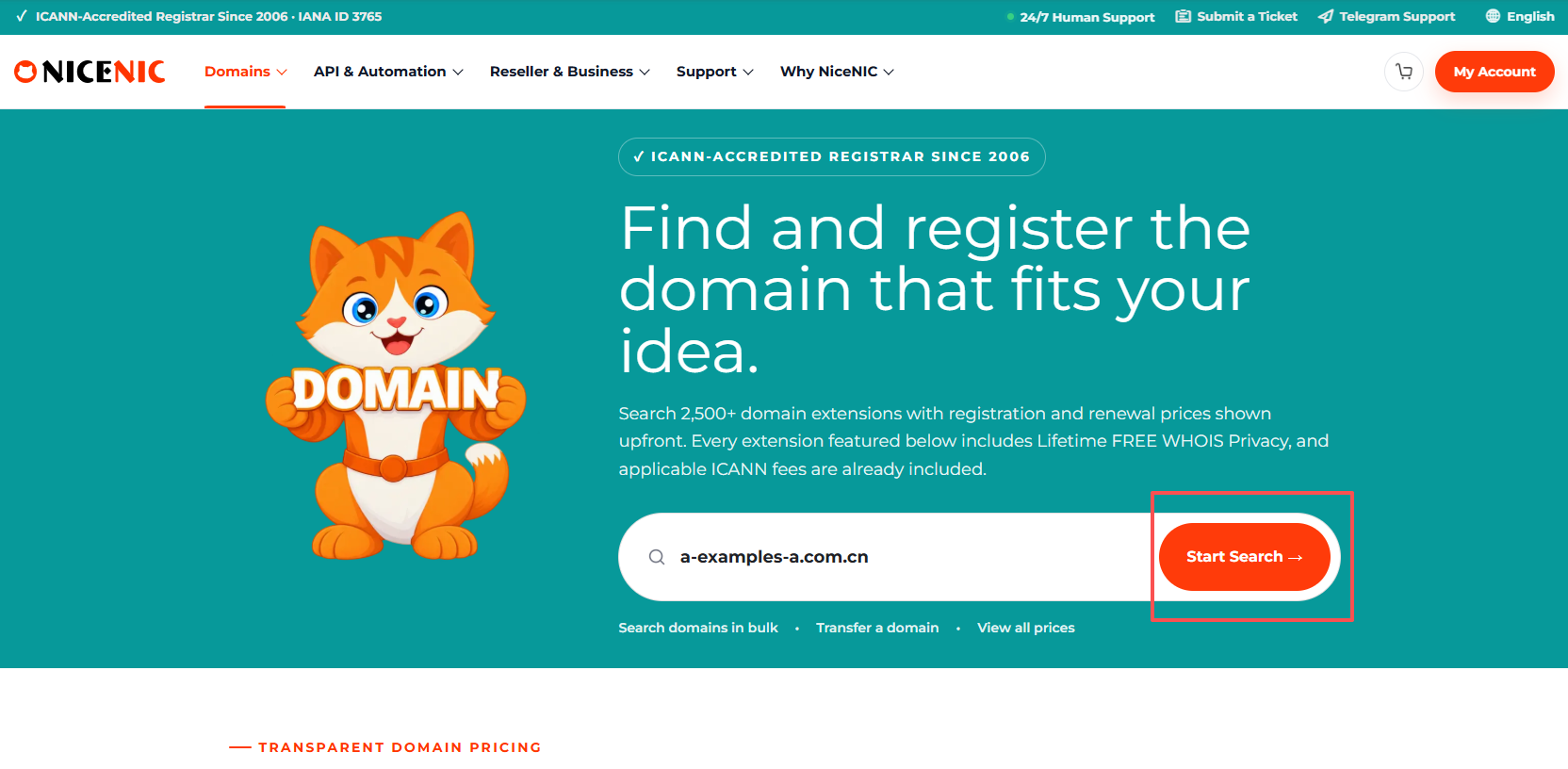
Screenshot caption: Enter the .CN or .COM.CN domain you want and click Start Search.
Step 2: Confirm Availability, Registration Price and Renewal Price
The search-results page shows:
- domain name;
- availability;
- registration price;
- renewal price;
- registration action.
If the domain is available, confirm the current price.
In the Market-account example shown:
Registration: $24.99/year
Renewal: $24.99
Then click Register.
Do not continue until you have confirmed:
Domain + Extension + Registration Price + Renewal Price
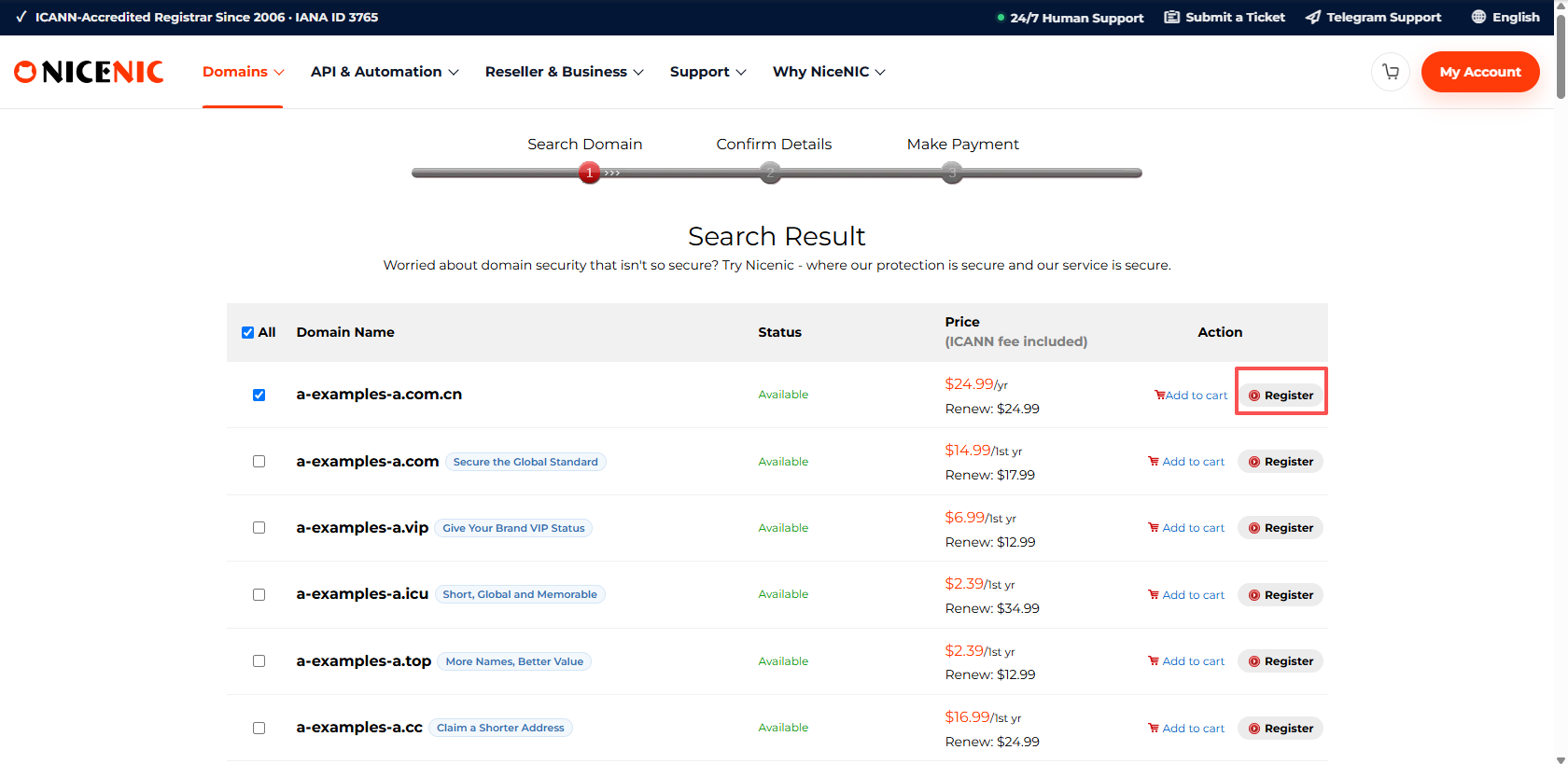
Screenshot caption: Confirm that the .CN or .COM.CN domain is available, review the registration and renewal price, then click Register.
Step 3: Complete "Additional Information Required for .CN Domains"
The next page contains a dedicated section:
Additional Information Required for .CN Domains
This information is required for the CNNIC real-name verification process.
Individual Registration
Choose:
Document Type: Passport
Then enter:
Passport Number
Complete the remaining registrant contact information, including:
- first name;
- last name;
- country or region;
- state / province;
- city;
- address;
- postal code;
- telephone;
- valid email address.
The system may also display a confirmation that the Owner Type is Individual.
The key rule is:
The first name, last name and passport number must correspond exactly with the valid passport submitted for verification.
Company Registration
For a company registrant, use:
- valid company registration certificate;
- corresponding registration / certificate number;
- exact legal company registrant name;
- accurate company contact information.
The company registrant name and document number must exactly match the company registration certificate submitted for verification.
Avoid These Common Errors
Do not:
- shorten the registrant name;
- translate or alter the legal company name unnecessarily;
- enter a nickname;
- mistype the passport number;
- enter an unrelated company number;
- use another person's document.
These mismatches can cause CNNIC real-name verification to fail.
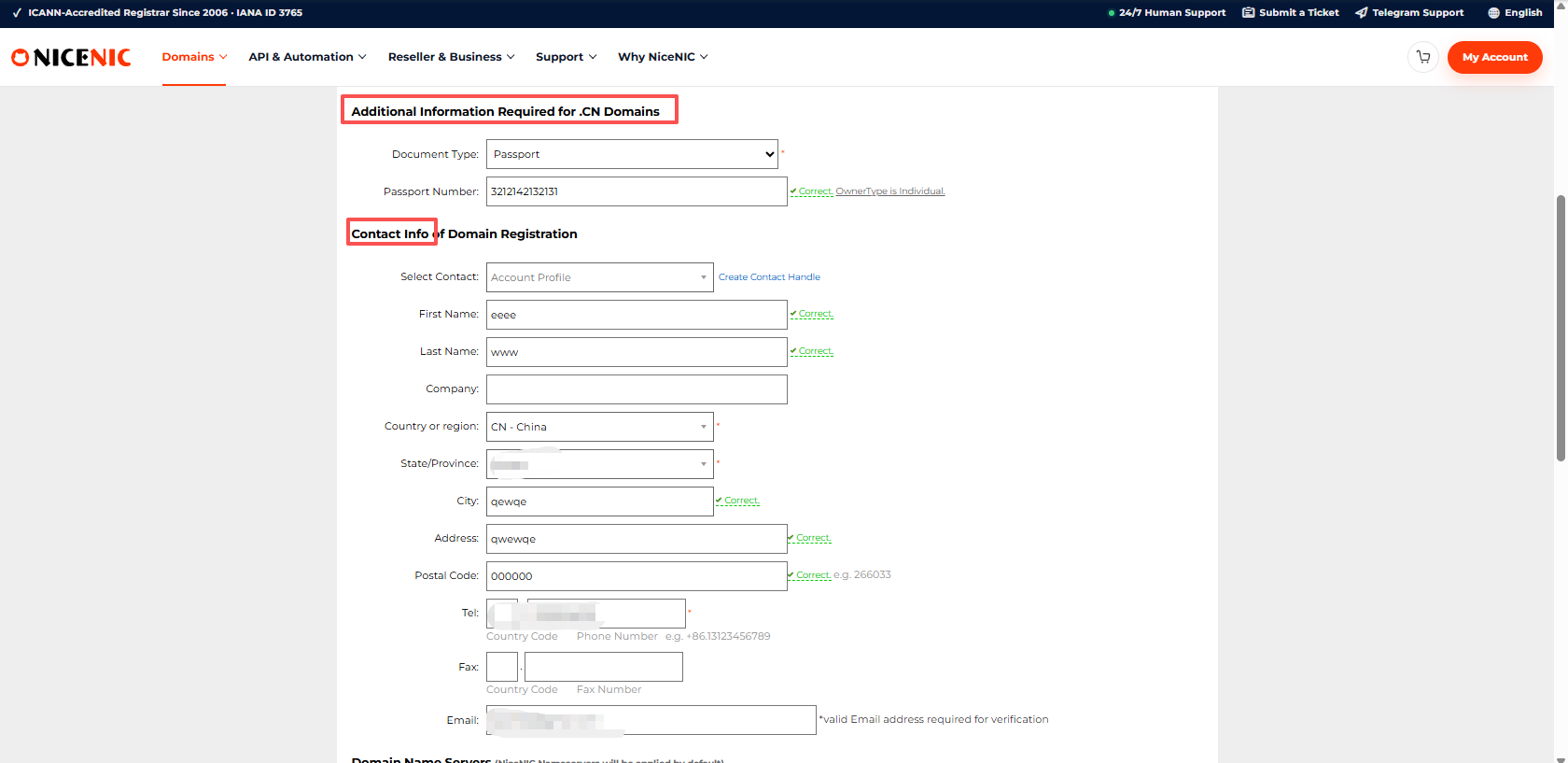
Screenshot caption: Complete the .CN-specific document information and registrant contact details. The registrant name and document number must exactly match the verification document.
Step 4: Review the Registrant Details and Nameservers
The next screen allows you to review the domain registration information.
Check:
- domain;
- registration term;
- registrant name;
- company, if applicable;
- country or region;
- province;
- city;
- address;
- postal code;
- telephone;
- email;
- nameservers.
For .CN, pay particular attention to:
Registrant Name
and:
Registrant Information
Compare them with the passport or company registration certificate before moving forward.
If the information is correct, click Next.
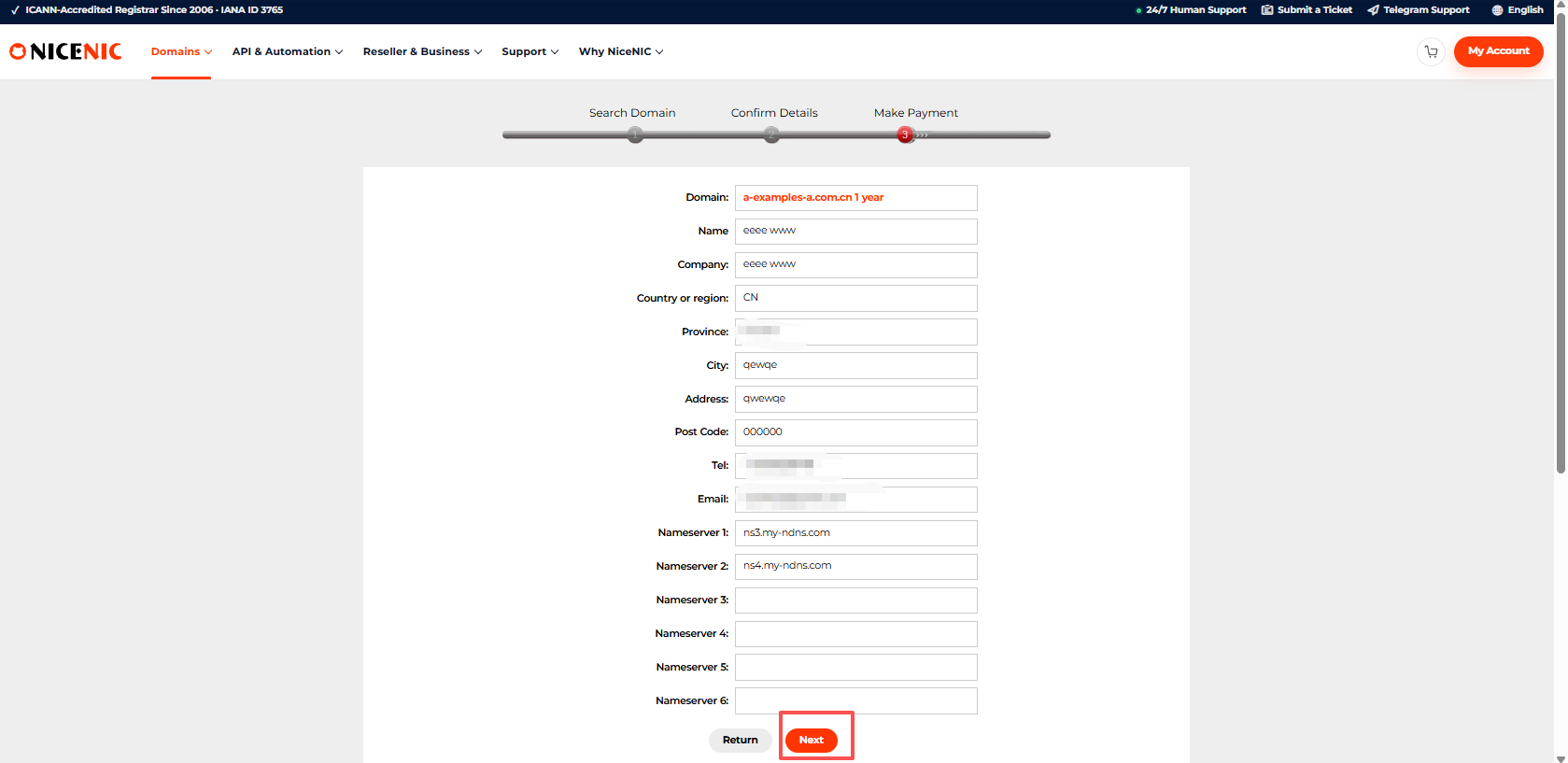
Screenshot caption: Review the .CN registrant details and nameservers carefully, then click Next.
Step 5: Review the Final Order Before Payment
The Make Payment page displays:
- Order Number;
- Register Domain;
- Term;
- Price;
- Total Amount;
- Current Balance.
Check the order one more time.
In the example shown:
Term: 1 year
Price: $24.99
Total Amount: $24.99
Before proceeding, verify:
Domain → Term → Price → Total Amount
If you want to continue using the available external payment methods, click:
Pay by Crypto / PayPAL
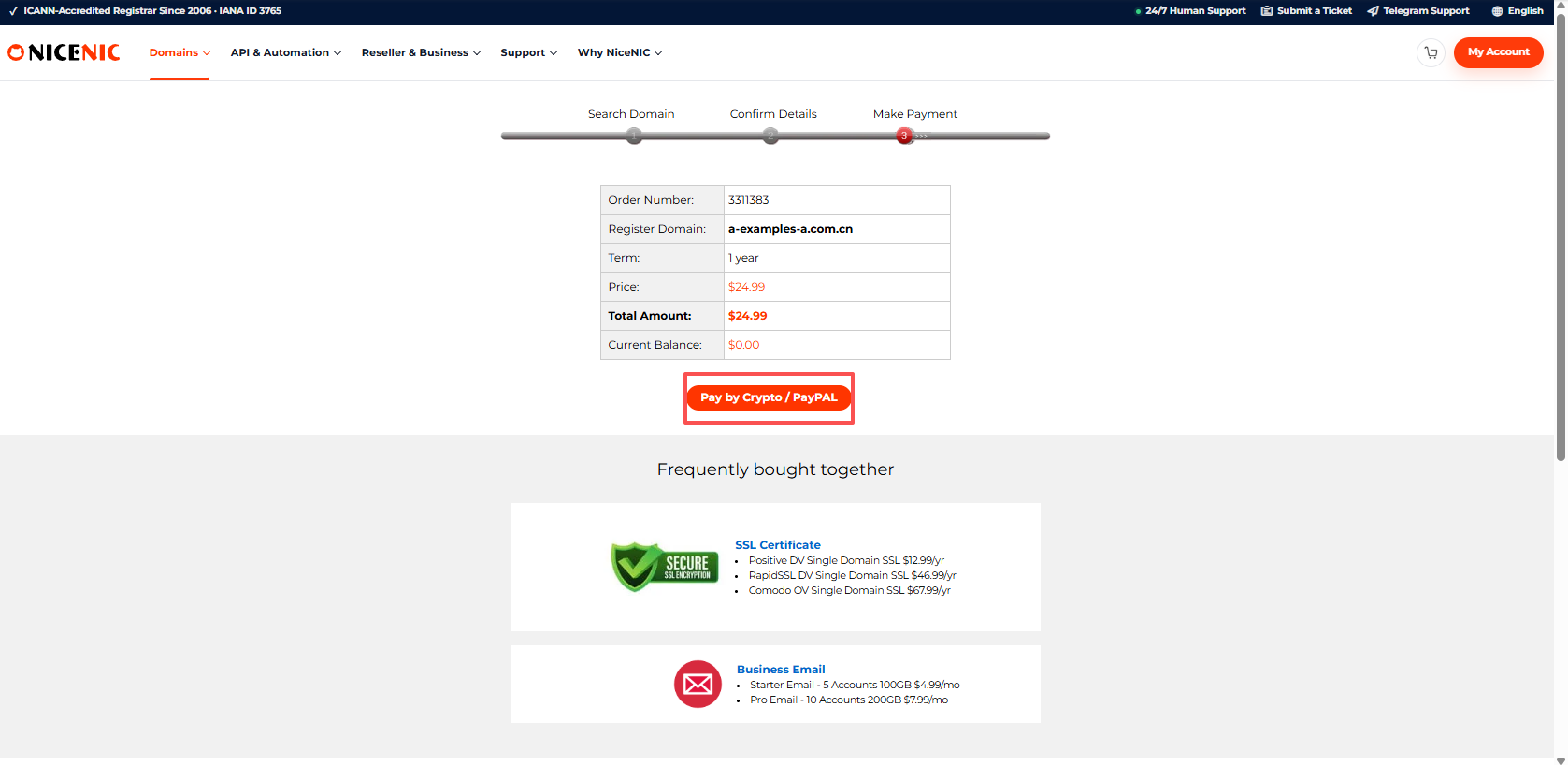
Screenshot caption: Review the .CN order number, domain, term and total amount before continuing to payment.
Step 6: Choose an Available Payment Method
The payment page shows:
- payment ID;
- current balance;
- price;
- order details;
- available payment methods;
- applicable payment-provider service fees.
Depending on the checkout options currently available, NiceNIC may offer:
Crypto or Stablecoin Payment
Options displayed may include:
- BTC;
- USDT;
- USDC;
- ETH;
- LTC;
- other supported crypto or stablecoin options.
Crypto Wallet Payment
Customers using the applicable wallet workflow can request a wallet address for supported currencies.
PayPal or Credit Card Through PayPal
Where available, customers can pay using PayPal or the corresponding card-payment route.
Any applicable third-party service fee is displayed before payment.
Review the final amount before submitting payment.
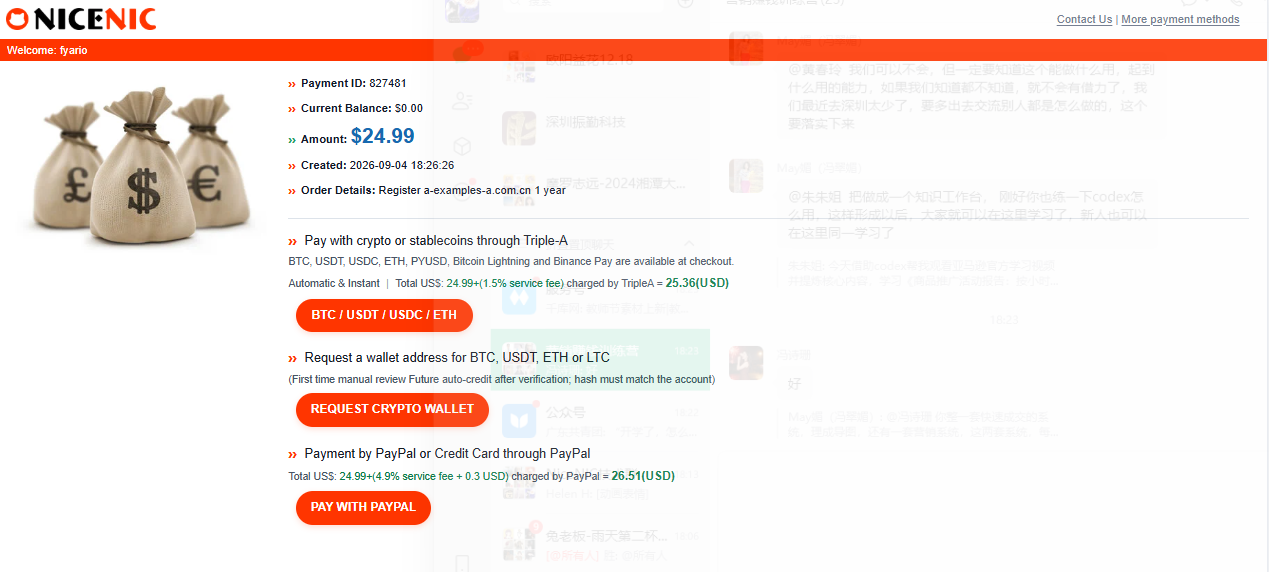
Screenshot caption: Select an available payment option and complete payment for the .CN or .COM.CN registration.
Step 7: Complete CNNIC Real-Name Verification
Payment does not mean that the domain has already completed registration.
CNNIC requires real-name verification before a .CN or .COM.CN domain can be successfully registered.
NiceNIC processes the submitted registrant information and supporting document according to the applicable .CN registration workflow.
Individual Verification
CNNIC verification requires:
- valid passport;
- matching passport number;
- registrant name matching the passport.
Company Verification
CNNIC verification requires:
- valid company registration certificate;
- matching registration / certificate number;
- company registrant name matching the certificate.
The rule is simple:
Registrant Name + Document Number = Submitted Document
If the information does not match, the registration may fail verification.
What If Your .CN Registration Returns an Error?
If the domain does not register successfully, first check:
- Is the correct registrant type selected?
- Is an individual using a valid passport?
- Is a company using a valid company registration certificate?
- Does the registrant name exactly match the document?
- Does the passport or company registration number exactly match the document?
- Is the contact information complete?
- Is the email address valid?
Do not repeatedly submit the same information if an error is already being returned.
If everything appears correct but registration still fails:
Take a screenshot of the error.
Then Submit a NiceNIC Support Ticket and send the screenshot so the NiceNIC team can check the registration.
When Is the .CN Domain Successfully Registered?
The registration should only be considered complete after:
- the domain is available;
- the order is submitted;
-
the
.CNregistrant information is completed; - payment is completed;
- CNNIC real-name verification passes;
- the domain registration completes successfully.
The full flow is:
Search → Register → Enter Real-Name Information → Confirm → Pay → CNNIC Verification → Registered
Do not schedule a critical:
- website launch;
- email migration;
- advertising campaign;
- DNS cutover
until the domain registration has actually completed.
Why the Current .CN Registration Flow Is Easier to Understand
The current NiceNIC workflow places the .CN information directly inside the registration path.
That means the customer sees the additional requirement before completing payment.
The user journey is:
1. Find the domain
Search .CN or .COM.CN.
2. See the real price
Registration and renewal are displayed before proceeding.
3. Enter the required registrant information
Use a passport for an individual or a valid company registration certificate for a company.
4. Check the exact match
Registrant name and document number must match the document.
5. Confirm the order
Review contact information and nameservers.
6. Pay
Choose an available payment method.
7. Complete verification
CNNIC real-name verification is completed before successful registration.
This makes the requirement visible before the customer reaches the final stage.
Final .CN Registration Checklist
Individual
- Domain spelling checked
-
.CNor.COM.CNconfirmed - Valid passport ready
- Passport number entered exactly
- First name matches passport
- Last name matches passport
- Valid email entered
- Contact details accurate
- Registration price checked
- Renewal price checked
- $120 redemption fee understood
- CNNIC real-name verification understood
Company
- Domain spelling checked
-
.CNor.COM.CNconfirmed - Valid company registration certificate ready
- Legal registrant name matches certificate
- Registration / certificate number entered exactly
- Valid email entered
- Contact details accurate
- Registration price checked
- Renewal price checked
- $120 redemption fee understood
- CNNIC real-name verification understood
Register .CN Directly With NiceNIC
NiceNIC now provides direct registrar service for:
-
.CN -
.COM.CN
Current pricing:
Search for your .CN domain
Search Available Domains at NiceNIC
Compare current pricing
Register domains for customers
Explore the NiceNIC Reseller Program
Automate domain registration
Registration or verification error?
Submit a NiceNIC Support Ticket
Primary Sources and Further Reading
- CNNIC - National Top-Level Domain and .CN Services
- CNNIC - .CN Registrar Information
- NiceNIC - Domain Registration
- NiceNIC - Domain Prices
- NiceNIC - Reseller Program
- NiceNIC - Domain API
Last verified: September 5, 2026. Pricing, registry requirements and registration workflows may change. Review the current NiceNIC checkout and applicable CNNIC requirements before completing a future registration.


