


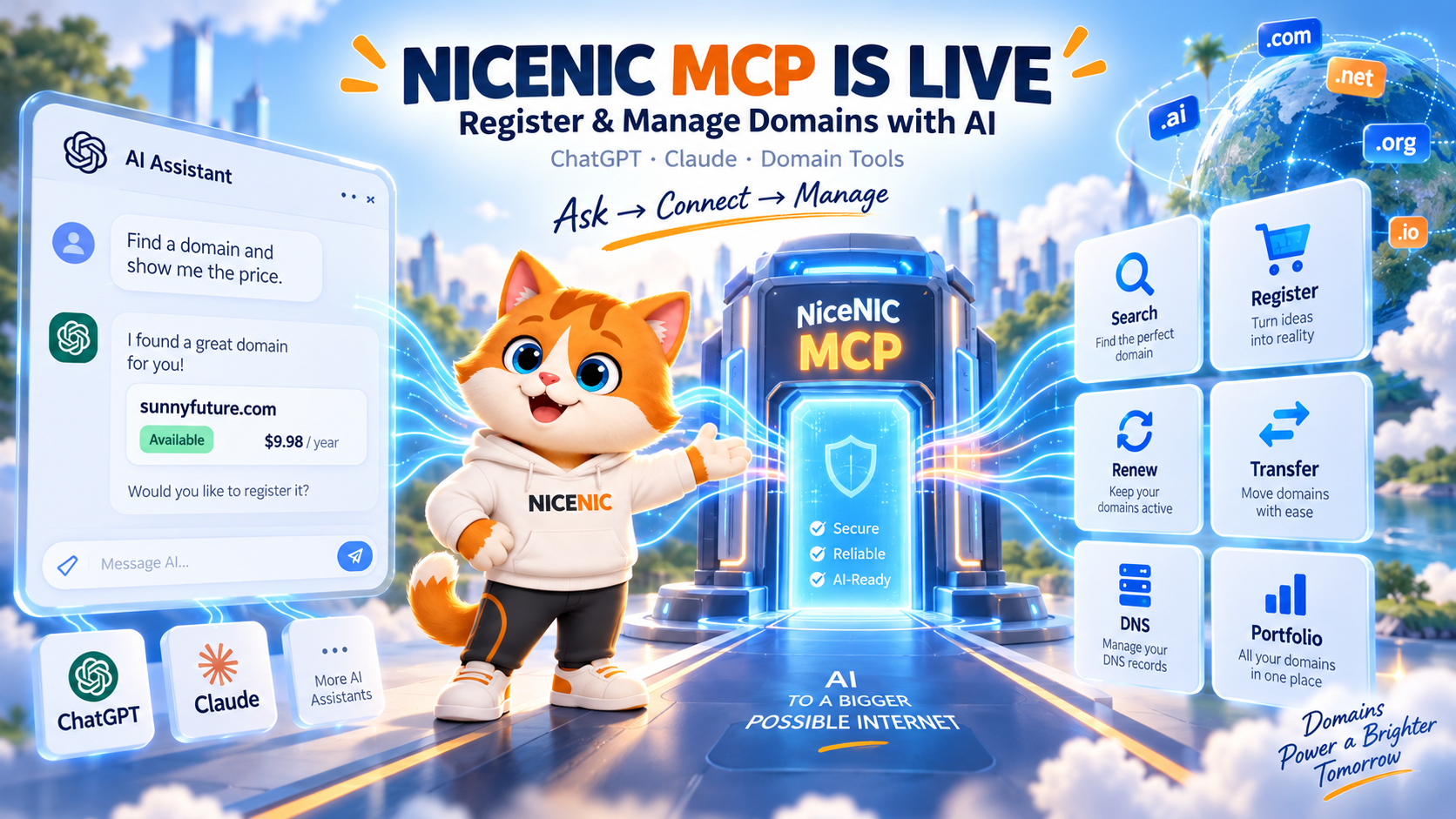
NiceNIC MCP is now live end to end.
You can connect a supported AI client to NiceNIC and work with your domains in natural language instead of clicking through multiple registrar menus.
With the current NiceNIC MCP tools, you can ask AI to help you:
- check domain availability;
- see your current NiceNIC registration, renewal and transfer prices;
- register supported domains;
- renew eligible domains;
- submit supported domain transfers;
- review domains in your portfolio;
- check expiration dates and nameservers;
- read and manage supported DNS records;
- review account balance and transactions;
- check supported abuse-case status and required actions.
NiceNIC currently provides setup guidance for ChatGPT and Claude through the NiceNIC MCP page.
A NiceNIC account is required. If you do not have one yet, create your NiceNIC account first.
The current remote MCP endpoint is:
https://mcp.nicenic.com/mcp
For normal conversational use, you do not need to build your own Domain API integration. Create or sign in to your NiceNIC account, connect the MCP endpoint through a compatible AI client, authorize access, and start with a simple read-only domain request.
Domain management is moving from "find the right menu" to "ask for the result you need."
NiceNIC MCP: Quick Facts
nicenic.com/reseller/mcp.php
https://mcp.nicenic.com/mcp
Supported actions can vary by:
- TLD;
- registry policy;
- account permissions;
- verification requirements;
- current domain status.
What Is NiceNIC MCP?
MCP stands for Model Context Protocol.
It is an open protocol designed to let compatible AI systems connect to external:
- tools;
- services;
- applications;
- data.
Instead of an AI assistant only explaining how to do something, MCP can allow the AI client to call supported tools in an authorized system.
NiceNIC MCP applies that model to domain management.
The connection becomes:
Your AI Client → NiceNIC MCP → Your Authorized NiceNIC Account → Supported Domain Tools
That means a conversation can move from:
"Where is the DNS menu?"
to:
"Show me the current DNS records for example.com. Do not change anything."
Or from:
"Which page shows my renewal price?"
to:
"Show me my current NiceNIC renewal price for example.com."
The official MCP project describes Model Context Protocol as an open standard for connecting AI assistants with external tools and data sources.
You can read more through the official Model Context Protocol project.
NiceNIC MCP Is Now Live End to End
The important news is not simply that NiceNIC has created an MCP endpoint.
The complete user path is now available.
NiceNIC currently has:
- the public MCP product page;
- website navigation entry points;
- a live remote MCP endpoint;
- NiceNIC account authorization;
- supported domain-management tools;
- ChatGPT setup guidance;
- Claude setup guidance;
- read and management workflows;
- human NiceNIC support if account-specific help is required.
So the customer journey is now:
Create Account → Open NiceNIC MCP → Connect AI Client → Authorize NiceNIC → Ask a Domain Question → Review → Approve Supported Actions
This is why NiceNIC MCP is now ready to be used as a real domain-management interface rather than only a development concept.
Where Can You Find NiceNIC MCP?
NiceNIC currently provides two visible website entry points.
Entry 1: API & Automation → Manage Domains with AI
From the main NiceNIC navigation:
- open API & Automation;
- find Manage Domains with AI;
- open the NiceNIC MCP page.
This places MCP alongside:
- Domain API;
- API Sandbox;
- WHMCS;
- reseller automation.
That is intentional.
NiceNIC now supports different automation paths depending on how you want to work:
AI conversation → MCP
Custom software → Domain API
Hosting billing workflow → WHMCS
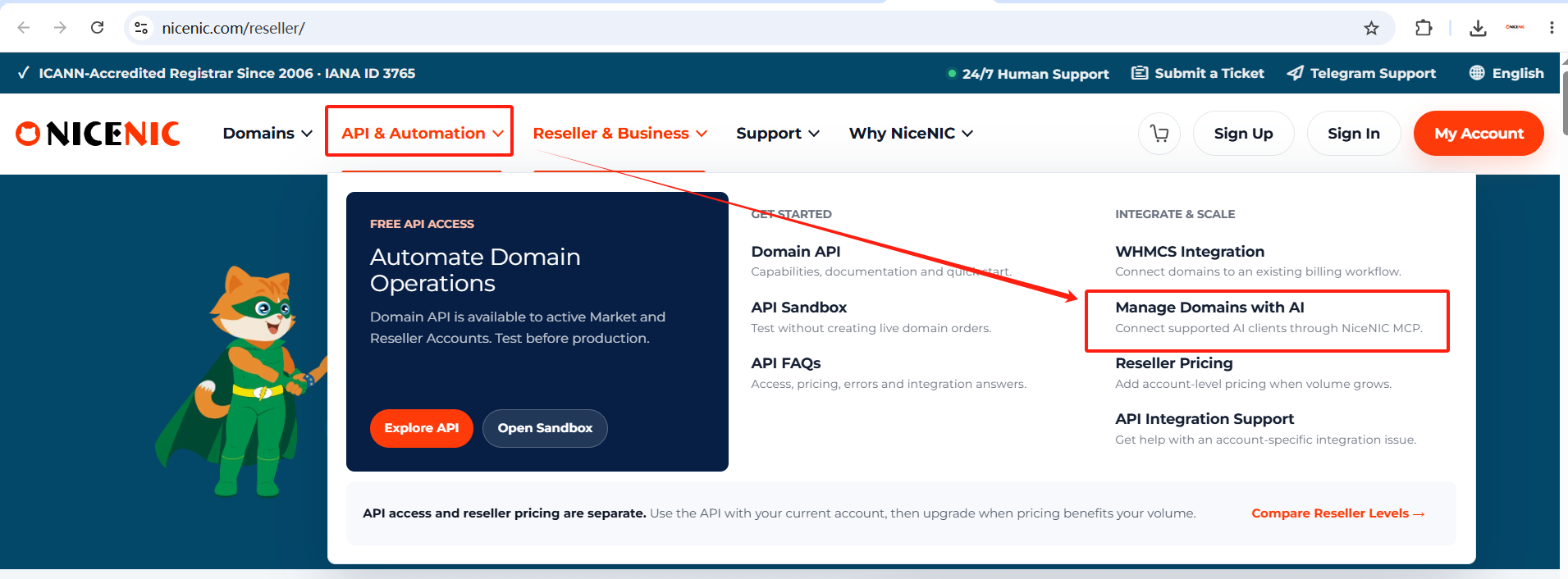
Image caption: Open API & Automation in the NiceNIC navigation and select Manage Domains with AI.
Entry 2: Footer → API & Automation → Manage Domains with AI
You can also reach NiceNIC MCP from the website footer.
Under API & Automation, select:
Manage Domains with AI — MCP
This provides a permanent MCP entry from across the NiceNIC website.
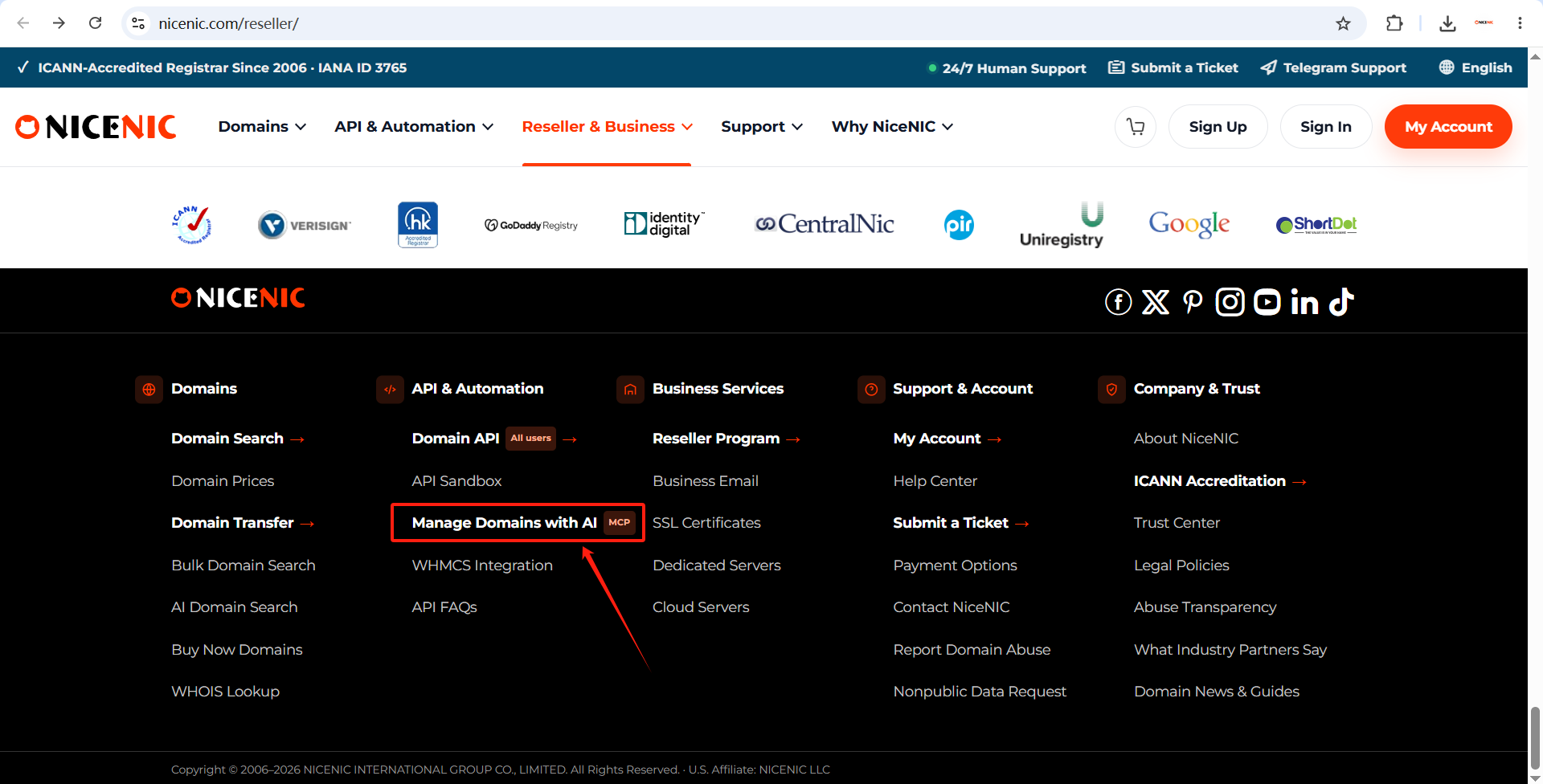
Image caption: NiceNIC MCP is also available under API & Automation in the website footer.
You can skip both navigation routes and go directly to:
NiceNIC MCP — Manage Domains with AI
What Can You Do With NiceNIC MCP Today?
NiceNIC MCP is designed around actual domain tasks.
It is not limited to answering:
"What is DNS?"
The current tools can work with supported NiceNIC account and domain operations.
1. Check Domain Availability
You can ask:
"Check whether brightpathlab.com is available. Do not register it."
NiceNIC MCP can check the domain through the NiceNIC domain service and return the result to the AI conversation.
This is a good first test because it is:
- simple;
- read-only;
- easy to verify.
2. Check Your Actual NiceNIC Price
Availability and price are different questions.
Instead of asking an AI model to guess a domain price from general web information, NiceNIC MCP can query the pricing assigned to your authorized NiceNIC account.
For example:
"Check whether brightpathlab.com is available and show me my current NiceNIC registration price. Do not register it."
The result can reflect your current NiceNIC account pricing rather than an unrelated public estimate.
This becomes especially useful when managing:
- multiple TLDs;
- renewal planning;
- transfer planning;
- reseller pricing.
3. Register a Domain Through AI
For supported TLDs and eligible registrations, NiceNIC MCP can carry out domain-registration actions.
A safer workflow is:
First ask:
"Check whether example.com is available and show me the current price. Do not register it."
Then review:
- exact domain;
- availability;
- registration price;
- TLD.
Only after you are satisfied should you proceed with the registration action.
The principle should be:
Inspect first. Approve the purchase second.
Registry and TLD-specific requirements still apply.
Some domains may require:
- additional registrant information;
- identity verification;
- company information;
- eligibility requirements;
- other registry-specific fields.
MCP does not remove registry policy.
4. Renew Domains
NiceNIC MCP can also support eligible domain-renewal actions.
For example, instead of opening domains one by one, you can first ask:
"Show me the domains in my NiceNIC account that expire within the next 60 days."
Then review the result.
You can continue with an eligible renewal request after confirming:
- domain;
- expiration;
- renewal term;
- renewal price.
For business-critical domains, AI can make portfolio review faster, but renewal approval should still be deliberate.
5. Submit Supported Domain Transfers
Supported domain transfers can also be handled through NiceNIC MCP.
A transfer can still depend on:
- TLD;
- domain status;
- transfer lock;
- Auth/EPP Code;
- transfer eligibility;
- registry rules.
So a better conversational flow is:
"Check the current status of example.com and tell me what is needed before transferring it."
Then proceed once the required information is available.
For deeper transfer rules, use NiceNIC Domain Transfer.
6. Review Your Domain Portfolio
This is one of the strongest reasons to use a conversational domain interface.
Instead of opening domains individually, ask questions across the account.
For example:
"List my domains expiring in the next 90 days."
Or:
"Show my domains that use external nameservers."
Or:
"Show the expiration date and nameservers for these five domains."
This is especially useful for:
- businesses;
- agencies;
- domain investors;
- resellers;
- portfolio managers.
The larger the portfolio becomes, the more useful natural-language filtering can become.
7. Check Nameservers
A simple request can be:
"Show me the current nameservers for example.com."
This lets the AI inspect the current state before any change is requested.
That is important because nameserver changes can affect:
- website DNS;
- email;
- CDN;
- verification records.
Always check the current configuration first.
8. Read DNS Records
You can ask:
"Show me all current DNS records for example.com. Do not change anything."
This is a safer first step than immediately asking the AI to edit DNS.
Review:
- A;
- AAAA;
- CNAME;
- MX;
- TXT;
- other supported records
before modifying live infrastructure.
9. Manage Supported DNS Records
Once the current DNS state has been reviewed, NiceNIC MCP can perform supported DNS-management actions.
Examples can include:
- creating a record;
- updating a record;
- deleting a record.
But DNS actions need care.
A wrong DNS change can affect:
- website availability;
- business email;
- APIs;
- verification;
- customer services.
The safest rule is:
Read → Confirm → Change → Verify
Do not begin with:
"Replace all DNS with this."
unless you understand exactly what the final complete zone should contain.
10. Check Account Balance and Transactions
NiceNIC MCP can also retrieve supported account information such as:
- balance;
- transactions.
This can help when you are preparing:
- registrations;
- renewals;
- portfolio operations.
For example:
"Show my current NiceNIC account balance."
This gives you another way to work with account operations without searching for the relevant control-panel page.
11. Check Supported Abuse-Case Status
NiceNIC’s current MCP tool set also includes supported abuse-status workflows.
The AI can help retrieve information such as:
- current case stage;
- required action;
- deadline
where supported by the account and tool.
This can help domain managers understand:
What needs attention now?
without searching across multiple pages or messages.
The Real Difference: Ask for the Task, Not the Menu
Traditional registrar management usually starts with:
"Where is the setting?"
AI-assisted management starts with:
"What do I need done?"
For example:
Traditional
Login → My Products → Domain → DNS → Find Record → Edit → Save
With MCP
Ask:
"Show me the current A record for example.com."
Then, if needed:
"Change it to the new server IP after showing me the existing value first."
That change in interface is the main reason MCP matters.
No Coding Is Required for Normal Conversational Use
NiceNIC already provides Domain API for developers building custom software.
MCP solves a different problem.
You do not need to write an application just to use supported NiceNIC domain tools conversationally.
The basic NiceNIC MCP setup is:
- create or sign in to a NiceNIC account;
- copy the NiceNIC MCP endpoint;
- add it to a compatible AI client;
- authorize your NiceNIC account;
- start with a simple read-only request.
The endpoint is:
https://mcp.nicenic.com/mcp
A NiceNIC account is required.
How to Connect NiceNIC MCP to ChatGPT
NiceNIC currently provides a dedicated ChatGPT MCP Setup Guide.
The simplified path is:
Step 1
Use a ChatGPT account that currently supports the required MCP/custom app capability.
Step 2
Add the NiceNIC MCP endpoint:
https://mcp.nicenic.com/mcp
Step 3
When NiceNIC authorization opens:
- sign in to your NiceNIC account;
- review the requested access;
- authorize the connection.
Step 4
Start with a safe test such as:
"Check whether nicenicmcpdemo.com is available. Do not register or purchase it."
The connection is working when ChatGPT can return the NiceNIC domain result through the MCP connection.
ChatGPT's MCP features and interface can change over time, so check the current OpenAI MCP / Developer Mode guidance if your menu differs from the NiceNIC setup screenshots.
How to Connect NiceNIC MCP to Claude
NiceNIC also provides a dedicated Claude MCP Setup Guide.
The simplified path is:
Step 1
Use a Claude account with access to the current custom connector functionality.
Step 2
Add a custom connector using:
https://mcp.nicenic.com/mcp
Step 3
Authorize the NiceNIC account.
Step 4
Enable the NiceNIC MCP connector in your conversation.
Step 5
Start with a read-only availability check.
For domain-management actions, review the AI client’s permission request before allowing the action to run.
A Good First NiceNIC MCP Request
Do not make your first MCP request:
"Change all my DNS records."
Start with something easy to verify.
The best first request is:
"Check whether nicenicmcpdemo.com is available. Do not register or purchase it."
Then try:
"Show me my current NiceNIC registration price for it."
After that:
"List the domains in my account that expire soon."
This lets you verify:
- connection;
- account authorization;
- tool access;
- returned information
before moving into state-changing actions.
10 Useful NiceNIC MCP Prompts to Try
Domain Search
"Check whether mybrandexample.com is available. Do not register it."
Price Check
"Show me my current registration, renewal and transfer prices for mybrandexample.com."
Portfolio Review
"List my domains expiring within the next 60 days."
Nameservers
"Show the current nameservers for example.com."
DNS Review
"Show the current DNS records for example.com. Do not make any changes."
Renewal Planning
"Show me which domains need renewal soon and their current renewal prices."
Domain Information
"Show the expiration date, status and nameservers for example.com."
Account
"Show my current NiceNIC account balance."
Transfer Preparation
"Check the current domain status and tell me what I need before transferring example.com."
Controlled Registration
"Check whether example.com is available and show the current price first. Do not register it until I approve."
The safest prompts specify:
- the exact domain;
- whether you want read-only information;
- whether an action may proceed.
Stay in Control: Let AI Investigate First
AI makes domain operations easier to request.
It does not make every requested change safe.
NiceNIC’s MCP workflow is designed around a simple principle:
Let AI inspect the current state first. Review sensitive actions before they are applied.
1. Read Before You Write
Before changing:
- DNS;
- nameservers;
- contact data;
ask the AI to show the existing values.
For example:
"Show the current nameservers. Do not change them."
Then review the result.
2. Be Careful With Full-Overwrite Actions
Some domain-management operations treat the values you submit as the complete final state.
That means an omitted value can potentially be removed.
For important operations:
- read the current state;
- understand whether the action adds, changes or replaces;
- verify every intended final value.
3. Confirm the Exact Domain
Before approving a state-changing action, verify:
- exact domain;
- exact DNS record;
- exact nameserver;
- exact renewal term;
- exact registration price.
A natural-language interface reduces menu friction.
It does not remove the need to confirm the target.
NiceNIC MCP vs Domain API vs WHMCS
NiceNIC now supports three different automation approaches.
When Should You Use MCP?
Choose MCP when you want to say:
"Show me the domains expiring this month."
instead of building software to make that query.
MCP is especially useful for:
- conversational management;
- fast portfolio checks;
- read-first troubleshooting;
- ad hoc domain tasks;
- AI-assisted operations.
When Should You Use the Domain API?
Use NiceNIC Domain API when your own software needs to trigger domain operations automatically.
Examples:
- SaaS;
- hosting platform;
- custom domain storefront;
- internal domain system;
- customer portal.
API is software-to-software automation.
MCP is AI-assisted conversational access.
When Should You Use WHMCS?
Use NiceNIC WHMCS Integration if WHMCS already runs:
- your hosting billing;
- customer accounts;
- recurring invoices;
- domain orders.
You do not need to replace WHMCS to use NiceNIC.
Choose the workflow that fits your business.
Do You Need a Reseller Account to Use NiceNIC MCP?
A NiceNIC account is required to authorize MCP.
You do not need to become a reseller simply to create a NiceNIC account and begin exploring the supported MCP workflow.
If your domain volume grows and reseller pricing becomes commercially useful, you can separately review the NiceNIC Reseller Program.
This keeps two questions separate:
How do I want to manage domains? → MCP / API / WHMCS
and:
What pricing level fits my volume? → Market / Reseller
Why NiceNIC MCP Matters for Domain Resellers and Agencies
Agencies and resellers often manage many small tasks every day:
- "When does this domain expire?"
- "What nameservers is it using?"
- "What does this renewal cost?"
- "Is this domain available?"
- "What are its DNS records?"
- "Which domains need attention?"
Each question may only take a few minutes manually.
Across hundreds of domains and customers, those minutes add up.
MCP gives teams another interface to the same operational infrastructure:
ask → inspect → decide → approve
That can reduce repetitive navigation while preserving the need for deliberate approval on important changes.
Why NiceNIC MCP Is More Than an AI Domain Search Tool
An AI domain-name generator can suggest names.
NiceNIC MCP goes further.
It connects AI to actual registrar operations associated with your authorized NiceNIC account.
That means it can move across the lifecycle:
Search → Price → Register → Manage → Renew → Transfer → DNS → Portfolio Review
That is the difference between:
AI talking about domains
and:
AI working with supported domain tools.
Frequently Asked Questions
What is NiceNIC MCP?
NiceNIC MCP is NiceNIC’s remote Model Context Protocol service that allows compatible AI clients to use supported NiceNIC domain and account tools after the user authorizes a NiceNIC account.
Is NiceNIC MCP live now?
Yes. The NiceNIC MCP page, remote endpoint, authorization workflow and current supported tools are live.
What is the NiceNIC MCP endpoint?
Use:
https://mcp.nicenic.com/mcp
Do I need a NiceNIC account?
Yes. A NiceNIC account is required before MCP can access the domains and account information you are authorized to manage.
How do I create an account?
Do I need coding experience?
No coding is required for normal conversational MCP use through a compatible AI client.
Can I use NiceNIC MCP with ChatGPT?
NiceNIC currently provides a ChatGPT MCP Setup Guide. Your ChatGPT account must have access to the current MCP/custom app capability required for the connection.
Can I use NiceNIC MCP with Claude?
NiceNIC currently provides a Claude MCP Setup Guide for Claude accounts that support the applicable custom connector feature.
Can MCP check domain availability?
Yes.
Can it show domain prices?
Yes. Supported pricing queries can return registration, renewal and transfer pricing assigned to the authorized NiceNIC account.
Can NiceNIC MCP register domains?
Yes for supported domain extensions and eligible orders, subject to registry requirements, account permissions and applicable verification.
Can it renew domains?
Yes for supported and eligible domains.
Can it transfer domains?
Yes, supported transfer actions are available subject to transfer eligibility and TLD requirements.
Can NiceNIC MCP manage DNS?
NiceNIC MCP includes supported DNS read and management operations.
Can it list domains in my account?
Yes. The current MCP tool set includes portfolio and domain-detail workflows.
Can I check my balance?
Supported account tools include account balance and transaction information.
Does MCP replace the NiceNIC control panel?
No. MCP gives you another way to work with supported NiceNIC operations. The control panel remains available.
Does MCP replace the Domain API?
No. The Domain API is for custom software integrations. MCP is designed for compatible AI-client workflows.
Does MCP replace WHMCS?
No. Hosting businesses already using WHMCS can continue using NiceNIC WHMCS Integration.
Can I use MCP safely for DNS?
Start by reading the current DNS state. Confirm the exact domain and intended result before approving a change. Be particularly careful with operations that replace the full existing state.
Start Using NiceNIC MCP
You do not need to build an application to start working with your domains through AI.
The shortest path is:
1. Create your NiceNIC account
2. Open NiceNIC MCP
Manage Domains with AI — NiceNIC MCP
3. Copy the MCP endpoint
https://mcp.nicenic.com/mcp
4. Connect your supported AI client
Choose the appropriate setup guide:
Connect NiceNIC MCP to ChatGPT
5. Authorize NiceNIC
Sign in through the NiceNIC authorization flow.
Do not paste your NiceNIC password or verification code into the AI conversation.
6. Start with a read-only request
Try:
"Check whether nicenicmcpdemo.com is available. Do not register or purchase it."
Then move into:
- portfolio review;
- pricing;
- renewals;
- transfers;
- DNS;
- other supported workflows
as needed.
Your Domains, Now Available Through Conversation
Registrar control panels are still useful.
APIs are still essential for software automation.
WHMCS is still the right workflow for many hosting providers.
NiceNIC MCP adds another option:
natural-language access to supported domain operations.
Instead of learning another sequence of menus, you can start with the business question:
"Which domains expire next month?"
"How much does this domain cost to renew?"
"Is this domain available?"
"Show me the current DNS before I change anything."
And when a supported action is needed, review it before approving the change.
NiceNIC MCP is live.
The first step is simply to create an account and connect.
Start with a NiceNIC account
Open the MCP product page
NiceNIC MCP — Manage Domains with AI
Already use NiceNIC?
Sign In to Your NiceNIC Account
Prefer software automation?
Running a hosting business on WHMCS?
Review NiceNIC WHMCS Integration
Need help?
Submit a NiceNIC Support Ticket
Primary Sources and Further Reading
- NiceNIC — MCP: Manage Domains with AI
- NiceNIC — Connect NiceNIC MCP to ChatGPT
- NiceNIC — Connect NiceNIC MCP to Claude
- NiceNIC — Domain API
- NiceNIC — WHMCS Integration
- Model Context Protocol — Official Project
- OpenAI — Developer Mode and MCP Apps in ChatGPT
Last verified: September 8, 2026. MCP client interfaces, permissions and availability can change over time. Supported domain operations may vary by TLD, registry requirements, domain status, account permissions and verification requirements.


