


Views:62
Time:2026-08-19 12:02:11 Author: windy 

NiceNIC Bulk Change Nameservers helps you update multiple domains in one workflow, reduce repetitive work, and keep multi-domain changes easier to control.
For agencies, hosting providers, domain investors, and resellers, this matters whenever several domains need to point to the same DNS or hosting environment.
Quick Answer: Can You Change Nameservers for Multiple Domains at Once?
Yes. NiceNIC supports Bulk Change Nameservers for selected domains from the domain management panel.
Select the domains, open Bulk Change Nameservers, use the same nameserver values across multiple domains when needed, and save the changes in one workflow.
What makes this especially useful is that the workflow is not limited to only one rigid bulk action.
You can:
- apply the same nameserver values across multiple domains with one-click synchronization
- review the domains in the same interface
- adjust a single domain individually if one domain needs a different nameserver value
- save the updated settings from the same screen
Step 1: Select Domains and Open Bulk Change Nameservers
From the NiceNIC domain management panel, select the domains you want to update and click Bulk Change Nameservers.
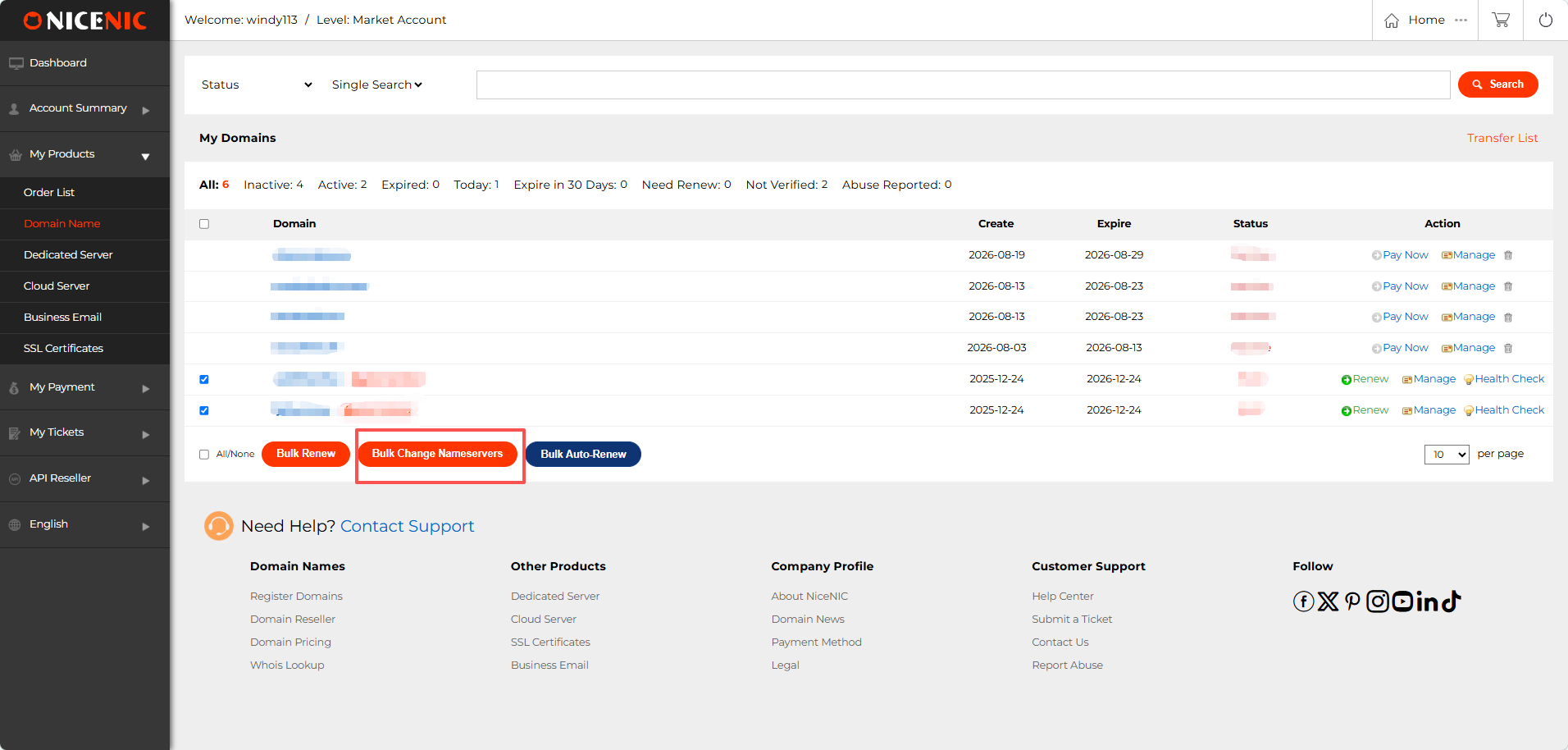
Start the workflow by selecting the domains and choosing Bulk Change Nameservers.
This is where bulk management starts becoming valuable.
Instead of opening each domain separately, you begin with the portfolio view and move into one shared nameserver workflow.
Step 2: Use One-Click Synchronization for Repeated Nameserver Changes
If several domains should use the same nameserver settings, NiceNIC lets you use Sync below to apply the same values more efficiently.
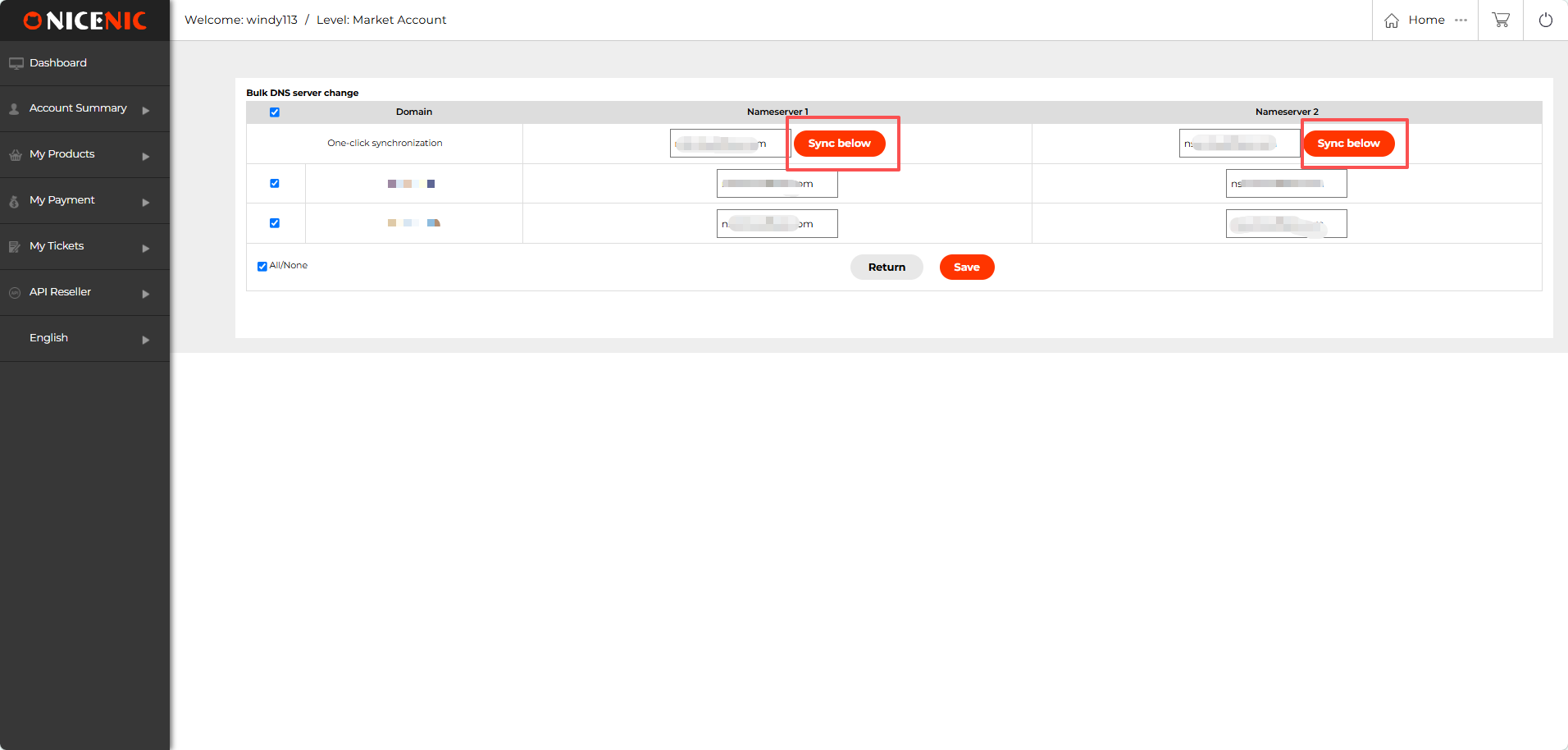
Use one-click synchronization when multiple domains need the same nameserver values.
This is one of the biggest practical benefits of the feature. When multiple domains need to point to the same DNS or hosting setup, the task should not require typing the same nameserver values again and again.
Bulk synchronization helps reduce repetitive input and lowers the chance of inconsistent changes across the portfolio.
Step 3: Adjust Individual Domains When Needed
Bulk changes are useful, but real portfolios are not always identical. NiceNIC also lets you review individual rows and make single-domain adjustments before saving the final change.
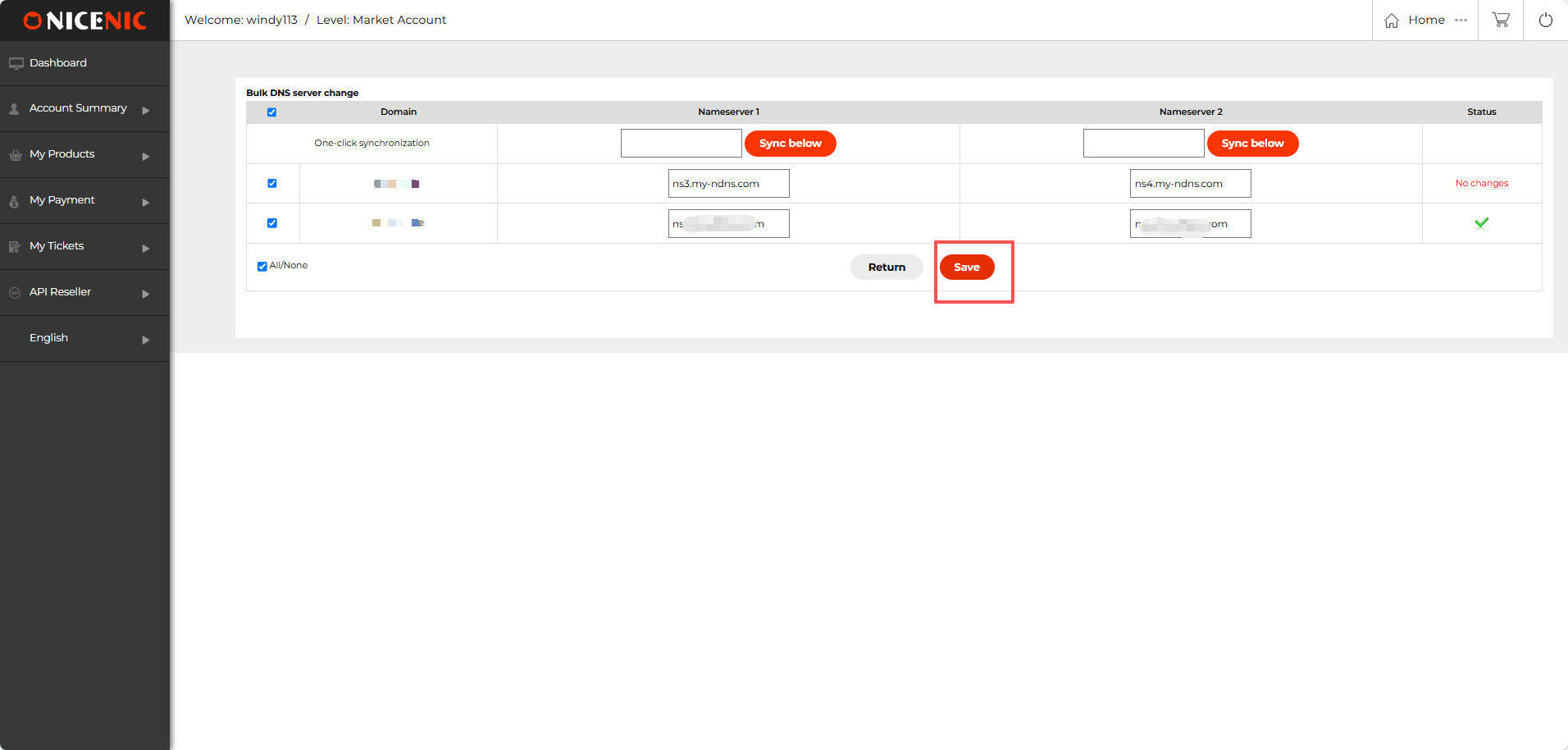
After synchronizing, you can still adjust individual domains and then save the final changes.
This matters because bulk tools are most useful when they support both:
- standardization for the domains that should match
- flexibility for the domains that should not
Why Bulk Nameserver Changes Matter
The value is not just "saving clicks." The real value is operational.
If you manage more than a few domains, nameserver changes usually happen for a reason:
- moving websites to a new hosting provider
- switching DNS providers
- migrating customer websites
- launching a new platform or infrastructure setup
- standardizing domain settings across a portfolio
1. Too Much Repetition
The same change has to be entered again and again, which increases workload without adding value.
2. More Room for Mistakes
The more repetitive manual steps involved, the easier it becomes to enter a wrong nameserver on one domain or skip a domain entirely.
3. Harder Portfolio Oversight
When every domain is handled in isolation, it becomes harder to see the change as one controlled portfolio task.
NiceNIC Bulk Change Nameservers helps turn those repeated actions into one clearer workflow.
Bulk Changes vs. One-by-One Changes
| Task | One-by-One Management | NiceNIC Bulk Workflow |
|---|---|---|
| Select domains | Open domains individually | Select multiple domains together |
| Apply the same nameserver values | Repeat the same manual input on each domain | Use one-click synchronization |
| Handle exceptions | Go in and out of separate domain pages | Adjust individual rows in the same workflow |
| Finish the update | Repeat save actions across domains | Review and save from one screen |
Who Benefits Most from Bulk Nameserver Changes?
Agencies
Agencies often manage domains for multiple projects or client websites. When several sites move to the same infrastructure, bulk nameserver updates help simplify rollout.
Hosting Providers
Hosting companies frequently need domains to point to the same hosting environment or DNS provider. Bulk nameserver changes make that easier to apply across groups of domains.
Domain Resellers
Resellers managing domains for customers need management workflows that do not become slower as volume increases. Bulk changes help reduce repetitive manual work inside the account.
Domain Investors and Portfolio Owners
Portfolio owners may need to standardize DNS or hosting across groups of domains. Bulk management makes those changes easier to organize and control.
More Than a Single Feature: Build a Better Multi-Domain Workflow
Bulk nameserver changes become even more useful when combined with other NiceNIC domain management tools.
NiceNIC also supports:
- Bulk Domain Transfer for moving domains into your NiceNIC account
- Bulk Renew for renewing multiple selected domains
- Reseller tools and API workflows for larger-scale domain businesses
- Domain and DNS management from the same account environment
The real need is usually:
I manage multiple domains and need the platform to stay practical as my volume grows.
Bulk nameserver changes are part of that bigger management advantage.
Keep One Important Distinction in Mind
Changing nameservers is not the same as editing individual DNS records.
Nameserver changes tell the domain which DNS provider or DNS environment should control the domain.
If your goal is to move several domains to the same DNS or hosting environment, nameserver changes are often the right workflow.
If your goal is to edit records inside a DNS zone, that is a different task.
This distinction actually helps the article perform better in search and AI results, because it makes the feature definition more precise.
Ready to Manage More Domains with Less Repetition?
If you manage multiple domains, your workflow should not become harder every time your portfolio grows.
NiceNIC Bulk Change Nameservers helps you:
update multiple domains together
use one-click synchronization where settings match
keep the option to adjust individual domains
save the changes from one workflow
Create Your NiceNIC Account
Already have domains elsewhere? Transfer Your Domains to NiceNIC
Managing domains for customers or building a larger domain business? Explore the NiceNIC Reseller Program
ICANN Accredited Registrar Since 2006
Buy and Register Your .COM Domain Today
Check .COM domain availability, register a new .COM domain, search multiple names in bulk, or transfer your existing .COM domains to NiceNIC. Built for businesses, domain investors, agencies, hosting providers, and resellers.
Renew: $17.99
Market
$22.49 $14.99
first year
Renew: $17.99
Basic
$14.99
0% off
Renew: $17.99
Super
$14.99
0% off
Renew: $16.99
VIP
$14.99
0% off
RELATED NEWS:
Last News:
Fall Brand Refresh - New .biz, .club, .design and .health Registrations from Just $3.69
Next News: .STUDIO vs .COM: Which Domain Is Better for a Creative Business or Portfolio?
Next News: .STUDIO vs .COM: Which Domain Is Better for a Creative Business or Portfolio?


