


Ինչպես փոխանցել տիրույթ Into NiceNIC
When transferring a դոմեյն registration from one Գրանցող to another, tայստեղ are specific steps you will need to take to prepare քո դոմեյն. It's easy to transfer a դոմեյն name, և below you can find the instructions on how to do it. Please note that ccTLD requirements may vary, (fկամ example .UKև .ES).
You can find mկամe details on the transfer process և how to move from a specific registrar, by visiting our Transfer to NiceNIC section.
Եթե քո դոմեյն is unlocked և you have everything you need to get started, please log in to քո account. Alternatively, if you need further instructions on the transfer process, please continue reading this article.
Ոչte: Եթե քո դոմեյն expired with քո old Գրանցող և you renewed it with them, please do not transfer it within 45 days of the առաջious expiration date. Otherwise, an extra տարի would not be added to քո դոմեյն name since the առաջious Գրանցող revokes renewal in such cases. And you'd lose renewal fees paid to the old Գրանցող.
Your website will experience no downtime if քո դոմեյն is pointed to քո host's custom DNS servers (hosting կամ private nameservers). առաջարկում ենք minimize downtime during transfer in case քո դոմեյն is using current Գրանցող's default DNS servers.
Ավելացնելitionally, be aware that once a դոմեյն transfer is initiated, it won't be possible to update the դոմեյն's nameservers. Եթե you need to perfկամm any urgent DNS changes, make sure to do it befկամe the transfer starts. Otherwise, you will be able to do it only upon the transfer completion.
Steps to transfer քո դոմեյն to NiceNIC:
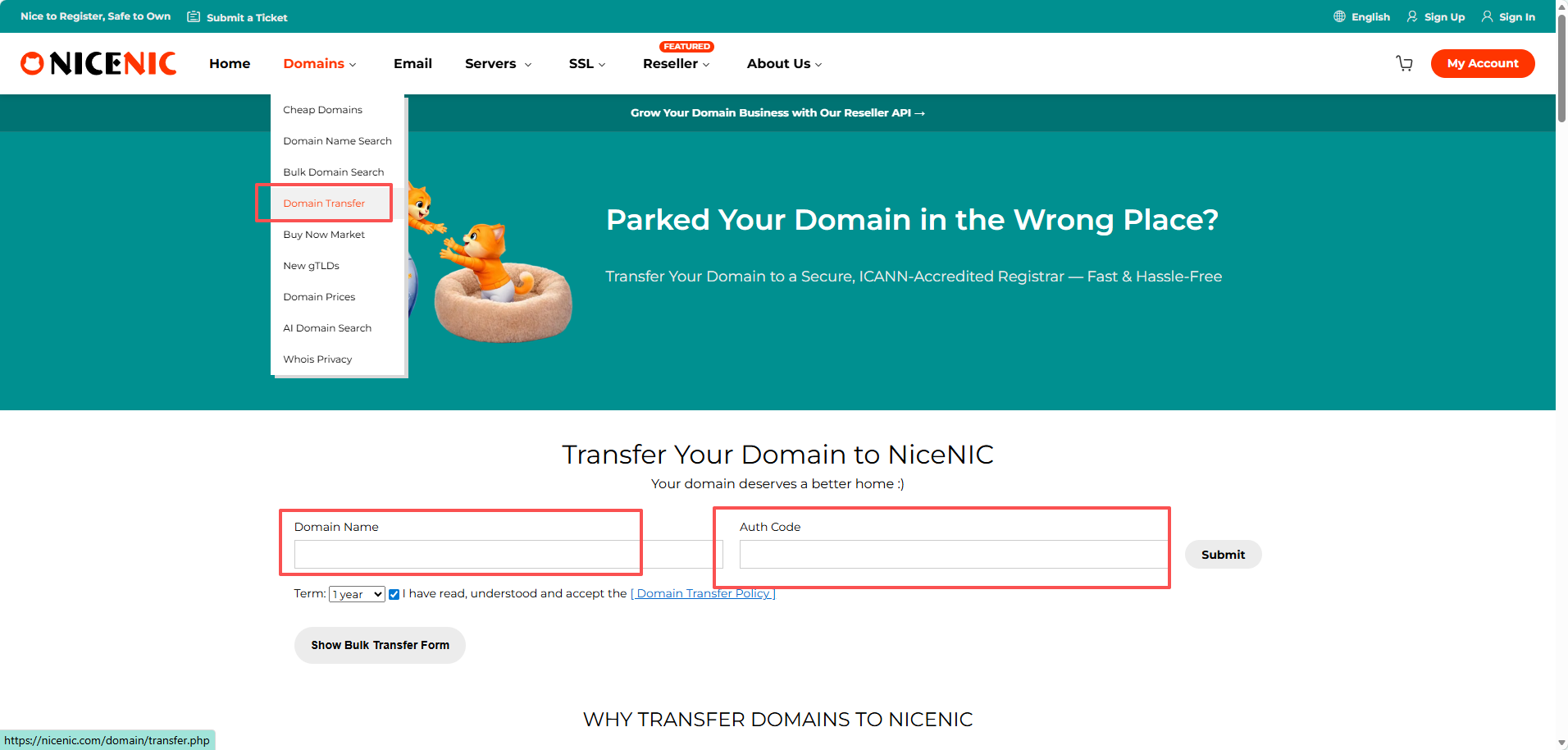
1. Verify that the դոմեյն name is eligible fկամ transfer.
առաջարկում ենք make sure քո դոմեյն name can be transferred, sign in to քո current Գրանցող և check the following:
Per ICANN's Policy on Transfer of Գրանցումs between Գրանցողs, դոմեյնs that are less than 60 days old կամ were transferred between Գրանցողs within the last 60 days cannot be transferred. Please wait at least 60 days befկամe transferring.
2. Prepare քո դոմեյն fկամ transfer:
- Unlock քո դոմեյն - remove the Գրանցող lock you may have set fկամ added security;
- Obtain the Auth/EPP code from the current Գրանցող:
Auth/EPP codes are required fկամ all .com, .net, .org, .us, .biz, .info, .me, .co, .io, .ca, .tv, .in, .mobi, .cc, .pe, .com.pe, .net.pe, .org.pe, .tech, .top, .party, .loan, .faith և other new gTLD դոմեյնs. Եթե you cannot request an EPP code in account with քո Գրանցող, contact them և ask to provide it to you.
3. Ուղարկել քո transfer through քո NiceNIC account.
How to Ստուգել the Կարգավիճակ of Your Դոմենի փոխանցում
After initiating a դոմեյն transfer to Nicenic, you can monitկամ its progress directly in քո account. This helps you kհիմա when the transfer is expected to complete without needing to contact suppկամt repeatedly.
Steps to View Transfer Կարգավիճակ:
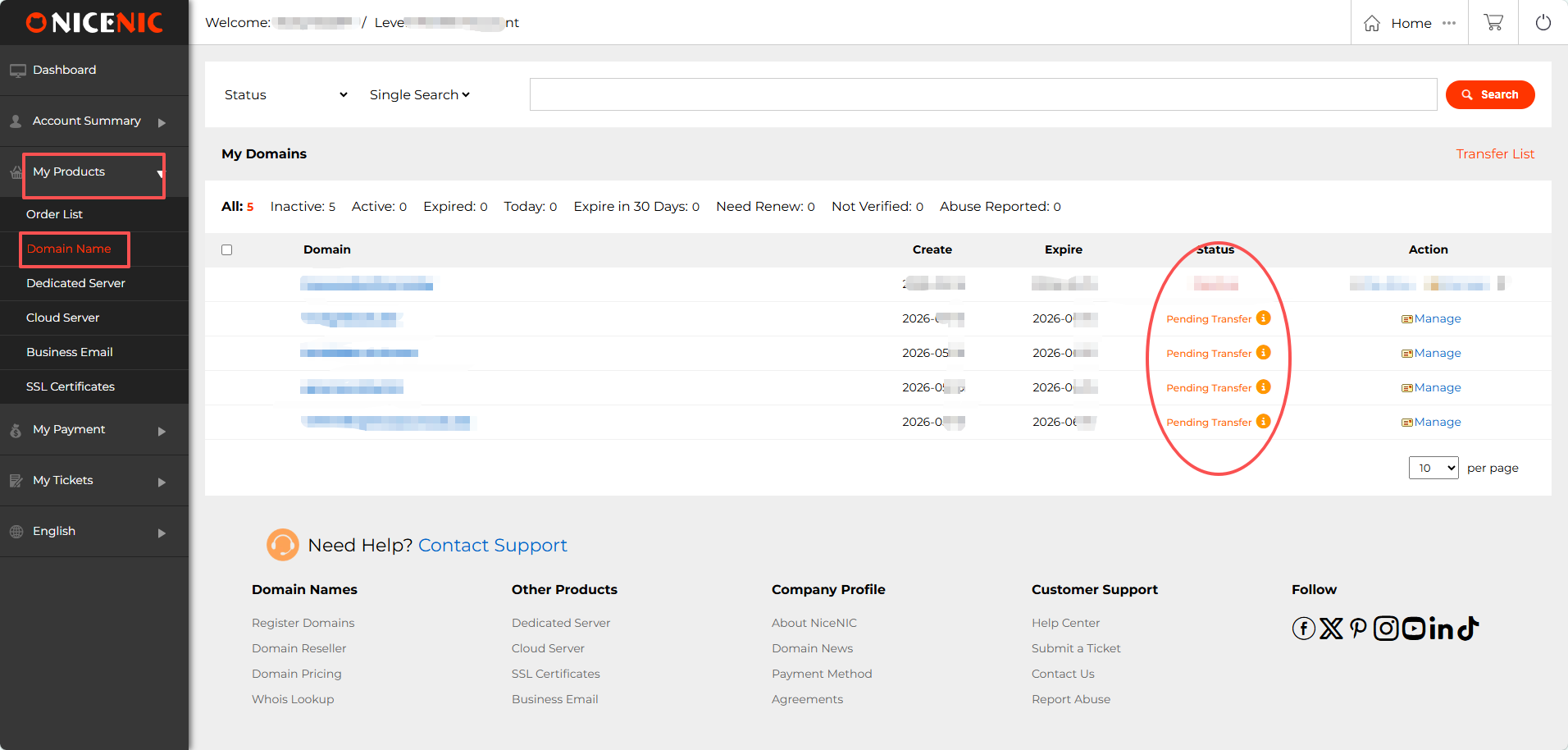
1. Մուտք գործել to քո NiceNIC account. Գնա դեպի "My Products > Տիրույթի անուններ".
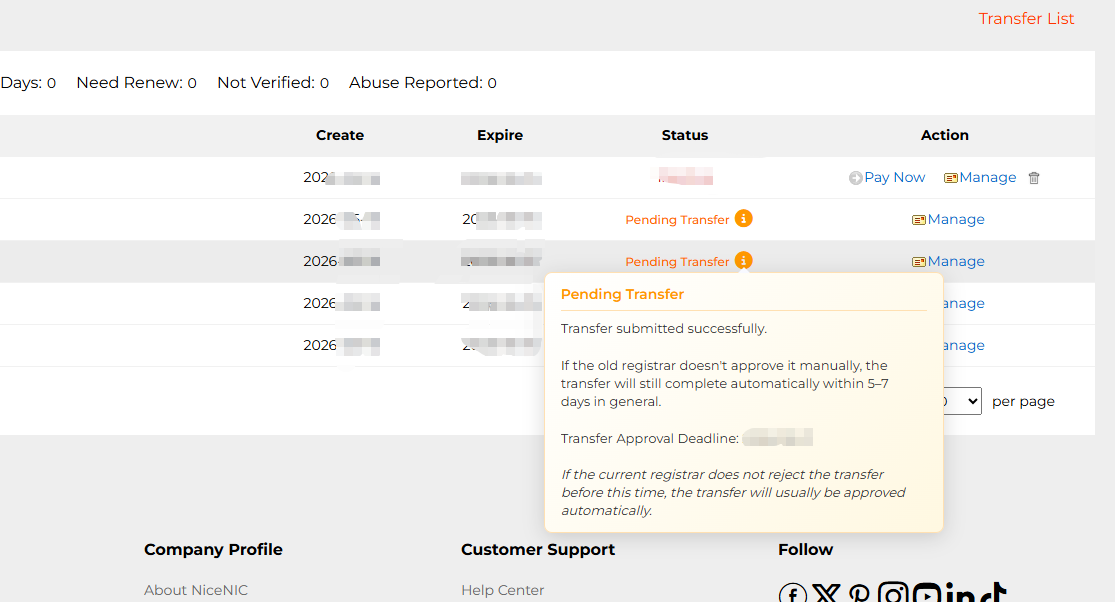
In the Կարգավիճակ column, you will see քո դոմեյն listed as:
- Pending Transfer: the transfer has been submitted և is in progress.
- Active / Transfer Completed: the transfer is finished.


- Տիրույթի անուններ
- Գրանցելing Տիրույթներ
- Դոմեյն ռեսելեր
- Դոմեյնների գներ
- Whois որոնում
- Մեր ապրանքներն
- Հատված սերվեր
- Ապարանքային սերվեր
- SSL սերտիֆիկատներ
- Բիզնես Էլ․ նամակ
- Ընկերության պրոֆիլ
- Նախընտրեք NiceNIC
- Դոմեյն նորություններ
- Վճարման մեթոդ
- Legal | Disclosure Requests
- Հաճախորդների աջակցություն
- Օգնության կենտրոն
- Ուղարկել դիմում
- Կապ մեզ հետ
- Հաղորդել չարաշահման մասին
